# Reference
Get details about the Airship platform.
Use for exact platform specifications — message and media requirements, data collection specs, billing details, platform settings, feature packages, and glossary definitions. Not for how-to guidance — refer to Guides or Developer docs for implementation steps.
# Airship Glossary
> A list of terms used in Airship products and documentation
# Billing
> Billing terms definitions for the Airship Service
## Monthly Active Users
*Monthly active users* (MAU) is a unit of measurement used as applicable based on the Customer's usage (a) to count the number of unique users who have opened an app within a calendar month and (b) the number of sends to unique [Channel IDs](https://www.airship.com/docs/reference/glossary/#channel_id) via Airship's open channels API in a calendar month. Monthly active users are tracked via Channel ID. A month is calculated as the billing period of one calendar month from 00:00 UTC on the first day of the calendar month to midnight UTC on the last day of the same calendar month.
## Monthly Unique Visitors
*Monthly unique visitors* (MUV) is a count of End Users to the Customer's website or portion of the website that records an active [Web Session](https://www.airship.com/docs/reference/glossary/#web_session) in a calendar month. Monthly unique visitors are tracked via [Channel ID](https://www.airship.com/docs/reference/glossary/#channel_id).
[Named Users](https://www.airship.com/docs/reference/glossary/#named_user) (authenticated users) that have multiple distinct Channel IDs will be counted as a single unique visitor for billing purposes in a given month.
## Contact
*Contact* means an End User that has registered an activation event and Customer can send a Notification via one or more Airship supported [Channel(s)](https://www.airship.com/docs/reference/glossary/#channel_dev). For the Airship Service, a Contact is a way of organizing data (e.g., [Events](https://www.airship.com/docs/reference/glossary/#events), [Tags](https://www.airship.com/docs/reference/glossary/#tag), and [Attributes](https://www.airship.com/docs/reference/glossary/#attributes)) and addressable Channels, such that data stored with the Contact is available to any associated Channels. A Contact may be any one of the following: (1) a Named User, with one or more channels associated with it; (2) an Anonymous User, with one or more channels associated with it; or (3) a single Channel that is not associated with a Named or Anonymous User, such as a mobile Channel ID, web notification Channel ID, email address.
* A “Named User” is an End User where the Customer has provided Airship with Customer-supplied user key value that can be used to identify that single End User across Channels (e.g., email address, Customer-generated account number). A Named User Contact represents that single End User across the associated Channels.
* An “Anonymous User” is a "Contact ID" with Airship-supplied identifier that can be used to identify that single End User across Channels. For billing purposes, a Contact is counted once per Channel, across projects. For the purposes of mobile applications, a Channel is iOS, Android, and Fire OS.
Activation events include opting in, subscribing, installing, registering or other similar types of events that allow Contacts to receive Notifications via one or more Channels. In counting the total number of Contacts each month, Airship removes users that have registered a deactivation event in the previous month. Deactivation events include opt-outs, unsubscribes, uninstalls, and deletions. Examples of activation and deactivation events are noted in the below table.
| Channels | Activation Event | Deactivation Event | Default Deactivation | Contact Count = Number of Activations less Number of Deactivations |
| --- | --- | --- | --- | --- |
| Mobile/App | Registration | Uninstall | 12 months | Number of Contacts |
| Web Notifications | Opted in | Opt-out or Uninstall | 12 months | Number of Contacts |
| Mobile Wallet | Installed Passes | Uninstalled or Expired Passes | Not applicable | Number of Contacts |
| Email | Subscribed | Unsubscribes from transactional emails or channel is deleted | Not applicable | Number of Contacts |
| SMS | Opted in | Opt-out or channel is deleted | Not applicable | Number of Contacts |
| Open Channel | Registration | Channel is deleted | Not applicable | Number of Contacts|
| **TOTAL** | | | | **Total number of Contacts** |
## Notification
*Notification* means each unit of content sent using an Airship supported channel. Examples of notifications are specified in the below table.
| Channels | Number of Notifications |
| --- | --- |
| Mobile/App | Number of Notifications sent |
| Web | Number of Notifications sent |
| Mobile Wallet | Number of Passes (each install and each update) |
| Email | Counted separately in Email package, if applicable |
| SMS | Counted separately in SMS package, if applicable |
| In-App Automation | Number of Impressions |
| Message Center | Number of Messages sent |
| Open Channel API | Number of Notifications sent |
> **Note:** Committed volumes, such as Impressions, SMS, and Email, specified in the Order Form represent minimum purchase commitments. Unused volumes do not roll over from year to year or from one Subscription Term to another.
## Impression
An *Impression* is a metric used to quantify an on-screen display of content delivered by the Airship SDK and displayed to an End User in the Customer Digital Asset. (Customer Digital Asset is defined as in the Airship Terms of Subscription Service or Main Subscription Agreement where applicable.)
**For Airship [AXP plan](https://www.airship.com/docs/reference/feature-packages/) contracts that include the *Native App Experiences* plan add-on:**
1. The *Native App Experiences* plan add-on is defined as [Scenes](https://www.airship.com/docs/reference/glossary/#scene).
1. An Impression is counted as billable when a Native App Experience is displayed for the End User in the Customer Digital Asset. Any attempt to display a Native App Experience that is not successfully presented to the End User will not be counted as a billable Impression. Each instance of display for an End User is counted as a billable Impression regardless of the content of the Native App Experience. Examples:
* The same one-screen Scene displayed to the End User five times is counted as five separate billable Impressions.
* The same four-screen Scene displayed to the End User three times is counted as three separate billable Impressions.
Impressions are billed as a minimum fee up to 1,000 Impressions and at the contracted rate multiplied by the counted number of billable Impressions rounded to the next applicable unit of currency thereafter.
> **Note:** Committed volumes, such as Impressions, SMS, and Email, specified in the Order Form represent minimum purchase commitments. Unused volumes do not roll over from year to year or from one Subscription Term to another.
### Embedded Content Impression
An Embedded Content will record a billable [Impression](#impression) on the first unique display to the End User. Subsequent displays of the same Embedded Content will be billed as additional Impressions once 30 minutes have elapsed from the first display. If the Embedded Content is dismissed and then displayed again due to a new triggering event, it will (a) be treated as a new unique display and (b) will create a new billable Impression regardless of whether the 30-minute duration has elapsed or not.
## Daily and Peak Daily Active Flags
*Daily Active Flags* means the maximum count of the following that are currently in Active status within one 24-hour day (UTC):
1. A [Feature Flag](https://www.airship.com/docs/reference/glossary/#feature_flag)
1. A [Scene Rollout](https://www.airship.com/docs/reference/glossary/#scene_rollout) with audience allocation set between 1 and 99%.
*Peak Daily Active Flags* means the highest Daily Active Flags count during an Observation Period of one month. A month is calculated as the billing period of one calendar month from 00:00 UTC on the first day of the calendar month to midnight UTC on the last day of the same calendar month.
For example, if a customer has 10 **Daily Active Flags** on day 1, 12 **Daily Active Flags** on day 2, 8 **Daily Active Flags** on day 3, and 9 **Daily Active Flags** on day 4, the **Peak Daily Active Flags** is 12.
**For Airship contracts that include the *Feature Flags* plan add-on:**
1. The *Feature Flags* plan add-on is defined as [Feature Flags](https://www.airship.com/docs/reference/glossary/#feature_flag) and [Scene Rollouts](https://www.airship.com/docs/reference/glossary/#scene_rollout).
1. For enterprise contracts, *Feature Flags* billing is based on the Peak Daily Active Flags count and at a rate based on the customer's Audience count. The Audience count is determined by the customer's Airship plan and based on the following as defined in the customer's contract:
* [Monthly Active Users](#monthly-active-users)
* [Monthly Unique Visitors](#monthly-unique-visitors)
* [Contacts](#contact)
* Any combination of the above
1. For **AXP Essentials** or **AXP Essentials Starter** plan contracts, *Feature Flags* add-on billing (a) is based on a contracted rate multiplied by the counted number of Peak Daily Active Flags and (b) has a minimum fee.
## Addressable Users {#addressable-users}
**For Airship contracts that include *Channels*, *Real-Time Data Streaming*, *Performance Analytics*, and *Web Notifications*:**
An *Addressable User* is a software installation on a device, an email address, or a [MSISDN](https://www.airship.com/docs/reference/glossary/#msisdn) managed by Airship. We measure the number of Addressable Users you can reach using Airship's Service in the previous billing month. At the beginning of every month we remove users who have uninstalled or were deactivated in the previous month.
## AI Fair Usage
Journeys AI usage is limited to 100 generated Journeys using AI prompts per project. The Scenes AI Agent, including the Accessibility Agent, includes 50 credits per month per project. An example usage calculation for Scenes: 50 generated screens with five AI revisions each equals a total of 250 AI interactions.
## SMS {#sms-billing}
SMS messages are billed based on message parts. Exceeding the standard character count limit in a single message will cause your message to be split into multiple parts. You will be charged for each separate message part sent.
For messages using GSM (GSM-7) characters, the limit is 160 characters. Messages using characters not in the GSM-7 character set fall back to UCS-2 encoding, which has a limit of 70 characters. Due to an additional 6 Byte data header instructing devices on how to assemble messages, each part consists of a maximum of 153 (GSM-7) or 67 (UCS-2) characters, respectively.
SMS messages and templates as viewed in the dashboard may not accurately reflect how your message will be divided into parts. For more information, see [SMS Appearance and behavior](https://www.airship.com/docs/guides/features/messaging/sms/#appearance-and-behavior).
## RCS
RCS messages are billed based on message type and length. In the US, two RCS message categories are used for billing: Rich Messages and Rich Media Messages.
* Rich Messages include text-based RCS messages up to 160 UTF-8 characters, which may contain suggested replies (chip lists), URLs, and call-to-action buttons. These messages are billed at the SMS rate, and any message exceeding 160 characters is billed per segment.
* Rich Media Messages include messages with media attachments, rich cards, carousels, or other advanced content types. These are billed at the MMS rate for each message.
If a recipient's device or carrier does not support RCS, messages automatically fall back to SMS or MMS, and standard SMS/MMS billing applies.
## Mobile Wallet — Total Passes Installed
**For Airship *Mobile Wallet* contracts:**
For billing purposes, Airship counts the total number of "Total Passes Installed" each month on a customer's account. The Total Passes Installed count includes each Apple Wallet mobile wallet pass and Google Wallet mobile wallet card that has been installed by an end user on a unique device during the current month, as well as those mobile wallet passes and/or mobile wallet cards that are still installed on devices from prior months.
Wallet passes and/or mobile wallet cards that fit the following conditions are counted in the month deleted or expired, but not the following months:
* Wallet passes and/or wallet cards deleted individually on each device by end users or systematically by Airship Mobile Wallet customers
* Wallet passes and/or wallet cards that have expired on each device
## Mobile Wallet — Items Under Management
**For Airship *Mobile Wallet* contracts entered into or renewed prior to July 1,
2016:**
For billing purposes, Airship counts the total number of "Wallet Items" each month on a customer's account that are managed by Airship Mobile Wallet. The Wallet Items under management count includes each unique Apple Wallet mobile wallet pass and Google Wallet mobile wallet pass that was being managed by Airship Mobile Wallet during a given month. This includes Wallet Items that were created that month, as well as those wallet items still under management from prior months.
Wallet items that fit the following conditions are counted in the month deleted or expired, but not the following months:
* Wallet items deleted individually by end users or systematically by Airship Mobile Wallet customers
* Wallet items that have expired
## Apptimize Service — Apptimize Monthly Devices
*Apptimize Monthly Devices* (AMD) means the sum of Monthly Active Users (MAU) or similar equivalent measure for all platforms the Customer uses as further provided herein. The metric for each applicable platform is as follows: (a) for Mobile, Web, OTT (except Roku): the sum of total unique instances of the Customer application featuring the Apptimize SDK that became active within a rolling 30 day period. More specifically as to Mobile, AMD refers to the number of unique iOS and Android devices opening the Customer application or other connected devices featuring the Apptimize SDK within a rolling 30 day period; and for (b) Server, REST, Roku, the number of unique Apptimize User IDs observed in API calls made within a rolling 30-day period.
# Feature packages reference
> Airship messaging features are grouped in packages, and some are available as add-ons.
Effective November 15, 2023, our product package is App Experience Platform (AXP), with plans Enterprise, Essentials, and Essentials Starter. Before April 6, 2022, our package was Customer Engagement Platform (CEP), with plans Orchestration, In App, and Mobile. This reference compares features and limitations per plan.
For details about contracts for other packages, [contact Sales](https://www.airship.com/contact-us/) or your account manager. See also: [Billing](https://www.airship.com/docs/reference/billing/).
## What plan do I have?
Select the account menu icon () in the Airship dashboard header, then select **Usage and Plan**. See **Plan** and **Additional Products** for your current products. Go there now:
* [go.airship.com/accounts/info/](https://go.airship.com/accounts/info/)
* [go.airship.eu/accounts/info/](https://go.airship.eu/accounts/info/)
## Upgrades and add-ons
Customers on AXP Essentials Starter and older plans can [upgrade to AXP Essentials and manage add-ons](https://www.airship.com/docs/guides/getting-started/admin/company-plan/#changing-your-airship-plan) in the dashboard.
To upgrade to AXP Enterprise or make changes to your Enterprise plan, [contact Airship Sales](https://www.airship.com/contact-us/).
## Features per package
The following table compares feature inclusion and availability per plan.
* The AXP column includes AXP Enterprise, Essentials, and Essentials Starter except where otherwise specified.
* CEP plans and Test/Development restrictions are indicated by icons. Hover over the icons for more information.
* Features that require an additional purchase are noted as Available.
* Additional restrictions and limits are also noted.
| Icon definitions | | |
| --- | --- | --- |
|
Included |
In App plan |
Mobile plan |
| |
Orchestration plan |
Orchestration v2 plan |
{class="legend-table"}
| | [AXP](https://www.airship.com/docs/reference/feature-packages/) Enterprise | [AXP](https://www.airship.com/docs/reference/feature-packages/) Essentials | [AXP](https://www.airship.com/docs/reference/feature-packages/) Essentials Starter | CEP |
| --- | --- | --- | --- | --- |
|
Company account
| | | | |
| [IP Allowlist](https://www.airship.com/docs/guides/getting-started/admin/security/allowlist/) |
|
|
|
|
| Can create production projects |
|
|
|
|
| Boost — *Guaranteed delivery speed* | Available | Available | Available | Available |
|
Content delivery
| | | | |
| CDN image hosting Included in CEP plans with In-App Automation, available to other CEP plans |
|
|
|
|
|
App channel message types
| | | | |
| [Push Notification](https://www.airship.com/docs/reference/glossary/#push_notification) |
|
|
| Included in Orchestration and Mobile plans only |
| [In-App Message (standard)](https://www.airship.com/docs/reference/glossary/#in_app_message) |
|
|
| Included in Orchestration and In App plans only |
| [Message Center](https://www.airship.com/docs/reference/glossary/#message_center) |
|
|
| Included in Orchestration and In App plans only |
| [In-App Automation](https://www.airship.com/docs/reference/glossary/#iaa) |
|
|
| Included in Orchestration and In App plans only |
| [Scene](https://www.airship.com/docs/reference/glossary/#scene) (includes [Story](https://www.airship.com/docs/reference/glossary/#story) and [Embedded Content](https://www.airship.com/docs/reference/glossary/#embedded_content)) Can contain [Survey](https://www.airship.com/docs/reference/glossary/#survey) questions |
|
| Available | |
|
Web channel message types
| | | | |
| [Web Push Notification](https://www.airship.com/docs/reference/glossary/#web_push_notification) |
|
|
| Included in Orchestration plan only |
| [Scene](https://www.airship.com/docs/reference/glossary/#scene) (includes [Story](https://www.airship.com/docs/reference/glossary/#story) and [Embedded Content](https://www.airship.com/docs/reference/glossary/#embedded_content)) Can contain [Survey](https://www.airship.com/docs/reference/glossary/#survey) questions |
|
| Available | |
|
Additional channels and message types
| | | | |
| [Open channels](https://www.airship.com/docs/guides/features/messaging/open-channels/) |
|
|
| Included in Orchestration plan only |
| [Live Activity](https://www.airship.com/docs/reference/glossary/#live_activity) |
|
|
| |
| [Live Update](https://www.airship.com/docs/reference/glossary/#live_update) |
|
|
| |
| [Email](https://www.airship.com/docs/guides/features/messaging/email/) | Available | | | Available |
| [SMS/MMS/RCS](https://www.airship.com/docs/guides/features/messaging/sms/) [RCS](https://www.airship.com/docs/reference/glossary/#rcs) is available to US data center-hosted customers. | Available | | | Available |
| [Wallet](https://www.airship.com/docs/guides/wallet/) | Available | | | Available |
|
Composers
| | | | |
| [Message](https://www.airship.com/docs/guides/messaging/messages/create/) |
|
|
|
|
| [A/B Test](https://www.airship.com/docs/guides/experimentation/a-b-tests/messages/) |
|
|
|
|
| [Journey](https://www.airship.com/docs/reference/glossary/#journey) AI-generated Journeys require the Orchestration plan for CEP. |
|
|
|
|
| [Automation](https://www.airship.com/docs/reference/glossary/#automation) |
|
|
|
|
| [In-App Automation](https://www.airship.com/docs/reference/glossary/#iaa) |
|
|
| Included in Orchestration and In App plans only |
| [Scene](https://www.airship.com/docs/reference/glossary/#scene) |
|
| Available | |
|
Audience segmentation
| | | | |
| [Segments](https://www.airship.com/docs/reference/glossary/#segment) |
|
|
|
|
| Segment location data |
|
|
| Included in Orchestration plan only |
| [Audience Retargeting](https://www.airship.com/docs/reference/glossary/#audience_retargeting) |
|
|
| Included in Orchestration plan only |
| [Audience Pulse](https://www.airship.com/docs/reference/glossary/#audience_pulse) AI recommendations are included with AXP Enterprise. |
|
|
| Included in Orchestration v2 plan only |
|
| | | | |
| [Predictive Churn](https://www.airship.com/docs/reference/glossary/#predicted_to_churn) |
|
|
| Included in Orchestration v2 plan only |
| [Send Time Optimization](https://www.airship.com/docs/reference/glossary/#optimal_send_time) |
|
|
| Included in Orchestration v2 plan only |
| Send Frequency dashboard in [Performance Analytics](https://www.airship.com/docs/reference/glossary/#pa) |
|
|
| Included in Orchestration v2 plan only |
| [AI features](https://www.airship.com/docs/guides/features/intelligence-ai/ai/) |
|
|
| |
|
Data
| | | | |
| [Custom Events](https://www.airship.com/docs/reference/glossary/#custom_event) |
|
|
|
|
| Reports All packages have access to the same aggregate and message-level [reports](https://www.airship.com/docs/guides/reports/reports/#aggregate-and-message-level-reports). |
|
|
|
|
| [Performance Analytics](https://www.airship.com/docs/reference/glossary/#pa) 3 months' data is included. Additional months are available to AXP Enterprise. |
|
|
| Included in Orchestration v2 plan only |
| [Real-Time Data Streaming](https://www.airship.com/docs/reference/glossary/#rtds) | One bi-directional connector included, uni-directional connectors available | Available | Available | Available |
|
Automation
| | | | |
| Location support For [Location Trigger](https://www.airship.com/docs/reference/glossary/#location_event_trigger) and [Location Attributes Trigger](https://www.airship.com/docs/reference/glossary/#location_attributes_event_trigger) |
|
|
| Included in Orchestration plan only |
| Total in-app experience limit The combined number of active and paused [In-App Automations](https://www.airship.com/docs/reference/glossary/#iaa) and [Scenes](https://www.airship.com/docs/reference/glossary/#scene) | 50 | 50 | 50 | Orchestration v2 = 50 Orchestration v1 = 50 Mobile = Available In App = 50 |
| Active automation limit The combined number of active automations created using the [Automation composer](https://www.airship.com/docs/guides/messaging/messages/sequences/create-automation/), active automations created using the [/pipelines endpoint](https://www.airship.com/docs/developer/rest-api/ua/operations/automation/), and each message in active [Sequences](https://www.airship.com/docs/reference/glossary/#sequence) | 1,000 | 1,000 | 25 | Orchestration v2 = 1,000 Orchestration v1 = 500 Mobile = 100 In App = 50 |
| Total automation limit The combined number of active and paused automations created using the [Automation composer](https://www.airship.com/docs/guides/messaging/messages/sequences/create-automation/), active automations created using the [/pipelines endpoint](https://www.airship.com/docs/developer/rest-api/ua/operations/automation/), and each message in active [Sequences](https://www.airship.com/docs/reference/glossary/#sequence) | 1,000 | 1,000 | 50 | Orchestration v2 = 1,000 Orchestration v1 = 500 Mobile = 100 In App = 50 |
{class="feature-table"}
# Data Retention and Legacy Products
> Airship data retention policy and legacy product information
## Data Retention Schedule {#data-retention-schedule}
> **Important:** "Contact" as used in this Data Retention Schedule means Customer Data for an End User and the associated communication channel(s) organized so that the Airship Service can address the specific End User across the associated communication channels.
### Current Version
#### V. October 9, 2025
This Data Retention Schedule specifies the default data retention settings for the [Airship App Experience Platform](https://www.airship.com/docs/reference/feature-packages/#features-per-package). You may view the previous version of the Data Retention Schedule [here](#retention-schedule-previous-version).
| Airship Service | Feature | Default Data Retention Period |
| --- | --- | --- |
| App Experience Platform: [Engagement Channels](https://www.airship.com/docs/reference/glossary/#channel_engage) | **Contacts** Deactivation Period for Web and Mobile channels1 | 13 months |
| App Experience Platform: [Engagement Channels](https://www.airship.com/docs/reference/glossary/#channel_engage) | Media Library & Optimized Rich Page Delivery | Longer of 13 months from creation of content or 6 months after last accessed date |
| App Experience Platform: [Engagement Channels](https://www.airship.com/docs/reference/glossary/#channel_engage) | Message content for each messaging channel (unless otherwise listed below) | **Unicast**: Not stored for processing, but in application logs for 30 days for support purposes
**Multicast**: 13 months
**Content template**: Contract term |
| App Experience Platform: [Engagement Channels](https://www.airship.com/docs/reference/glossary/#channel_engage) | [Message Center](https://www.airship.com/docs/reference/glossary/#message_center) content | 13 months |
| App Experience Platform: [Engagement Channels](https://www.airship.com/docs/reference/glossary/#channel_engage) (SMS/MMS/RCS, Email) | [MSISDN](https://www.airship.com/docs/reference/glossary/#msisdn) Opt-in and opt-out date/time | 4 years, in archival storage for Airship record keeping purposes |
| App Experience Platform: [Engagement Channels](https://www.airship.com/docs/reference/glossary/#channel_engage)| Server-side [Automation](https://www.airship.com/docs/reference/glossary/#automation), [In-App Automation](https://www.airship.com/docs/reference/glossary/#iaa), [Sequence](https://www.airship.com/docs/reference/glossary/#sequence), [Scene](https://www.airship.com/docs/reference/glossary/#scene), and [Survey](https://www.airship.com/docs/reference/glossary/#survey) message content | Longer of 13 months after message expiration or contract term if none specified |
| App Experience Platform: [Engagement Channels](https://www.airship.com/docs/reference/glossary/#channel_engage) | [Mobile Wallet Passes](https://www.airship.com/docs/reference/glossary/#mobile_wallet_pass)2 | **Coupon:** 365 days **Gift card:** 730 days **Loyalty:** 730 days **Generic:** 730 days **Event ticket:** 30 days **Boarding pass:** 30 days **Member card:** 730 days |
| App Experience Platform: [Engagement Channels](https://www.airship.com/docs/reference/glossary/#channel_engage) | [Named User](https://www.airship.com/docs/reference/glossary/#named_user) data | **If named user is never associated with a [Channel ID](https://www.airship.com/docs/reference/glossary/#channel_id):** 90 days from data being set on named user
**If named user is associated with a channel ID within 90 days from data being set on named user:** Deleted within 90 days of contract termination |
| App Experience Platform: [Engagement Channels](https://www.airship.com/docs/reference/glossary/#channel_engage) | Unicast send counts data | 13 months |
| App Experience Platform: [Performance Analytics](https://www.airship.com/docs/reference/glossary/#pa)| [SMS/MMS/RCS](https://www.airship.com/docs/reference/glossary/#sms) message content | **Unicast**: no storage **Mobile Originated content and Mobile Terminated response**: 13 months **Multicast**: 13 months **MMS/RCS Media Files**: Longer of 13 months from creation of content or 6 months after last accessed date |
| App Experience Platform: [Performance Analytics](https://www.airship.com/docs/reference/glossary/#pa)| Performance Analytics data| 13 months (unless otherwise noted in this table)|
| App Experience Platform: [Real-Time Data Streaming API](https://www.airship.com/docs/reference/glossary/#rtds) | Real-Time Data Streaming data (including [Compliance Event Stream](https://www.airship.com/docs/developer/rest-api/connect/operations/compliance-event-stream/) data) | Lesser of 7 days or 100 GB |
| App Experience Platform: All Services and Channels | Customer data | Deleted within 90 days of contract termination |
1. Deactivation Period refers to the period of time after which a mobile application or web communication channel has not issued a Registration Event. This is also referred to as the “decay” process, and the effect for such communication channel is to begin the deletion process related to a communication channel uninstallation.Contacts for the mobile and web notification channels are deactivated from the Airship Service when a Contact has not issued a Registration Event to Airship during the applicable Deactivation Period. Registration Events are calls to the Airship Service by the Airship SDK or an Airship API that indicate activity from the webpage or mobile application managed by the Airship Service. Registration Events typically occur on app opens or web page visits. Once Contact is deactivated or uninstalled, data associated with that Contact (other than data included in aggregated metrics or reports, records of opt-in or opt-out status, or data retained for legal or finance compliance purposes) is deleted within 13 months.2. These are default settings only. Airship customers are able to set individual retention periods for each use case.
### Previous Version {#retention-schedule-previous-version}
#### V. February 11, 2025
This version of the Airship Data Retention Schedule applies to the time period between February 11, 2025, and October 8, 2025.
| Airship Service | Feature | Default Data Retention Period |
| --- | --- | --- |
| App Experience Platform: [Engagement Channels](https://www.airship.com/docs/reference/glossary/#channel_engage) | **Contacts** Deactivation Period for Web and Mobile channels1 | 13 months |
| App Experience Platform: [Engagement Channels](https://www.airship.com/docs/reference/glossary/#channel_engage) | Image Hosting & Optimized Rich Page Delivery | Longer of 13 months from creation of content or 6 months after last accessed date |
| App Experience Platform: [Engagement Channels](https://www.airship.com/docs/reference/glossary/#channel_engage) | Message content for each messaging channel (unless otherwise listed below) | **Unicast**: Not stored for processing, but in application logs for 30 days for support purposes
**Multicast**: 13 months
**Content template**: Contract term |
| App Experience Platform: [Engagement Channels](https://www.airship.com/docs/reference/glossary/#channel_engage) | [Message Center](https://www.airship.com/docs/reference/glossary/#message_center) content | 13 months |
| App Experience Platform: [Engagement Channels](https://www.airship.com/docs/reference/glossary/#channel_engage) (SMS/MMS, Email) | [MSISDN](https://www.airship.com/docs/reference/glossary/#msisdn) Opt-in and opt-out date/time | 4 years, in archival storage for Airship record keeping purposes |
| App Experience Platform: [Engagement Channels](https://www.airship.com/docs/reference/glossary/#channel_engage)| Server-side [Automation](https://www.airship.com/docs/reference/glossary/#automation), [In-App Automation](https://www.airship.com/docs/reference/glossary/#iaa), [Sequence](https://www.airship.com/docs/reference/glossary/#sequence), [Scene](https://www.airship.com/docs/reference/glossary/#scene), and [Survey](https://www.airship.com/docs/reference/glossary/#survey) message content | Longer of 13 months after message expiration or contract term if none specified |
| App Experience Platform: [Engagement Channels](https://www.airship.com/docs/reference/glossary/#channel_engage) | [Mobile Wallet Passes](https://www.airship.com/docs/reference/glossary/#mobile_wallet_pass)2 | **Coupon:** 365 days **Gift card:** 730 days **Loyalty:** 730 days **Generic:** 730 days **Event ticket:** 30 days **Boarding pass:** 30 days **Member card:** 730 days |
| App Experience Platform: [Engagement Channels](https://www.airship.com/docs/reference/glossary/#channel_engage) | [Named User](https://www.airship.com/docs/reference/glossary/#named_user) data | **If named user is never associated with a [Channel ID](https://www.airship.com/docs/reference/glossary/#channel_id):** 90 days from data being set on named user
**If named user is associated with a channel ID within 90 days from data being set on named user:** Deleted within 90 days of contract termination |
| App Experience Platform: [Engagement Channels](https://www.airship.com/docs/reference/glossary/#channel_engage) | Unicast send counts data3 | 13 months |
| App Experience Platform: [Performance Analytics](https://www.airship.com/docs/reference/glossary/#pa)| [SMS/MMS](https://www.airship.com/docs/reference/glossary/#sms) message content | **Unicast**: no storage **Mobile Originated content and Mobile Terminated response**: 13 months **Multicast**: 13 months|
| App Experience Platform: [Performance Analytics](https://www.airship.com/docs/reference/glossary/#pa)| Performance Analytics data| 13 months (unless otherwise noted in this table)|
| App Experience Platform: [Real-Time Data Streaming API](https://www.airship.com/docs/reference/glossary/#rtds) | Real-Time Data Streaming data (including [Compliance Event Stream](https://www.airship.com/docs/developer/rest-api/connect/operations/compliance-event-stream/) data) | Lesser of 7 days or 100 GB |
| App Experience Platform: All Services and Channels | Customer data | Deleted within 90 days of contract termination |
1. Deactivation Period refers to the period of time after which a mobile application or web communication channel has not issued a Registration Event. This is also referred to as the “decay” process, and the effect for such communication channel is to begin the deletion process related to a communication channel uninstallation.Contacts for the mobile and web notification channels are deactivated from the Airship Service when a Contact has not issued a Registration Event to Airship during the applicable Deactivation Period. Registration Events are calls to the Airship Service by the Airship SDK or an Airship API that indicate activity from the webpage or mobile application managed by the Airship Service. Registration Events typically occur on app opens or web page visits. Once Contact is deactivated or uninstalled, data associated with that Contact (other than data included in aggregated metrics or reports, records of opt-in or opt-out status, or data retained for legal or finance compliance purposes) is deleted within 13 months.2. These are default settings only. Airship customers are able to set individual retention periods for each use case.3. Effective February 25, 2025.
### Older Versions {#retention-schedule-older-versions}
#### V. February 10, 2023
This version of the Airship Data Retention Schedule applies to the time period between February 10, 2023, and February 10, 2025.
| Airship Service | Feature | Default Data Retention Period |
| --- | --- | --- |
| App Experience Platform: [Engagement Channels](https://www.airship.com/docs/reference/glossary/#channel_engage) | **Contacts** Deactivation Period for Web and Mobile channels1 | 13 months |
| App Experience Platform: [Engagement Channels](https://www.airship.com/docs/reference/glossary/#channel_engage) | Image Hosting & Optimized Rich Page Delivery | Longer of 13 months from creation of content or 6 months after last accessed date |
| App Experience Platform: [Engagement Channels](https://www.airship.com/docs/reference/glossary/#channel_engage) | Message content for each messaging channel (unless otherwise listed below) | **Unicast**: Not stored for processing, but in application logs for 30 days for support purposes
**Multicast**: 13 months
**Content template**: Contract term |
| App Experience Platform: [Engagement Channels](https://www.airship.com/docs/reference/glossary/#channel_engage) | [Message Center](https://www.airship.com/docs/reference/glossary/#message_center) content | 13 months |
| App Experience Platform: [Engagement Channels](https://www.airship.com/docs/reference/glossary/#channel_engage) (SMS/MMS, Email) | [MSISDN](https://www.airship.com/docs/reference/glossary/#msisdn) Opt-in and opt-out date/time | 4 years, in archival storage for Airship record keeping purposes |
| App Experience Platform: [Engagement Channels](https://www.airship.com/docs/reference/glossary/#channel_engage)| Server-side [Automation](https://www.airship.com/docs/reference/glossary/#automation), [In-App Automation](https://www.airship.com/docs/reference/glossary/#iaa), [Sequence](https://www.airship.com/docs/reference/glossary/#sequence), [Scene](https://www.airship.com/docs/reference/glossary/#scene), and [Survey](https://www.airship.com/docs/reference/glossary/#survey) message content | Longer of 13 months after message expiration or contract term if none specified |
| App Experience Platform: [Engagement Channels](https://www.airship.com/docs/reference/glossary/#channel_engage) | [Mobile Wallet Passes](https://www.airship.com/docs/reference/glossary/#mobile_wallet_pass)2 | **Coupon:** 365 days **Gift card:** 730 days **Loyalty:** 730 days **Generic:** 730 days **Event ticket:** 30 days **Boarding pass:** 30 days **Member card:** 730 days |
| App Experience Platform: [Engagement Channels](https://www.airship.com/docs/reference/glossary/#channel_engage) | [Named User](https://www.airship.com/docs/reference/glossary/#named_user) data | **If named user is never associated with a [Channel ID](https://www.airship.com/docs/reference/glossary/#channel_id):** 90 days from data being set on named user
**If named user is associated with a channel ID within 90 days from data being set on named user:** Deleted within 90 days of contract termination |
| App Experience Platform: [Performance Analytics](https://www.airship.com/docs/reference/glossary/#pa)| [SMS/MMS](https://www.airship.com/docs/reference/glossary/#sms) message content | **Unicast**: no storage **Mobile Originated content and Mobile Terminated response**: 13 months **Multicast**: 13 months|
| App Experience Platform: [Performance Analytics](https://www.airship.com/docs/reference/glossary/#pa)| Performance Analytics data| 13 months (unless otherwise noted in this table)|
| App Experience Platform: [Real-Time Data Streaming API](https://www.airship.com/docs/reference/glossary/#rtds) | Real-Time Data Streaming data (including [Compliance Event Stream](https://www.airship.com/docs/developer/rest-api/connect/operations/compliance-event-stream/) data) | Lesser of 7 days or 100 GB |
| App Experience Platform: All Services and Channels | Customer data | Deleted within 90 days of contract termination |
1. Deactivation Period refers to the period of time after which a mobile application or web communication channel has not issued a Registration Event. This is also referred to as the “decay” process, and the effect for such communication channel is to begin the deletion process related to a communication channel uninstallation.Contacts for the mobile and web notification channels are deactivated from the Airship Service when a Contact has not issued a Registration Event to Airship during the applicable Deactivation Period. Registration Events are calls to the Airship Service by the Airship SDK or an Airship API that indicate activity from the webpage or mobile application managed by the Airship Service. Registration Events typically occur on app opens or web page visits. Once Contact is deactivated or uninstalled, data associated with that Contact (other than data included in aggregated metrics or reports, records of opt-in or opt-out status, or data retained for legal or finance compliance purposes) is deleted within 13 months.2. These are default settings only. Airship customers are able to set individual retention periods for each use case.
#### V. September 1, 2022
This version of the Airship Data Retention Schedule applies to the time period between September 1, 2022, and February 9, 2023.
| Airship Service | Feature | Default Data Retention Period |
| --- | --- | --- |
| App Experience Platform: Engagement Channels | **Contacts** Deactivation Period for Web and Mobile channels1 | 13 months |
| App Experience Platform: Engagement Channels | Image Hosting & Optimized Rich Page Delivery | Longer of 13 months from creation of content or 6 months after last accessed date |
| App Experience Platform: Engagement Channels | Message content for each messaging channel (unless otherwise listed below) | **Unicast**: Not stored for processing, but in application logs for 30 days for support purposes
**Multicast**: 13 months
**Content template**: Contract term |
| App Experience Platform: Engagement Channels | Message Center content | 13 months |
| App Experience Platform: Engagement Channels (SMS/MMS, Email) | MSISDN Opt-in and opt-out date/time | 4 years, in archival storage for Airship record keeping purposes |
| App Experience Platform: Engagement Channels | Server-side Automation, In-App Automation, Sequence, Scene, and Survey message content | Longer of 13 months after message expiration or contract term if none specified |
| App Experience Platform: Engagement Channels | Mobile Wallet Passes2 | **Coupon:** 365 days **Gift card:** 730 days **Loyalty:** 730 days **Generic:** 730 days **Event ticket:** 30 days **Boarding pass:** 30 days **Member card:** 730 days |
| App Experience Platform: Performance Analytics| SMS/MMS message content | **Unicast**: no storage **Mobile Originated content and Mobile Terminated response**: 13 months **Multicast**: 13 months|
| App Experience Platform: Performance Analytics| Performance Analytics data| 13 months (unless otherwise noted in this table)|
| App Experience Platform: Real-Time Data Streaming API | Real-Time Data Streaming data (including Compliance Event Stream data) | Lesser of 7 days or 100 GB |
| Airship App Experience Platform: All Services and Channels | Customer data | Deleted within 90 days of contract termination |
1. Contacts for the mobile and web notification channels are deactivated from the Airship Service when a Contact has not issued a Registration Event to Airship during the applicable Deactivation Period. Registration Events are calls to the Airship Service by the Airship SDK or an Airship API that indicate activity from the webpage or mobile application managed by the Airship Service. Registration Events typically occur on app opens or web page visits. Once Contact is deactivated or uninstalled, data associated with that Contact (other than data included in aggregated metrics or reports, records of opt-in or opt-out status, or data retained for legal or finance compliance purposes) is deleted within 13 months.2. These are default settings only. Airship customers are able to set individual retention periods for each use case.
#### V. April 6, 2022
This version of the Airship Data Retention Schedule applies to the time period between April 6, 2022, and August 31, 2022.
| Airship Service | Feature | Default Data Retention Period |
| --- | --- | --- |
| App Experience Platform: Engagement Channels | **Contacts** Deactivation Period for Web and Mobile channels1 | 13 months |
| App Experience Platform: Engagement Channels | Image Hosting & Optimized Rich Page Delivery | Longer of 13 months from creation of content or 6 months after last accessed date |
| App Experience Platform: Engagement Channels | Message content for each messaging channel (unless otherwise listed below) | **Unicast**: Not stored for processing, but in application logs for 30 days for support purposes
**Multicast**: 13 months
**Content template**: Contract term |
| App Experience Platform: Engagement Channels | Message Center content | 13 months |
| App Experience Platform: Engagement Channels (SMS/MMS, Email) | MSISDN Opt-in and opt-out date/time | 4 years, in archival storage for Airship record keeping purposes |
| App Experience Platform: Engagement Channels2 | Server-side Automation, In-App Automation, Scene, and Survey message content | Longer of 13 months after message expiration or contract term if none specified |
| App Experience Platform: Engagement Channels | Mobile Wallet Passes3 | **Coupon:** 365 days **Gift card:** 730 days **Loyalty:** 730 days **Generic:** 730 days **Event ticket:** 30 days **Boarding pass:** 30 days **Member card:** 730 days |
| App Experience Platform: Performance Analytics| SMS/MMS message content | **Unicast**: no storage **Mobile Originated content and Mobile Terminated response**: 13 months **Multicast**: 13 months|
| App Experience Platform: Performance Analytics| Performance Analytics data| 13 months (unless otherwise noted in this table)|
| App Experience Platform: Real-Time Data Streaming API | Real-Time Data Streaming data (including Compliance Event Stream data) | Lesser of 7 days or 100 GB |
| Airship App Experience Platform: All Services and Channels | Customer data | Deleted within 90 days of contract termination |
1. Contacts for the mobile and web notification channels are deactivated from the Airship Service when a Contact has not issued a Registration Event to Airship during the applicable Deactivation Period. Registration Events are calls to the Airship Service by the Airship SDK or an Airship API that indicate activity from the webpage or mobile application managed by the Airship Service. Registration Events typically occur on app opens or web page visits. Once Contact is deactivated or uninstalled, data associated with that Contact (other than data included in aggregated metrics or reports, records of opt-in or opt-out status, or data retained for legal or finance compliance purposes) is deleted within 13 months.2. On 8/12/22 this data retention schedule was updated to correct an error in this table row.3. These are default settings only. Airship customers are able to set individual retention periods for each use case.
#### V. March 15, 2021
This version of the Airship Data Retention Schedule applies to the time period between March 15, 2021, and April 5, 2022.
| Airship Service | Feature | Default Data Retention Period |
| --- | --- | --- |
| Customer Engagement Platform: Engagement Channels | **Contacts** Deactivation Period for Web and Mobile channels1 | 13 months |
| Customer Engagement Platform: Engagement Channels | Image Hosting & Optimized Rich Page Delivery | Longer of 13 months from creation of content or 6 months after last accessed date |
| Customer Engagement Platform: Engagement Channels | Message content for each messaging channel (unless otherwise listed below) | **Unicast**: Not stored for processing, but in application logs for 30 days for support purposes
**Multicast**: 13 months
**Content template**: Contract term |
| Customer Engagement Platform: Engagement Channels | Message Center content | 13 months |
| Customer Engagement Platform: Engagement Channels (SMS/MMS, Email) | MSISDN Opt-in and opt-out date/time | 4 years, in archival storage for Airship record keeping purposes |
| Customer Engagement Platform: Engagement Channels | Server-side Automation In-App Automation message content | Message expiration date or contract term if none specified|
| Customer Engagement Platform: Engagement Channels | Mobile Wallet Passes2 | **Coupon:** 365 days **Gift card:** 730 days **Loyalty:** 730 days **Generic:** 730 days **Event ticket:** 30 days **Boarding pass:** 30 days **Member card:** 730 days |
| Customer Engagement Platform: Performance Analytics| SMS/MMS message content | **Unicast**: no storage **Mobile Originated content and Mobile Terminated response**: 13 months **Multicast**: 13 months|
| Customer Engagement Platform: Performance Analytics| Performance Analytics data| 13 months (unless otherwise noted in this table)|
| Customer Engagement Platform: Real-Time Data Streaming API | Real-Time Data Streaming data (including Compliance Event Stream data) | Lesser of 7 days or 100 GB |
| Airship Customer Engagement Platform: All Services and Channels | Customer data | Deleted within 90 days of contract termination |
1. Contacts for the mobile and web notification channels are deactivated from the Airship Service when a Contact has not issued a Registration Event to Airship during the applicable Deactivation Period. Registration Events are calls to the Airship Service by the Airship SDK or an Airship API that indicate activity from the webpage or mobile application managed by the Airship Service. Registration Events typically occur on app opens or web page visits. Once Contact is deactivated or uninstalled, data associated with that Contact (other than data included in aggregated metrics or reports, records of opt-in or opt-out status, or data retained for legal or finance compliance purposes) is deleted within 13 months.2. These are default settings only. Airship customers are able to set individual retention periods for each use case.
#### V. February 27, 2020
This version of the Airship Data Retention Schedule applies to the time period between February 27, 2020, and March 14, 2021.
| Airship Service | Feature | Default Data Retention Period |
| --- | --- | --- |
| Customer Engagement Platform: Engagement Channels | **Contacts** Deactivation Period for Web and Mobile channels1 | 13 months |
| Customer Engagement Platform: Engagement Channels | Image Hosting & Optimized Rich Page Delivery | Longer of 13 months from creation of content or 6 months after last accessed date |
| Customer Engagement Platform: Engagement Channels | Message content for each messaging channel (unless otherwise listed below) | **Unicast**: Not stored for processing, but in application logs for 30 days for support purposes
**Multicast**: 13 months
**Content template**: Contract term |
| Customer Engagement Platform: Engagement Channels | Message Center content | 13 months |
| Customer Engagement Platform: Engagement Channels (SMS/MMS, Email) | MSISDN Opt-in and opt-out date/time | 4 years, in archival storage for Airship record keeping purposes |
| Customer Engagement Platform: Engagement Channels | Server-side Automation In-App Automation message content | Message expiration date or contract term if none specified|
| Customer Engagement Platform: Engagement Channels | Mobile Wallet Passes2 | **Coupon:** 365 days **Gift card:** 730 days **Loyalty:** 730 days **Generic:** 730 days **Event ticket:** 30 days **Boarding pass:** 30 days **Member card:** 730 days |
| Customer Engagement Platform: Performance Analytics| Location History data | 3 months |
| Customer Engagement Platform: Performance Analytics| SMS/MMS message content | **Unicast**: no storage **Mobile Originated content and Mobile Terminated response**: 13 months **Multicast**: 13 months|
| Customer Engagement Platform: Performance Analytics| Performance Analytics data| 13 months (unless otherwise noted in this table)|
| Customer Engagement Platform: Real-Time Data Streaming API | Real-Time Data Streaming data | Lesser of 7 days or 100 GB |
| Airship Customer Engagement Platform: All Services and Channels | Customer data | Deleted within 90 days of contract termination |
1. Contacts for the mobile and web notification channels are deactivated from the Airship Service when a Contact has not issued a Registration Event to Airship during the applicable Deactivation Period. Registration Events are calls to the Airship Service by the Airship SDK or an Airship API that indicate activity from the webpage or mobile application managed by the Airship Service. Registration Events typically occur on app opens or web page visits. Once Contact is deactivated or uninstalled, data associated with that Contact (other than data included in aggregated metrics or reports, records of opt-in or opt-out status, or data retained for legal or finance compliance purposes) is deleted within 13 months.2. These are default settings only. Airship customers are able to set individual retention periods for each use case.
#### V. April 16, 2019
This version of the Airship Data Retention Schedule applies to the time period between April 16, 2019, and February 26, 2020.
| Airship Service | Feature | Default Data Retention Period |
| --- | --- | --- |
| Customer Engagement Platform: Engagement Channels | **Contacts** Deactivation Period for Web and Mobile channels1 | 12 months |
| Customer Engagement Platform: Engagement Channels | Image Hosting & Optimized Rich Page Delivery | Longer of 13 months from creation of content or 6 months after last accessed date |
| Customer Engagement Platform: Engagement Channels | Message content for each messaging channel (unless otherwise listed below) | **Unicast**: Not stored for processing, but in application logs for 30 days for support purposes
**Multicast**: 13 months
**Content template**: Contract term |
| Customer Engagement Platform: Engagement Channels | Message Center content | 13 months |
| Customer Engagement Platform: Engagement Channels | Server-side Automation In-App Automation message content | Longer of 13 months from creation of message or message expiration |
| Customer Engagement Platform: Engagement Channels | Mobile Wallet Passes | **Coupon:** 365 days **Gift card:** 730 days **Loyalty:** 730 days **Generic:** 730 days **Event ticket:** 30 days **Boarding pass:** 30 days **Member card:** 730 days |
| Customer Engagement Platform: Engagement Channels Customer Data (Performance Analytics)| Location History data | 3 months |
| Customer Engagement Platform: Analytics & Data | Performance Analytics data | 3 months or 13 months, depending on the purchased package. |
| Customer Engagement Platform: Analytics & Data | Real-Time Data Streaming data | Lesser of 7 days or 100 GB |
1. Contacts for the mobile and web notification channels are deactivated from the Airship Service when a Contact has not issued a Registration Event to Airship during the applicable Deactivation Period. Registration Events are calls to the Airship Service by the Airship SDK or an Airship API that indicate activity from the webpage or mobile application managed by the Airship Service. Registration Events typically occur on app opens or web page visits. Once Contact is deactivated or uninstalled, data associated with that Contact (other than data included in aggregated metrics or reports, records of opt-in or opt-out status, or data retained for legal compliance purposes) is deleted.
#### V. September 1, 2018
This version of the Airship Data Retention Schedule applies to the time period between September 1, 2018, and April 15, 2019.
| Airship Service | Feature | Default Data Retention Period |
| --- | --- | --- |
| Digital Growth Platform: Customer Engagement | **Contacts** Deactivation Period for Web and Mobile channels1 | 12 months |
| Digital Growth Platform: Customer Engagement | Image Hosting & Optimized Rich Page Delivery | Longer of 13 months from creation of content or 6 months after last accessed date |
| Digital Growth Platform: Customer Engagement | Message content for each messaging channel (unless otherwise listed below) | **Unicast**: Not stored for processing, but in application logs for 30 days for support purposes
**Multicast**: 13 months
**Content template**: Contract term |
| Digital Growth Platform: Customer Engagement | Message Center content | 13 months |
| Digital Growth Platform: Customer Engagement | Server-side Automation In-App Automation message content | Longer of 13 months from creation of message or message expiration |
| Digital Growth Platform: Customer Engagement | Mobile Wallet Passes | **Coupon:** 365 days **Gift card:** 730 days **Loyalty:** 730 days **Generic:** 730 days **Event ticket:** 30 days **Boarding pass:** 30 days **Member card:** 730 days |
| Digital Growth Platform: Customer Engagement Customer Data (Insight)| Location History data | 3 months |
| Digital Growth Platform: Customer Data | Insight data | 3 months or 13 months, depending on the purchased package. |
| Digital Growth Platform: Customer Data | Connect data | Lesser of 7 days or 100 GB |
1. Contacts for the mobile and web notification channels are deactivated from the Airship Service when a Contact has not issued a Registration Event to Airship during the applicable Deactivation Period.
Registration Events are calls to the Airship Service by the Airship SDK or an Airship API that indicate activity from the webpage or mobile application managed by the Airship Service.
Registration Events typically occur on app opens or web page visits.
Once Contact is deactivated or uninstalled, data associated with that Contact (other than data included in aggregated metrics or reports, records of opt-in or opt-out status, or data retained for legal compliance purposes) is deleted.
#### V. June 6, 2018
This version of the Airship Data Retention Schedule applies to the time period between June 6, 2018, and August 31, 2018.
| Airship Service | Feature | Default Data Retention Period |
| --- | --- | --- |
| Digital Growth Platform: Customer Engagement | **Contacts** Deactivation Period for Web and Mobile channels1 | 12 months |
| Digital Growth Platform: Customer Engagement | Image Hosting & Optimized Rich Page Delivery | Longer of 13 months from creation of content or 6 months after last accessed date |
| Digital Growth Platform: Customer Engagement | Message content for each messaging channel (unless otherwise listed below) | **Unicast**: Not stored for processing, but in application logs for 30 days for support purposes
**Multicast**: 13 months
**Content template**: Contract term |
| Digital Growth Platform: Customer Engagement | Message Center content | 13 months |
| Digital Growth Platform: Customer Engagement | Server-side Automation In-App Automation message content | Longer of 13 months from creation of message or message expiration |
| Digital Growth Platform: Customer Engagement | Mobile Wallet Passes | **Coupon:** 365 days **Gift card:** 730 days **Loyalty:** 730 days **Generic:** 730 days **Event ticket:** 30 days **Boarding pass:** 30 days **Member card:** 730 days |
| Digital Growth Platform: Customer Engagement | Location History data | 3 months |
| Digital Growth Platform: Customer Data | Insight data | 3 months or 13 months, depending on the purchased package. |
| Digital Growth Platform: Customer Data | Connect data | Lesser of 7 days or 100 GB |
1. Contacts for the mobile and web notification channels are deactivated from the Airship Service when a Contact has not issued a Registration Event to Airship during the applicable Deactivation Period.
Registration Events are calls to the Airship Service by the Airship SDK or an Airship API that indicate activity from the webpage or mobile application managed by the Airship Service.
Registration Events typically occur on app opens or web page visits.
#### Before June 6, 2018
This version of the Airship Data Retention Schedule applies to the time period prior to June 6, 2018.
| Airship Service | Feature | Data Retention Period |
| --- | --- | --- |
| Engage | Location History | 3 months |
| Engage | Image Hosting & Optimized Rich Page Delivery | 6 months after last accessed date |
| Engage | Addressable User Deactivation Period1 | 12 months |
| Engage | Push Payload | **Unicast:** 30 days
**Multicast:** 13 months |
| Engage | Unicast Messages | N/A2 |
| Insight | Insight data | 3 months or 13 months, depending on the purchased package |
| Connect | Connect data | Lesser of 7 days or 100 GB |
1. Addressable Users are deactivated from the Airship Service when an
Addressable User has not issued a Registration Event to Airship during
the applicable Addressable User Deactivation Period. Registration Events are
calls to the Airship Service by the Airship SDK that indicate
activity from the software installation or device managed by the Airship
Service. Registration Events typically occur on app opens or web page visits.2. Unicast messages are stored in system logs for 30 days, but are not otherwise retained.
## Legacy Products and Services
Documentation for products and services that are scheduled for deprecation.
### Deprecation Schedule {#deprecation-schedule}
API deprecation schedule:
| Version | Docs | Release Date | End of Life Date |
| --- | --- | --- | --- |
| v3 | [API Reference](https://www.airship.com/docs/developer/rest-api/ua/) | July 22, 2013 | Current recommended version |
| v1/v2 | N/A | 2009 | July 31, 2015 (deprecated) |
Products deprecation schedule:
| Product | Docs | End of Life Date |
| --- | --- | --- |
| Blackberry Support | N/A | December 1, 2016 |
| Legacy Message Composer | N/A | November 29, 2016 |
| MPNS Service | N/A | March 31, 2017 |
| Aliases | N/A | TBD |
| Device Feedback API | N/A | June 30, 2018 |
| Location History | N/A | March 15, 2021 |
| Legacy Segment Builder | N/A | March 15, 2021 |
## Messages
Get technical specifications and requirements for your messages.
# Media guidelines
> Get supported media file types, sizes, recommendations, and more.
* Media URLs must use HTTPS and be accessible by your audience.
* Uploaded (Airship-hosted) media must be 2 MB or smaller. *Maximum file size* on this page refers to URL-linked media only.
* Airship recommends a maximum file size of 1 MB for all media. Additional recommendations and exceptions are noted.
> **Note:** Your audience's ability to receive media may be limited by their download speeds. If media is too large and takes too long to download, your message may render without it. In general, you should use the smallest possible image size to ensure that your audience receives messages quickly, regardless of connection quality.
See also:
* [Media library](https://www.airship.com/docs/guides/messaging/features/media/)
* [Personalize Media URLs](https://www.airship.com/docs/guides/personalization/content/personalize-actions/#personalize-media-urls)
## Push notifications
You can add media to your [Push Notification](https://www.airship.com/docs/reference/glossary/#push_notification) message content and [Templates](https://www.airship.com/docs/reference/glossary/#template).
**File type and size:**
| Platform | Media type | File types | Recommended file size | Maximum file size |
| --- | --- | --- | --- | --- | --- |
| **Android / Fire OS** | Image | JPEG, PNG1 | < 200 K | 2 MB |
| **iOS** | Image | JPEG, PNG, GIF (static or animated) | < 200 K | 10 MB2 |
| **iOS** | Audio | AIFF, WAV, MP3, M4A | < 1 MB | 5 MB2 |
| **iOS** | Video | AVI, MPEG, MPEG2, MP4 | < 5 MB | 50 MB2 |
1. Android and Fire OS support additional file types. Only JPEG and PNG are supported for Airship push notifications. 2. Refers to URL-linked media only. Uploaded (Airship-hosted) media must be 2 MB or smaller.
**Image width and height:**
| Platform | Minimum | Maximum | Recommended dimensions | Recommended aspect ratio |
| --- | --- | --- | --- | --- |
| **Android / Fire OS** | 300 x 300 px | 2048 x 1024 px | 720 x 360 px | 2:11 |
| **iOS** | 300 x 300 px | 1038 x 1038 px | 1038 x 1038 px or 518 x 1036 px | 1:1 or 1:21 |
1. For non-iOS devices, the 2:1 aspect ratio prevents cropping. Images in iOS scale vertically. If you use a 2:1 aspect ratio on iOS, or 1:2 on Android, the image will zoom and crop accordingly. We recommend testing to ensure your messages appear as intended.
> **Important:** Media attachments for iOS notifications are not guaranteed to be delivered by Apple and are dependent on local device conditions. A combination of the media file size, connection speed, and network congestion may result in Apple's push service dropping the media in favor of delivering the text only. Use the smallest media file possible to increase the chances it will be delivered even under suboptimal conditions.
## Web notifications
You can add an image to your [Web Push Notification](https://www.airship.com/docs/reference/glossary/#web_push_notification) content and [Templates](https://www.airship.com/docs/reference/glossary/#template). The image appears in web push notifications in Chrome and Opera browsers on Windows and Android platforms.
| File types | Recommended file size | Maximum file size | Recommended aspect ratio |
| --- | --- | --- | --- | --- |
| **JPEG, PNG** | < 200 k | 2 MB | 2:11 |
1. If you use a 1:2 aspect ratio, the image will zoom and crop accordingly. We recommend testing to ensure your messages appear as intended.
### Web icon
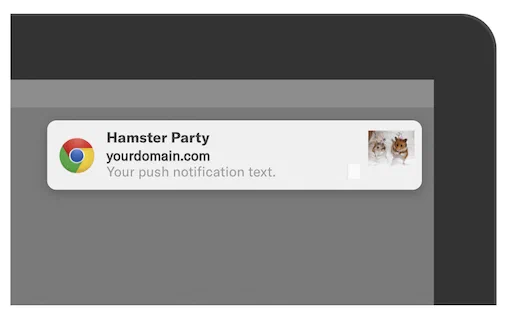
*Web icon*
The web icon is an image that appears in a [Web Push Notification](https://www.airship.com/docs/reference/glossary/#web_push_notification). Typically, it is your brand's logo. You set the default icon when [configuring the Web channel](https://www.airship.com/docs/developer/sdk-integration/web/getting-started/#airship-setup). You can also override the default icon for an individual message. See [Icon](https://www.airship.com/docs/guides/messaging/messages/content/web/#icon) in *Web content*.
If you are including Safari support, the default icon must be square and at least 256 x 256 pixels. Overriding the icon in an individual message is not supported for Safari.
| File types | Recommended file size | Maximum file size | Recommended dimensions | Recommended aspect ratio |
| --- | --- | --- | --- | --- | --- |
| **JPEG, PNG** | < 100 k | 2 MB | 256 x 256 px | 1:1 |
## Email
You can add images to your [Email](https://www.airship.com/docs/guides/messaging/messages/content/email/email/) message content or [Templates](https://www.airship.com/docs/reference/glossary/#template).
| File types | Recommended file size | Maximum file size |
| --- | --- | --- |
| **JPEG, PNG, GIF (static or animated)**1 | < 200 K | 2 MB |
1. Additional formats are supported (e.g., TIFF, BMP), but they do not always display in email clients.
**Recommendations:**
* 72 DPI.
* Keep image size as small as possible. Use compression to decrease the size and balance quality.
* Consider using an image that is twice the size of the space you'd like to fill so that it looks good on all screens. You can adjust the dimensions in the [Interactive editor](https://www.airship.com/docs/guides/messaging/editors/interactive/about/), or with `` tags if using HTML. The width of the image will depend on the space you are trying to fill, but for reference, it is commonly recommended to have your email width at 600 px.
## SMS (MMS)
You can add media to your [MMS](https://www.airship.com/docs/guides/messaging/messages/content/sms/) message content or [Templates](https://www.airship.com/docs/reference/glossary/#template). SMS does not support media.
Twilio [automatically resizes supported image file types](https://help.twilio.com/articles/223133547) based on specific carrier limits. See also [Twilio Programmable SMS Supported File Types and Size Limits for MMS Media Messages](https://help.twilio.com/articles/360018832773-Twilio-Programmable-SMS-Supported-File-Types-and-Size-Limits-for-MMS-Media-Messages).
| Media type | File types | Recommended file size | Maximum file size | Recommended dimensions | Recommended aspect ratio |
| --- | --- | --- | --- | --- | --- |
| **Image** | JPEG | < 600 KB | 1 MB | 640 x 1138 px | 9:16 |
| **Image** | PNG, GIF (static or animated) | < 600 KB | 1 MB | 640 x 480 px or 640 x 640 px | 4:3 or 1:1 |
| **Audio** | MP1, MP2, MP3, M1A, M2A, M4A, M4P, M4B, M4R, MPA, WAV, 3GP, 3G2 | < 600 KB | 1 MB |
| **Virtual Contact File (vCard)** | VCARD, VCF | < 600 KB | 1 MB |
### Virtual Contact File (vCard)
Airship sends vCard files without validation or other processing. We recommend verifying vCard rendering on devices before sending to users.
vCards must start and end with `BEGIN:VCARD` and `END:VCARD` and also include a `VERSION`. The table below is to illustrate the sample vCard. For additional information, including requirements and formatting variations for different versions, see [Properties](https://en.wikipedia.org/wiki/VCard#Properties) in the *vCard* Wikipedia article.
**Sample vCard file content**
```text
BEGIN:VCARD
VERSION:3.0
FN:Sabine Airlines
N:Airlines;Sabine;;;
TITLE:SMS Text Alerts
TEL;TYPE=sms:01234
URL;TYPE=Homepage:https://www.example.com
ADR;TYPE=Address:;;5678 Party Place;Portland;OR;97296;USA
NOTE:Text STOP to 01234 to unsubscribe from alerts.
PHOTO;TYPE=JPEG;VALUE=URI:https://example.com/logo.jpg
END:VCARD
```
Properties and example values for the above sample vCard:
| Property name | Description | Example formatted content for version 3.0 |
| --- | --- | --- |
| **ADR** | Optional. A physical address of the vCard object. | ADR;TYPE=Address:;;5678 Party Place;Portland;OR;97296;USA |
| **BEGIN** | Required. Indicates the start of the vCard. | BEGIN:VCARD |
| **END** | Required. Indicates the end of the vCard. | END:VCARD |
| **FN** | Optional or required, depending on version. Formatted name string. Should be the full name of the vCard contact. | FN:Sabine Airlines |
| **N** | Optional or required, depending on version. The structured name of the vCard contact. | N:Airlines;Sabine;;; |
| **NOTE** | Optional. A string of additional information or notes about the vCard contact. | NOTE:Text STOP to 01234 to unsubscribe from alerts. |
| **PHOTO** | Optional. An image or photograph associated with the vCard contact as either a public URL or an embedded in the vCard as a Base64 encoded block of text. Image types are generally `GIF`, `JPEG`, or `PNG`. Base64 encoding is recommended, as URI-based images may fail to load on some devices. To convert images, you can use the [Image to Base64](https://base64.guru/converter/encode/image) tool on *Base64 Guru*. For formatting requirements per version, see the information for [`PHOTO`](https://en.wikipedia.org/wiki/VCard#Properties) in the *vCard* Wikipedia article. | PHOTO;TYPE=JPEG;VALUE=URI:https://example.com/logo.jpg
or
PHOTO;ENCODING=b;TYPE=JPEG:[BASE64 IMAGE] |
| **TEL** | Optional. A number string representing the vCard contact's telephone number. Type values include `work`, `home`, `cell`, `voice`, `fax`, `pager`, and `sms`. Comma separate multiple values, for example: `TEL;TYPE=home,voice:(503) 555-2204`. | TEL;TYPE=sms:01234 |
| **TITLE** | Optional. The job title or function of the vCard contact. | TITLE:SMS Text Alerts |
| **URL** | Optional. A URL related to the vCard contact. You can add a `TYPE` value that acts as a field label in the vCard. | URL;TYPE=Homepage:https://www.example.com |
| **VERSION** | Required. The version of the vCard format being used. Common versions are 2.1, 3.0, and 4.0. | VERSION:3.0 |
{class="table-col-1-20 table-col-2-40"}
## Message Center and landing pages
The hosted content limit for a [Rich Page](https://www.airship.com/docs/reference/glossary/#rich_page) is 1.5 MB, which includes the HTML and images. So the maximum image file size to use should be calculated in aggregate with other included images and kept as low as possible. See also: [Message Center content: Hosting and page size](https://www.airship.com/docs/guides/messaging/messages/content/app/message-center/#hosting-and-page-size); this information applies to both Message Center and [Landing pages](https://www.airship.com/docs/guides/features/messaging/landing-pages/).
You can enter a URL for video content in the Interactive and Visual editors, but the Interactive editor accepts YouTube URLs only. The same image file types are allowed in both editors.
| Editor | File types | Recommended file size | Maximum file size |
| --- | --- | --- | --- |
| **Interactive** | JPEG, PNG, GIF (static or animated) | < 200 KB | 1 MB |
| **Visual** | JPEG, PNG, GIF (static or animated) | < 200 KB | 512 KB |
### Message Center thumbnail image
The default size for a Message Center thumbnail image is 64x48 points. This translates to 256 x 192 px for xxxhdpi screens on Android and 192 x 144 px for @3x on iPhones. To avoid image scaling on Android devices, we advise using 256 x192 px.
| File types | Recommended file size | Maximum file size | Recommended Dimensions | Recommended aspect ratio |
| --- | --- | --- | --- | --- | --- |
| **JPEG, PNG** | < 100 k | 2 MB | 256 x 192 px | 1:4 |
## In-app automation
You can add media to your [In-App Automation](https://www.airship.com/docs/reference/glossary/#iaa) content and [Templates](https://www.airship.com/docs/reference/glossary/#template).
* *Banner* image — A small thumbnail image that appears on the right or left side of the message.
* *Modal* image — A large image embedded in the message.
* *Fullscreen* image — A large image embedded in the message.
* *Fullscreen* video — Can be displayed instead of an image.
| Media type | File types | Recommended file size | Maximum file size |
| --- | --- | --- | --- |
| **Image** | JPEG, PNG, GIF (static or animated) | < 200 K | 2 MB |
| **Video** | MPEG, MPEG2, MP4, YouTube | < 1 MB | 2 MB |
## Scenes
In [Scene](https://www.airship.com/docs/reference/glossary/#scene) content you can use images and video for background media and the Media content element. If using the List content element, you can use an image for each bullet. We recommend that all bullet images in a list have the same aspect ratio.
| Media type | File types | Recommended file size | Maximum file size |
| --- | --- | --- | --- |
| **Image** | JPEG, PNG, GIF (static or animated) | < 2 MB | 2 MB |
| **Video** | MPEG, MPEG2, MP4, Vimeo1, YouTube | < 2 MB | 2 MB |
1. Vimeo requires minimum SDKs iOS 19.4 and Android 19.7.
The following image dimensions are meant to provide a single recommendation that works reasonably well for both Android and iOS devices.
**Image width and height:**
| View style | Minimum dimensions | Maximum dimensions | Recommended dimensions | Recommended aspect ratio |
| --- | --- | --- | --- | --- |
| **Fullscreen** | 1125 x 2436 px1 | 1440 x 3088 px2 | 1242 x 2688 px3 | 19.5:94 |
| **Modal** using percentage sizing | Fullscreen dimensions x view style percentage | Fullscreen dimensions x view style percentage | Fullscreen dimensions x view style percentage | Equal to the view style aspect ratio |
| **Modal** using a fixed size | Equal to the view style dimensions | View style dimensions x 3 | View style dimensions x 2 | Equal to the view style aspect ratio |
1. These dimensions are equal to the screen size of the iPhone X, XS, and 11 Pro. 2. These dimensions are equal to the highest resolution Android phones while maintaining the aspect ratio, providing a good balance between quality and file size, and should display well on most modern smartphones. 3. These dimensions are equal to the screen size of the iPhone 11 Pro Max, 12 Pro Max, and most high-end Android devices. 4. This aspect ratio is an optimal middle ground as it is used by many modern smartphones, including recent (as of 2025) iPhones and Android devices.
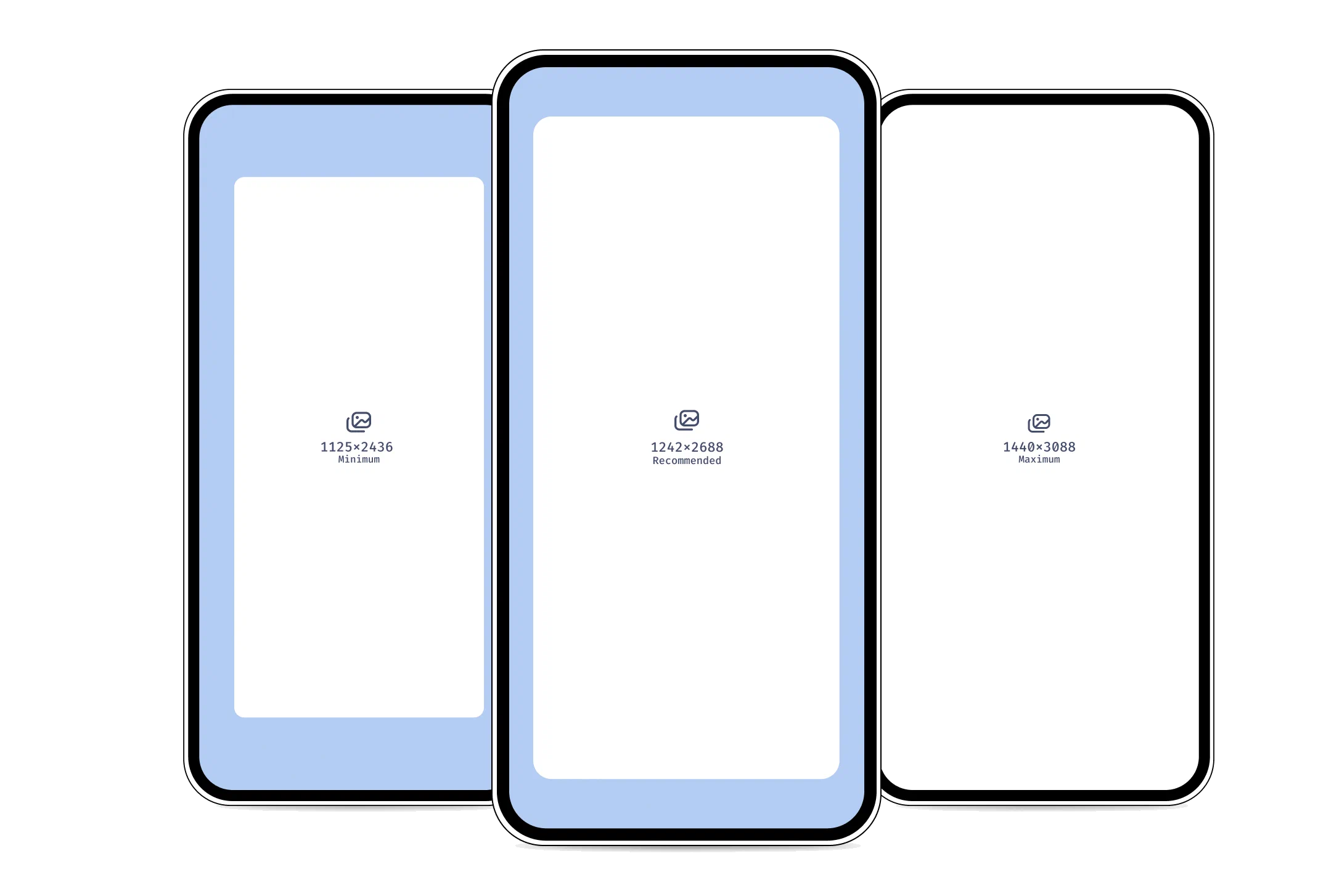
*Recommended dimensions for Scene images*
Media can appear cropped based on device screen size. When configuring the Fit option for background media and the List and Media content elements, you can determine how or if the media will be cropped. See the options for Fit and Position in [Set background color and media](https://www.airship.com/docs/guides/messaging/editors/native/screens/#set-background-color-and-media) and [Design properties](https://www.airship.com/docs/guides/messaging/editors/native/design-properties/).
Additional guidelines:
* Place important elements within the middle 80% of the image, leaving at least 10% margin on all sides. For example, if your image is 1000 x 2000 pixels, keep the focal point, such as text or a subject, inside a center area of 800 x 1600 pixels.
* Leave larger margins from the edges for Text elements.
* Test on various devices or emulators to ensure acceptable display across different screen sizes.
## Responsive design
Images for HTML content should be designed for and tested on multiple devices to ensure your content looks great on a range of screen sizes and orientations.
* Make sure your images are wide enough to look correct on a wide desktop screen.
* Be aware of what part of your content will appear on smaller screens or in landscape mode when the page loads, and what will show only when scrolling.
* If you include text within your images, make sure your font is large enough to be readable when it is resized down to smaller screen sizes.
## Open channel
When including media URLs in open channel payloads, make sure to use media that match the criteria of your OS or interface, or the third-party service you are integrating with.
# Built-In Interactive Notification Types
> Find predefined interactive notification types with their IDs, button labels, and descriptions.
## Predefined App Buttons {#predefined-app-buttons}
Airship provides a set of standard Interactive Notification types.
The Airship library, along with the custom user notification types, will always register the following set:
| Type | Type ID | Examples | Description | Button 1 label | B1 ID | B1 Foreground | Button 2 label | B2 ID | B2 Foreground |
| --- | --- | --- | --- | --- | --- | --- | --- | --- | --- |
| Yes or No (Open the app) | ua_yes_no_foreground | Would you like to fill out a survey? [Yes] [No] | Yes option takes user into the app. No dismisses the notification, but can record a tag. | Yes | yes | TRUE | No | no | FALSE |
| Yes or No (Dismiss notification) | ua_yes_no_background | Would you receive black friday offers? [Yes] [No] | Yes and No options dismiss the notification when clicked, without taking the user into the app. | Yes | yes | FALSE | No | no | FALSE |
| Accept or Decline (Open the app) | ua_accept_decline_foreground | Would you like to fill out a survey? [Accept] [Decline] | Accept option takes the user into the app. No dismisses the notification, but can record a tag. | Accept | accept | TRUE | Decline | decline | FALSE |
| Accept or Decline (Dismiss notification) | ua_accept_decline_background | Would you receive black friday offers? [Accept] [Decline] | Yes and No options dismiss the notification when clicked, without taking the user into the app. | Accept | accept | FALSE | Decline | decline | FALSE |
| Shop Now | ua_shop_now | 20% off Men's shoes [Shop now] | Shop Now takes user into the app; should be a different location from the notification action. Can also set a tag. | Shop Now | shop_now | TRUE | n/a | n/a | n/a |
| Buy Now | ua_buy_now | 20% off Men's shoes [Buy Now] | Buy Now takes user into the app; should be a different location from the notification action. Can also set a tag. | Buy Now | buy_now | TRUE | n/a | n/a | n/a |
| Follow | ua_follow | New York City bans the plastic bag. [Follow] | Follow sets a tag allowing a user to opt in to receiving more notifications about a story, offer, event, program, etc. | Follow | follow | FALSE | n/a | n/a | n/a |
| Opt-in | ua_opt_in | Would you receive Black Friday offers? [Opt-in] | Opt-in sets a tag allowing a user to opt in to receiving more notifications about a story, offer, event, program, etc. | Opt-in | opt_in | FALSE | n/a | n/a | n/a |
| Unfollow | ua_unfollow | Black Friday Furby Boom 80% off Last Chance! [Unfollow] | Unfollow sets a tag allowing a user to stop receiving notifications about a story, offer, event, program, etc. | Unfollow | unfollow | FALSE | n/a | n/a | n/a |
| Opt-out | ua_opt_out | Black Friday Furby Boom 80% off Last Chance! [Opt-out] | Opt-out sets a tag allowing a user to stop receiving notifications about a story, offer, event, program, etc. | Opt-out | opt_out | FALSE | n/a | n/a | n/a |
| Opt-in / Remind Me Later | ua_opt_in_remind | Black Friday Furby Boom 80% off Last Chance! [Opt-in] [Remind me later] | Encouraging Opted-Out Users to Opting In to a program, feature or option. Remind can set tag for retargeting. | Opt-in | opt_in | No | Remind Me Later | remind | No |
| Remind Me Later | ua_remind_me_later | Black Friday Furby Boom 80% off Last Chance! [Remind Me Later] | Remind Me Later sets a tag that can be used for retargeting a message, e.g. manually or with automation | Remind Me Later | remind | FALSE | n/a | n/a | n/a |
| Tell Me More | ua_more_info | Black Friday Furby Boom 80% off Last Chance! [Tell me more] | Deep link to more details about a specific offer or program | Tell Me More | more_info | Yes |
| Download | ua_download | Weekly wallpaper view of the Grand Canyon [Download] | Download deep links users directly to media e.g. wallpaper images, apps, music downloads, file downloads, etc. | Download | download | TRUE | n/a | n/a | n/a |
| Share | ua_share | Obama wins the election! [Share] | Pass sharing text through to native OS apps like Facebook and Twitter using the UA Share Action. | Share | share | TRUE | n/a | n/a | n/a |
| Download / Share | ua_download_share | Weekly wallpaper view of the Grand Canyon [Share] [Download] | Download deep links users directly to media e.g. wallpaper images, apps, music downloads, file downloads, etc. Share the same media socially. | Download | download | TRUE | Share | share | TRUE |
| Remind Me Later / Share | ua_remind_share | Black Friday Furby Boom 80% off Last Chance! [Share] [Remind Me Later] | Remind Me Later sets a tag that can be used for retargeting a message, e.g. manually or with automation. See UA Share Action. | Remind Me Later | remind | FALSE | Share | share | TRUE |
| Opt-in / Share | ua_opt_in_share | Would you receive Black Friday offers? [Share] [Opt-in] | Opt-in sets a tag allowing a user to opt in to receiving more notifications about a story, offer, event, program, etc. See UA Share Action. | Opt-in | opt_in | FALSE | Share | share | TRUE |
| Opt-out / Share | ua_opt_out_share | Black Friday Furby Boom 80% off Last Chance! [Share] [Opt-out] | Opt-out sets a tag allowing a user to stop receiving notifications about a story, offer, event, program, etc. See UA Share Action. | Opt-out | opt_out | FALSE | Share | share | TRUE |
| Follow / Share | ua_follow_share | New York City bans the plastic bag. [Share] [Follow] | Follow sets a tag allowing a user to opt in to receiving more notifications about a story, offer, event, program, etc. See UA Share Action. | Follow | follow | FALSE | Share | share | TRUE |
| Unfollow / Share | ua_unfollow_share | Black Friday Furby Boom 80% off Last Chance! [Share] [Unfollow] | Unfollow sets a tag allowing a user to stop receiving notifications about a story, offer, event, program, etc. See UA Share Action. | Unfollow | unfollow | FALSE | Share | share | TRUE |
| Shop Now / Share | ua_shop_now_share | 20% off Men's shoes [Share] [Shop now] | Shop Now takes user into the app; should be a different location from the notification action. Can also set a tag. See UA Share Action. | Shop Now | shop_now | TRUE | Share | share | TRUE |
| Buy Now / Share | ua_buy_now_share | 20% off Men's shoes [Share] [Buy Now] | Buy Now takes user into the app; should be a different location from the notification action. Can also set a tag. See UA Share Action. | Buy Now | buy_now | TRUE | Share | share | TRUE |
| More Like This / Less Like This | ua_more_like_less_like | Take 30% off of all Mead notebooks and White Out. [More Like This] [Less Like This] | Let users opt in to additional messages of this type. Set tags in the background. | More Like This | more_like | FALSE | Less Like This | less_like | FALSE |
| Like / Dislike | ua_like_dislike | Justin Bieber just got a pet poodle in prison and named it Sparky. [Like] [Dislike] | Capture user sentiment by recording the # of likes/dislikes of a message. Optionally set tags for retargeting. | Like | like | FALSE | Dislike | dislike | FALSE |
| Like | ua_like | Justin Bieber just got a pet poodle in prison and named it Sparky. [Like] | Capture user sentiment by allowing users to like a message. Optionally set a tag for retargeting. | Like | like | FALSE | n/a | n/a | n/a |
| Like / Share | ua_like_share | Weird Al playing at the Moda Center this weekend, last chance to buy tickets. [Like] [Share] | Capture user sentiment by allowing users to like a message, or share. Optionally set tags for retargeting. | Like | like | FALSE | Share | share | TRUE |
| Add to Calendar | ua_add_calendar_remind | Add David Bowie Look-Alike Contest to your calendar? [Add to calendar] | Add a calendar event (.ics file) to the calendar on the phone. | Add to Calendar | add_calendar | Yes | Remind Me Later | remind | No |
| Add | ua_add | Add Wesley Willis Tribute Concert ticket to your Wallet now. [Add] | Add an item: most frequently a wallet pass or card to your digital Wallet | Add | add | Yes |
| Save / No | ua_save | Tiger Flees Zoo, Steals Ice Cream Truck! [Save] | Save something for future reference | Save | save | No |
| Follow / Save | ua_follow_save | Tiger Flees Zoo, Steals Ice Cream Truck! [Follow] [Save] | Give customer choice of following a story, which implies opting in to ongoing notifications, vs. merely saving it for future reference. | Follow | follow | No | Save | save | No |
| Rate Now | ua_rate | Show us some love in the app store. [Rate now] | Drive users to rate the app in the app store by deep linking from this button | Rate Now | rate | Yes |
| Rate Now / Remind Me Later | ua_rate_remind | Show us some love in the app store. [Rate now] [Remind me later] | Prompt users to rate app or alternative set tag for retargeting and reminding user to rate at future date. | Rate Now | rate | Yes | Remind Me Later | remind | No |
| Search | ua_search | Find a deal on Weird Al plastic Furby shoes? [Search] | Deep link to a search functionality within the app | Search | search | Yes |
| Book Now | ua_book | Rest up for Black Friday! Save your hotel room early. [Book now] | Deep link to booking flow within an app | Book Now | book | Yes |
## Emoji {#built-in-emoji}
You may also assign button labels that render on the device as emoji.
> **Note:** For iOS and devices running Android M or higher, the types will render as emoji as shown below. For older Android versions we use icons instead of emoji.
| Type | Type ID | Examples | Description | Button 1 label | B1 ID | B1 Foreground | Button 2 label | B2 ID | B2 Foreground |
| --- | --- | --- | --- | --- | --- | --- | --- | --- | --- |
| :smile: / :unamused:| `ua_icons_happy_sad` | Justin Bieber just got a pet poodle in prison and named it Sparky. :smile: :unamused: | Capture user sentiment by recording the number of happy/sad emotions for a message. Optionally set tags for retargeting. | :smile:| happy | FALSE | :unamused: | sad | FALSE |
| :thumbsup: / :thumbsdown: | `ua_icons_up_down` | Justin Bieber just got a pet poodle and named it Sparky :thumbsup: :thumbsdown: | Capture user sentiment by recording the number of thumbs up or down for a message. Optionally set tags for retargeting. | :thumbsup:| up | FALSE | :thumbsdown:| down | FALSE |
# CSV Formatting Reference
> Find CSV formatting requirements and information for uploading data to Airship.
## Attributes CSV format {#attributes}
**For use with:**
* **Dashboard:** [Setting or removing Attributes using CSV upload](https://www.airship.com/docs/guides/audience/attributes/setting/#csv-file)
* **SFTP:** [Setting or removing Attributes using CSV upload](https://www.airship.com/docs/guides/audience/segmentation/sftp-upload/)
> **Important:** You must add Custom and Predefined Attributes to your project before setting them on users. Otherwise, setting those Attributes will result in an error. See [Adding Attributes to your project](https://www.airship.com/docs/guides/audience/attributes/adding/).
>
> JSON Attributes can only be set using the API.
The fields in your CSV depend on the type of audience you want to upload. You can upload lists for channels, named users, email addresses, or [MSISDNs](https://www.airship.com/docs/reference/glossary/#msisdn), but you cannot mix identifiers. Attributes in your CSV should appear to the right of channel and registration identifiers — anything not included in the required or additional fields below.
When using email or SMS identifiers, Airship registers new channels for addresses or MSISDN/sender combinations that are new to your project. Use the additional fields to indicate opt-in statuses, so that you can send messages to new channels generated from your CSV upload.
When you upload your file in the dashboard or transfer it using SFTP, you must select a type that determines how empty values in Attribute columns are handled:
| | Attributes | Attributes Snapshot |
| --- | --- | --- |
| **Handling of empty/null values** | Empty or null values are ignored, preserving any existing Attribute values not explicitly set in the CSV. | Empty or null values trigger removing those Attributes from the user. |
| **Primary use case** | This mode is useful for making partial updates to a user's Attributes without affecting others. | This mode is useful for synchronizing Attribute states with external systems, ensuring the Attributes in the CSV exactly match the user's Attributes. |
To see a sample formatted file, go to **Audience**, then **Attributes**, then **Upload Attribute Data**. Select each upload type, and then select the download link.
CSV formatting for Attributes:
**Any channel**
* Required: `channel_id`
**Named User**
* Required: `named_user`
**Email**
* Required: `email_address`
* Additional fields:
* `ua_commercial_opted_in` or `ua_commercial_opted_out` — Opted in/out dates are mutually exclusive. Providing a date for both in the same row is considered invalid.
* `ua_transactional_opted_in` or `ua_transactional_opted_out` — Same mutually exclusive rule as commercial dates above.
* `ua_email_suppression_state` — With values: `BOUNCE`, `SPAM_COMPLAINT`, `COMMERCIAL_SPAM_COMPLAINT`, or `IMPORTED`.
* `ua_open_tracking_opted_in` or `ua_open_tracking_opted_out` — By default, new channels are opted in to both open and click tracking. A channel can be opted out of tracking by setting an opted out date. The channel can be opted back in to tracking by setting an opted in date that is newer than the opted out date. Providing a date for both opted in and opted out in the same row is considered invalid.
* `ua_click_tracking_opted_in` or `ua_click_tracking_opted_out` — Same rules as open tracking above.
* `timezone` — Format according to the IANA timezone database. Example: `America/Los_Angeles`.
**SMS/MMS**
* Required: `msisdn` (numeric, without leading 0), `sms_sender`
* Additional fields:
* `ua_opted_in`
File guidelines:
* File size must not exceed 10 million rows or 1.5 GB.
* The first field of the header row must be an identifier field.
* No more than 100 Attribute fields.
* Date Attributes use ISO 8601 date-time format — `YYYY-MM-DDTHH:MM:SS`. Set an offset by appending the date-time with `+HH:MM`.
* One identifier per line.
* One Attribute per cell.
* To ensure the support of special characters and accents, the file must be encoded to UTF-8 without BOM.
### Channel IDs or named users
If you know your audience's Airship identifiers, you can use `channel_id` or `named_user` in your list. Whichever you use, the identifier must be the first field in your header row. Subsequent rows represent Attribute names.
**Channel ID example**
```text
channel_id,fav_food,age,birthdate
,pizza,18,2002-05-05T00:00:00
,burgers,22,1998-06-12T00:00:00
,sushi,27,1993-03-04T00:00:00
```
### Email or SMS
You can also assign Attributes to a list of email or SMS addresses, which can be helpful if you don't know the Airship identifiers for your audience or you need to create new channels. When you upload an audience of email addresses or phone numbers, Airship generates new channels for email addresses or MSISDN/sender combinations it doesn't recognize.
You should provide additional information in the CSV if you want to be able to send messages to new channels. While Airship will create new channels for addresses that don't exist in our system, and fields containing `opted_in` are optional, you cannot send messages to email or SMS channels that have not explicitly opted in to messages. If you want to be able to send messages to new channels, you must provide the appropriate date-time value when users opted in to messaging.
**Email example**
```text
email_address,ua_commercial_opted_in,fav_food,age,birthdate
brandy@example.com,2022-01-01T18:45:30,burger,18,2004-05-05T00:00:00
jake@example.com,2022-01-01T12:45:30,sushi,22,2000-06-12T00:00:00
```
**SMS example**
```text
msisdn,sms_sender,ua_opted_in,fav_food,age,birthdate
15558675309,12345,2020-05-05T10:34:22,tacos,18,2002-05-05T00:00:00
15559867543,12345,2020-05-05T12:03:45,pizza,22,1998-06-12T00:00:00
```
## Named user association CSV format {#named-user-association}
**For use with:**
* **Dashboard:** [Associating channels with named users using CSV upload](https://www.airship.com/docs/guides/audience/named-users/#csv-file)
* **SFTP:** [Associating channels with named users using CSV upload](https://www.airship.com/docs/guides/audience/segmentation/sftp-upload/)
The fields in your CSV depend on the type of identifier you want to associate with a named user. You can upload lists for channel IDs, email addresses, or [MSISDNs](https://www.airship.com/docs/reference/glossary/#msisdn), but you cannot mix identifiers. For email addresses and MSISDNs, additional fields indicate opt-in statuses. Upon upload, Airship:
* Registers channels that are new to your project
* Creates the named user ID if it does not already exist
The named user in your CSV must be the first column in the file header. The identifier and any additional fields should follow.
CSV formatting for named user associations:
**Any channel**
* Required: `channel_id`
**Email**
* Required: `email_address`
* Additional fields:
* `ua_commercial_opted_in` or `ua_commercial_opted_out` — Opted in/out dates are mutually exclusive. Providing a date for both in the same row is considered invalid.
* `ua_transactional_opted_in` or `ua_transactional_opted_out` — Same mutually exclusive rule as commercial dates above.
* `ua_email_suppression_state` — With values: `BOUNCE`, `SPAM_COMPLAINT`, `COMMERCIAL_SPAM_COMPLAINT`, or `IMPORTED`.
* `ua_open_tracking_opted_in` or `ua_open_tracking_opted_out` — By default, new channels are opted in to both open and click tracking. A channel can be opted out of tracking by setting an opted out date. The channel can be opted back in to tracking by setting an opted in date that is newer than the opted out date. Providing a date for both opted in and opted out in the same row is considered invalid.
* `ua_click_tracking_opted_in` or `ua_click_tracking_opted_out` — Same rules as open tracking above.
**SMS/MMS**
* Required: `msisdn` (numeric, without leading 0), `sms_sender`
* Additional fields:
* `ua_opted_in`
File guidelines:
* File size must not exceed 10 million rows or 1.5 GB.
* The first field of the header row must be `named_user`.
* One identifier per line.
* To ensure the support of special characters and accents, the file must be encoded to UTF-8 without BOM.
### Channel IDs
If you know your audience's Airship identifiers, you can use `channel_id` in your list. `named_user` must be the first field in your header row. The second column will be the identifier.
**Channel ID example**
```text
named_user,channel_id
Joe,
9834lejrw,
```
### Email or SMS
You can also associate named users to a list of email or SMS addresses, which can be helpful if you don't know the Airship identifiers for your audience or you need to create new channels. When you upload an audience of email addresses or phone numbers, Airship generates new channels for email addresses or MSISDN/sender combinations it doesn't recognize.
You should provide additional information in the CSV if you want to be able to send messages to new channels. While Airship will create new channels for addresses that don't exist in our system, and fields containing `opted_in` are optional, you cannot send messages to email or SMS channels that have not explicitly opted in to messages. If you want to be able to send messages to new channels, you must provide the appropriate date-time value when users opted in to messaging.
**Email example**
```text
named_user,email_address,ua_commercial_opted_in
Abby,brandy@example.com,2022-01-01T18:45:30
98er3o34,jake@example.com,2022-01-01T12:45:30
```
**SMS example**
```text
named_user,msisdn,sms_sender,ua_opted_in
Leia,15558675309,12345,2020-05-05T10:34:22
23jw77s,15559867543,12345,2020-05-05T12:03:45
```
## Tags CSV format {#tags-format}
**For use with:**
* **Dashboard:** [Setting or removing tags using CSV upload](https://www.airship.com/docs/guides/audience/tags/#file-upload)
When setting or removing tags using CSV upload, your file must contain a list of user identifiers only. When you upload the file, you can select which tags to add or remove.
The fields in your CSV depend on the type of audience you want to upload. You can upload lists for channels, named users, email addresses, or [MSISDNs](https://www.airship.com/docs/reference/glossary/#msisdn), but you cannot mix identifiers in a single CSV file. To upload more than one channel type, create separate files and upload them individually. List your channel type at the top of the first column and list your identifiers below the channel type.
When using email or SMS identifiers, Airship registers new channels for addresses or MSISDN/sender combinations that are new to your project. Use the additional fields to indicate opt-in statuses, so that you can send messages to new channels generated from your CSV upload.
> **Tip:** You can download a sample formatted CSV in the dashboard. Go to **Audience**, then **Tags**, then **Set tags**, and select **Download sample CSV**.
CSV formatting for tag uploads:
**Any channel**
* Required: `channel_id`
**Named User**
* Required: `named_user`
**Email**
* Required: `email_address`
* Additional fields:
* `ua_commercial_opted_in`
* `ua_transactional_opted_in`
* `ua_open_tracking_opted_in` or `ua_open_tracking_opted_out` — By default, new channels are opted in to both open and click tracking. A channel can be opted out of tracking by setting an opted out date. The channel can be opted back in to tracking by setting an opted in date that is newer than the opted out date. Providing a date for both opted in and opted out in the same row is considered invalid.
* `ua_click_tracking_opted_in` or `ua_click_tracking_opted_out` — Same rules as open tracking above.
**SMS/MMS**
* Required: `msisdn` (numeric, without leading 0), `sms_sender`
* Additional fields:
* `ua_opted_in`
File guidelines:
* File size must not exceed 10 million rows or 1.5 GB.
* The first field of the header row must be an identifier field.
* To ensure the support of special characters and accents, the file must be encoded to UTF-8 without BOM.
### Channel IDs or named users
If you know your audience's Airship identifiers, you can use `channel_id` or `named_user` in your list. Whichever you use, the identifier must be the first field in your header row.
**Channel ID example**
```text
channel_id
```
### Email or SMS
You can also assign tags from custom tag groups to a list of email or SMS addresses, which can be helpful if you don't know the Airship identifiers for your audience or you need to create new channels. When you upload an audience of email addresses or phone numbers, Airship generates new channels for email addresses or MSISDN/sender combinations it doesn't recognize.
You should provide additional information in the CSV if you want to be able to send messages to new channels. While Airship will create new channels for addresses that don't exist in our system, and fields containing `opted_in` are optional, you cannot send messages to email or SMS channels that have not explicitly opted in to messages. If you want to be able to send messages to new channels, you must provide the appropriate date-time value when users opted in to messaging.
**SMS example**
```text
msisdn,sms_sender,ua_opted_in
15558675309,12345,2020-05-05T10:34:22
15559867543,12345,2020-05-05T12:03:45
```
# Scene SDK minimums
> Find the minimum SDK versions for Scene features.
Web [Scenes](https://www.airship.com/docs/reference/glossary/#scene) require Web SDK 2+. The features and capabilities on this page require the stated mobile app SDK versions, which are also noted in their documentation sections.
> **Tip:** You can view the most frequently installed Airship SDK versions among your users. In [Performance Analytics](https://www.airship.com/docs/reference/glossary/#pa), go to the [Device Properties Dashboard](https://www.airship.com/docs/guides/reports/analytics/definitions/#device-properties) and select the **iOS** or **Android UA Version (During Date Range)** Look.
## Surveys and channel collection
These minimums are for input collection and validation:
| Feature | iOS | Android |
|---------|:---:|:-------:|
| [Email address collection](https://www.airship.com/docs/guides/messaging/editors/native/elements/#email) | [18.13](/docs/docs/developer/sdk-integration/apple/ios-changelog/#18.13.0) | [18.5](/docs/docs/developer/sdk-integration/android/changelog/#18.5.0) |
| [Email address registration](https://www.airship.com/docs/guides/messaging/editors/native/elements/#email) | [19.1](/docs/docs/developer/sdk-integration/apple/ios-changelog/#19.1.0) | [19.2](/docs/docs/developer/sdk-integration/android/changelog/#19.2.0) |
| [Phone number collection or registration](https://www.airship.com/docs/guides/messaging/editors/native/elements/#sms) | [19.6](/docs/docs/developer/sdk-integration/apple/ios-changelog/#19.6.0) | [19.9](/docs/docs/developer/sdk-integration/android/changelog/#19.9.0) |
| [Validate form](https://www.airship.com/docs/guides/messaging/in-app-experiences/configuration/button-actions/#validate-form) | [19.6](/docs/docs/developer/sdk-integration/apple/ios-changelog/#19.6.0) | [19.9](/docs/docs/developer/sdk-integration/android/changelog/#19.9.0) |
## Accessibility
These minimums are for accessibility features:
| Feature | iOS | Android |
|---------|:---:|:-------:|
| Accessibility heading level for [text](https://www.airship.com/docs/guides/messaging/editors/native/design-properties/#text-properties) or [media](https://www.airship.com/docs/guides/messaging/editors/native/design-properties/#media-properties) properties | [18.13](/docs/docs/developer/sdk-integration/apple/ios-changelog/#18.13.0) | [18.5](/docs/docs/developer/sdk-integration/android/changelog/#18.5.0) |
| Using a Text element as the accessibility description for an [Email](https://www.airship.com/docs/guides/messaging/editors/native/elements/#email), [SMS](https://www.airship.com/docs/guides/messaging/editors/native/elements/#sms), or [Text Input](https://www.airship.com/docs/guides/messaging/editors/native/elements/#text-input) field | [19.8](/docs/docs/developer/sdk-integration/apple/ios-changelog/#19.8.0) | [19.10](/docs/docs/developer/sdk-integration/android/changelog/#19.10.0) |
| [Video controls](https://www.airship.com/docs/guides/messaging/editors/native/screens/#video-controls) for background video | [20.6.2](/docs/docs/developer/sdk-integration/apple/ios-changelog/#20.6.2) | [20.5](/docs/docs/developer/sdk-integration/android/changelog/#20.5.0) |
## Custom Views
These minimums are for [Custom Views](https://www.airship.com/docs/reference/glossary/#custom_view):
| Feature | iOS | Android |
|---------|:---:|:-------:|
| Custom Views | [19.2](/docs/docs/developer/sdk-integration/apple/ios-changelog/#19.2.0) | [19.4](/docs/docs/developer/sdk-integration/android/changelog/#19.4.0) |
| Scene control API for Custom Views ([iOS SDK](https://www.airship.com/docs/developer/sdk-integration/apple/in-app-experiences/custom-views/#scene-control), [Android SDK](https://www.airship.com/docs/developer/sdk-integration/android/in-app-experiences/custom-views/#scene-control)) | [20.0](/docs/docs/developer/sdk-integration/apple/ios-changelog/#20.0.0) | [20.0](/docs/docs/developer/sdk-integration/android/changelog/#20.0.0) |
## Markdown styling
These minimums are for [Markdown styling](https://www.airship.com/docs/guides/messaging/editors/native/about/#markdown-styling):
| Feature | iOS | Android |
|---------|:---:|:-------:|
| Bold, italic, strikethrough, and links | [18.6](/docs/docs/developer/sdk-integration/apple/ios-changelog/#18.6.0) | [18.2](/docs/docs/developer/sdk-integration/android/changelog/#18.2.0) |
| Highlight | [20.2](/docs/docs/developer/sdk-integration/apple/ios-changelog/#20.2.0) | [20.1](/docs/docs/developer/sdk-integration/android/changelog/#20.1.0) |
| Subscript and superscript | [20.6](/docs/docs/developer/sdk-integration/apple/ios-changelog/#20.6.0) | [20.6](/docs/docs/developer/sdk-integration/android/changelog/#20.6.0) |
## Text design properties
These minimums are for [text design properties](https://www.airship.com/docs/guides/messaging/editors/native/design-properties/#text-properties) and [text styles in brand guidelines](https://www.airship.com/docs/guides/messaging/features/brand-guidelines/#text-button-and-input-styles):
| Feature | iOS | Android |
|---------|:---:|:-------:|
| Font weight | [20.1](/docs/docs/developer/sdk-integration/apple/ios-changelog/#20.1.0) | [20.1](/docs/docs/developer/sdk-integration/android/changelog/#20.1.0) |
| Line height | [20.1](/docs/docs/developer/sdk-integration/apple/ios-changelog/#20.1.0) | [20.1](/docs/docs/developer/sdk-integration/android/changelog/#20.1.0) |
| Letter spacing | [20.1](/docs/docs/developer/sdk-integration/apple/ios-changelog/#20.1.0) | [20.1](/docs/docs/developer/sdk-integration/android/changelog/#20.1.0) |
## General
These minimums are for various Scene features:
| Feature | iOS | Android |
|---------|:---:|:-------:|
| [Embedded Content](https://www.airship.com/docs/reference/glossary/#embedded_content) | [18.7](/docs/docs/developer/sdk-integration/apple/ios-changelog/#18.7.0) | [18.1.4](/docs/docs/developer/sdk-integration/android/changelog/#18.1.4) |
| Adding an action when a user [taps/clicks the screen](https://www.airship.com/docs/guides/messaging/editors/native/screens/#add-an-action) or [an image](https://www.airship.com/docs/guides/messaging/editors/native/elements/#media) | [18.12](/docs/docs/developer/sdk-integration/apple/ios-changelog/#18.12.0) | [18.4](/docs/docs/developer/sdk-integration/android/changelog/#18.4.0) |
| Setting both margins and a border in the same Scene ([root appearance](https://www.airship.com/docs/guides/messaging/editors/native/root/)) | [19.0](/docs/docs/developer/sdk-integration/apple/ios-changelog/#19.0.0) | [19.0](/docs/docs/developer/sdk-integration/android/changelog/#19.0.0) |
| Scene border radius — Embedded Content view styles: [Default setting](https://www.airship.com/docs/guides/messaging/in-app-experiences/configuration/defaults/#set-embedded-content-view-styles) and [root appearance](https://www.airship.com/docs/guides/messaging/editors/native/root/) | [19.6](/docs/docs/developer/sdk-integration/apple/ios-changelog/#19.6.0) | [19.9](/docs/docs/developer/sdk-integration/android/changelog/#19.9.0) |
| [Branching](https://www.airship.com/docs/reference/glossary/#branching) | [19.6](/docs/docs/developer/sdk-integration/apple/ios-changelog/#19.6.0) | [19.9](/docs/docs/developer/sdk-integration/android/changelog/#19.9.0) |
| [Custom HTML](https://www.airship.com/docs/guides/messaging/editors/native/about/#provide-custom-html) | [20.1](/docs/docs/developer/sdk-integration/apple/ios-changelog/#20.1.0) | [20.1](/docs/docs/developer/sdk-integration/android/changelog/#20.1.0) |
| [Navigation control and Play control](https://www.airship.com/docs/guides/messaging/editors/native/root/) | [20.1](/docs/docs/developer/sdk-integration/apple/ios-changelog/#20.1.0) | [20.1.1](/docs/docs/developer/sdk-integration/android/changelog/#20.1.1) |
# Custom HTML for Rich Pages and In-App Automation
> Create and upload custom HTML templates for In-App Automation, Message Center messages, and landing pages in your app.
Airship provides several predefined templates for sending [rich pages](https://www.airship.com/docs/reference/glossary/#rich_page) to the device. Custom templates are also supported by uploading an HTML page.
You can also add custom HTML blocks when using drag-and-drop in the [Interactive editor](https://www.airship.com/docs/guides/messaging/editors/interactive/) for rich pages.
## JavaScript Interface
Both iOS and Android/Fire OS load an Airship JavaScript interface into
landing pages, Message Center messages, and In-App Automation messages. You can use the following functions in your custom HTML to access information about the system and trigger actions. The interface is available on both iOS and Android platforms, namespaced by a global `UAirship` object.
### UAirship.getAppKey()
The App Key in Airship, e.g., `Wx7SIqAdJDmFj6ar97AFcQ`.
### UAirship.getUserId()
Get the user's Airship ID, e.g., `4e84b80563051f67ec001a87`.
### UAirship.getChannelId()
Get the user's Airship `channel_id`, e.g., `45741d38-2dab-4c7b-8981-41423e078959`.
### UAirship.getNamedUser()
Get the named user that the `channel_id` is associated with.
### UAirship.getDeviceModel()
Returns the device model that the user is viewing your message on, e.g., iPod Touch, XT1053.
### UAirship.close()
Closes the current landing page or Message Center message.
* **Android:** Simulates the Back button.
* **iOS:** If the webview's delegate implements the protocol `NativeBridgeDelegate`, it will call `close`.
### UAirship.runAction(actionName, argument, callback)
Triggers an action asynchronously. You can trigger any action registered with the device's action registry using JavaScript. For more information about actions, including a list of available actions and how to write custom actions, see
[Mobile Actions](https://www.airship.com/docs/sdk-topics/actions/).
* `actionName` — The name of the action you want to trigger.
* `argument` — The value of the action's argument in JSON.
* `callback` — Callback when the action finishes. Invoked with an instance
of an error if an error occurred and any result data from the action.
```javascript
// Triggers the add tags action with tag "MY_TAG"
UAirship.runAction("add_tags_action", "MY_TAG", function(error, result) {
console.log("add_tags_action finished")
if (!error) {
console.log("Added MY_TAG")
} else {
console.log("Failed to add MY_TAG")
}
})
console.log("add_tags_action called")
```
The earliest the callback will execute is during the next turn of the event loop, i.e., the example above will log `add_tags_action called` before `add_tags_action finished`.
### UAirship.getMessageId()
Get the message ID of the current message/page or `null` for landing pages.
### UAirship.getMessageSentDate()
The message's sent date in GMT `yyyy-MM-dd HH:mm:ss` format or null for landing pages.
### UAirship.getMessageSentDateMS()
The message's sent date in milliseconds (Unix epoch time) or -1 for landing pages.
### UAirship.getMessageTitle()
The message's title or null for landing pages.
### UA Library Ready Event
The `ualibraryready` event fires when the UAirship interface and page content are fully loaded.
```javascript
// Check if the interface is fully loaded
if(typeof UAirship === 'object' && UAirship.runAction) {
onload()
} else {
document.addEventListener('ualibraryready', onload, false)
}
```
## URL Intercepting
URLs with the scheme `uairship` are intercepted by the Airship SDK.
### uairship://run-basic-actions
Runs action with implicit string arguments. Actions and the arguments are
defined by the URI parameters. The following example adds the `hi` tag when a user clicks the link.
```html
Add tags!
```
### uairship://run-actions
The same as `run-basic-actions`, but the action's arguments are JSON encoded. The following example adds the `foo` and `bar` tags to a device when a user clicks the link.
```html
Add tags!
```
## Custom HTML Sample
Send an In-App Automation, Message Center message, or landing page with the following HTML.
```html
Tap a button below to perform an action!
Check out what you can do with a little bit of JavaScript
```
# OTT Platform Support
> Deliver rich experiences to Over-the-Top (OTT) devices with comprehensive messaging and engagement features.
Airship provides comprehensive support for Over-the-Top (OTT) devices, enabling you to deliver engaging experiences across Android TV, Fire OS, and Apple tvOS. Create and manage OTT messages the same way as messages for mobile platforms—simply target the corresponding platform to reach your OTT audience.
## Complete Feature Support
Airship's OTT capabilities extend beyond basic messaging to include the full suite of engagement features:
| Feature | Android TV | Fire OS | Apple tvOS |
|------------------------------------------------------|:-------------------------------------------:|:-------------------------------------------:|:-------------------------------------------:|
| [Push Notification](https://www.airship.com/docs/reference/glossary/#push_notification) | :x: | :white_check_mark: 1 | :white_check_mark: 2 |
| [In-App Message](https://www.airship.com/docs/reference/glossary/#in_app_message) (standard) | :x: | :white_check_mark: | :x: |
| [In-App Automation](https://www.airship.com/docs/reference/glossary/#iaa) | :white_check_mark: | :x: | :white_check_mark: 3 |
| [Scene](https://www.airship.com/docs/reference/glossary/#scene) | :white_check_mark: | :white_check_mark: | :white_check_mark: 3 |
| [Embedded Content](https://www.airship.com/docs/reference/glossary/#embedded_content) | :white_check_mark: | :white_check_mark: | :white_check_mark: 3 |
| [Message Center](https://www.airship.com/docs/reference/glossary/#message_center) | :white_check_mark: 4 | :white_check_mark: 5 | :x: |
| [Preference Center](https://www.airship.com/docs/reference/glossary/#preference_center) | :white_check_mark: | :white_check_mark: | :white_check_mark: |
| [Feature Flag](https://www.airship.com/docs/reference/glossary/#feature_flag) | :white_check_mark: | :white_check_mark: | :white_check_mark: |
| [Contact](https://www.airship.com/docs/reference/glossary/#contact) | :white_check_mark: | :white_check_mark: | :white_check_mark: |
| [Tag](https://www.airship.com/docs/reference/glossary/#tag) | :white_check_mark: | :white_check_mark: | :white_check_mark: |
| [Attributes](https://www.airship.com/docs/reference/glossary/#attributes) | :white_check_mark: | :white_check_mark: | :white_check_mark: |
| [Subscription List](https://www.airship.com/docs/reference/glossary/#subscription_list) | :white_check_mark: | :white_check_mark: | :white_check_mark: |
| Analytics | :white_check_mark: | :white_check_mark: | :white_check_mark: |
| Privacy Manager | :white_check_mark: | :white_check_mark: | :white_check_mark: |
1. Fire OS: The notification appears in the notification tray. Fire TV Stick does not support: buttons, *Summary* field, *Share* action, and high priority push ([heads-up notifications](https://developer.amazon.com/docs/fire-tv/notifications.html#headsup)). 2. tvOS: User-visible notifications are restricted to [badges](https://www.airship.com/docs/developer/sdk-integration/apple/push-notifications/badge-management/). Content-available pushes are available for performing content fetching and other silent operations in the background. 3. tvOS: HTML content is not supported. Scheduled In-App Experiences will no longer display if the app's cache is wiped due to tvOS storage limitations. 4. Android TV: The [OpenExternalUrlAction](https://www.airship.com/docs/reference/libraries/android-kotlin/latest/urbanairship-core/com.urbanairship.actions/-open-external-url-action/index.html)
to open URLs in messages will not work, as Android TV does not have a web browser. 5. Fire OS: The [MessageCenterAction](https://www.airship.com/docs/reference/libraries/android-kotlin/latest/urbanairship-message-center-core/com.urbanairship.messagecenter.actions/-message-center-action/index.html)
opens the Message Center but does not directly open the message. If a web browser is installed, URLs function as button actions.
## Getting Started
Set up Airship for your OTT platform:
- [Android SDK](https://www.airship.com/docs/developer/sdk-integration/android/) — supports Android TV and Fire OS
- [Apple SDK](https://www.airship.com/docs/developer/sdk-integration/apple/) — supports tvOS
## Data Collection
Get information about data collection methods, data types, and privacy compliance.
# SDK Data Collection
> Learn about data collection and privacy controls provided by the Airship SDK.
## Privacy Manager
Data collected by the Airship SDK can be controlled using Privacy Manager flags. Each flag enables additional Airship features within the SDK and controls what data is collected. The flags are for individual or groups of functional features within the SDK. Some Airship features, such as contact tags, require enabling multiple flags.
| Privacy Manager Flag | Features |
|----------------------|----------|
| Push | Push notifications |
| In-App Automation | In-App Automation, In-App Messages, Scenes, and Landing Pages |
| Message Center | Message Center |
| Tags and Attributes | [Tags](https://www.airship.com/docs/guides/audience/tags/), [Attributes](https://www.airship.com/docs/guides/audience/attributes/about/), Subscription Lists, and Preference Center |
| Contacts | Contact Tags, Attributes, and Subscription Lists; Named User; and Associated Channels |
| Analytics | Associated identifiers, Custom events, Screen tracking, Surveys (questions and NPS surveys in Scenes), email address (via form inputs in Scenes), Feature Flag interaction |
| Feature Flags | Feature Flag evaluation and interaction |
### SDK Data Collection
All SDK features are enabled by default, but the SDK can be configured to disable all or a subset of features on start. If the SDK is initialized without any features enabled, it will not store any data or make any network requests. If the SDK features are disabled after being previously enabled, it may make a few network requests to opt the channel out to prevent notifications.
> **Note:** The data collected automatically by the SDK is not used to track users across apps.
| Data | Description | Privacy Manager Features |
|------|-------------|--------------------------|
| Channel ID | Airship app install identifier. | *Any* |
| Locale | The app's locale, comprised of language and language country. | *Any* |
| Time zone | The device time zone. | *Any* |
| Platform | The platform the device is running on, e.g., Android, Fire OS, iOS. | *Any* |
| SDK version | The Airship SDK version. | *Any* |
| Notification opt-In status | Notifications and background opt-in status. | *Any* |
| Contact ID | Internal Airship ID that maps to contact. | Contacts |
| App version | The app's version. | Analytics, In-App Automation |
| Message Center credentials | The message center credentials for message list access. | Message Center |
| Message Center message status | Message reads and deletes. | Message Center |
| Push token | The push address for push notifications. | Push |
| Push provider | The push delivery platform, e.g., FCM, HMS. | Push |
| Device model | The device model, e.g., Samsung GT-S5830L, iPad Air. | Analytics |
| Device manufacturer | The device manufacturer name. | Analytics |
| OS version | The device OS version. | Analytics |
| Carrier1 | The device mobile carrier. | Analytics |
| Connection Type1 | The connection type, e.g., Cell, Wifi. | Analytics |
| Framework | Airship framework usage: React Native, Unity, Cordova, Flutter, Titanium, and .NET Maui. | Analytics |
| Lifecycle events | Init, foreground, background, and time in app. | Analytics |
| Scheduled summary2 | Scheduled summary notification status. Only collected if it is being used. | Analytics |
| Time sensitive2 | Time sensitive notification status. Only collected if it is being used. | Analytics |
| Notification events | Push notification interaction events. | Analytics, Push |
| Notification permissions | Authorized notification types and permissions. | Analytics, Push |
| In-App Automation events | Events within an In-App display: displays, resolutions, page views, button taps, and survey results. | Analytics, In-App Automation |
1. No longer collected as of SDK 20.2. iOS 15+ only
### App Data Collection
In addition to the data automatically collected by the SDK, the app can provide data to the SDK for collection:
| Data | Description | Privacy Manager Features |
|------|-------------|--------------------------|
| Channel Tags | Tags and tag groups set on the channel | Tags and Attributes |
| Channel Subscription Lists | Subscription Lists set on the channel | Tags and Attributes |
| Channel Attributes | Attributes set on the channel | Tags and Attributes |
| Contact Tags | Tags and tag groups set on the contact | Tags and Attributes, Contacts |
| Contact Subscription Lists | Subscription Lists set on the contact | Tags and Attributes, Contacts |
| Contact Attributes | Attributes set on the contact | Tags and Attributes, Contacts |
| Named User | Contact's external ID | Contacts |
| Associated Channels | Email and email opt-in data, SMS and SMS opt-in data, etc. | Contacts |
| Associated Identifiers | Additional analytics identifiers | Analytics |
| Custom Events | App's custom events | Analytics |
| Screen Tracking | App's screen tracking | Analytics |
| Permission Collection | Additional permissions collected by the SDK | Analytics |
| Feature Flag Interaction | Events related to [Feature Flags](https://www.airship.com/docs/reference/glossary/#feature_flag) | Feature Flags, Analytics |
## Data Privacy
Airship makes HTTPS encryption (also referred to as TLS connection) available for data in transit to or from the Service. For more information, see [Airship Security Measures](https://www.airship.com/legal/security-measures/). Data collected by the SDK is not transferred to any third parties unless a partner integration is enabled and configured by the application. For information on individual data requests, see [Individual Data Privacy Rights](https://www.airship.com/docs/guides/audience/privacy/individual-data-privacy/).
## Platform-Specific Guides
- [Apple Privacy Manifest](https://www.airship.com/docs/reference/data-collection/apple-privacy-manifest/) - Declare data collection practices to Apple
- [Google Play Data Safety](https://www.airship.com/docs/reference/data-collection/google-play-data-safety/) - Reference for Google Play's Data Safety section
# Device Properties
> This reference provides details about device properties, default Attributes, and device property Tags collected by the SDK.
*Device properties* are metadata representing the default attributes and property tags of a device, such as language and time zone settings, OS and browser versions, and notification opt-in status. Device properties are used for audience segmentation. The data used for the tags and attributes is collected automatically from the Airship SDKs, and are updated daily. See also: [Attributes](https://www.airship.com/docs/reference/glossary/#attributes), [Tags](https://www.airship.com/docs/reference/glossary/#tag).
> **Note:** Default Attributes differ from device property tags in providing evaluation operators such as equals, less than/greater than, contains, before/after, to determine whether or not to target a user. Additionally, they can be used for message personalization.
## Default Attributes
Airship default Attributes are built-in metadata that represent device Attributes that are collected by the SDK and used to segment your audience, target specific devices, and personalize messages.
See [Default Attributes](https://www.airship.com/docs/reference/data-collection/attributes/#default-attributes) in the *Attributes Reference*.
## Device Property Tags
Airship device property tags are built-in metadata tags that represent the properties of a device, are collected by the SDK and used to segment your audience and target specific devices.
| UI Name | Tag Group ID | Valid Tags | Sentinel Value |
| --- | --- | --- | --- |
| Timezone | `timezone` | [Time zone](#time-zone) | Unknown (UI) or NO_TIME_ZONE (API) |
| Notification Opt-in | `ua_opt_in` | `"true"` or `"false"`† | None available |
| Background Enabled | `ua_background_enabled` | `"true"` or `"false"`1 | None available |
| Location Enabled | `ua_location_enabled` | `"true"` or `"false"`1,2 | None available |
| Application Version | `ua_app_version` | Any sanitized string3 | Unknown |
| Language | `ua_locale_language`4 | [ISO 639-1](https://en.wikipedia.org/wiki/List_of_ISO_639-1_codes) | Unknown |
| Language Country | `ua_locale_country`4 | [ISO 3166-1 (alpha-2 codes)](https://en.wikipedia.org/wiki/ISO_3166-1#Current_codes) | Unknown |
| SDK Version | `ua_sdk_version` | [SDK version number](#sdk-version) | Unknown |
| Device OS Version | `ua_os_version` | [Device OS version number](#platform-version) | Unknown |
| Device Model | `ua_ios_model` | [iOS Model](#device-model) | Unknown |
1 Note that when pushing to these tags via the API, you use a
string that represents a boolean value, not an actual boolean. In other words, the valid tags are `"true"` and `"false"` rather than `true` and
`false`. For example:
```json
{ "group": "ua_background_enabled", "tag": "true" }
```
2 The *Location Enabled* tag group only contains devices with SDK
6.0+.
3 Because we cannot check whether a string describing your app
version is correct, the iOS App Version and Android App Version tag groups
will accept any sanitized string as valid. However, a push will only reach
your users if you use a valid version string for your app. For example,
while the API will not flag a push to the following as invalid, presumably
none of your iOS users are using the `"pizzzzzza"` version of your app, so
no one will receive the message:
```json
{ "tag": "pizzzzzza", "group": "ua_ios_app_version" }
```
4 See [Locale](#locale) below.
UI Name
: How the tag group is displayed within the Airship dashboard.
Tag Group ID
: The ID used to refer to the tag group in the API.
Valid Tags
: The tags contained within the tag group.
Sentinel Value
: A special tag that is equivalent to "unknown".
> **Note:** **Example:** If our system is unable to determine a device's language
> settings, the device will receive an `"Unknown"` tag in the `"ua_locale_language"` tag group. You could target such devices like so:
>
> ```json
> { "group": "ua_locale_language", "tag": "Unknown" }
> ```
>
> This push goes to all devices with unknown language settings.
> **Note:** There are no sentinel values for *Background Enabled*, *Location Enabled*,
> or *Notification Opt-in*; every device will be tagged with either `"true"`
> or `"false"` for each of these groups.
>
> Sentinel values will be presented as **Unknown**, both in the UI and API, with
> the exception of *Timezone*. Due to legacy reasons, the sentinel value for
> Timezone will display as **Unknown** in the UI but must be referred to as
> `"NO_TIME_ZONE"` via the API, e.g.:
>
> ```json
> { "group": "timezone", "tag": "NO_TIME_ZONE" }
> ```
## Collected Properties
**Apps and web browsers**
* Language
* Language country
* Time zone
> **Note:** By default, for web browsers the language and country data are retrieved from the browser. Under some conditions, the browser might not have Country information set. Using the [Locale Override](https://www.airship.com/docs/developer/sdk-integration/web/advanced/localization/#overriding-locale) methods in the Web SDK, you can set the language and country and override the browser defaults.
**Apps only**
* Device model
* Device OS
* Application version
* Location
* SDK Version
* Push Notification opt-in
* Background enabled
**Web browsers only**
* Browser name
* Browser version
* Browser type
**Email only**
* Email domain
### Time Zone
A time zone (`timezone`) tag is identical to its UI name.
> **Note:** This is not a full list of possible device time zones. If a device has a
> time zone setting that is not listed below, our system will attempt to resolve
> it to the nearest available time zone, then tag the device accordingly.
> **Tip:** Make sure to use quotes around the tag when using the API. Example:
>
> ```json
> { "group": "timezone", "tag": "Africa/Addis_Ababa" }
> ```
| Time Zone Tag / UI Name| UTC Offset | UTC DST Offset |
| --- | --- | --- |
| `Africa/Addis_Ababa` | +03:00 | +03:00 |
| `Africa/Harare` | +02:00 | +02:00 |
| `Africa/Lagos` | +01:00 | +01:00 |
| `America/Argentina/Buenos_Aires` | -03:00 | -03:00 |
| `America/Bogota` | -05:00 | -05:00 |
| `America/Caracas` | -04:30 | -04:30 |
| `America/Chicago` (Central time zone) | -06:00 | -05:00 |
| `America/Costa_Rica` | -06:00 | -06:00 |
| `America/Denver` (Mountain time zone) | -07:00 | -06:00 |
| `America/Halifax` | -04:00 | -03:00 |
| `America/Juneau` (Alaska time zone) | -09:00 | -08:00 |
| `America/Lima` | -05:00 | -05:00 |
| `America/Los_Angeles` (Pacific time zone) | -08:00 | -07:00 |
| `America/New_York` (Eastern time zone) | -05:00 | -04:00 |
| `America/Phoenix` | -07:00 | -07:00 |
| `America/Santiago` | -03:00 | -03:00 |
| `America/Sao_Paolo` | -03:00 | -02:00 |
| `Asia/Bangkok` | +07:00 | +07:00 |
| `Asia/Dhaka` | +06:00 | +06:00 |
| `Asia/Dubai` | +04:00 | +04:00 |
| `Asia/Hong_Kong` | +08:00 | +08:00 |
| `Asia/Jakarta` | +07:00 | +07:00 |
| `Asia/Karachi` | +05:00 | +05:00 |
| `Asia/Kolkata` | +05:30 | +05:30 |
| `Asia/Manila` | +08:00 | +08:00 |
| `Asia/Seoul` | +09:00 | +09:00 |
| `Asia/Singapore` | +08:00 | +08:00 |
| `Asia/Tehran` | +03:30 | +04:30 |
| `Asia/Tokyo` | +09:00 | +09:00 |
| `Asia/Vladivostok` | +10:00 | +10:00 |
| `Australia/Adelaide` | +09:30 | +10:30 |
| `Australia/Brisbane` | +10:00 | +10:00 |
| `Australia/Sydney` | +10:00 | +11:00 |
| `Etc/GMT` | +00:00 | +00:00 |
| `Europe/Istanbul` | +02:00 | +03:00 |
| `Europe/Lisbon` | +00:00 | +01:00 |
| `Europe/London` | +00:00 | +01:00 |
| `Europe/Moscow` | +03:00 | +03:00 |
| `Europe/Paris` | +01:00 | +02:00 |
| `Pacific/Auckland` | +12:00 | +13:00 |
| `Pacific/Honolulu` (Hawaii time zone) | -10:00 | -10:00 |
| `UTC` | +00:00 | +00:00 |
### SDK Version
SDK version tags are in the format `#.#.X`, e.g., `14.0.X`. We do not allow
targeting of specific patches, such as `14.0.1`.
When setting a tag, searching for the SDK version group will resolve any
queries of specific patches to the nearest possible version. For example,
searching for *14.0.1* will return *14.0.X* as a result. When using the API, you
must use the `#.#.X` format or the push will not reach your audience.
**Example**:
```json
{ "tag": "14.0.X", "group": "ua_ios_version" }
```
### Platform Version
Platform version tags are in format `#.#.X`, e.g., `14.2.X`. We do not allow targeting of specific patches, such as `14.2.6`.
### Device Model
A device model tag's UI name appears in the dashboard when building [Segments](https://www.airship.com/docs/reference/glossary/#segment) or using the Targeting Specific Users audience option.
Example:
| UI Name | Device Model |
| --- | --- |
| iPhone 12 Pro | `iPhone13,3` |
### Locale
A device's locale is determined by its language and country settings. Target a
specific locale via tag groups `ua_locale_language` and `ua_locale_country`.
> **Warning:** Keep in mind that a device's language and country settings imply nothing about
> the user's actual language or location. For example, an English speaking citizen of
> the US could set the phone's country to China and language to Arabic, and the
> device locale would reflect those changes.
>
> It is best to think of `ua_locale_country` and `ua_locale_language` as useful approximations only.
On iOS, the locale is a combination of the *iPhone Language* and *Region*
settings. Using ISO standards, an iPhone with language English and region United States has a locale of `en_US`. With Android devices, you choose the language/country combination together, e.g., English (United States).
The `ua_locale_language` tag group is used to specify the language half of the
locale. To target both iOS and Android devices set to English, use the tag `en`:
```json
{ "group": "ua_locale_language", "tag": "en" }
```
### Email Domain
Email channels include an `ua_email_domain` tag group with a single tag indicating the domain of
the email address. The domain is the portion after the `@` symbol. This tag is often used to help with reputation management by excluding problem domains from bulk sends.
# Events Reference
> This reference lists all default and predefined events with their properties, use cases, and paths.
This page organizes events by type and channel. See also:
* [Events user guide](https://www.airship.com/docs/guides/audience/events/events/)
* [API: Activity Audience Object](https://www.airship.com/docs/developer/rest-api/ua/schemas/event-segmentation/#activityobject)
For a complete list of events, see our [RTDS API Reference](https://www.airship.com/docs/developer/rest-api/connect/schemas/events/).
## Default events
Below are lists of all available default events per channel. Default events do not require additional configuration.
### App and Web events
The events in this section are recorded for both mobile apps and web.
#### Scenes
Your project includes these default Scene events:
Scene displayed — `scene_displayed`
: User viewed at least the first screen in a Scene.
Scene completed — `scene_completed`
: User viewed all the screens in a Scene.
Scene incomplete — `scene_incomplete`
: User dismissed a Scene before the last screen was viewed.
The following table describes properties for Scene events:
| Property | Use case | Path |
| --- | --- | --- |
| Push ID | Received a Scene associated with a [Push ID](https://www.airship.com/docs/reference/glossary/#push_id). | `/_msg/push_id` |
| Campaign Category | Received a Scene from a push with a specific campaign category. | `$._msg.campaigns.categories[*]` |
#### Surveys
Your project includes these default events for survey content in Scenes:
Survey displayed — `survey_displayed`
: Scene containing questions or NPS survey was displayed on a user's device.
Survey submitted — `survey_submitted`
: Scene containing questions or NPS survey was submitted by a user.
Survey not submitted — `survey_not_submitted`
: Scene containing questions or NPS survey was dismissed without being submitted.
The following table describes properties for survey events:
| Property | Use case | Path |
| --- | --- | --- |
| Push ID | Received a survey associated with a [Push ID](https://www.airship.com/docs/reference/glossary/#push_id). | `/_msg/push_id` |
| Survey type | Received a survey associated with a survey type `nps` or `user_feedback`. | `/_msg/context/state/form/response_type` |
| Campaign Category | Received survey from a push with a specific campaign category. | `$._msg.campaigns.categories[*]` |
### App events
The events in this section are recorded for mobile apps.
#### First seen
Your project includes this default app event:
First seen — first_seen
User opted in to notifications or opened your app for the first time.
The following table describes properties for the first seen event:
Property
Use case
Path
Platform
Target users who were [first seen](https://www.airship.com/docs/reference/glossary/#first_seen_event_trigger) on a specific platform in a sequence.
/_msg/platform
#### App open
Your project includes this default app open event:
App open — `app_open`
: User opened your mobile app. This event fires every time a user opens your app, including the first time. See also [First open](#first-open).
The following table describes properties for the app open event:
| Property | Use case | Path |
| --- | --- | --- |
| Push ID | Opened app as result of a specific [Push ID](https://www.airship.com/docs/reference/glossary/#push_id). | `/_triggering_push/push_id` |
| Group ID | Opened app as result of a specific [Group ID](https://www.airship.com/docs/reference/glossary/#group_id). | `/_triggering_push/group_id` |
| Variant ID | Opened app as result of a specific A/B test variant. | `/_triggering_push/variant_id` |
| Campaign Category | Opened app as result of a push with a specific campaign category. | `/_triggering_push/campaigns/categories` |
#### First open
Your project includes this default first open event:
First open — `first_open`
: User first registered a channel in your app. This event fires only once per user, when a channel is first registered. Channel registration most commonly occurs immediately after the first app open but can happen at other times as well, For example, if channel registration was delayed. The [app open](#app-open) event fires on every app open, including the first.
The `first_open` event has no additional properties at this time.
#### Message received
Your project includes this default message received event:
Message received — `message_received`
: User was sent a message by Airship.
The following table describes properties for the message received event:
Property
Use Case
Path
Push ID
Received a message associated with a [Push ID](https://www.airship.com/docs/reference/glossary/#push_id).
/_msg/push_id
Group ID
Received message associated with a [Group ID](https://www.airship.com/docs/reference/glossary/#group_id).
/_msg/group_id
Variant ID
Received message as a member a specific A/B test variant.
/_msg/variant_id
Campaign Category
Received message from a push with a specific campaign category.
$._msg.campaigns.categories[*]
#### In-app messages
Your project includes these default in-app message events:
In-app message display — `in_app_message_display`
: In-app message was displayed on user's device.
In-app message resolution — `in_app_message_resolution`
: In-app message was cleared from the display, either by user action or timeout.
In-app message events have no properties at this time.
#### Message Center
Your project includes these default Message Center events:
Message Center delivered — `message_center_delivered`
: Message Center message was delivered to device.
Message Center read — `message_center_read`
: User viewed Message Center message.
Message Center deleted — `message_center_deleted`
: Message Center message was deleted by user.
The following table describes properties for Message Center events:
| Property | Use case | Path |
| --- | --- | --- |
| Push ID | Received a message associated with a [Push ID](https://www.airship.com/docs/reference/glossary/#push_id). | `/_msg/push_id` |
| Group ID | Received message associated with a [Group ID](https://www.airship.com/docs/reference/glossary/#group_id). | `/_msg/group_id` |
| Variant ID | Received message as a member of a specific A/B test variant. | `/_msg/variant_id` |
| Campaign Category | Received message from a push with a specific campaign category. | `/_msg/campaigns/categories` |
#### Message Center control
Your project includes this default Message Center control event:
Message Center control — `message_center_control`
: Message Center message was not sent to user because the user's channel or contact was held out of a push as part of an experiment.
The following table describes properties for the Message Center control event:
| Property | Use case | Path |
| --- | --- | --- |
| Push ID | Did not receive a message associated with a [Push ID](https://www.airship.com/docs/reference/glossary/#push_id). | `/_msg/push_id` |
| Group ID | Did not receive a message associated with a [Group ID](https://www.airship.com/docs/reference/glossary/#group_id). | `/_msg/group_id` |
| Variant ID | Did not receive a message as a member of a specific A/B test variant. | `/_msg/variant_id` |
| Campaign Category | Did not receive a message from a push with a specific campaign category. | `/_msg/campaigns/categories` |
### Web events
The events in this section are recorded for websites.
#### First seen
Your project includes this default web event:
First seen — first_seen
User opted in to notifications or opened your app for the first time.
The following table describes properties for the first seen event:
Property
Use case
Path
Platform
Target users who were [first seen](https://www.airship.com/docs/reference/glossary/#first_seen_event_trigger) on a specific platform in a sequence.
/_msg/platform
#### Message received
Your project includes this default message received event:
Message received — `message_received`
: User was sent a message by Airship.
The following table describes properties for the message received event:
Property
Use Case
Path
Push ID
Received a message associated with a [Push ID](https://www.airship.com/docs/reference/glossary/#push_id).
/_msg/push_id
Group ID
Received message associated with a [Group ID](https://www.airship.com/docs/reference/glossary/#group_id).
/_msg/group_id
Variant ID
Received message as a member a specific A/B test variant.
/_msg/variant_id
Campaign Category
Received message from a push with a specific campaign category.
$._msg.campaigns.categories[*]
#### Engagement
Your project includes these default web engagement events:
Web click — `web_click`
: User clicked the web notification.
Web session — `web_session`
: User generated a [web session](https://www.airship.com/docs/reference/glossary/#web_session).
The following table describes properties for web engagement events:
| Property | Use case | Path |
| --- | --- | --- |
| Push ID | Received a message associated with a [Push ID](https://www.airship.com/docs/reference/glossary/#push_id). | `/_triggering_push/push_id` |
| Group ID | Received message associated with a [Group ID](https://www.airship.com/docs/reference/glossary/#group_id). | `/_triggering_push/group_id` |
### Email events
The events in this section are recorded for email.
#### First seen
Your project includes this default email event:
First seen — first_seen
User opted in to notifications or opened your app for the first time.
The following table describes properties for the first seen event:
Property
Use case
Path
Platform
Target users who were [first seen](https://www.airship.com/docs/reference/glossary/#first_seen_event_trigger) on a specific platform in a sequence.
/_msg/platform
#### Delivery and opens
Your project includes these default email delivery and open events:
Email injection — `email_injection`
: The number of emails successfully sent from SparkPost to the email provider.
Email delay — `email_delay`
: Mailbox provider temporarily rejected an email. In general, this event indicates that the provider will attempt to resend the message.
Email bounce — `email_bounce`
: Email could not be delivered to an address.
Email delivered — `email_delivered`
: Remote email server acknowledged receipt of a message.
Initial open — `initial_open`
: User opened an email, rendering a tracking pixel at the top of the message.
Email open — `email_open`
: User opened an email, rendering a tracking pixel at the bottom of the message. This event only occurs when the entire email has loaded on screen.
The following table describes properties for email delivery and open events:
| Property | Use case | Path |
| --- | --- | --- |
| Sender | Received email from a specific email address. | `sender` |
| Subject | Received email with specific subject. | `subject` |
| Email address | Message targeted recipient's email address. | `email` |
| Push ID | Received a message associated with a [Push ID](https://www.airship.com/docs/reference/glossary/#push_id). | `/_triggering_push/push_id` |
| Group ID | Received message associated with a [Group ID](https://www.airship.com/docs/reference/glossary/#group_id). | `/_triggering_push/group_id` |
| Campaign Category | Received message associated with a specific campaign category. | `$._triggering_push.campaigns.categories[*]` |
#### Link clicks
Your project includes this default email click event:
Email click — `email_click`
: User clicked a tracked link in a message. Only HTTP and HTTPS links are tracked.
The following table describes properties for the email click event:
| Property | Use case | Path |
| --- | --- | --- |
| Sender | Received email from a specific email address. | `sender` |
| Subject | Received email with specific subject. | `subject` |
| Link URL | User clicked on a specific email link. | `link_url` |
| Link Name | User clicked on a [named email link](https://www.airship.com/docs/guides/messaging/messages/content/email/email/#link-names). | `link_name` |
| Email address | Message targeted recipient's email address. | `email` |
| Push ID | Received a message associated with a [Push ID](https://www.airship.com/docs/reference/glossary/#push_id). | `/_triggering_push/push_id` |
| Group ID | Received message associated with a [Group ID](https://www.airship.com/docs/reference/glossary/#group_id). | `/_triggering_push/group_id` |
| Campaign Category | Received message associated with a specific campaign category. | `$._triggering_push.campaigns.categories[*]` |
#### Unsubscribe
Your project includes this default email unsubscribe event:
Email unsubscribe — `email_unsubscribe`
: User clicked an unsubscribe link in an email you sent.
The following table describes properties for the email unsubscribe event:
| Property | Use case | Path |
| --- | --- | --- |
| Unsubscribe | User unsubscribes via the link that you provided. **Note**: There is only one unsubscribe event type (`link_unsubscribe`) | `unsubscribe_event_type` |
| Push ID | Received a message associated with a [Push ID](https://www.airship.com/docs/reference/glossary/#push_id). | `/_triggering_push/push_id` |
| Group ID | Received message associated with a [Group ID](https://www.airship.com/docs/reference/glossary/#group_id). | `/_triggering_push/group_id` |
| Campaign Category | Received message associated with a specific campaign category. | `$._triggering_push.campaigns.categories[*]` |
### SMS events
The events in this section are recorded for SMS.
#### First seen
Your project includes this default SMS event:
First seen — first_seen
User opted in to notifications or opened your app for the first time.
The following table describes properties for the first seen event:
Property
Use case
Path
Platform
Target users who were [first seen](https://www.airship.com/docs/reference/glossary/#first_seen_event_trigger) on a specific platform in a sequence.
/_msg/platform
#### Delivery status
Your project includes these default SMS delivery status events:
SMS dispatched — `sms_dispatched`
: SMS message was dispatched and accepted for delivery by the short message service center.
SMS delivered — `sms_delivered`
: SMS message was delivered.
SMS aborted — `sms_aborted`
: SMS message was aborted before reaching short message service center.
SMS expired — `sms_expired`
: SMS message expired before delivery to the short message service center.
SMS rejected — `sms_rejected`
: SMS message was rejected by short message service center.
SMS failed — `sms_failed`
: SMS message failed to be delivered.
SMS undeliverable — `sms_undeliverable`
: SMS message could not be delivered.
SMS unknown — `sms_unknown`
: SMS message was delivered to the short message service center, but no delivery receipt has been received or a delivery receipt that could not be interpreted was received.
The following table describes properties for SMS delivery status events:
| Property | Use case | Path |
| --- | --- | --- |
| Vendor Delivery ID | Received SMS from specific vendor. | `vendorDeliveryId` |
| Sender ID | Received SMS from specific sender. | `sender` |
| Error code | SMS resulted in specific error code. | `error_code` |
| Push ID | Received a message associated with a [Push ID](https://www.airship.com/docs/reference/glossary/#push_id). | `/_triggering_push/push_id` |
#### Short Link click
Your project includes this default Short Link click event:
Short Link click — `short_link_click`
: User clicked the Short Link in the sent message.
The following table describes properties for the Short Link click event:
| Property | Use case | Path |
| --- | --- | --- |
| Original Url | User clicked on a shortened link in a message. | `original_url` |
| Push ID | Received a message associated with a [Push ID](https://www.airship.com/docs/reference/glossary/#push_id). | `/_triggering_push/push_id` |
| Group ID | Received message associated with a [Group ID](https://www.airship.com/docs/reference/glossary/#group_id). | `/_triggering_push/group_id` |
## Predefined events
Below are groupings of all available predefined events. See the templates information in our [Custom Events](https://www.airship.com/docs/sdk-topics/custom-events/) SDK documentation for implementation details.
Before you can segment on predefined events you must [activate them for segmentation](https://www.airship.com/docs/guides/audience/events/manage/) in the dashboard. Predefined events are [Custom Events](https://www.airship.com/docs/reference/glossary/#custom_event), so you can define additional properties for them if you like, as long as you declare the properties in the SDK.
> **Note:** **Transaction ID** is not currently supported with event segmentation for predefined events.
### Registration
Your project includes this predefined registration event:
Registered for account — `registered_account`
: User registered for an account.
It has a single string property, `category`.
### Authentication
Your project includes these predefined authentication events:
Logged in — `logged_in`
: User logged into their account.
Logged out — `logged_out`
: User logged out of their account.
The following table describes properties for authentication events:
| Property | Type |
|-----------|--------|
| `user_id` | String |
| `type` | String |
### Shopping
Your project includes these predefined shopping events:
Browsed — `browsed`
: User browsed a product.
Starred product — `starred_product`
: User starred or favorited a product.
Shared product — `shared_product`
: User shared a product.
Added to cart — `added_to_cart`
: User added a product to their shopping cart.
Purchased — `purchased`
: User completed a purchase.
The following table describes properties for shopping events:
| Property | Type |
|---------------|---------|
| `category` | String |
| `id` | String |
| `description` | String |
| `brand` | String |
| `new_item` | Boolean |
### Wishlist
Your project includes these predefined wishlist events:
Added to wishlist — `add_to_wishlist`
: User added a product to their wishlist.
Removed from wishlist — `remove_from_wishlist`
: User removed a product from their wishlist.
The following table describes properties for wishlist events:
| Property | Type |
|-----------------|---------|
| `wishlist_id` | String |
| `wishlist_name` | String |
| `category` | String |
| `id` | String |
| `description` | String |
| `brand` | String |
| `new_item` | Boolean |
### Content
Your project includes these predefined content events:
Browsed content — `browsed_content`
: User browsed content.
Consumed content — `consumed_content`
: User consumed content, such as read an article or watched a video.
Starred content — `starred_content`
: User starred or favorited content.
Shared content — `shared_content`
: User shared content.
The following table describes properties for content events:
| Property | Type |
|------------------|--------|
| `category` | String |
| `id` | String |
| `description` | String |
| `type` | String |
| `author` | String |
| `feature` | String |
| `published_date` | Date |
### Search
Your project includes this predefined search event:
Search — `search`
: User performed a search.
The following table describes properties for the search event:
| Property | Type |
|-----------------|--------|
| `type` | String |
| `query` | String |
| `category` | String |
| `id` | String |
| `total_results` | Number |
# Attributes Reference
> Get the Name, ID, and type for each Attribute.
Values or value examples and supported channels are also provided for default and NPS survey Attributes. See also the [Attributes user guide](https://www.airship.com/docs/guides/audience/attributes/).
## Default Attributes
Airship default Attributes.
| Name | ID | Type | Channels | Example |
| ---- | -- | ---- | -------- | ------- |
| Browser Name | `ua_browser_name` | Text | Web | `chrome`, `firefox` |
| Browser Type | `ua_browser_type` | Text | Web | `mobile` or `desktop` |
| Browser Version | `ua_browser_version` | Text | Web | `chrome-77`, `firefox-69` |
| Carrier1 | `ua_carrier` | Text | App | `Verizon`, `AT\u0026T`, `Free`, `Google Fi` |
| Device Model | `ua_device_model` | Text | App | `Pixel 3a`, `iPhone8,1` |
| Device OS | `ua_device_os` | Text | App | `13.1.2`, `10` |
| Email Domain | `ua_email_domain` | Text | Email | `example.com` |
| iOS/Android App Version | `ua_app_version` | Text | App | `1051.c3eca0`, `957` |
| Language | `ua_language` | Text | App, Web | `en` |
| Language Country | `ua_country` | Text | App, Web | Two-letter ISO country code like `DE`, or `Unknown` |
| Local Time Zone | `ua_local_tz` | Text | App, Web | `Africa/Abidjan` |
| Location Settings | `ua_location_settings` | Text | App | `true`/`false` value indicating if location services are enabled |
| Named User ID | `ua_named_user_id` | Text | App, Web, Email, SMS | `a.user` or `abd3c488-52c8-4fb7-942b-10ffSAMPLEb5` |
| NDC | `ua_ndc` | Text | SMS | The 2- or 3-digit _national destination code_, commonly known in the US as the _area code_, e.g., `503`. This Attribute is country-specific and is only populated if the [MSISDN](https://www.airship.com/docs/reference/glossary/#msisdn) has a discernible code. |
| RCS Enabled | `ua_rcs_enabled` | Text | SMS | `true` if messages can be upgraded to RCS, or unset if unknown |
| SDK Version | `ua_sdk_version` | Text | App, Web | `12.0.0-beta3` (Point version) |
| Subdivision | `ua_subdivision` | Text | SMS | The ISO 3166 country and subdivision for the channel — state, province, etc e.g., `US-OR`. |
1. This Attribute will not be available as of SDK 20 for both iOS and Android and will be removed on October 8, 2025.
## Predefined Attributes
Airship predefined Attributes.
| Name | ID | Type |
| --- | --- | --- |
| Title | `title` | Text |
| First Name | `first_name` | Text |
| Last Name | `last_name` | Text |
| Full Name | `full_name` | Text |
| Gender | `gender` | Text |
| Zipcode | `zipcode` | Number |
| City | `city` | Text |
| Region 1 | `region` | Text |
| Country | `country` | Text |
| Birthdate | `birthdate` | Date |
| Age | `age` | Number |
| Mobile Phone Number | `mobile_phone` | Number |
| Home Phone Number | `home_phone` | Number |
| Work Phone Number | `work_phone` | Number |
| Loyalty Tier | `loyalty_tier` | Text |
| Company | `company` | Text |
| Username | `username` | Text |
| Account Creation | `account_creation` | Date |
| Email Address | `email` | Text |
| Altitude| `altitude` | Number |
| Latitude | `latitude` | Number |
| Longitude | `longitude` | Number |
| Advertising ID (IDFA) | `advertising_id` | Text |
1. State or province.
## NPS survey Attributes
Airship NPS survey Attributes.
| Name | ID | Type | Channels | Value |
| --- | --- | --- | --- | --- |
| [NPS Score](https://www.airship.com/docs/reference/glossary/#nps_score) | `ua_nps_score` | Number | App | A number 0-10 |
| [NPS Category](https://www.airship.com/docs/reference/glossary/#nps_category) | `ua_nps_category` | Text | App | One of three categories: `detractor`, `passive`, or `promoter`. |
# Apple Privacy Manifest
> Declare to Apple the data collected by your app or by third-party SDKs.
Apple's privacy manifest is a file type that outlines the privacy practices of an app or its third-party SDKs. In the manifest, you declare the types of data you collect, using specific categories they provide, and the purpose for collecting the data.
See Apple's developer documentation detail about its purpose, data collection categories, and more:
* [Privacy manifest files](https://developer.apple.com/documentation/bundleresources/privacy_manifest_files)
* [Describing data use in privacy manifests](https://developer.apple.com/documentation/bundleresources/privacy_manifest_files/describing_data_use_in_privacy_manifests)
* [Describing use of required reason API](https://developer.apple.com/documentation/bundleresources/privacy_manifest_files/describing_use_of_required_reason_api)
---
All privacy manifests in an app and its third-party SDKs automatically roll up into a single **privacy report**. The report provides a full list of the required reason APIs, and it can be used to help developers create more accurate [Privacy Nutrition Labels](https://www.apple.com/privacy/labels/) and protect end users from being tracked through fingerprinting.
Apple provides steps for [creating your app's privacy report](https://developer.apple.com/documentation/bundleresources/privacy_manifest_files/describing_data_use_in_privacy_manifests#4239187).
---
The remainder of this document describes Airship's privacy manifest and data collection information as related to Apple's privacy manifest.
Airship's SDKs are configurable by you, both in the data we collect on your behalf and how you use that data. Airship's privacy manifest describes what Airship's SDK collects and the settings at default. However, you should identify all possible data collections and uses based on your configuration of the Airship SDK, even if not outlined here or even if certain data will be collected and used only in limited situations. Your answers should follow the [Apple App Store Review Guidelines](https://developer.apple.com/app-store/review/guidelines/) and any applicable laws. You are solely responsible for keeping your responses accurate and up to date. If your practices change, you must update your responses in your Privacy Nutrition Label as needed.
## Airship privacy manifest
Airship includes its own privacy manifest in SDK 17.3.0 and above. For apps using an SDK version older than 17.3.0, refer to the [required reason API usage by Airship](#required-reason-api-usage) defined below when creating an Apple privacy manifest.
### Tracking
Airship does not track any data that is protected by the [App Tracking Transparency framework](https://developer.apple.com/documentation/apptrackingtransparency). Therefore, tracking is set to `false` and the tracking domains are empty in Airship's privacy manifest.
### Required reason API usage
Apple provides a list of [required reason APIs](https://developer.apple.com/documentation/bundleresources/privacy_manifest_files/describing_use_of_required_reason_api) that could potentially be abused for fingerprinting a user. Usage of these APIs alone does not indicate that the app or third-party SDK is being abused to track users, but the APIs must be listed in the manifest with a valid reason of usage.
The Airship SDK uses two APIs that must be declared in the manifest:
| API type | Reason | Notes |
|---------------------------------------------|:--------:|----------------------------------------------------------------------------------------------------------------------|
| `NSPrivacyAccessedAPICategoryFileTimestamp` | `C617.1` | Airship uses the `creationDate` API to determine App install date for In-App and Feature Flag audience segmentation. |
| `NSPrivacyAccessedAPICategoryUserDefaults` | `CA92.1` | Airship uses user defaults to persist some SDK settings, such as push enabled and tags. |
Customers must audit their app's API usage to see if any of the restricted APIs are being used. If so, the app must create its own privacy manifest that declares the APIs and the reasons for using them.
### Collected data
Airship's privacy manifest only defines data categories that Airship collects by default. Customers must review their own implementation and verify what data they are collecting with tags, attributes, and events, as well as how they use this data outside of Airship.
Examples:
- Fitness apps may collect data about users' workouts or fitness goals that must be declared under the Health and Fitness category.
- Retail apps may collect data about purchase behavior that much be declared under the Purchases category.
- Quick-service restaurant apps may collect location data in order to locate users for curbside pickup, which must be declared under the Location category.
---
Data collected by Airship is not linked to and does not track particular users by default. However, it's possible to configure Airship to do so by associating a [Channel](https://www.airship.com/docs/reference/glossary/#channel_dev) to a [Named User](https://www.airship.com/docs/reference/glossary/#named_user). If an application uses the named user feature to link a particular user to a channel, then the app must declare that in its own Privacy Nutrition Labels.
Default Airship collected data categories:
| Data type | Purpose | Notes |
|-----------------------------------------------|------------------------------------------------------------------------------------------------------------------------------------------------------------|-------------------------------------------------------------------------------------------------------------------------------------------------------------------------------------------------------------------------------------|
| User ID |
Developer's advertising or marketing
App functionality
| Airship generates a [Channel ID](https://www.airship.com/docs/reference/glossary/#channel_id), Anonymous [Contact](https://www.airship.com/docs/reference/glossary/#contact) ID, and a Message Center user ID. These IDs are not associated with individuals by default. |
| Product interaction |
Developer's advertising or marketing
Analytics
Product personalization
| Airship collects foreground, background, and interaction events for Airship features. |
| Other data types |
Developer's advertising or marketing
Analytics
Product personalization
| Airship collects additional data, such as device model, versions (e.g., SDK and OS), and carrier, that can be used for analytics, segmentation, and personalization. |
For more details on controlling what data Airship collects, see the [SDK Data Collection](https://www.airship.com/docs/reference/data-collection/sdk-data-collection/).
# Google Play Data Safety
> This reference provides information for Google Play's Data safety section.
Use this table to help fill out the [Google Play data safety section](https://support.google.com/googleplay/android-developer/answer/10787469) in Play console. The Airship SDK can be configured to not require any data (all features disabled), but some data maybe be required based on the app's usage of the SDK.
| Data Category | Details |
|--------------------------|------------------------------------------------------------------------------------------------------------------------------------------------------------------------------------------------------------------------------------------------------------------------------------------------------------------------------------------------------------------------------------------------------------------------------------------------------------------------------------------------------------------------------------------------------------------------------------------------------|
| Location | If location module is used, lat/longs will be requested on behalf of the application but Airship does not upload or store the location lat/longs. |
| Personal Info | Only collected if the app uses the Airship SDK to gather such data. (e.g., first name with attributes) |
| Financial Info | Only collected if the app uses the Airship SDK to gather such data. (e.g., purchase history with custom events) |
| Health and Fitness | Only collected if the app uses the Airship SDK to gather such data. (e.g., favorite type of workout with attributes) |
| Messages | User messages are collected only if Chat module is enabled. |
| Photos or videos | Airship does not collect photos or video files from users. |
| Audio files | Airship does not collect audio or music files from users. |
| Files and docs | Airship does not collect files or docs from users. |
| Calendar | Airship does not collect calendar events or information from users. |
| Contacts | Airship does not collect contacts from users. |
| App activity | Some app activity data is collected if analytics is enabled, including analytic lifecycle events (e.g., app foreground and background), message center message status, notification opt-in status, in-app automation events, and push responses (e.g., buttons, quick reply).
Other app activity data may be collected, such as custom events and screen views, if the app uses the Airship SDK to gather such data. |
| Web browsing | Airship does not collect browsing history from users |
| App info and performance | Airship does not collect crash logs or diagnostics. |
| Device or other IDs | Airship creates a device-level ID called a channel ID for functionality and analytics purposes. It is not linked to a user's identity.
If using push notifications, push token is collected.
If using Contacts, Airship creates a Contact ID that is linked to the channel ID. It can be tied to the user's identity if configured by the app. Otherwise, it is anonymous.
If using Message Center, Airship generates Message Center user credentials.
Other identifiers may be collected, such as Advertising ID, if the app uses the Airship SDK to gather such data. |
For more details on controlling what data Airship collects, see the [SDK Data Collection](https://www.airship.com/docs/reference/data-collection/sdk-data-collection/).