You have the option to include anonymous data. Enable this if you want to send events that are not attributed to a Named User to Segment. This can increase the number of customer profiles and the cost of using Segment.
By default, custom events that are sent from Segment to Airship are excluded from being sent back to Segment. If you would prefer to receive these events, [contact Airship Support](https://support.airship.com). It may take several minutes to begin populating events in Segment. You can open the Airship source in Segment and use the Debugger option to see incoming data and confirm that your integration is working properly. ## Destination integration This Segment destination integration uses the [Segment Actions framework](https://segment.com/docs/connections/destinations/actions/) to map Segment events of all types to Airship Custom Events, Attributes, and Tags. It can also be used to register email addresses and SMS [MSISDNs](https://www.airship.com/docs/reference/glossary/#msisdn) as well as associate them with Named Users. There are predefined mappings for the Segment Actions *Set Attributes*, *Custom Events*, and *Register and Associate*. The Named User defaults to `userId`. You can customize these mappings and also manually map the *Manage Tags* actions. ### Configuring the Segment destination integration In Airship: 1. Next to your project name, select the dropdown menu ( ), then **Settings**. 1. Under **Project settings**, select **Partner Integrations**. 1. Select **Segment**. 1. Select **Configure** for the destination integration and follow the onscreen instructions to: * Create [Tag Group](https://www.airship.com/docs/reference/glossary/#tag_group), [Attributes](https://www.airship.com/docs/reference/glossary/#attributes), and an authentication token. Segment uses the token to communicate with your project in Airship. * Configure Airship as a destination in Segment. You must select the Airship Actions integration, not the Airship integration. ### Custom Events The default trigger for the Custom Events Action is the `Track` event type. This, like the rest of the mappings, is configurable in Segment to suit your requirements. 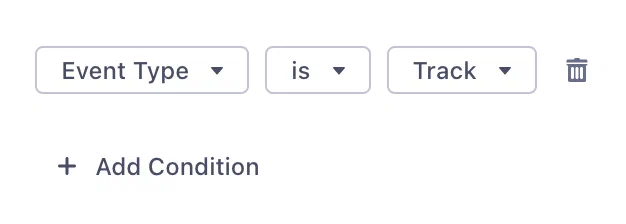 *The default trigger mapping for the Segment Action Custom Events* Airship Custom Events must have an Audience (Named User), an Occurred Time, and a Name. These default to `userId`, `timestamp`, and `event`. Feel free to modify, but note that they must exist and be valid. Custom Events can also (optionally) have properties, and these default to items in the `properties` object. 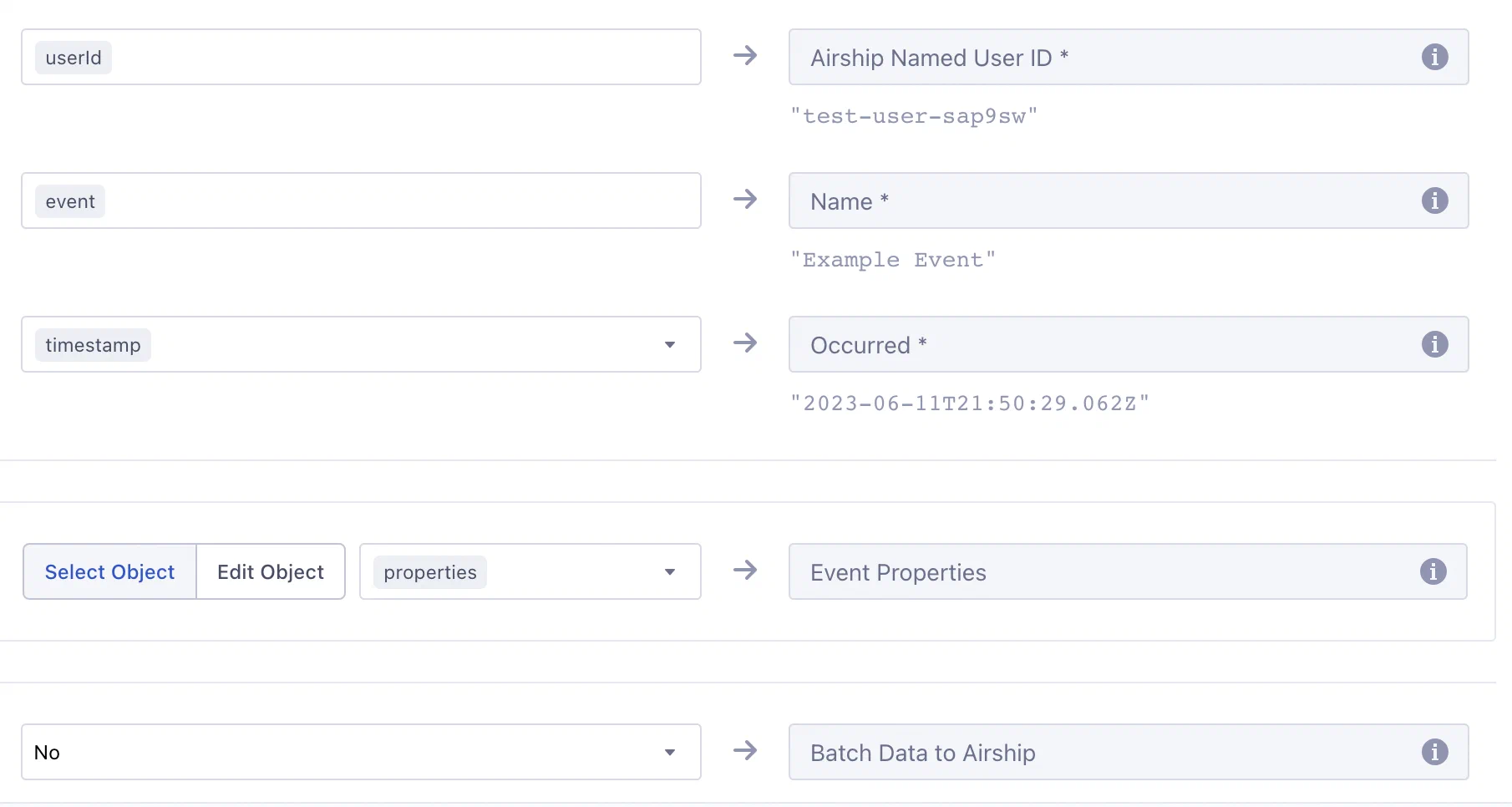 *Mapping the Custom Events Action in Segment* **Example `track` event from Segment** ```json { "receivedAt": "2019-07-09T19:24:15Z", "messageId": "6dJnUw1OKG", "type": "track", "properties": { "provider": "Branch", "campaign": { "source": "AdWords", "name": "Campaign Name", "content": "Organic Content Title", "ad_creative": "Red Hello World Ad", "ad_group": "Red Ones" }, "categories": ["test-campaign"] }, "event": "Install Attributed", "userId": "sKQR2ORpaw", "timestamp": "2019-07-09T19:24:15Z" } ``` **Example Custom Event in Airship** ```json { "occurred": "2019-07-09T19:24:15", "user": { "named_user_id": "sKQR2ORpaw" }, "body": { "name": "install attributed", "interaction_type": "cdp", "properties": { "provider": "Branch", "campaign": { "source": "AdWords", "name": "Campaign Name", "content": "Organic Content Title", "ad_creative": "Red Hello World Ad", "ad_group": "Red Ones" }, "categories": ["test-campaign"], "source": "Segment" } } } ``` > **Note:** * Airship transforms all custom event names to lowercase. In the following > example, note that the value of `event` appears as *Install Attributed* for > Segment while in Airship it is recorded as *install attributed* in the `name` > attribute. > > * Events from Segment are sent as server-side events, which cannot be used to trigger an [In-App Automation](https://www.airship.com/docs/reference/glossary/#iaa) or [Scene](https://www.airship.com/docs/reference/glossary/#scene). ### Manage Tags For the Manage Tags Action, you must manually map Segment event objects to Airship tags. When mapping, the tag names default to `traits.airship_tags`. Change these to whatever is relevant, noting that values must be boolean. The integration uses the `segment-integration` Airship tag group, which is created automatically when you configure the integration in the Airship project settings. You can use a different tag group that better fits your use case, but the examples on this page refer to `segment-integration`. This integration supports boolean properties only. Airship adds or removes its key as a tag in the `segment-integration` tag group depending on the boolean value. Airship adds tags for properties that are `true` and removes tags for properties that are `false`. **Example Segment Identify Event** ```json { "userId": "jane", "type": "identify", "timestamp": "2019-06-12T22:21:33Z", "traits": { "airship_tags": { "new-customer": false, "order-completed-last-60-days": true } } } ``` **Example Airship Tag Change event** ```json { "id": "00000170-cff9-7e5e-6a5a-21814f6b3a37", "offset": "1000031868729", "occurred": "2019-06-12T22:21:33Z", "processed": "2019-06-12T22:21:33Z", "device": { "named_user_id": "jane" }, "body": { "add": { "segment-integration": ["order-completed-last-60-days"] }, "remove": { "segment-integration": ["new-customer"] } }, "type": "TAG_CHANGE" } ``` ### Set Attributes The default trigger for the Set Attributes Action is the `Identify` event type, but you can change it in Segment. 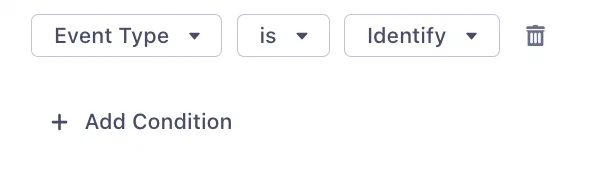 *The default trigger mapping for the Segment Action Set Attributes* The integration maps [Segment reserved traits](https://segment.com/docs/connections/spec/identify/#traits) to [Airship predefined attributes](https://www.airship.com/docs/reference/data-collection/attributes/#predefined-attributes): | Segment Property | Attribute Name | Attribute ID | Attribute Type | |---|---|---|---| | `traits.address.city` | City | `city` | Text | | `traits.address.country` | Country | `country` | Text | | `traits.address.postalCode` | Zipcode | `zipcode` | Number | | `traits.address.region` | Region | `region` | Text | | `traits.age` | Age | `age` | Number | | `traits.birthday` | Birthdate | `birthdate` | Date | | `traits.company_name` | Company | `company` | Text | | `traits.account_creation` | Account Creation | `account_creation` | Date | | `traits.email` | Email Address | `email` | Text | | `traits.first_name` | First Name | `first_name` | Text | | `traits.gender` | Gender | `gender` | Text | | `traits.last_name` | Last Name | `last_name` | Text | | `traits.full_name` | Full Name | `full_name` | Text | | `traits.phone` | Mobile Phone Number | `mobile_phone` | Number | | `traits.home_phone` | Home Phone Number | `home_phone` | Number | | `traits.work_phone` | Work Phone Number | `work_phone` | Number | | `traits.title` | Title | `title` | Text | | `traits.username` | Username | `username` | Text | | `traits.loyalty_tier` | Loyalty Tier | `loyalty_tier` | Text | | `traits.altitude` | Altitude | `altitude` | Number | | `traits.longitude` | Longitude | `longitude` | Number | | `traits.latitude` | Latitude | `latitude` | Number | | `context.device.advertisingId` | Advertising ID | `advertising_id` | Text | The following example `identify` call assigns attributes to the Named User `jane`. In this example, `age` maps to a predefined Airship attribute. The integration assumes that there is an attribute defined in Airship with the ID `favorite_color`. **Example Segment call** ```json { "type": "identify", "traits": { "age": 30, "favorite_color": "purple" }, "userId": "jane" } ``` For traits in the `identify` call that do not map to a predefined or customer-defined Airship attribute, you must create and enable the attribute in the Airship dashboard. Go to *Audience » Attributes* in your project. See [About attributes](https://www.airship.com/docs/guides/audience/attributes/about/) for details. ### Register and Associate The default trigger for the Register and Associate Action is the `Track` event type with an `Address Registered` event, but you can change it in Segment.  *The default trigger mapping for the Segment Action Register and Associate* The main requirement for registering an email address is simply an email address. This, and most of the other channel objects default to the `properties` object. The only exception is `suppression_state` which defaults to `context.suppression_state`. If a `userId` (or alternatively mapped) value is present, the email address will be registered and associated with the Named User ID in the same trigger. If `new_email` is present, it will replace the old email address. To use [Delivery By Time Zone](https://www.airship.com/docs/reference/glossary/#delivery_by_time_zone) for email or SMS, include `timezone` as a property when registering. For email, all other registration properties are optional and mostly involve opt-in state for various features.  *Mapping the Register and Associate Action in Segment* **Example `track` event from Segment for email registration and Named User association** ```json { "type": "track", "properties": { "email": "floofy@kittens.org", "commercial_opted_out": "2023-08-30T22:19:03.944Z", "transactional_opted_in": "2023-08-30T22:19:03.944Z", "click_tracking_opted_in": "2023-08-30T22:19:03.944Z", "open_tracking_opted_in": "2023-08-30T22:19:03.944Z", "timezone": "PST" }, "userId": "6319ffd6-f486-4258-9e96-f256fe7c712f", "event": "Address Registered" } ``` The above call registers the email address `floofy@kittens.org` and also: * Associates the address with the Named User `6319ffd6-f486-4258-9e96-f256fe7c712f` * Opts the address in to receiving Commercial and Transaction emails * Opts the address in to tracking clicks and opens * Sets the registered email address's time zone to "PST" SMS registration works in the same way but with more limited fields. **Example `track` event from Segment for SMS registration and Named User association** ```json { "type": "track", "properties": { "msisdn": "15035551212", "sender": "12345", "opted_in": "2023-08-30T22:19:03.944Z" }, "userId": "77565D39-CF68-44AC-86C2-ACE7E8892439", "event": "Address Registered" } ``` The above call registers the SMS [MSISDN](https://www.airship.com/docs/reference/glossary/#msisdn) `15035551212`, associates it with the Named User `77565D39-CF68-44AC-86C2-ACE7E8892439`, and sets the opt-in date to `2023-08-30T22:19:03.944Z`. > **Note:** The date-times should be in ISO 8601 format. The integration will attempt to convert them to Airship-compliant values. ## Troubleshooting your Segment integration {#troubleshooting} Airship returns errors based on the events received as a part of this integration. `400` Bad Request : The call is either missing traits or traits are empty, resulting in no Airship API calls to set tags or attributes. If you don't see events in Airship and you don't see errors in Segment, make sure that your `userId` values in Segment exist as Named Users in Airship. Airship returns `200 OK` when attributing events to Named Users, even if the `named_user_id` does not exist in Airship.