# Gimbal
Automatically send messages based on Gimbal location data.
[Gimbal](https://gimbal.com/) sends their location data to Airship via Gimbal Adapters. An Airship Gimbal adapter is a drop-in class for iOS, Android, and Fire OS that integrates Gimbal [Places](#key-terms) events with Airship.
The Gimbal data can then be used with the [Custom Event Trigger](https://www.airship.com/docs/reference/glossary/#custom_event_trigger) in [Automation](https://www.airship.com/docs/reference/glossary/#automation) and [Sequences](https://www.airship.com/docs/reference/glossary/#sequence). Gimbal is the system of record for their location data, and all updates to places data are managed by Gimbal.
Our [legacy integration] instead uses the [Location Trigger](https://www.airship.com/docs/reference/glossary/#location_event_trigger) and [Location Attributes Trigger](https://www.airship.com/docs/reference/glossary/#location_attributes_event_trigger).
## Gimbal integration requirements
* **Accounts**
1. Gimbal
1. Airship — Must include messaging
* **Airship project**
* The Airship SDK must use the same user identity as the Gimbal SDK.
## Adding Gimbal adapters
Follow the installation instructions:
* [iOS Gimbal Adapter](https://github.com/gimbalinc/airship-adapter-ios)
* [Android Gimbal Adapter](https://github.com/gimbalinc/airship-adapter-android)
## Configuring Gimbal integration
In Airship:
1. Next to your project name, select the dropdown menu (
), then **Settings**.
1. Under **Project settings**, select **Partner Integrations**.
1. Select **Gimbal**.
1. Select **Configure** for the inbound integration and follow the onscreen instructions to create the [Custom Events](https://www.airship.com/docs/reference/glossary/#custom_event) `gimbal_custom_entry_event` and `gimbal_custom_exit_event`.
### Gimbal events and properties
When you configure the integration in the Airship dashboard, the following two custom events are created. Each event is followed by its associated properties and each property’s acceptable value.
gimbal_custom_entry_event
: placeAttributes — Gimbal place [attribute](#key-terms). Attributes are flattened and prefixed with `GMBL_PA_`.
visitID — String
placeIdentifier — String
placeName — String
boundaryEvent — Number: 1 = Entry, 2 = Exit.
gimbal_custom_exit_event
: placeAttributes — Gimbal place [attribute](#key-terms). Attributes are flattened and prefixed with `GMBL_PA_`.
visitID — String
placeIdentifier — String
placeName — String
boundaryEvent — Number: 1 = Entry, 2 = Exit.
dwellTimeInSeconds — Number
## Using the Custom Event trigger
In the *Setup* step in an [automation](https://www.airship.com/docs/guides/messaging/messages/sequences/create-automation/) or when configuring the *Trigger* for a [sequence](https://www.airship.com/docs/guides/messaging/messages/sequences/create/create/):
1. Select the *Custom Event* trigger.
1. Use the *Events* box to search for and select `gimbal_custom_entry_event` or `gimbal_custom_exit_event`.
1. (Optional) Click **Add Another** to add more events. Airship handles multiple events as a boolean OR.
1. (Optional) Follow the [Filtering Custom Events](https://www.airship.com/docs/guides/messaging/messages/sequences/triggers/#filtering-custom-events) steps to add custom event filters. Refer to the [properties](#gimbal-events-and-properties) for each event.
1. (Optional) Set the maximum age for the events. If an event is received after it is older than a certain age, the automation or sequence will not start.
1. Enable *Event Expiration*.
1. Enter a value in minutes, hours, days, months, or years.
## Legacy integration
You cannot set up the legacy integration. You can only manage an existing legacy integration, and you can use Gimbal location data with the triggers.
### Syncing events or removing the integration
1. Next to your project name, select the dropdown menu (
), then **Settings**.
1. Under **Project settings**, select **Partner Integrations**.
1. Select **Gimbal**.
1. Select **Sync Now** to sync Gimbal region events or **Remove** to remove the integration.
### Using the Location and Location Attributes triggers
Configure triggers in the Setup step in an [Automation](https://www.airship.com/docs/guides/messaging/messages/sequences/create-automation/) or the [Journey Map](https://www.airship.com/docs/reference/glossary/#journey_map) for a [Sequence](https://www.airship.com/docs/guides/messaging/messages/sequences/create/create/). See [Location](https://www.airship.com/docs/guides/messaging/messages/sequences/triggers/#location) and [Location Attributes](https://www.airship.com/docs/guides/messaging/messages/sequences/triggers/#location-attributes) in *Automation and Sequence triggers*.
## Gimbal key terms {#key-terms}
Location
: A location is a logical place defined by a set of beacons and/or geofences.
Locations are the logical entities that are signalled by devices and may be
used to trigger automations and sequences.
Attributes
: Attributes are *key/value pair* metadata associated with a particular
location, e.g., *chain:BobsBurgers*, *has_blender:yes*. Attributes must be
defined and assigned to a particular location in the Gimbal system and
synced with an Airship account.
Beacon
: A beacon represents a physical device used for proximity detection. Beacons
may represent hardware implementing the iBeacon standard for use with iOS,
or proprietary beacons (such as Gimbal beacons) for use with Android.
Beacons may or may not have geolocation data associated with them.
Geofence
: A geofence represents a fixed location representable by one or more points
in the
[WGS coordinate system](http://en.wikipedia.org/wiki/World_Geodetic_System).
Geofences can consist of a single point and a radius expressed in meters,
defining a circular region, or a series of points defining a polygon.
Place
: The Gimbal system refers to your app's locations as *Places*. A Place is
either a single geofence, one or more beacons, or one or more beacons and a
geofence.
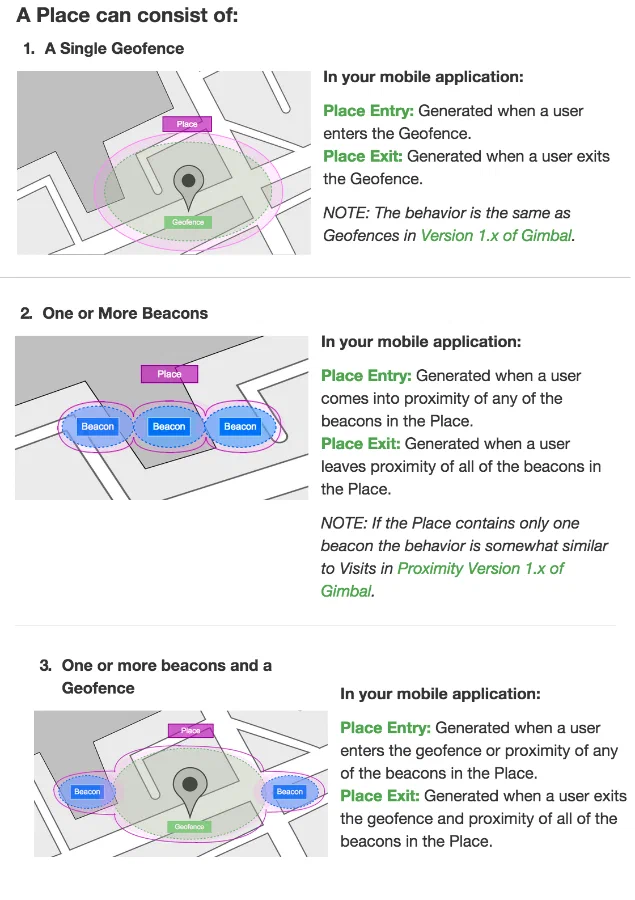
*Gimbal place definitions*