You can select JSON or CSV as the output format and have the option to encrypt your data using [server-side encryption](https://docs.aws.amazon.com/AmazonS3/latest/dev/UsingServerSideEncryption.html) or export as a compressed gzip file. Tag changes are not supported by CSV because their dynamic nature cannot be easily represented in a single row column structure. ### Output Structure and Files Your S3 bucket's directory structure and files will be named using the following patterns: CSV : appKey + "/" + integrationId + "/S3_CSV/" + eventType + "/" + year + "\_" + month + "\_" + day + "/" + year + "\_" + month + "\_" + day + "\_" + hour + "\_" + minute + "\_" + second + ".csv" For a list of headers for each supported event type, see [S3 CSV Headers](#s3-csv-headers) below. JSON : appKey + "/" + integrationId + "/S3_JSON/" + year + "\_" + month + "\_" + day + "/" + year + "\_" + month + "\_" + day + "\_" + hour + "\_" + minute + "\_" + second + ".json" There will be one file generated per hour, assuming the relevant event occurred during that hour. > **Note:** File size maximum is 15 GB. If the volume of events for an app results in a > file exceeding 15 GB, you may instead see multiple files. #### Sample File Here are a few lines from a sample CSV file for `LOCATION` events: ```text Nonet.id,event.type,event.occurred,device.platform,device.channel_id,device.named_user_id,LOCATION.latitude,LOCATION.longitude,LOCATION.foreground,LOCATION.session_id 00000000-0000-0000-0000-000000000000,LOCATION,2015-11-18T01:21:33.180Z,IOS,90823094-1234-94b2-sb39-099s9018gx55,,14.5224123,-22.1236212,false, 00000000-0000-0000-0000-000000000000,LOCATION,2015-11-18T01:21:33.171Z,IOS,90823094-1234-94b2-sb39-099s9018gx55,,14.5224123,-22.1236212,false, 00000000-0000-0000-0000-000000000000,LOCATION,2015-11-18T01:21:33.162Z,IOS,90823094-1234-94b2-sb39-099s9018gx55,,14.5224123,-22.1236212,false, ... ``` If you choose to output your data as JSON, the files will follow the schemas in [Data Formats](https://www.airship.com/docs/developer/rest-api/connect/schemas/) for the RTDS API. ## Amazon Kinesis Kinesis is AWS's conduit for streaming data. Once you have integrated Real-Time Data Streaming with Kinesis, you will be able to load and analyze mobile events in real time. Once you have Airship data running through a functioning Kinesis stream, you will likely want to begin analyzing and processing that data. To that end, [AWS Lambda](https://aws.amazon.com/documentation/lambda/) is a backend compute service that can process events in real time. Lambda responds to events that occur on other AWS products, such as a Kinesis stream. As an example, let's say you have built out a mapping between named user IDs and associated email addresses, and you would like to send an email to any user that chooses to uninstall your app. Here's a typical app uninstall event: ```json { "id" : "ff76bb85-74bc-4511-a3bf-11b6117784db", "type": "UNINSTALL", "offset": 1235, "occurred": "2015-05-03T02:32:12.088Z", "processed": "2015-05-03T12:12:43.180Z", "device": {"named_user_id": "named-user-id-123"} } ``` You would then use Lambda to create a function associated with your Airship-Kinesis stream. The function should search for `UNINSTALL` type events that occurred on devices with associated named user IDs and then send those devices an email: ```python def uninstall_email(event, context): if (event['type'] == 'UNINSTALL' and 'named_user_id' in event['device']): send_email(event['device']['named_user_id']) ``` The above pseudo-code finds events that fit the parameters and then uses the `send_email` function to send an email to the appropriate named user. There are thousands of ways to process and analyze your Airship data with Kinesis and Lambda, e.g., editing your CRM database when certain events come in, writing streams into Redshift or Dynamo DB, monitoring tag changes. The possibilities are endless. ### Setting up AWS Kinesis {#aws-kinesis} First, create a Kinesis stream: 1. Log in to the AWS Console. 1. Go to **Kinesis**. 1. Select **Create Data Stream**, and follow the steps. When complete, copy the **ARN**. You will need it when creating a policy. Next, create a policy. The following represents the minimum policy to support Airship Real-Time Data Streaming: 1. Go to **Services**, then search for and select "IAM" (Identity and Access Management). 1. Go to **Policies** and select **Create Policy**. 1. For the **Service**, select **Kinesis**. 1. Assign actions for the policy. At a minimum, you should assign `DescribeStream`, `GetRecords`, `GetShardIterator`, `PutRecord`, and `PutRecords` (found under Read and Write categories). 1. For **Resources**, enter the ARN. 1. Review, and then submit the policy. Now you can set up an authentication method that gives Airship access to your Kinesis instance. Airship supports two authentication methods for Kinesis integration: Role delegation or an IAM user with access keys. Role delegation is recommended since it provides enhanced security by allowing Airship to assume a role in your AWS account without requiring long-lived access keys. Benefits include: - **No long-term credentials** — No access keys to manage or rotate - **Temporary access** — Credentials automatically expire - **External ID protection** — Prevents confused deputy attacks - **Least privilege** — Role only has permissions you specify To set up role delegation in Kinesis: 1. Go to **Roles** and select **Create Role**. 1. Under **Trusted entity type**, select **AWS account**. 1. Under **An AWS account**, select **Another AWS account**. 1. In the **Account ID** field, enter Airship's AWS account ID: `208889940903` 1. (Optional) For enhanced security, check **Require external ID** and enter a value. You will enter the ID when configuring the connection in Airship. 1. Select **Next**. 1. Under **Permissions policies**, select the policy you created in previous steps. 1. Select **Next**. 1. Enter a role name and description. 1. Select **Create role**. 1. After creating the role, select it and copy the **Role ARN**. You will need this when configuring your Kinesis integration in Airship. Authentication using an IAM user with access keys is a legacy method, where you create a user to attach your policy to and to represent Airship in your Kinesis instance. To set up an IAM user with access keys in Kinesis: 1. Go to **Users** and select **Create User**. 1. Enter a user name. 1. Select **Next**. 1. Under **Permissions options**, select **Attach policies directly**, and then select the policy you created in previous steps. 1. Under **Set permissions boundary**, select **Use a permissions boundary to control the maximum user permissions**, and then select the policy you created in previous steps. 1. Select **Next**. 1. Select **Create user**, and then select the new user and go to **Security credentials**. 1. Select **Create access key**, choose **Third-party service**, and complete the remaining onscreen steps. 1. After you finish creating your access key, copy the **Access key ID** and **Secret access key**. You will need these when configuring your Kinesis integration in Airship. ### Configuring the AWS Kinesis Integration To set up the integration, you will need your Kinesis stream name and your authentication information: * **For Role delegation**, you need your role ARN from the IAM role you created and your external ID, if configured. * **For IAM User with access keys**, you need your Access Key ID and Secret Access Key from the IAM user you created. In Airship: 1. Next to your project name, select the dropdown menu (▼), then **Settings**. 1. Under **Project settings**, select **Real-Time Data Streaming**. 1. Under **Real-Time Data Streaming**, select **Amazon Web Services / Amazon Kinesis**. 1. Choose your authentication method and follow the onscreen instructions to configure the integration. 1. (Optional) Select **Include app key in event payloads** to add an `app_key` field to each event. This is useful when sending events from multiple Airship applications to the same Kinesis stream, allowing you to distinguish which application generated each event. ### Troubleshooting Role Delegation Use the following steps to troubleshoot errors you may encounter when using role delegation for authentication: **"Access Denied"** - Check that the role ARN is correct and exists. - Verify the external ID matches exactly. See the information for "Invalid external ID" below. - Ensure the role trusts account `208889940903`. **"Invalid external ID"** - Ensure the external ID in your integration configurations matches the one in your role's trust policy. The ID is case-sensitive. **"Stream not found"** - Verify the stream name is correct. - Check that the region matches your stream's region. - Ensure the stream exists and is active. ## Appendix: S3 CSV Headers {#s3-csv-headers} You may choose the CSV format for your [Amazon S3](#amazon-s3) data output. These are the headers for supported event types. OPEN : ID, TYPE, OCCURRED, PROCESSED, OFFSET, NAMED_USER_ID, ANDROID_CHANNEL, IOS_CHANNEL, AMAZON_CHANNEL, CHANNEL, DEVICE_TYPE, LAST_DELIVERED_PUSH_ID, LAST_DELIVERED_GROUP_ID, LAST_DELIVERED_VARIANT_ID, LAST_DELIVERED_TIME, TRIGGERING_PUSH_ID, TRIGGERING_GROUP_ID, TRIGGERING_VARIANT_ID, TRIGGERING_TIME, SESSION CLOSE : ID, TYPE, OCCURRED, PROCESSED, OFFSET, NAMED_USER_ID, ANDROID_CHANNEL, IOS_CHANNEL, AMAZON_CHANNEL, CHANNEL, DEVICE_TYPE, SESSION CUSTOM : ID, TYPE, OCCURRED, PROCESSED, OFFSET, NAMED_USER_ID, ANDROID_CHANNEL, IOS_CHANNEL, AMAZON_CHANNEL, CHANNEL, DEVICE_TYPE, LAST_DELIVERED_PUSH_ID, LAST_DELIVERED_GROUP_ID, LAST_DELIVERED_VARIANT_ID, LAST_DELIVERED_TIME, TRIGGERING_PUSH_ID, TRIGGERING_GROUP_ID, TRIGGERING_VARIANT_ID, TRIGGERING_TIME, SESSION, NAME, VALUE, TRANSACTION, INTERACTION_ID, INTERACTION_TYPE, CUSTOMER_ID LOCATION : ID, TYPE, OCCURRED, PROCESSED, OFFSET, NAMED_USER_ID, ANDROID_CHANNEL, IOS_CHANNEL, AMAZON_CHANNEL, CHANNEL, DEVICE_TYPE, SESSION, LATITUDE, LONGITUDE, FOREGROUND SEND : ID, TYPE, OCCURRED, PROCESSED, OFFSET, NAMED_USER_ID, ANDROID_CHANNEL, IOS_CHANNEL, AMAZON_CHANNEL, CHANNEL, DEVICE_TYPE, PUSH_ID, GROUP_ID, VARIANT_ID TAG_CHANGE : ID, TYPE, OCCURRED, PROCESSED, OFFSET, NAMED_USER_ID, ANDROID_CHANNEL, IOS_CHANNEL, AMAZON_CHANNEL, CHANNEL, DEVICE_TYPE RICH_DELETE : ID, TYPE, OCCURRED, PROCESSED, OFFSET, NAMED_USER_ID, ANDROID_CHANNEL, IOS_CHANNEL, AMAZON_CHANNEL, CHANNEL, DEVICE_TYPE, PUSH_ID, GROUP_ID, VARIANT_ID RICH_DELIVERY : ID, TYPE, OCCURRED, PROCESSED, OFFSET, NAMED_USER_ID, ANDROID_CHANNEL, IOS_CHANNEL, AMAZON_CHANNEL, CHANNEL, DEVICE_TYPE, PUSH_ID, GROUP_ID, VARIANT_ID RICH_READ : ID, TYPE, OCCURRED, PROCESSED, OFFSET, NAMED_USER_ID, ANDROID_CHANNEL, IOS_CHANNEL, AMAZON_CHANNEL, CHANNEL, DEVICE_TYPE, PUSH_ID, GROUP_ID, VARIANT_ID REGION : ID, TYPE, OCCURRED, PROCESSED, OFFSET, NAMED_USER_ID, ANDROID_CHANNEL, IOS_CHANNEL, AMAZON_CHANNEL, CHANNEL, DEVICE_TYPE, SESSION, ACTION, REGION_ID, NAME, SOURCE, SOURCE_ID IN_APP_MESSAGE_DISPLAY : ID, TYPE, OCCURRED, PROCESSED, OFFSET, NAMED_USER_ID, ANDROID_CHANNEL, IOS_CHANNEL, AMAZON_CHANNEL, CHANNEL, DEVICE_TYPE, PUSH_ID, GROUP_ID, VARIANT_ID, TRIGGERING_PUSH_ID, TRIGGERING_GROUP_ID, TRIGGERING_VARIANT_ID, TRIGGERING_TIME, SESSION IN_APP_MESSAGE_EXPIRATION : ID, TYPE, OCCURRED, PROCESSED, OFFSET, NAMED_USER_ID, ANDROID_CHANNEL, IOS_CHANNEL, AMAZON_CHANNEL, CHANNEL, DEVICE_TYPE, PUSH_ID, GROUP_ID, VARIANT_ID, TRIGGERING_PUSH_ID, TRIGGERING_GROUP_ID, TRIGGERING_VARIANT_ID, TRIGGERING_TIME, SESSION, TIME_SENT, RESOLUTION_TYPE, TIME_EXPIRED, REPLACING_PUSH_PUSH_ID, REPLACING_PUSH_GROUP_ID, REPLACING_PUSH_VARIANT_ID, REPLACING_PUSH_TIME IN_APP_MESSAGE_RESOLUTION : ID, TYPE, OCCURRED, PROCESSED, OFFSET, NAMED_USER_ID, ANDROID_CHANNEL, IOS_CHANNEL, AMAZON_CHANNEL, CHANNEL, DEVICE_TYPE, PUSH_ID, GROUP_ID, VARIANT_ID, TRIGGERING_PUSH_ID, TRIGGERING_GROUP_ID, TRIGGERING_VARIANT_ID, TRIGGERING_TIME, SESSION, TIME_SENT, RESOLUTION_TYPE, BUTTON_ID, BUTTON_DESCRIPTION, DURATION CONTROL : ID, TYPE, OCCURRED, PROCESSED, OFFSET, NAMED_USER_ID, ANDROID_CHANNEL, IOS_CHANNEL, AMAZON_CHANNEL, CHANNEL, DEVICE_TYPE, PUSH_ID, GROUP_ID, VARIANT_ID SCREEN_VIEWED : ID, TYPE, OCCURRED, PROCESSED, OFFSET, NAMED_USER_ID, ANDROID_CHANNEL, IOS_CHANNEL, AMAZON_CHANNEL, CHANNEL, DEVICE_TYPE, SESSION, DURATION, PREVIOUS_SCREEN, VIEWED_SCREEN FIRST_OPEN : ID, TYPE, OCCURRED, PROCESSED, OFFSET, NAMED_USER_ID, ANDROID_CHANNEL, IOS_CHANNEL, AMAZON_CHANNEL, CHANNEL, DEVICE_TYPE UNINSTALL : ID, TYPE, OCCURRED, PROCESSED, OFFSET, NAMED_USER_ID, ANDROID_CHANNEL, IOS_CHANNEL, AMAZON_CHANNEL, CHANNEL, DEVICE_TYPE PUSH_BODY : ID, TYPE, OCCURRED, PROCESSED, OFFSET, PUSH_ID, GROUP_ID, VARIANT_ID, PAYLOAD, TRIMMED, RESOURCE WEB_CLICK : ID, TYPE, OCCURRED, PROCESSED, OFFSET, NAMED_USER_ID, ANDROID_CHANNEL, IOS_CHANNEL, AMAZON_CHANNEL, CHANNEL, DEVICE_TYPE, PUSH_ID, GROUP_ID, VARIANT_ID WEB_SESSION : ID, TYPE, OCCURRED, PROCESSED, OFFSET, NAMED_USER_ID, ANDROID_CHANNEL, IOS_CHANNEL, AMAZON_CHANNEL, CHANNEL, DEVICE_TYPE, LAST_DELIVERED_PUSH_ID, LAST_DELIVERED_GROUP_ID, LAST_DELIVERED_VARIANT_ID, LAST_DELIVERED_TIME, SESSION IN_APP_BUTTON_TAP : ID, TYPE, OCCURRED, PROCESSED, OFFSET, NAMED_USER_ID, ANDROID_CHANNEL, IOS_CHANNEL, AMAZON_CHANNEL, CHANNEL, DEVICE_TYPE, APP_PACKAGE_NAME, APP_VERSION DEVICE_MODEL, DEVICE_OS, PUSH_OPT_IN, BACKGROUND_PUSH_ENABLED, LOCATION_ENABLED, LOCALE_LANGUAGE_CODE, LOCALE_COUNTRY_CODE, LOCATION_PERMISSION, IANA_TIMEZONE, APP_DEFINED_ID, BUTTON_ID, GROUP_ID, RENDERED_LOCALE, PUSH_ID, SESSION, TIME_SENT, TRIGGERING_PUSH_ID, TRIGGERING_GROUP_ID, TRIGGERING_VARIANT_ID, TRIGGERING_TIME IN_APP_EXPERIENCES : ID, TYPE, OCCURRED, PROCESSED, OFFSET, NAMED_USER_ID, ANDROID_CHANNEL, IOS_CHANNEL, AMAZON_CHANNEL, CHANNEL, DEVICE_TYPE, APP_PACKAGE_NAME, APP_VERSION DEVICE_MODEL, DEVICE_OS, PUSH_OPT_IN, BACKGROUND_PUSH_ENABLED, LOCATION_ENABLED, LOCALE_LANGUAGE_CODE, LOCALE_COUNTRY_CODE, LOCATION_PERMISSION, IANA_TIMEZONE, APP_DEFINED_ID, EVENT_NAME, GROUP_ID, PUSH_ID, SESSION, SURVEY_TYPE, TIME_SENT, TRIGGERING_PUSH_ID, TRIGGERING_GROUP_ID, TRIGGERING_VARIANT_ID, TRIGGERING_TIME, VARIANT_ID IN_APP_FORM_DISPLAY : ID, TYPE, OCCURRED, PROCESSED, OFFSET, NAMED_USER_ID, ANDROID_CHANNEL, IOS_CHANNEL, AMAZON_CHANNEL, CHANNEL, DEVICE_TYPE, APP_PACKAGE_NAME, APP_VERSION DEVICE_MODEL, DEVICE_OS, PUSH_OPT_IN, BACKGROUND_PUSH_ENABLED, LOCATION_ENABLED, LOCALE_LANGUAGE_CODE, LOCALE_COUNTRY_CODE, LOCATION_PERMISSION, IANA_TIMEZONE, APP_DEFINED_ID, GROUP_ID, PUSH_ID, SESSION, TIME_SENT, TRIGGERING_PUSH_ID, TRIGGERING_GROUP_ID, TRIGGERING_VARIANT_ID, TRIGGERING_TIME, IN_APP_FORM_EVENT_TYPE IN_APP_FORM_RESULT : ID, TYPE, OCCURRED, PROCESSED, OFFSET, NAMED_USER_ID, ANDROID_CHANNEL, IOS_CHANNEL, AMAZON_CHANNEL, CHANNEL, DEVICE_TYPE, APP_PACKAGE_NAME, APP_VERSION DEVICE_MODEL, DEVICE_OS, PUSH_OPT_IN, BACKGROUND_PUSH_ENABLED, LOCATION_ENABLED, LOCALE_LANGUAGE_CODE, LOCALE_COUNTRY_CODE, LOCATION_PERMISSION, IANA_TIMEZONE, APP_DEFINED_ID, GROUP_ID, PUSH_ID, SESSION, TIME_SENT, TRIGGERING_PUSH_ID, TRIGGERING_GROUP_ID, TRIGGERING_VARIANT_ID, TRIGGERING_TIME, IN_APP_FORM_EVENT_TYPE IN_APP_PAGE_SWIPE : ID, TYPE, OCCURRED, PROCESSED, OFFSET, NAMED_USER_ID, ANDROID_CHANNEL, IOS_CHANNEL, AMAZON_CHANNEL, CHANNEL, DEVICE_TYPE, APP_PACKAGE_NAME, APP_VERSION DEVICE_MODEL, DEVICE_OS, PUSH_OPT_IN, BACKGROUND_PUSH_ENABLED, LOCATION_ENABLED, LOCALE_LANGUAGE_CODE, LOCALE_COUNTRY_CODE, LOCATION_PERMISSION, IANA_TIMEZONE, APP_DEFINED_ID, FROM_PAGE_INDEX, FROM_PAGE_IDENTIFIER, GROUP_ID, RENDERED_LOCALE, PAGER_IDENTIFIER, PUSH_ID, SESSION, TIME_SENT, TO_PAGE_IDENTIFIER, TO_PAGE_INDEX, TRIGGERING_PUSH_ID, TRIGGERING_GROUP_ID, TRIGGERING_VARIANT_ID, TRIGGERING_TIME IN_APP_PAGE_VIEW : ID, TYPE, OCCURRED, PROCESSED, OFFSET, NAMED_USER_ID, ANDROID_CHANNEL, IOS_CHANNEL, AMAZON_CHANNEL, CHANNEL, DEVICE_TYPE, APP_PACKAGE_NAME, APP_VERSION DEVICE_MODEL, DEVICE_OS, PUSH_OPT_IN, BACKGROUND_PUSH_ENABLED, LOCATION_ENABLED, LOCALE_LANGUAGE_CODE, LOCALE_COUNTRY_CODE, LOCATION_PERMISSION, IANA_TIMEZONE, APP_DEFINED_ID, COMPLETED, GROUP_ID, RENDERED_LOCALE, PAGE_COUNT, PAGE_IDENTIFIER, PAGE_INDEX, PAGER_IDENTIFIER, PUSH_ID, SESSION, TIME_SENT, TRIGGERING_PUSH_ID, TRIGGERING_GROUP_ID, TRIGGERING_VARIANT_ID, TRIGGERING_TIME, VIEWED_COUNT IN_APP_PAGER_COMPLETED : ID, TYPE, OCCURRED, PROCESSED, OFFSET, NAMED_USER_ID, ANDROID_CHANNEL, IOS_CHANNEL, AMAZON_CHANNEL, CHANNEL, DEVICE_TYPE, APP_PACKAGE_NAME, APP_VERSION DEVICE_MODEL, DEVICE_OS, PUSH_OPT_IN, BACKGROUND_PUSH_ENABLED, LOCATION_ENABLED, LOCALE_LANGUAGE_CODE, LOCALE_COUNTRY_CODE, LOCATION_PERMISSION, IANA_TIMEZONE, APP_DEFINED_ID, COMPLETED, GROUP_ID, RENDERED_LOCALE, PAGE_COUNT, PAGE_IDENTIFIER, PAGE_INDEX, PAGER_IDENTIFIER, PUSH_ID, SESSION, TIME_SENT, TRIGGERING_PUSH_ID, TRIGGERING_GROUP_ID, TRIGGERING_VARIANT_ID, TRIGGERING_TIME IN_APP_PAGER_SUMMARY : ID, TYPE, OCCURRED, PROCESSED, OFFSET, NAMED_USER_ID, ANDROID_CHANNEL, IOS_CHANNEL, AMAZON_CHANNEL, CHANNEL, DEVICE_TYPE, APP_PACKAGE_NAME, APP_VERSION DEVICE_MODEL, DEVICE_OS, PUSH_OPT_IN, BACKGROUND_PUSH_ENABLED, LOCATION_ENABLED, LOCALE_LANGUAGE_CODE, LOCALE_COUNTRY_CODE, LOCATION_PERMISSION, IANA_TIMEZONE, APP_DEFINED_ID, COMPLETED, GROUP_ID, RENDERED_LOCALE, PAGE_COUNT, PAGE_IDENTIFIER, PAGER_IDENTIFIER, PUSH_ID, SESSION, TIME_SENT, TRIGGERING_PUSH_ID, TRIGGERING_GROUP_ID, TRIGGERING_VARIANT_ID, TRIGGERING_TIME SEND_ABORTED : ID, TYPE, OCCURRED, PROCESSED, OFFSET, NAMED_USER_ID, ANDROID_CHANNEL, IOS_CHANNEL, AMAZON_CHANNEL, CHANNEL, DEVICE_TYPE, APP_PACKAGE_NAME, APP_VERSION DEVICE_MODEL, DEVICE_OS, PUSH_OPT_IN, BACKGROUND_PUSH_ENABLED, LOCATION_ENABLED, LOCALE_LANGUAGE_CODE, LOCALE_COUNTRY_CODE, LOCATION_PERMISSION, IANA_TIMEZONE, GROUP_ID, PUSH_ID, REASON # Azure Event Hubs > Send Airship user-level event data into Azure using our Event Hubs integration. By integrating with Microsoft Azure Event Hubs, you can store events from your airship project in Microsoft Azure. With Azure, you can store events for long term analysis and pass data to real-time analytics providers, making it easy to take advantage of your Airship engagement data in external business intelligence platforms. As a part of this integration, you must create an Event Hub to receive and store events from Airship. An Event Hub exists within a namespace belonging to a resource group. This setup assumes that you've already set up a resource group and a namespace to contain your Airship Real-Time Data Streaming Event Hub. If you have not already done so, [create your resource group and namespace before you begin](https://docs.microsoft.com/en-us/azure/event-hubs/event-hubs-create). ## Azure Integration Requirements This integration requires these accounts: 1. Azure 1. Airship — Must include both: * Messaging * [Real-Time Data Streaming](https://www.airship.com/docs/reference/feature-packages/#data) ## Creating an Airship Event Hub 1. Go to the Azure Portal and select **Event Hubs**. If **Event Hubs** is not in your Favorites menu, select **All Services** and locate it from there. 1. Select the namespace in which to create your Airship Event Hub. 1. Select **Event Hubs** in your namespace page. 1. Select **+ Event Hub**. 1. Type a name for your Event Hub, then select **Create**. You can check the status of the Event Hub creation in alerts. When complete, your new Event Hub appears in the list. ## Getting Keys from your Shared Access Policy A shared-access policy contains the keys you'll provide to Airship to authenticate with your Event Hub. 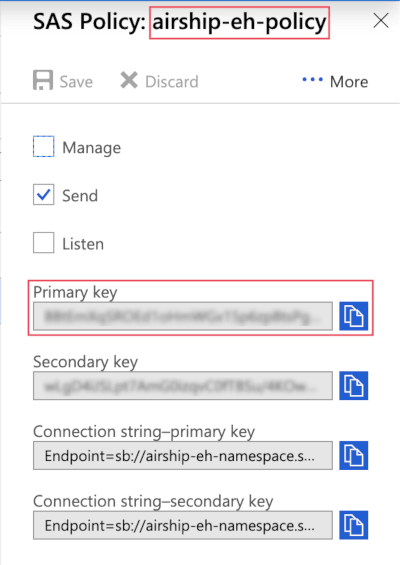 *An Azure shared access policy* 1. Go to the Azure Portal and select **Event Hubs**. If **Event Hubs** is not in your Favorites menu, select **All Services** and locate it from there. 1. In the list of Event Hubs, select the namespace containing your Airship Event Hub. 1. Select **Shared Access Policies**. 1. Select a policy from the list. The default policy is `RootManageSharedAccessPolicy`. If you add a new policy, it must have at least the `send` (write) permission. 1. Copy the policy name and primary key. These are the Shared Access Signature (SAS) Policy Name and Shared Access Signature (SAS) Primary Key Name that you will provide to Airship to authenticate with your Azure Event Hub. You can also copy the Connection string-primary key, which contains both the Shared Access Signature Primary Key and Policy Name. ## Configuring the Integration in Airship Before you configure your Azure integration, you must have configured a namespace and a specific Event Hub to store events from Airship. To configure your Microsoft Azure Event Hubs integration in Airship, you will need: * Event Hub namespace name * Event Hub name * Shared access signature (SAS) policy name — This is the *Policy Name* of a shared access policy in the namespace containing your Event Hub. * Shared access signature (SAS) primary key — This is the *Connection string-primary key* from a shared access policy in the namespace containing your Event Hub. In Airship: 1. Next to your project name, select the dropdown menu (▼), then **Settings**. 1. Under **Project settings**, select **Partner Integrations**. 1. Select **Microsoft Azure**. 1. Select **Configure** for the outbound integration and follow the onscreen instructions to: * Enter your Event Hub information. * Select the Airship events to send to your Event Hub. # BigQuery > Send Airship event data to BigQuery for storage and analysis. BigQuery is a fully managed cloud-based data warehouse and analytics service for storing and analyzing data. This guide helps you integrate Airship [Real-Time Data Streaming](https://www.airship.com/docs/reference/glossary/#rtds) event data into BigQuery using this process: 1. **Configure Data Export to Google Cloud Storage**: Use Airship's [Data Export](https://www.airship.com/docs/integrations/data-warehouse/data-export/) integration to send RTDS event data as batched CSV files to a Google Cloud Storage (GCS) bucket. 1. **Create tables and load data**: Create BigQuery tables using the event schemas provided in this document, and then load the CSV files from GCS into BigQuery using Google's Data Transfer Service, BigQuery's `LOAD DATA` statements, or another data pipeline method. Airship provides event schemas for tables that correspond to each Airship event type. These schemas are included in this document to help you create the appropriate BigQuery tables and ensure your data loads correctly. This approach gives you flexibility in designing your data pipeline while maintaining full control over your data. While the Data Export integration operates hourly, you can choose how frequently to load data into BigQuery and implement the data transfer method that best fits your infrastructure and requirements. ## Requirements This integration requires the following: * A Google Cloud Platform account with BigQuery and Cloud Storage enabled * Airship account that includes messaging and [Real-Time Data Streaming](https://www.airship.com/docs/reference/feature-packages/#data) ## Set up the data pipeline Follow the steps for the [Data Export integration](https://www.airship.com/docs/integrations/data-warehouse/data-export/) to send your RTDS event data to a Google Cloud Storage bucket. Select GCS as your storage provider and configure the integration according to your needs. ## Create Airship tables in BigQuery Use the [provided schemas](#sample-airship-setup-script-and-event-schemas) to create the BigQuery dataset and tables for your Airship event data. The table definitions match the structure of the CSV files exported by the Data Export integration. ### File structure The Data Export integration organizes CSV files in your GCS bucket according to the file layout you select. See the [Data Export documentation](https://www.airship.com/docs/integrations/data-warehouse/data-export/#structure-and-files) for details on Standard, Simplified, and Flattened layouts. For the DTS pipeline, we recommend the Simplified layout to avoid namespace collisions. Regardless of the layout you choose, files are generated hourly when events occur and include a header row. The file paths follow these patterns: * **Standard layout**: `[folder_path]/appKey/integrationId/eventType/YYYY_MM_DD/YYYY_MM_DD_HH_mm_ss.csv` * **Simplified layout**: `[folder_path]/appKey/integrationId/eventType/YYYY_MM_DD_HH_mm_ss.csv` * **Flattened layout**: `[folder_path]/appKey/integrationId/eventType_YYYY_MM_DD_HH_mm_ss.csv` **Example CSV** ```csv "id","offset","occurred","processed","app_key","channel","device_type","named_user","custom_identifiers","locale_variant","locale_country_code","locale_timezone","locale_language_code","iana_timezone","app_version","device_model","connection_type","ua_sdk_version","push_opt_in","device_os","carrier","location_enabled","location_permission","background_push_enabled","web_browser_name","web_browser_type","web_browser_version","web_user_agent_string","open_platform_name","alerting","campaigns","push_id","group_id","variant_id" "f5e05251-b128-11ec-8a12-0242eb00e5a9","1000042149690","2022-03-31 19:30:02.357 +00:00","2022-03-31 19:30:14.867 +00:00","YOUR_APP_KEY","b1ab9a9e-9634-4fb4-875a-9a02dcd68e66","ANDROID","","","","FR","7200","fr","Europe/Paris","2022-02-09T000134-goat","VOG-L29","CELL","16.3.0","true","10","F SFR","false","NOT_ALLOWED","true","","","","","","true","","f5d2bdc0-b128-11ec-bae4-024205acadbe","ac4058f7-981b-4f0e-b9c4-8b7af3a647da","" "f8fb4df1-b128-11ec-a0e3-0242e24c72c5","1000042149691","2022-03-31 19:30:07.567 +00:00","2022-03-31 19:30:16.760 +00:00","YOUR_APP_KEY","b1ab9a9e-9634-4fb4-875a-9a02dcd68e66","ANDROID","","","","FR","7200","fr","Europe/Paris","2022-02-09T000134-goat","VOG-L29","CELL","16.3.0","true","10","F SFR","false","NOT_ALLOWED","true","","","","","","true","","f6586880-b128-11ec-99dd-02423b3f5d45","879056c8-0b34-4c8c-8cdc-1df4f3d40b40","" "9aa98182-e854-4fa7-9c9f-ddea2082cc4c","1000042149694","2022-03-31 19:33:51.225 +00:00","2022-03-31 19:33:51.416 +00:00","YOUR_APP_KEY","62d92a24-0ced-40d1-ad1d-e1ea953189b7","SMS","","{""sender"":""17372004196""}","","","","","","","","","","","","","","","","","","","","","true","","75fdde30-b129-11ec-99dd-02423b3f5d45","0e2a3d4b-b4b4-4208-838f-08eb7333aa5e","" ``` ## Load data into BigQuery tables Once your tables are created and data is being exported to GCS, load the CSV files into your BigQuery tables. You can use any of the following methods: * **Google Data Transfer Service** — Automatically transfer data from GCS to BigQuery on a schedule * **BigQuery `LOAD DATA` statements** — Manually or programmatically load data using SQL * **Other data pipeline tools** — Use your preferred ETL tool or custom scripts The frequency and method of data loading is up to you and should align with your analytics requirements. ### Loading CSV files in BigQuery BigQuery automatically handles CSV files when loading data. You can specify CSV options in the LOAD DATA statement or when creating external tables. When loading CSV files, BigQuery will: - Skip the header row if you specify `skip_leading_rows = 1` - Automatically detect timestamp formats - Handle quoted fields - Treat empty strings as NULL values The example below shows how to load data using BigQuery's `LOAD DATA` statement: ```sql -- Load data from Cloud Storage into BigQuery LOAD DATA INTO `PROJECT_ID.AIRSHIP_EVENTS.TAG_CHANGE` FROM FILES ( uris = ['gs://your-bucket/YOUR_APP_KEY/gcs/19c15b67-1dd5-46b9-a25a-dfbd5d60ce58/TAG_CHANGE/2022_03_31/*.csv'], format = 'CSV', skip_leading_rows = 1 ); ``` ## Sample Airship setup script and event schemas Use the following SQL script to create your BigQuery dataset and tables for Airship event data: **SQL setup script** ```sql CREATE SCHEMA IF NOT EXISTS `PROJECT_ID.AIRSHIP_EVENTS`; -- Use PROJECT_ID.AIRSHIP_EVENTS CREATE TABLE IF NOT EXISTS `PROJECT_ID.AIRSHIP_EVENTS.ATTRIBUTE_OPERATION` ( `id` STRING NOT NULL OPTIONS(description="The event ID"), `offset` STRING OPTIONS(description="The offset of the event that represents the location of the event in the stream."), `occurred` TIMESTAMP OPTIONS(description="The time the event occurred."), `processed` TIMESTAMP OPTIONS(description="The time the event was processed."), `app_key` STRING OPTIONS(description="The identifier for the Airship project."), `channel` STRING NOT NULL OPTIONS(description="The unique, platform-agnostic channel identifier for a device."), `device_type` STRING OPTIONS(description="The platform of the channel"), `named_user` STRING OPTIONS(description="The named user identifier associated with the channel."), `custom_identifiers` JSON OPTIONS(description="The custom identifiers associated with the app channel, stored as an object."), `locale_variant` STRING OPTIONS(description="The language variant as reported by the device."), `locale_country_code` STRING OPTIONS(description="The ISO 3166-1 country code as defined in device settings."), `locale_timezone` STRING OPTIONS(description="The timezone as reported by the device offset in seconds from UTC."), `locale_language_code` STRING OPTIONS(description="The ISO 639-1 two-letter language code as defined in device settings."), `iana_timezone` STRING OPTIONS(description="The IANA timezone of the device."), `app_version` STRING OPTIONS(description="The version of the app installed on the device."), `device_model` STRING OPTIONS(description="The model of the device."), `connection_type` STRING OPTIONS(description="The internet connection type used by the device."), `ua_sdk_version` STRING OPTIONS(description="The version of the Airship SDK used to record the event."), `push_opt_in` BOOL OPTIONS(description="Whether the user has opted in to push notifications."), `device_os` STRING OPTIONS(description="The operating system of the device."), `carrier` STRING OPTIONS(description="The wireless carrier used by the device."), `location_enabled` BOOL OPTIONS(description="Whether the device has location services enabled."), `location_permission` STRING OPTIONS(description="Location permission level as configured in device settings."), `background_push_enabled` BOOL OPTIONS(description="Whether the device has background push notifications enabled."), `web_browser_name` STRING OPTIONS(description="The name of the browser running the SDK."), `web_browser_type` STRING OPTIONS(description="Indicates whether the browser was running on a desktop or mobile device."), `web_browser_version` STRING OPTIONS(description="The version of the browser running the SDK."), `web_user_agent_string` STRING OPTIONS(description="The user agent string reported by the browser."), `attribute_set` JSON OPTIONS(description="The attributes set on the device as an array of attribute objects."), `attribute_remove` JSON OPTIONS(description="The attributes removed from the device as an array of attribute objects.") ) OPTIONS( description="Attribute Operation events indicate a change in the device's attributes. Because attribute operations are related to a device, they will have a device field. If you set an attribute on a named user, Airship records events for each device associated with the named user." ); CREATE TABLE IF NOT EXISTS `PROJECT_ID.AIRSHIP_EVENTS.CLOSE` ( `id` STRING NOT NULL OPTIONS(description="The event ID"), `offset` STRING OPTIONS(description="The offset of the event that represents the location of the event in the stream."), `occurred` TIMESTAMP OPTIONS(description="The time the event occurred."), `processed` TIMESTAMP OPTIONS(description="The time the event was processed."), `app_key` STRING OPTIONS(description="The identifier for the Airship project."), `channel` STRING NOT NULL OPTIONS(description="The unique, platform-agnostic channel identifier for a device."), `device_type` STRING OPTIONS(description="The platform of the channel"), `named_user` STRING OPTIONS(description="The named user identifier associated with the channel."), `custom_identifiers` JSON OPTIONS(description="The custom identifiers associated with the app channel, stored as an object."), `locale_variant` STRING OPTIONS(description="The language variant as reported by the device."), `locale_country_code` STRING OPTIONS(description="The ISO 3166-1 country code as defined in device settings."), `locale_timezone` STRING OPTIONS(description="The timezone as reported by the device offset in seconds from UTC."), `locale_language_code` STRING OPTIONS(description="The ISO 639-1 two-letter language code as defined in device settings."), `iana_timezone` STRING OPTIONS(description="The IANA timezone of the device."), `app_version` STRING OPTIONS(description="The version of the app installed on the device."), `device_model` STRING OPTIONS(description="The model of the device."), `connection_type` STRING OPTIONS(description="The internet connection type used by the device."), `ua_sdk_version` STRING OPTIONS(description="The version of the Airship SDK used to record the event."), `push_opt_in` BOOL OPTIONS(description="Whether the user has opted in to push notifications."), `device_os` STRING OPTIONS(description="The operating system of the device."), `carrier` STRING OPTIONS(description="The wireless carrier used by the device."), `location_enabled` BOOL OPTIONS(description="Whether the device has location services enabled."), `location_permission` STRING OPTIONS(description="Location permission level as configured in device settings."), `background_push_enabled` BOOL OPTIONS(description="Whether the device has background push notifications enabled."), `web_browser_name` STRING OPTIONS(description="The name of the browser running the SDK."), `web_browser_type` STRING OPTIONS(description="Indicates whether the browser was running on a desktop or mobile device."), `web_browser_version` STRING OPTIONS(description="The version of the browser running the SDK."), `web_user_agent_string` STRING OPTIONS(description="The user agent string reported by the browser."), `session_id` STRING OPTIONS(description="Represents the 'session' of user activity. Absent if the application was initialized while backgrounded.") ) OPTIONS( description="Occurs when a user closes the app. Close events are often latent, as they aren't sent back to Airship until the user activates the app again." ); CREATE TABLE IF NOT EXISTS `PROJECT_ID.AIRSHIP_EVENTS.CONTROL` ( `id` STRING NOT NULL OPTIONS(description="The event ID"), `offset` STRING OPTIONS(description="The offset of the event that represents the location of the event in the stream."), `occurred` TIMESTAMP OPTIONS(description="The time the event occurred."), `processed` TIMESTAMP OPTIONS(description="The time the event was processed."), `app_key` STRING OPTIONS(description="The identifier for the Airship project."), `channel` STRING NOT NULL OPTIONS(description="The unique, platform-agnostic channel identifier for a device."), `device_type` STRING OPTIONS(description="The platform of the channel"), `named_user` STRING OPTIONS(description="The named user identifier associated with the channel."), `custom_identifiers` JSON OPTIONS(description="The custom identifiers associated with the app channel, stored as an object."), `locale_variant` STRING OPTIONS(description="The language variant as reported by the device."), `locale_country_code` STRING OPTIONS(description="The ISO 3166-1 country code as defined in device settings."), `locale_timezone` STRING OPTIONS(description="The timezone as reported by the device offset in seconds from UTC."), `locale_language_code` STRING OPTIONS(description="The ISO 639-1 two-letter language code as defined in device settings."), `iana_timezone` STRING OPTIONS(description="The IANA timezone of the device."), `app_version` STRING OPTIONS(description="The version of the app installed on the device."), `device_model` STRING OPTIONS(description="The model of the device."), `connection_type` STRING OPTIONS(description="The internet connection type used by the device."), `ua_sdk_version` STRING OPTIONS(description="The version of the Airship SDK used to record the event."), `push_opt_in` BOOL OPTIONS(description="Whether the user has opted in to push notifications."), `device_os` STRING OPTIONS(description="The operating system of the device."), `carrier` STRING OPTIONS(description="The wireless carrier used by the device."), `location_enabled` BOOL OPTIONS(description="Whether the device has location services enabled."), `location_permission` STRING OPTIONS(description="Location permission level as configured in device settings."), `background_push_enabled` BOOL OPTIONS(description="Whether the device has background push notifications enabled."), `web_browser_name` STRING OPTIONS(description="The name of the browser running the SDK."), `web_browser_type` STRING OPTIONS(description="Indicates whether the browser was running on a desktop or mobile device."), `web_browser_version` STRING OPTIONS(description="The version of the browser running the SDK."), `web_user_agent_string` STRING OPTIONS(description="The user agent string reported by the browser."), `group_id` STRING OPTIONS(description="Identifies a push specification delivered over an interval of time, e.g. multiple push_ids as part of the fulfillment of an automation pipeline or a push-to-local-time specification."), `push_id` STRING OPTIONS(description="A unique identifier for a push operation."), `campaigns` JSON OPTIONS(description="An object listing the campaigns a push specification is associated with. The campaigns object includes an array of categories that must have between 1 and 10 elements, each of which is a string with a 64-byte and -character limit.") ) OPTIONS( description="Occurs when a device is excluded from a push because it was arbitrarily selected as a member of a control group. Membership in a control group indicates what would've happened if you did not send a message to a user at all. This occurs for A/B Test-related pushes only." ); CREATE TABLE IF NOT EXISTS `PROJECT_ID.AIRSHIP_EVENTS.CUSTOM` ( `id` STRING NOT NULL OPTIONS(description="The event ID"), `offset` STRING OPTIONS(description="The offset of the event that represents the location of the event in the stream."), `occurred` TIMESTAMP OPTIONS(description="The time the event occurred."), `processed` TIMESTAMP OPTIONS(description="The time the event was processed."), `app_key` STRING OPTIONS(description="The identifier for the Airship project."), `channel` STRING OPTIONS(description="The unique, platform-agnostic channel identifier for a device. Can be null if the event was sent to a named user."), `device_type` STRING OPTIONS(description="The platform of the channel"), `named_user` STRING OPTIONS(description="The named user identifier associated with the channel."), `custom_identifiers` JSON OPTIONS(description="The custom identifiers associated with the app channel, stored as an object."), `locale_variant` STRING OPTIONS(description="The language variant as reported by the device."), `locale_country_code` STRING OPTIONS(description="The ISO 3166-1 country code as defined in device settings."), `locale_timezone` STRING OPTIONS(description="The timezone as reported by the device offset in seconds from UTC."), `locale_language_code` STRING OPTIONS(description="The 639-1 two-letter language code as defined in device settings."), `iana_timezone` STRING OPTIONS(description="The IANA timezone of the device."), `app_version` STRING OPTIONS(description="The version of the app installed on the device."), `device_model` STRING OPTIONS(description="The model of the device."), `connection_type` STRING OPTIONS(description="The internet connection type used by the device."), `ua_sdk_version` STRING OPTIONS(description="The version of the Airship SDK used to record the event."), `push_opt_in` BOOL OPTIONS(description="Whether the user has opted in to push notifications."), `device_os` STRING OPTIONS(description="The operating system of the device."), `carrier` STRING OPTIONS(description="The wireless carrier used by the device."), `location_enabled` BOOL OPTIONS(description="Whether the device has location services enabled."), `location_permission` STRING OPTIONS(description="Location permission level as configured in device settings."), `background_push_enabled` BOOL OPTIONS(description="Whether the device has background push notifications enabled."), `web_browser_name` STRING OPTIONS(description="The name of the browser running the SDK."), `web_browser_type` STRING OPTIONS(description="Indicates whether the browser was running on a desktop or mobile device."), `web_browser_version` STRING OPTIONS(description="The version of the browser running the SDK."), `web_user_agent_string` STRING OPTIONS(description="The user agent string reported by the browser."), `name` STRING OPTIONS(description="The name of the event."), `properties` JSON OPTIONS(description="A JSON object containing the properties of the event."), `session_id` STRING OPTIONS(description="Represents the 'session' of user activity. Absent if the application was initialized while backgrounded."), `value` NUMERIC OPTIONS(description="Populated if the event is associated with a count or amount. Airship treats this field as a representation of money. The `value` field respects six digits of precision to the right of the decimal point."), `source` STRING OPTIONS(description="The source of the event either API or SDK."), `triggering_push_push_id` STRING OPTIONS(description="The push ID of the push that triggered the custom event."), `triggering_push_group_id` STRING OPTIONS(description="The specific `push_id` and accompanying identifiers associated with an event. An associated push helps you trace an event to the original notification or operation. An associated push object may specify a `time`, if the push was a singular operation sent at a defined time. Otherwise, the object will include a `group_id` if the push was sent at a relative time (`best_time` or `local_time`) an automation pipeline, or another operation resulting in multiple `push_id`s"), `triggering_push_campaigns` JSON OPTIONS(description="An object listing the campaigns a push specification is associated with. The campaigns object includes an array of categories that must have between 1 and 10 elements, each of which is a string with a 64-byte and -character limit."), `triggering_push_time` TIMESTAMP OPTIONS(description="The UTC time when the push occurred."), `triggering_push_variant_id` STRING OPTIONS(description="The ID of the variant that a push is associated with, if the push was a part of an A/B test (experiment)."), `last_delivered_push_id` STRING OPTIONS(description="Identifies the last push notification the audience received before the event. Absent if the last push occurred more than 12 hours ago."), `last_delivered_group_id` STRING OPTIONS(description="Identifies a push specification delivered over an interval of time, e.g. multiple push_ids as part of the fulfillment of an automation pipeline or a push-to-local-time specification."), `last_delivered_campaigns` JSON OPTIONS(description="An object listing the campaigns a push specification is associated with. The campaigns object includes an array of categories that must have between 1 and 10 elements, each of which is a string with a 64-byte and -character limit."), `last_delivered_time` TIMESTAMP OPTIONS(description="The UTC time when the push occurred."), `last_delivered_variant_id` STRING OPTIONS(description="The ID of the variant that a push is associated with, if the push was a part of an A/B test (experiment).") ) OPTIONS( description="Represents custom events that are either emitted from the Airship SDK or submitted through the Custom Events API. You can configure custom events yourself. There are also several CUSTOM-type events for email and SMS that are defined by Airship.In general, you can expect device information if the event source is `SDK` or if the event is one of the defined email or SMS events (as defined by `event_type`)." ); CREATE TABLE IF NOT EXISTS `PROJECT_ID.AIRSHIP_EVENTS.FEATURE_FLAG_INTERACTION` ( `id` STRING NOT NULL OPTIONS(description="The event ID"), `offset` STRING OPTIONS(description="The offset of the event that represents the location of the event in the stream."), `occurred` TIMESTAMP OPTIONS(description="The time the event occurred."), `processed` TIMESTAMP OPTIONS(description="The time the event was processed."), `app_key` STRING OPTIONS(description="The identifier for the Airship project."), `channel` STRING NOT NULL OPTIONS(description="The unique, platform-agnostic channel identifier for a device."), `device_type` STRING OPTIONS(description="The platform of the channel"), `named_user` STRING OPTIONS(description="The named user identifier associated with the channel."), `locale_variant` STRING OPTIONS(description="The language variant as reported by the device."), `locale_country_code` STRING OPTIONS(description="The ISO 3166-1 country code as defined in device settings."), `locale_timezone` STRING OPTIONS(description="The timezone as reported by the device offset in seconds from UTC."), `locale_language_code` STRING OPTIONS(description="The ISO 639-1 two-letter language code as defined in device settings."), `iana_timezone` STRING OPTIONS(description="The IANA timezone of the device."), `app_version` STRING OPTIONS(description="The version of the app installed on the device."), `device_model` STRING OPTIONS(description="The model of the device."), `connection_type` STRING OPTIONS(description="The internet connection type used by the device."), `ua_sdk_version` STRING OPTIONS(description="The version of the Airship SDK used to record the event."), `push_opt_in` BOOL OPTIONS(description="Whether the user has opted in to push notifications."), `device_os` STRING OPTIONS(description="The operating system of the device."), `carrier` STRING OPTIONS(description="The wireless carrier used by the device."), `location_enabled` BOOL OPTIONS(description="Whether the device has location services enabled."), `location_permission` STRING OPTIONS(description="Location permission level as configured in device settings."), `background_push_enabled` BOOL OPTIONS(description="Whether the device has background push notifications enabled."), `web_browser_name` STRING OPTIONS(description="The name of the browser running the SDK."), `web_browser_type` STRING OPTIONS(description="Indicates whether the browser was running on a desktop or mobile device."), `web_browser_version` STRING OPTIONS(description="The version of the browser running the SDK."), `web_user_agent_string` STRING OPTIONS(description="The user agent string reported by the browser."), `eligible` BOOL OPTIONS(description="Indicates whether or not the user was in the feature flag audience and had access to the feature. true means the user was in the feature flag audience and had access to the feature."), `flag_name` STRING OPTIONS(description="The name of a feature flag."), `flag_id` STRING OPTIONS(description="A UUID that is associated with a feature flag."), `push_id` STRING OPTIONS(description="A unique identifier for a push operation."), `app_defined_id` STRING OPTIONS(description="An identifier defined by the application if the feature flag interaction was created by the application logic, not Airship. If this field is present, the event body will not contain `push_id`, `group_id`, `variant_id`, or `triggering_push` fields."), `group_id` STRING OPTIONS(description="Identifies a push specification delivered over an interval of time, e.g. multiple push_ids as part of the fulfillment of an automation pipeline or a push-to-local-time specification."), `session_id` STRING OPTIONS(description="Represents the 'session' of user activity. Absent if the application was initialized while backgrounded."), `variant_id` STRING OPTIONS(description="The UUID of the A/B test variant, if available."), `campaigns` JSON OPTIONS(description="An object listing the campaigns a push specification is associated with. The campaigns object includes an array of categories that must have between 1 and 10 elements, each of which is a string with a 64-byte and -character limit."), `triggering_push_push_id` STRING OPTIONS(description="The push ID of the push that triggered the custom event."), `triggering_push_group_id` STRING OPTIONS(description="The specific `push_id` and accompanying identifiers associated with an event. An associated push helps you trace an event to the original notification or operation. An associated push object may specify a `time`, if the push was a singular operation sent at a defined time. Otherwise, the object will include a `group_id` if the push was sent at a relative time (`best_time` or `local_time`) an automation pipeline, or another operation resulting in multiple `push_id`s"), `triggering_push_campaigns` JSON OPTIONS(description="An object listing the campaigns a push specification is associated with. The campaigns object includes an array of categories that must have between 1 and 10 elements, each of which is a string with a 64-byte and -character limit."), `triggering_push_time` TIMESTAMP OPTIONS(description="The UTC time when the push occurred."), `triggering_push_variant_id` STRING OPTIONS(description="The ID of the variant that a push is associated with, if the push was a part of an A/B test (experiment).") ) OPTIONS( description="Occurs when a user interacts with a tracked flagged feature. See Feature Flags. The events have a flag ID and flag name, which identify which flagged feature a user interacted with. They also have a boolean eligible field, which indicates whether or not the user was in the feature flag audience and had access to the feature." ); CREATE TABLE IF NOT EXISTS `PROJECT_ID.AIRSHIP_EVENTS.FIRST_OPEN` ( `id` STRING NOT NULL OPTIONS(description="The event ID"), `offset` STRING OPTIONS(description="The offset of the event that represents the location of the event in the stream."), `occurred` TIMESTAMP OPTIONS(description="The time the event occurred."), `processed` TIMESTAMP OPTIONS(description="The time the event was processed."), `app_key` STRING OPTIONS(description="The identifier for the Airship project."), `channel` STRING NOT NULL OPTIONS(description="The unique, platform-agnostic channel identifier for a device."), `device_type` STRING OPTIONS(description="The platform of the channel"), `named_user` STRING OPTIONS(description="The named user identifier associated with the channel."), `custom_identifiers` JSON OPTIONS(description="The custom identifiers associated with the app channel, stored as an object."), `locale_variant` STRING OPTIONS(description="The language variant as reported by the device."), `locale_country_code` STRING OPTIONS(description="The ISO 3166-1 country code as defined in device settings."), `locale_timezone` STRING OPTIONS(description="The timezone as reported by the device offset in seconds from UTC."), `locale_language_code` STRING OPTIONS(description="The ISO 639-1 two-letter language code as defined in device settings."), `iana_timezone` STRING OPTIONS(description="The IANA timezone of the device."), `app_version` STRING OPTIONS(description="The version of the app installed on the device."), `device_model` STRING OPTIONS(description="The model of the device."), `connection_type` STRING OPTIONS(description="The internet connection type used by the device."), `ua_sdk_version` STRING OPTIONS(description="The version of the Airship SDK used to record the event."), `push_opt_in` BOOL OPTIONS(description="Whether the user has opted in to push notifications."), `device_os` STRING OPTIONS(description="The operating system of the device."), `carrier` STRING OPTIONS(description="The wireless carrier used by the device."), `location_enabled` BOOL OPTIONS(description="Whether the device has location services enabled."), `location_permission` STRING OPTIONS(description="Location permission level as configured in device settings."), `background_push_enabled` BOOL OPTIONS(description="Whether the device has background push notifications enabled."), `web_browser_name` STRING OPTIONS(description="The name of the browser running the SDK."), `web_browser_type` STRING OPTIONS(description="Indicates whether the browser was running on a desktop or mobile device."), `web_browser_version` STRING OPTIONS(description="The version of the browser running the SDK."), `web_user_agent_string` STRING OPTIONS(description="The user agent string reported by the browser.") ) OPTIONS( description="This event occurs when a user opens an Airship-integrated app for the first time." ); CREATE TABLE IF NOT EXISTS `PROJECT_ID.AIRSHIP_EVENTS.FIRST_OPT_IN` ( `id` STRING NOT NULL OPTIONS(description="The event ID"), `offset` STRING OPTIONS(description="The offset of the event that represents the location of the event in the stream."), `occurred` TIMESTAMP OPTIONS(description="The time the event occurred."), `processed` TIMESTAMP OPTIONS(description="The time the event was processed."), `app_key` STRING OPTIONS(description="The identifier for the Airship project."), `channel` STRING NOT NULL OPTIONS(description="The unique, platform-agnostic channel identifier for a device."), `device_type` STRING OPTIONS(description="The platform of the channel"), `named_user` STRING OPTIONS(description="The named user identifier associated with the channel."), `delivery_address` STRING OPTIONS(description="The address of the device."), `open_platform_name` STRING OPTIONS(description="If device_type is set to OPEN, this field shows the full name of the platform.") ) OPTIONS( description="This event appears in the stream when a channel is first opted in. This event is specific to email (commercial), sms and open channels." ); CREATE TABLE IF NOT EXISTS `PROJECT_ID.AIRSHIP_EVENTS.IN_APP_BUTTON_TAP` ( `id` STRING NOT NULL OPTIONS(description="The event ID"), `offset` STRING OPTIONS(description="The offset of the event that represents the location of the event in the stream."), `occurred` TIMESTAMP OPTIONS(description="The time the event occurred."), `processed` TIMESTAMP OPTIONS(description="The time the event was processed."), `app_key` STRING OPTIONS(description="The identifier for the Airship project."), `channel` STRING NOT NULL OPTIONS(description="The unique, platform-agnostic channel identifier for a device."), `device_type` STRING OPTIONS(description="The platform of the channel"), `named_user` STRING OPTIONS(description="The named user identifier associated with the channel."), `custom_identifiers` JSON OPTIONS(description="The custom identifiers associated with the app channel, stored as an object."), `locale_variant` STRING OPTIONS(description="The language variant as reported by the device."), `locale_country_code` STRING OPTIONS(description="The ISO 3166-1 country code as defined in device settings."), `locale_timezone` STRING OPTIONS(description="The timezone as reported by the device offset in seconds from UTC."), `locale_language_code` STRING OPTIONS(description="The ISO 639-1 two-letter language code as defined in device settings."), `iana_timezone` STRING OPTIONS(description="The IANA timezone of the device."), `app_version` STRING OPTIONS(description="The version of the app installed on the device."), `device_model` STRING OPTIONS(description="The model of the device."), `connection_type` STRING OPTIONS(description="The internet connection type used by the device."), `ua_sdk_version` STRING OPTIONS(description="The version of the Airship SDK used to record the event."), `push_opt_in` BOOL OPTIONS(description="Whether the user has opted in to push notifications."), `device_os` STRING OPTIONS(description="The operating system of the device."), `carrier` STRING OPTIONS(description="The wireless carrier used by the device."), `location_enabled` BOOL OPTIONS(description="Whether the device has location services enabled."), `location_permission` STRING OPTIONS(description="Location permission level as configured in device settings."), `background_push_enabled` BOOL OPTIONS(description="Whether the device has background push notifications enabled."), `app_defined_id` STRING OPTIONS(description="An identifier defined by the application if the In-App Button Tap was created by the application logic, not Airship. If this field is present, the event body will not contain push_id, group_id, variant_id, or triggering_push fields."), `button_id` STRING OPTIONS(description="A unique identifier for the button."), `context_reporting_context_content_types` JSON OPTIONS(description="The content types of the in-app automation."), `context_state_form_form_identifier` STRING OPTIONS(description="Is the form controller identifier."), `context_state_form_response_type` STRING OPTIONS(description="The form response type. Possible values: nps, user_feedback."), `context_state_form_submitted` BOOL OPTIONS(description="Whether the form has been submitted."), `context_state_form_type` STRING OPTIONS(description="The form type. Possible values: nps, form."), `context_state_pager_completed` BOOL OPTIONS(description="Whether the user reached the end of the pager."), `context_state_pager_identifier` STRING OPTIONS(description="The pager controller identifier."), `context_state_pager_page_count` NUMERIC OPTIONS(description="The total number of pages."), `context_state_pager_page_identifier` STRING OPTIONS(description="The current page identifier."), `context_state_pager_page_index` NUMERIC OPTIONS(description="The current pager index."), `group_id` STRING OPTIONS(description="Identifies a push specification delivered over an interval of time, e.g. multiple push_ids as part of the fulfillment of an automation pipeline or a push-to-local-time specification."), `rendered_locale` STRING OPTIONS(description="Optional string that defines the country and language this in-app-automation was localized as by remote-config-api. country - (String) an ISO 3166-1 country code, set by device settings. language - (String) The ISO 639-1 two-letter language code reflecting the language the phone is set to."), `push_id` STRING OPTIONS(description="A unique identifier for a push operation."), `session_id` STRING OPTIONS(description="Represents the 'session' of user activity. Absent if the application was initialized while backgrounded."), `time_sent` TIMESTAMP OPTIONS(description="An ISO 8601 datetime indicating when the payload defining the in-app message was sent to the device."), `triggering_push_push_id` STRING OPTIONS(description="The push ID of the push that triggered the custom event."), `triggering_push_group_id` STRING OPTIONS(description="The specific `push_id` and accompanying identifiers associated with an event. An associated push helps you trace an event to the original notification or operation. An associated push object may specify a `time`, if the push was a singular operation sent at a defined time. Otherwise, the object will include a `group_id` if the push was sent at a relative time (`best_time` or `local_time`) an automation pipeline, or another operation resulting in multiple `push_id`s"), `triggering_push_campaigns` JSON OPTIONS(description="An object listing the campaigns a push specification is associated with. The campaigns object includes an array of categories that must have between 1 and 10 elements, each of which is a string with a 64-byte and -character limit."), `triggering_push_time` TIMESTAMP OPTIONS(description="The UTC time when the push occurred."), `triggering_push_variant_id` STRING OPTIONS(description="The ID of the variant that a push is associated with, if the push was a part of an A/B test (experiment).") ) OPTIONS( description="Occurs when an in-app button is tapped within a scene." ); CREATE TABLE IF NOT EXISTS `PROJECT_ID.AIRSHIP_EVENTS.IN_APP_EXPERIENCES` ( `id` STRING NOT NULL OPTIONS(description="The event ID"), `offset` STRING OPTIONS(description="The offset of the event that represents the location of the event in the stream."), `occurred` TIMESTAMP OPTIONS(description="The time the event occurred."), `processed` TIMESTAMP OPTIONS(description="The time the event was processed."), `app_key` STRING OPTIONS(description="The identifier for the Airship project."), `channel` STRING NOT NULL OPTIONS(description="The unique, platform-agnostic channel identifier for a device."), `device_type` STRING OPTIONS(description="The platform of the channel"), `named_user` STRING OPTIONS(description="The named user identifier associated with the channel."), `custom_identifiers` JSON OPTIONS(description="The custom identifiers associated with the app channel, stored as an object."), `locale_variant` STRING OPTIONS(description="The language variant as reported by the device."), `locale_country_code` STRING OPTIONS(description="The ISO 3166-1 country code as defined in device settings."), `locale_timezone` STRING OPTIONS(description="The timezone as reported by the device offset in seconds from UTC."), `locale_language_code` STRING OPTIONS(description="The ISO 639-1 two-letter language code as defined in device settings."), `iana_timezone` STRING OPTIONS(description="The IANA timezone of the device."), `app_version` STRING OPTIONS(description="The version of the app installed on the device."), `device_model` STRING OPTIONS(description="The model of the device."), `connection_type` STRING OPTIONS(description="The internet connection type used by the device."), `ua_sdk_version` STRING OPTIONS(description="The version of the Airship SDK used to record the event."), `push_opt_in` BOOL OPTIONS(description="Whether the user has opted in to push notifications."), `device_os` STRING OPTIONS(description="The operating system of the device."), `carrier` STRING OPTIONS(description="The wireless carrier used by the device."), `location_enabled` BOOL OPTIONS(description="Whether the device has location services enabled."), `location_permission` STRING OPTIONS(description="Location permission level as configured in device settings."), `background_push_enabled` BOOL OPTIONS(description="Whether the device has background push notifications enabled."), `campaigns` JSON OPTIONS(description="An object listing the campaigns a push specification is associated with. The campaigns object includes an array of categories that must have between 1 and 10 elements, each of which is a string with a 64-byte and -character limit."), `push_id` STRING OPTIONS(description="A unique identifier for a push operation."), `group_id` STRING OPTIONS(description="Identifies a push specification delivered over an interval of time, e.g. multiple push_ids as part of the fulfillment of an automation pipeline or a push-to-local-time specification."), `variant_id` STRING OPTIONS(description="The ID of the variant that a push is associated with, if the push was a part of an A/B test (experiment)."), `app_defined_id` STRING OPTIONS(description="An identifier defined by the application if the in-app message was created by the application logic, not Airship. If this field is present, the event body will not contain push_id, group_id, variant_id, or triggering_push fields."), `event_name` STRING OPTIONS(description="Name of the experiences event. Possible values: scene_displayed, scene_completed, scene_incomplete, survey_displayed, survey_submitted, survey_not_submitted."), `session_id` STRING OPTIONS(description="Represents the 'session' of user activity. Absent if the application was initialized while backgrounded."), `survey_type` STRING OPTIONS(description="The survey type, only present for survey events. Possible values: nps, user_feedback."), `time_sent` TIMESTAMP OPTIONS(description="An ISO 8601 datetime indicating when the payload defining the in-app message was sent to the device."), `triggering_push_push_id` STRING OPTIONS(description="The push ID of the push that triggered the custom event."), `triggering_push_group_id` STRING OPTIONS(description="The specific `push_id` and accompanying identifiers associated with an event. An associated push helps you trace an event to the original notification or operation. An associated push object may specify a `time`, if the push was a singular operation sent at a defined time. Otherwise, the object will include a `group_id` if the push was sent at a relative time (`best_time` or `local_time`) an automation pipeline, or another operation resulting in multiple `push_id`s"), `triggering_push_campaigns` JSON OPTIONS(description="An object listing the campaigns a push specification is associated with. The campaigns object includes an array of categories that must have between 1 and 10 elements, each of which is a string with a 64-byte and -character limit."), `triggering_push_time` TIMESTAMP OPTIONS(description="The UTC time when the push occurred."), `triggering_push_variant_id` STRING OPTIONS(description="The ID of the variant that a push is associated with, if the push was a part of an A/B test (experiment).") ) OPTIONS( description="Events that occur related to the display and completion behavior of a scene." ); CREATE TABLE IF NOT EXISTS `PROJECT_ID.AIRSHIP_EVENTS.IN_APP_FORM_DISPLAY` ( `id` STRING NOT NULL OPTIONS(description="The event ID"), `offset` STRING OPTIONS(description="The offset of the event that represents the location of the event in the stream."), `occurred` TIMESTAMP OPTIONS(description="The time the event occurred."), `processed` TIMESTAMP OPTIONS(description="The time the event was processed."), `app_key` STRING OPTIONS(description="The identifier for the Airship project."), `channel` STRING NOT NULL OPTIONS(description="The unique, platform-agnostic channel identifier for a device."), `device_type` STRING OPTIONS(description="The platform of the channel"), `named_user` STRING OPTIONS(description="The named user identifier associated with the channel."), `custom_identifiers` JSON OPTIONS(description="The custom identifiers associated with the app channel, stored as an object."), `locale_variant` STRING OPTIONS(description="The language variant as reported by the device."), `locale_country_code` STRING OPTIONS(description="The ISO 3166-1 country code as defined in device settings."), `locale_timezone` STRING OPTIONS(description="The timezone as reported by the device offset in seconds from UTC."), `locale_language_code` STRING OPTIONS(description="The ISO 639-1 two-letter language code as defined in device settings."), `iana_timezone` STRING OPTIONS(description="The IANA timezone of the device."), `app_version` STRING OPTIONS(description="The version of the app installed on the device."), `device_model` STRING OPTIONS(description="The model of the device."), `connection_type` STRING OPTIONS(description="The internet connection type used by the device."), `ua_sdk_version` STRING OPTIONS(description="The version of the Airship SDK used to record the event."), `push_opt_in` BOOL OPTIONS(description="Whether the user has opted in to push notifications."), `device_os` STRING OPTIONS(description="The operating system of the device."), `carrier` STRING OPTIONS(description="The wireless carrier used by the device."), `location_enabled` BOOL OPTIONS(description="Whether the device has location services enabled."), `location_permission` STRING OPTIONS(description="Location permission level as configured in device settings."), `background_push_enabled` BOOL OPTIONS(description="Whether the device has background push notifications enabled."), `app_defined_id` STRING OPTIONS(description="An identifier defined by the application if the In-App Form was created by the application logic, not Airship. If this field is present, the event body will not contain push_id, group_id, variant_id, or triggering_push fields."), `context_reporting_context_content_types` JSON OPTIONS(description="The content types of the in-app automation."), `context_state_form_form_identifier` STRING OPTIONS(description="Is the form controller identifier."), `context_state_form_response_type` STRING OPTIONS(description="The form response type. Possible values: nps, user_feedback."), `context_state_form_submitted` BOOL OPTIONS(description="Whether the form has been submitted."), `context_state_form_type` STRING OPTIONS(description="The form type. Possible values: nps, form."), `context_state_pager_completed` BOOL OPTIONS(description="Whether the user reached the end of the pager."), `context_state_pager_identifier` STRING OPTIONS(description="The pager controller identifier."), `context_state_pager_page_count` NUMERIC OPTIONS(description="The total number of pages."), `context_state_pager_page_identifier` STRING OPTIONS(description="The current page identifier."), `context_state_pager_page_index` NUMERIC OPTIONS(description="The current pager index."), `forms` JSON OPTIONS(description="Information about the forms."), `group_id` STRING OPTIONS(description="Identifies a push specification delivered over an interval of time, e.g. multiple push_ids as part of the fulfillment of an automation pipeline or a push-to-local-time specification."), `push_id` STRING OPTIONS(description="A unique identifier for a push operation."), `session_id` STRING OPTIONS(description="Represents the 'session' of user activity. Absent if the application was initialized while backgrounded."), `time_sent` TIMESTAMP OPTIONS(description="An ISO 8601 datetime indicating when the payload defining the in-app message was sent to the device."), `triggering_push_push_id` STRING OPTIONS(description="The push ID of the push that triggered the custom event."), `triggering_push_group_id` STRING OPTIONS(description="The specific `push_id` and accompanying identifiers associated with an event. An associated push helps you trace an event to the original notification or operation. An associated push object may specify a `time`, if the push was a singular operation sent at a defined time. Otherwise, the object will include a `group_id` if the push was sent at a relative time (`best_time` or `local_time`) an automation pipeline, or another operation resulting in multiple `push_id`s"), `triggering_push_campaigns` JSON OPTIONS(description="An object listing the campaigns a push specification is associated with. The campaigns object includes an array of categories that must have between 1 and 10 elements, each of which is a string with a 64-byte and -character limit."), `triggering_push_time` TIMESTAMP OPTIONS(description="The UTC time when the push occurred."), `triggering_push_variant_id` STRING OPTIONS(description="The ID of the variant that a push is associated with, if the push was a part of an A/B test (experiment)."), `in_app_form_event_type` STRING OPTIONS(description="The In-App Form event type. The value is always DISPLAY.") ) OPTIONS( description="Occurs when an in-app form (currently specific to surveys) is displayed." ); CREATE TABLE IF NOT EXISTS `PROJECT_ID.AIRSHIP_EVENTS.IN_APP_FORM_RESULT` ( `id` STRING NOT NULL OPTIONS(description="The event ID"), `offset` STRING OPTIONS(description="The offset of the event that represents the location of the event in the stream."), `occurred` TIMESTAMP OPTIONS(description="The time the event occurred."), `processed` TIMESTAMP OPTIONS(description="The time the event was processed."), `app_key` STRING OPTIONS(description="The identifier for the Airship project."), `channel` STRING NOT NULL OPTIONS(description="The unique, platform-agnostic channel identifier for a device."), `device_type` STRING OPTIONS(description="The platform of the channel"), `named_user` STRING OPTIONS(description="The named user identifier associated with the channel."), `custom_identifiers` JSON OPTIONS(description="The custom identifiers associated with the app channel, stored as an object."), `locale_variant` STRING OPTIONS(description="The language variant as reported by the device."), `locale_country_code` STRING OPTIONS(description="The ISO 3166-1 country code as defined in device settings."), `locale_timezone` STRING OPTIONS(description="The timezone as reported by the device offset in seconds from UTC."), `locale_language_code` STRING OPTIONS(description="The ISO 639-1 two-letter language code as defined in device settings."), `iana_timezone` STRING OPTIONS(description="The IANA timezone of the device."), `app_version` STRING OPTIONS(description="The version of the app installed on the device."), `device_model` STRING OPTIONS(description="The model of the device."), `connection_type` STRING OPTIONS(description="The internet connection type used by the device."), `ua_sdk_version` STRING OPTIONS(description="The version of the Airship SDK used to record the event."), `push_opt_in` BOOL OPTIONS(description="Whether the user has opted in to push notifications."), `device_os` STRING OPTIONS(description="The operating system of the device."), `carrier` STRING OPTIONS(description="The wireless carrier used by the device."), `location_enabled` BOOL OPTIONS(description="Whether the device has location services enabled."), `location_permission` STRING OPTIONS(description="Location permission level as configured in device settings."), `background_push_enabled` BOOL OPTIONS(description="Whether the device has background push notifications enabled."), `app_defined_id` STRING OPTIONS(description="An identifier defined by the application if the In-App Form was created by the application logic, not Airship. If this field is present, the event body will not contain push_id, group_id, variant_id, or triggering_push fields."), `context_reporting_context_content_types` JSON OPTIONS(description="The content types of the in-app automation."), `context_state_form_form_identifier` STRING OPTIONS(description="Is the form controller identifier."), `context_state_form_response_type` STRING OPTIONS(description="The form response type. Possible values: nps, user_feedback."), `context_state_form_submitted` BOOL OPTIONS(description="Whether the form has been submitted."), `context_state_form_type` STRING OPTIONS(description="The form type. Possible values: nps, form."), `context_state_pager_completed` BOOL OPTIONS(description="Whether the user reached the end of the pager."), `context_state_pager_identifier` STRING OPTIONS(description="The pager controller identifier."), `context_state_pager_page_count` NUMERIC OPTIONS(description="The total number of pages."), `context_state_pager_page_identifier` STRING OPTIONS(description="The current page identifier."), `context_state_pager_page_index` NUMERIC OPTIONS(description="The current pager index."), `forms` JSON OPTIONS(description="Information about the forms."), `group_id` STRING OPTIONS(description="Identifies a push specification delivered over an interval of time, e.g. multiple push_ids as part of the fulfillment of an automation pipeline or a push-to-local-time specification."), `push_id` STRING OPTIONS(description="A unique identifier for a push operation."), `session_id` STRING OPTIONS(description="Represents the 'session' of user activity. Absent if the application was initialized while backgrounded."), `time_sent` TIMESTAMP OPTIONS(description="An ISO 8601 datetime indicating when the payload defining the in-app message was sent to the device."), `triggering_push_push_id` STRING OPTIONS(description="The push ID of the push that triggered the custom event."), `triggering_push_group_id` STRING OPTIONS(description="The specific `push_id` and accompanying identifiers associated with an event. An associated push helps you trace an event to the original notification or operation. An associated push object may specify a `time`, if the push was a singular operation sent at a defined time. Otherwise, the object will include a `group_id` if the push was sent at a relative time (`best_time` or `local_time`) an automation pipeline, or another operation resulting in multiple `push_id`s"), `triggering_push_campaigns` JSON OPTIONS(description="An object listing the campaigns a push specification is associated with. The campaigns object includes an array of categories that must have between 1 and 10 elements, each of which is a string with a 64-byte and -character limit."), `triggering_push_time` TIMESTAMP OPTIONS(description="The UTC time when the push occurred."), `triggering_push_variant_id` STRING OPTIONS(description="The ID of the variant that a push is associated with, if the push was a part of an A/B test (experiment)."), `in_app_form_event_type` STRING OPTIONS(description="The In-App Form event type. The value is always RESULT.") ) OPTIONS( description="Occurs when an in-app form (currently specific to surveys) is submitted." ); CREATE TABLE IF NOT EXISTS `PROJECT_ID.AIRSHIP_EVENTS.IN_APP_MESSAGE_DISPLAY` ( `id` STRING NOT NULL OPTIONS(description="The event ID"), `offset` STRING OPTIONS(description="The offset of the event that represents the location of the event in the stream."), `occurred` TIMESTAMP OPTIONS(description="The time the event occurred."), `processed` TIMESTAMP OPTIONS(description="The time the event was processed."), `app_key` STRING OPTIONS(description="The identifier for the Airship project."), `channel` STRING NOT NULL OPTIONS(description="The unique, platform-agnostic channel identifier for a device."), `device_type` STRING OPTIONS(description="The platform of the channel"), `named_user` STRING OPTIONS(description="The named user identifier associated with the channel."), `custom_identifiers` JSON OPTIONS(description="The custom identifiers associated with the app channel, stored as an object."), `locale_variant` STRING OPTIONS(description="The language variant as reported by the device."), `locale_country_code` STRING OPTIONS(description="The ISO 3166-1 country code as defined in device settings."), `locale_timezone` STRING OPTIONS(description="The timezone as reported by the device offset in seconds from UTC."), `locale_language_code` STRING OPTIONS(description="The ISO 639-1 two-letter language code as defined in device settings."), `iana_timezone` STRING OPTIONS(description="The IANA timezone of the device."), `app_version` STRING OPTIONS(description="The version of the app installed on the device."), `device_model` STRING OPTIONS(description="The model of the device."), `connection_type` STRING OPTIONS(description="The internet connection type used by the device."), `ua_sdk_version` STRING OPTIONS(description="The version of the Airship SDK used to record the event."), `push_opt_in` BOOL OPTIONS(description="Whether the user has opted in to push notifications."), `device_os` STRING OPTIONS(description="The operating system of the device."), `carrier` STRING OPTIONS(description="The wireless carrier used by the device."), `location_enabled` BOOL OPTIONS(description="Whether the device has location services enabled."), `location_permission` STRING OPTIONS(description="Location permission level as configured in device settings."), `background_push_enabled` BOOL OPTIONS(description="Whether the device has background push notifications enabled."), `web_browser_name` STRING OPTIONS(description="The name of the browser running the SDK."), `web_browser_type` STRING OPTIONS(description="Indicates whether the browser was running on a desktop or mobile device."), `web_browser_version` STRING OPTIONS(description="The version of the browser running the SDK."), `web_user_agent_string` STRING OPTIONS(description="The user agent string reported by the browser."), `push_id` STRING OPTIONS(description="A unique identifier for a push operation."), `app_defined_id` STRING OPTIONS(description="An identifier defined by the application if the in-app message was created by the application logic, not Airship. If this field is present, the event body will not contain `push_id`, `group_id`, `variant_id`, or `triggering_push` fields."), `group_id` STRING OPTIONS(description="Identifies a push specification delivered over an interval of time, e.g. multiple push_ids as part of the fulfillment of an automation pipeline or a push-to-local-time specification."), `session_id` STRING OPTIONS(description="Represents the 'session' of user activity. Absent if the application was initialized while backgrounded."), `variant_id` STRING OPTIONS(description="The ID of the variant that a push is associated with, if the push was a part of an A/B test (experiment)."), `triggering_push_push_id` STRING OPTIONS(description="The push ID of the push that triggered the custom event."), `triggering_push_group_id` STRING OPTIONS(description="The specific `push_id` and accompanying identifiers associated with an event. An associated push helps you trace an event to the original notification or operation. An associated push object may specify a `time`, if the push was a singular operation sent at a defined time. Otherwise, the object will include a `group_id` if the push was sent at a relative time (`best_time` or `local_time`) an automation pipeline, or another operation resulting in multiple `push_id`s"), `triggering_push_campaigns` JSON OPTIONS(description="An object listing the campaigns a push specification is associated with. The campaigns object includes an array of categories that must have between 1 and 10 elements, each of which is a string with a 64-byte and -character limit."), `triggering_push_time` TIMESTAMP OPTIONS(description="The UTC time when the push occurred."), `triggering_push_variant_id` STRING OPTIONS(description="The ID of the variant that a push is associated with, if the push was a part of an A/B test (experiment)."), `campaigns` JSON OPTIONS(description="An object listing the campaigns a push specification is associated with. The campaigns object includes an array of categories that must have between 1 and 10 elements, each of which is a string with a 64-byte and -character limit.") ) OPTIONS( description="Occurs when an in-app message is displayed to a user. Because the event pertains to a specific device, the device information object will be populated." ); CREATE TABLE IF NOT EXISTS `PROJECT_ID.AIRSHIP_EVENTS.IN_APP_MESSAGE_EXPIRATION` ( `id` STRING NOT NULL OPTIONS(description="The event ID"), `offset` STRING OPTIONS(description="The offset of the event that represents the location of the event in the stream."), `occurred` TIMESTAMP OPTIONS(description="The time the event occurred."), `processed` TIMESTAMP OPTIONS(description="The time the event was processed."), `app_key` STRING OPTIONS(description="The identifier for the Airship project."), `channel` STRING NOT NULL OPTIONS(description="The unique, platform-agnostic channel identifier for a device."), `device_type` STRING OPTIONS(description="The platform of the channel"), `named_user` STRING OPTIONS(description="The named user identifier associated with the channel."), `custom_identifiers` JSON OPTIONS(description="The custom identifiers associated with the app channel, stored as an object."), `locale_variant` STRING OPTIONS(description="The language variant as reported by the device."), `locale_country_code` STRING OPTIONS(description="The ISO 3166-1 country code as defined in device settings."), `locale_timezone` STRING OPTIONS(description="The timezone as reported by the device offset in seconds from UTC."), `locale_language_code` STRING OPTIONS(description="The ISO 639-1 two-letter language code as defined in device settings."), `iana_timezone` STRING OPTIONS(description="The IANA timezone of the device."), `app_version` STRING OPTIONS(description="The version of the app installed on the device."), `device_model` STRING OPTIONS(description="The model of the device."), `connection_type` STRING OPTIONS(description="The internet connection type used by the device."), `ua_sdk_version` STRING OPTIONS(description="The version of the Airship SDK used to record the event."), `push_opt_in` BOOL OPTIONS(description="Whether the user has opted in to push notifications."), `device_os` STRING OPTIONS(description="The operating system of the device."), `carrier` STRING OPTIONS(description="The wireless carrier used by the device."), `location_enabled` BOOL OPTIONS(description="Whether the device has location services enabled."), `location_permission` STRING OPTIONS(description="Location permission level as configured in device settings."), `background_push_enabled` BOOL OPTIONS(description="Whether the device has background push notifications enabled."), `web_browser_name` STRING OPTIONS(description="The name of the browser running the SDK."), `web_browser_type` STRING OPTIONS(description="Indicates whether the browser was running on a desktop or mobile device."), `web_browser_version` STRING OPTIONS(description="The version of the browser running the SDK."), `web_user_agent_string` STRING OPTIONS(description="The user agent string reported by the browser."), `app_defined_id` STRING OPTIONS(description="An identifier defined by the application if the in-app message was created by the application logic, not Airship. If this field is present, the event body will not contain `push_id`, `group_id`, `variant_id`, or `triggering_push` fields."), `group_id` STRING OPTIONS(description="Identifies a push specification delivered over an interval of time, e.g. multiple push_ids as part of the fulfillment of an automation pipeline or a push-to-local-time specification."), `push_id` STRING OPTIONS(description="A unique identifier for a push operation."), `replacing_push_campaigns` JSON OPTIONS(description="An object listing the campaigns a push specification is associated with. The campaigns object includes an array of categories that must have between 1 and 10 elements, each of which is a string with a 64-byte and -character limit."), `replacing_push_group_id` STRING OPTIONS(description="The specific group_id associated with the new message."), `replacing_push_push_id` STRING OPTIONS(description="The specific push_id associated with the new message."), `replacing_push_variant_id` STRING OPTIONS(description="The specific variant_id associated with the new message."), `replacing_push_time` TIMESTAMP OPTIONS(description="The UTC time when the push occurred."), `session_id` STRING OPTIONS(description="Represents the 'session' of user activity. Absent if the application was initialized while backgrounded."), `variant_id` STRING OPTIONS(description="The ID of the variant that a push is associated with, if the push was a part of an A/B test (experiment)."), `time_expired` TIMESTAMP OPTIONS(description="The date-time when the in-app message payload expires."), `time_sent` TIMESTAMP OPTIONS(description="The date-time when the in-app message payload was sent to the device."), `expiration_type` STRING OPTIONS(description="Indicates how the in-app message expired."), `triggering_push_push_id` STRING OPTIONS(description="The push ID of the push that triggered the custom event."), `triggering_push_group_id` STRING OPTIONS(description="The specific `push_id` and accompanying identifiers associated with an event. An associated push helps you trace an event to the original notification or operation. An associated push object may specify a `time`, if the push was a singular operation sent at a defined time. Otherwise, the object will include a `group_id` if the push was sent at a relative time (`best_time` or `local_time`) an automation pipeline, or another operation resulting in multiple `push_id`s"), `triggering_push_campaigns` JSON OPTIONS(description="An object listing the campaigns a push specification is associated with. The campaigns object includes an array of categories that must have between 1 and 10 elements, each of which is a string with a 64-byte and -character limit."), `triggering_push_time` TIMESTAMP OPTIONS(description="The UTC time when the push occurred."), `triggering_push_variant_id` STRING OPTIONS(description="The ID of the variant that a push is associated with, if the push was a part of an A/B test (experiment).") ) OPTIONS( description="Occurs when a new message has taken the place of another message, a message has passed its expiration, or because displaying the message in-app would be redundant. This event type may be latent; it is not emitted until the app becomes active." ); CREATE TABLE IF NOT EXISTS `PROJECT_ID.AIRSHIP_EVENTS.IN_APP_MESSAGE_RESOLUTION` ( `id` STRING NOT NULL OPTIONS(description="The event ID"), `offset` STRING OPTIONS(description="The offset of the event that represents the location of the event in the stream."), `occurred` TIMESTAMP OPTIONS(description="The time the event occurred."), `processed` TIMESTAMP OPTIONS(description="The time the event was processed."), `app_key` STRING OPTIONS(description="The identifier for the Airship project."), `channel` STRING NOT NULL OPTIONS(description="The unique, platform-agnostic channel identifier for a device."), `device_type` STRING OPTIONS(description="The platform of the channel"), `named_user` STRING OPTIONS(description="The named user identifier associated with the channel."), `custom_identifiers` JSON OPTIONS(description="The custom identifiers associated with the app channel, stored as an object."), `locale_variant` STRING OPTIONS(description="The language variant as reported by the device."), `locale_country_code` STRING OPTIONS(description="The ISO 3166-1 country code as defined in device settings."), `locale_timezone` STRING OPTIONS(description="The timezone as reported by the device offset in seconds from UTC."), `locale_language_code` STRING OPTIONS(description="The ISO 639-1 two-letter language code as defined in device settings."), `iana_timezone` STRING OPTIONS(description="The IANA timezone of the device."), `app_version` STRING OPTIONS(description="The version of the app installed on the device."), `device_model` STRING OPTIONS(description="The model of the device."), `connection_type` STRING OPTIONS(description="The internet connection type used by the device."), `ua_sdk_version` STRING OPTIONS(description="The version of the Airship SDK used to record the event."), `push_opt_in` BOOL OPTIONS(description="Whether the user has opted in to push notifications."), `device_os` STRING OPTIONS(description="The operating system of the device."), `carrier` STRING OPTIONS(description="The wireless carrier used by the device."), `location_enabled` BOOL OPTIONS(description="Whether the device has location services enabled."), `location_permission` STRING OPTIONS(description="Location permission level as configured in device settings."), `background_push_enabled` BOOL OPTIONS(description="Whether the device has background push notifications enabled."), `web_browser_name` STRING OPTIONS(description="The name of the browser running the SDK."), `web_browser_type` STRING OPTIONS(description="Indicates whether the browser was running on a desktop or mobile device."), `web_browser_version` STRING OPTIONS(description="The version of the browser running the SDK."), `web_user_agent_string` STRING OPTIONS(description="The user agent string reported by the browser."), `push_id` STRING OPTIONS(description="A unique identifier for a push operation."), `app_defined_id` STRING OPTIONS(description="An identifier defined by the application if the in-app message was created by the application logic, not Airship. If this field is present, the event body will not contain `push_id`, `group_id`, `variant_id`, or `triggering_push` fields."), `button_description` STRING OPTIONS(description="The title of the button the user interacted with. Present if `type` is set to `BUTTON_CLICK`."), `button_group` STRING OPTIONS(description="A category associated with the button. Present if `type` is set to `BUTTON_CLICK`."), `button_id` STRING OPTIONS(description="A unique identifier for the button. Present if `type` is set to `BUTTON_CLICK`."), `duration` STRING OPTIONS(description="The number of milliseconds that the user was on the screen."), `time_sent` TIMESTAMP OPTIONS(description="The date-time when the in-app message payload was sent to the device."), `group_id` STRING OPTIONS(description="Identifies a push specification delivered over an interval of time, e.g. multiple push_ids as part of the fulfillment of an automation pipeline or a push-to-local-time specification."), `session_id` STRING OPTIONS(description="Represents the 'session' of user activity. Absent if the application was initialized while backgrounded."), `variant_id` STRING OPTIONS(description="The ID of the variant that a push is associated with, if the push was a part of an A/B test (experiment)."), `resolution_type` STRING OPTIONS(description="Indicates how the in-app message was resolved."), `triggering_push_push_id` STRING OPTIONS(description="The push ID of the push that triggered the custom event."), `triggering_push_group_id` STRING OPTIONS(description="The specific `push_id` and accompanying identifiers associated with an event. An associated push helps you trace an event to the original notification or operation. An associated push object may specify a `time`, if the push was a singular operation sent at a defined time. Otherwise, the object will include a `group_id` if the push was sent at a relative time (`best_time` or `local_time`) an automation pipeline, or another operation resulting in multiple `push_id`s"), `triggering_push_campaigns` JSON OPTIONS(description="An object listing the campaigns a push specification is associated with. The campaigns object includes an array of categories that must have between 1 and 10 elements, each of which is a string with a 64-byte and -character limit."), `triggering_push_time` TIMESTAMP OPTIONS(description="The UTC time when the push occurred."), `triggering_push_variant_id` STRING OPTIONS(description="The ID of the variant that a push is associated with, if the push was a part of an A/B test (experiment)."), `campaigns` JSON OPTIONS(description="An object listing the campaigns a push specification is associated with. The campaigns object includes an array of categories that must have between 1 and 10 elements, each of which is a string with a 64-byte and -character limit.") ) OPTIONS( description="Occurs when an in-app message is cleared from the display, either by user action or timeout. Because this event pertains to an individual device, the device information object will be present." ); CREATE TABLE IF NOT EXISTS `PROJECT_ID.AIRSHIP_EVENTS.IN_APP_PAGER_COMPLETED` ( `id` STRING NOT NULL OPTIONS(description="The event ID"), `offset` STRING OPTIONS(description="The offset of the event that represents the location of the event in the stream."), `occurred` TIMESTAMP OPTIONS(description="The time the event occurred."), `processed` TIMESTAMP OPTIONS(description="The time the event was processed."), `app_key` STRING OPTIONS(description="The identifier for the Airship project."), `channel` STRING NOT NULL OPTIONS(description="The unique, platform-agnostic channel identifier for a device."), `device_type` STRING OPTIONS(description="The platform of the channel"), `named_user` STRING OPTIONS(description="The named user identifier associated with the channel."), `custom_identifiers` JSON OPTIONS(description="The custom identifiers associated with the app channel, stored as an object."), `locale_variant` STRING OPTIONS(description="The language variant as reported by the device."), `locale_country_code` STRING OPTIONS(description="The ISO 3166-1 country code as defined in device settings."), `locale_timezone` STRING OPTIONS(description="The timezone as reported by the device offset in seconds from UTC."), `locale_language_code` STRING OPTIONS(description="The ISO 639-1 two-letter language code as defined in device settings."), `iana_timezone` STRING OPTIONS(description="The IANA timezone of the device."), `app_version` STRING OPTIONS(description="The version of the app installed on the device."), `device_model` STRING OPTIONS(description="The model of the device."), `connection_type` STRING OPTIONS(description="The internet connection type used by the device."), `ua_sdk_version` STRING OPTIONS(description="The version of the Airship SDK used to record the event."), `push_opt_in` BOOL OPTIONS(description="Whether the user has opted in to push notifications."), `device_os` STRING OPTIONS(description="The operating system of the device."), `carrier` STRING OPTIONS(description="The wireless carrier used by the device."), `location_enabled` BOOL OPTIONS(description="Whether the device has location services enabled."), `location_permission` STRING OPTIONS(description="Location permission level as configured in device settings."), `background_push_enabled` BOOL OPTIONS(description="Whether the device has background push notifications enabled."), `app_defined_id` STRING OPTIONS(description="An identifier defined by the application if the In-App Pager was created by the application logic, not Airship. If this field is present, the event body will not contain push_id, group_id, variant_id, or triggering_push fields."), `context_reporting_context_content_types` JSON OPTIONS(description="The content types of the in-app automation."), `context_state_form_form_identifier` STRING OPTIONS(description="Is the form controller identifier."), `context_state_form_response_type` STRING OPTIONS(description="The form response type. Possible values: nps, user_feedback."), `context_state_form_submitted` BOOL OPTIONS(description="Whether the form has been submitted."), `context_state_form_type` STRING OPTIONS(description="The form type. Possible values: nps, form."), `context_state_pager_completed` BOOL OPTIONS(description="Whether the user reached the end of the pager."), `context_state_pager_identifier` STRING OPTIONS(description="The pager controller identifier."), `context_state_pager_page_count` NUMERIC OPTIONS(description="The total number of pages."), `context_state_pager_page_identifier` STRING OPTIONS(description="The current page identifier."), `context_state_pager_page_index` NUMERIC OPTIONS(description="The current pager index."), `group_id` STRING OPTIONS(description="Identifies a push specification delivered over an interval of time, e.g. multiple push_ids as part of the fulfillment of an automation pipeline or a push-to-local-time specification."), `rendered_locale` STRING OPTIONS(description="Optional string that defines the country and language this in-app-automation was localized as by remote-config-api. country - (String) an ISO 3166-1 country code, set by device settings. language - (String) The ISO 639-1 two-letter language code reflecting the language the phone is set to."), `page_count` NUMERIC OPTIONS(description="The total number of pages."), `page_identifier` STRING OPTIONS(description="The current page identifier."), `page_index` NUMERIC OPTIONS(description="The current pager index."), `pager_identifier` STRING OPTIONS(description="The pager controller identifier."), `push_id` STRING OPTIONS(description="A unique identifier for a push operation."), `session_id` STRING OPTIONS(description="Represents the 'session' of user activity. Absent if the application was initialized while backgrounded."), `time_sent` TIMESTAMP OPTIONS(description="An ISO 8601 datetime indicating when the payload defining the in-app message was sent to the device."), `triggering_push_push_id` STRING OPTIONS(description="The push ID of the push that triggered the custom event."), `triggering_push_group_id` STRING OPTIONS(description="The specific `push_id` and accompanying identifiers associated with an event. An associated push helps you trace an event to the original notification or operation. An associated push object may specify a `time`, if the push was a singular operation sent at a defined time. Otherwise, the object will include a `group_id` if the push was sent at a relative time (`best_time` or `local_time`) an automation pipeline, or another operation resulting in multiple `push_id`s"), `triggering_push_campaigns` JSON OPTIONS(description="An object listing the campaigns a push specification is associated with. The campaigns object includes an array of categories that must have between 1 and 10 elements, each of which is a string with a 64-byte and -character limit."), `triggering_push_time` TIMESTAMP OPTIONS(description="The UTC time when the push occurred."), `triggering_push_variant_id` STRING OPTIONS(description="The ID of the variant that a push is associated with, if the push was a part of an A/B test (experiment).") ) OPTIONS( description="Occurs when the last page (screen) of a pager is viewed for the first time (currently specific to Scenes & Surveys)." ); CREATE TABLE IF NOT EXISTS `PROJECT_ID.AIRSHIP_EVENTS.IN_APP_PAGER_SUMMARY` ( `id` STRING NOT NULL OPTIONS(description="The event ID"), `offset` STRING OPTIONS(description="The offset of the event that represents the location of the event in the stream."), `occurred` TIMESTAMP OPTIONS(description="The time the event occurred."), `processed` TIMESTAMP OPTIONS(description="The time the event was processed."), `app_key` STRING OPTIONS(description="The identifier for the Airship project."), `channel` STRING NOT NULL OPTIONS(description="The unique, platform-agnostic channel identifier for a device."), `device_type` STRING OPTIONS(description="The platform of the channel"), `named_user` STRING OPTIONS(description="The named user identifier associated with the channel."), `custom_identifiers` JSON OPTIONS(description="The custom identifiers associated with the app channel, stored as an object."), `locale_variant` STRING OPTIONS(description="The language variant as reported by the device."), `locale_country_code` STRING OPTIONS(description="The ISO 3166-1 country code as defined in device settings."), `locale_timezone` STRING OPTIONS(description="The timezone as reported by the device offset in seconds from UTC."), `locale_language_code` STRING OPTIONS(description="The ISO 639-1 two-letter language code as defined in device settings."), `iana_timezone` STRING OPTIONS(description="The IANA timezone of the device."), `app_version` STRING OPTIONS(description="The version of the app installed on the device."), `device_model` STRING OPTIONS(description="The model of the device."), `connection_type` STRING OPTIONS(description="The internet connection type used by the device."), `ua_sdk_version` STRING OPTIONS(description="The version of the Airship SDK used to record the event."), `push_opt_in` BOOL OPTIONS(description="Whether the user has opted in to push notifications."), `device_os` STRING OPTIONS(description="The operating system of the device."), `carrier` STRING OPTIONS(description="The wireless carrier used by the device."), `location_enabled` BOOL OPTIONS(description="Whether the device has location services enabled."), `location_permission` STRING OPTIONS(description="Location permission level as configured in device settings."), `background_push_enabled` BOOL OPTIONS(description="Whether the device has background push notifications enabled."), `app_defined_id` STRING OPTIONS(description="An identifier defined by the application if the In-App Pager was created by the application logic, not Airship. If this field is present, the event body will not contain push_id, group_id, variant_id, or triggering_push fields."), `completed` BOOL OPTIONS(description="Whether the user has reached the end of the pager."), `context_reporting_context_content_types` JSON OPTIONS(description="The content types of the in-app automation."), `context_state_form_form_identifier` STRING OPTIONS(description="Is the form controller identifier."), `context_state_form_response_type` STRING OPTIONS(description="The form response type. Possible values: nps, user_feedback."), `context_state_form_submitted` BOOL OPTIONS(description="Whether the form has been submitted."), `context_state_form_type` STRING OPTIONS(description="The form type. Possible values: nps, form."), `context_state_pager_completed` BOOL OPTIONS(description="Whether the user reached the end of the pager."), `context_state_pager_identifier` STRING OPTIONS(description="The pager controller identifier."), `context_state_pager_page_count` NUMERIC OPTIONS(description="The total number of pages."), `context_state_pager_page_identifier` STRING OPTIONS(description="The current page identifier."), `context_state_pager_page_index` NUMERIC OPTIONS(description="The current pager index."), `group_id` STRING OPTIONS(description="Identifies a push specification delivered over an interval of time, e.g. multiple push_ids as part of the fulfillment of an automation pipeline or a push-to-local-time specification."), `rendered_locale` STRING OPTIONS(description="Optional string that defines the country and language this in-app-automation was localized as by remote-config-api. country - (String) an ISO 3166-1 country code, set by device settings. language - (String) The ISO 639-1 two-letter language code reflecting the language the phone is set to."), `page_count` NUMERIC OPTIONS(description="The total number of pages."), `page_identifier` STRING OPTIONS(description="The current page identifier."), `pager_identifier` STRING OPTIONS(description="The pager controller identifier."), `push_id` STRING OPTIONS(description="A unique identifier for a push operation."), `session_id` STRING OPTIONS(description="Represents the 'session' of user activity. Absent if the application was initialized while backgrounded."), `time_sent` TIMESTAMP OPTIONS(description="An ISO 8601 datetime indicating when the payload defining the in-app message was sent to the device."), `triggering_push_push_id` STRING OPTIONS(description="The push ID of the push that triggered the custom event."), `triggering_push_group_id` STRING OPTIONS(description="The specific `push_id` and accompanying identifiers associated with an event. An associated push helps you trace an event to the original notification or operation. An associated push object may specify a `time`, if the push was a singular operation sent at a defined time. Otherwise, the object will include a `group_id` if the push was sent at a relative time (`best_time` or `local_time`) an automation pipeline, or another operation resulting in multiple `push_id`s"), `triggering_push_campaigns` JSON OPTIONS(description="An object listing the campaigns a push specification is associated with. The campaigns object includes an array of categories that must have between 1 and 10 elements, each of which is a string with a 64-byte and -character limit."), `triggering_push_time` TIMESTAMP OPTIONS(description="The UTC time when the push occurred."), `triggering_push_variant_id` STRING OPTIONS(description="The ID of the variant that a push is associated with, if the push was a part of an A/B test (experiment)."), `viewed_pages` JSON OPTIONS(description="Information about each viewed page.") ) OPTIONS( description="Describes the full path a user took within a pager (currently specific to Scenes), including the order of pages (screens) visited and time spent per page." ); CREATE TABLE IF NOT EXISTS `PROJECT_ID.AIRSHIP_EVENTS.IN_APP_PAGE_SWIPE` ( `id` STRING NOT NULL OPTIONS(description="The event ID"), `offset` STRING OPTIONS(description="The offset of the event that represents the location of the event in the stream."), `occurred` TIMESTAMP OPTIONS(description="The time the event occurred."), `processed` TIMESTAMP OPTIONS(description="The time the event was processed."), `app_key` STRING OPTIONS(description="The identifier for the Airship project."), `channel` STRING NOT NULL OPTIONS(description="The unique, platform-agnostic channel identifier for a device."), `device_type` STRING OPTIONS(description="The platform of the channel"), `named_user` STRING OPTIONS(description="The named user identifier associated with the channel."), `custom_identifiers` JSON OPTIONS(description="The custom identifiers associated with the app channel, stored as an object."), `locale_variant` STRING OPTIONS(description="The language variant as reported by the device."), `locale_country_code` STRING OPTIONS(description="The ISO 3166-1 country code as defined in device settings."), `locale_timezone` STRING OPTIONS(description="The timezone as reported by the device offset in seconds from UTC."), `locale_language_code` STRING OPTIONS(description="The ISO 639-1 two-letter language code as defined in device settings."), `iana_timezone` STRING OPTIONS(description="The IANA timezone of the device."), `app_version` STRING OPTIONS(description="The version of the app installed on the device."), `device_model` STRING OPTIONS(description="The model of the device."), `connection_type` STRING OPTIONS(description="The internet connection type used by the device."), `ua_sdk_version` STRING OPTIONS(description="The version of the Airship SDK used to record the event."), `push_opt_in` BOOL OPTIONS(description="Whether the user has opted in to push notifications."), `device_os` STRING OPTIONS(description="The operating system of the device."), `carrier` STRING OPTIONS(description="The wireless carrier used by the device."), `location_enabled` BOOL OPTIONS(description="Whether the device has location services enabled."), `location_permission` STRING OPTIONS(description="Location permission level as configured in device settings."), `background_push_enabled` BOOL OPTIONS(description="Whether the device has background push notifications enabled."), `app_defined_id` STRING OPTIONS(description="An identifier defined by the application if the In-App Pager was created by the application logic, not Airship. If this field is present, the event body will not contain push_id, group_id, variant_id, or triggering_push fields."), `context_reporting_context_content_types` JSON OPTIONS(description="The content types of the in-app automation."), `context_state_form_form_identifier` STRING OPTIONS(description="Is the form controller identifier."), `context_state_form_response_type` STRING OPTIONS(description="The form response type. Possible values: nps, user_feedback."), `context_state_form_submitted` BOOL OPTIONS(description="Whether the form has been submitted."), `context_state_form_type` STRING OPTIONS(description="The form type. Possible values: nps, form."), `context_state_pager_completed` BOOL OPTIONS(description="Whether the user reached the end of the pager."), `context_state_pager_identifier` STRING OPTIONS(description="The pager controller identifier."), `context_state_pager_page_count` NUMERIC OPTIONS(description="The total number of pages."), `context_state_pager_page_identifier` STRING OPTIONS(description="The current page identifier."), `context_state_pager_page_index` NUMERIC OPTIONS(description="The current pager index."), `from_page_index` NUMERIC OPTIONS(description="The previous page index"), `from_page_identifier` STRING OPTIONS(description="The previous page identifier."), `group_id` STRING OPTIONS(description="Identifies a push specification delivered over an interval of time, e.g. multiple push_ids as part of the fulfillment of an automation pipeline or a push-to-local-time specification."), `rendered_locale` STRING OPTIONS(description="Optional string that defines the country and language this in-app-automation was localized as by remote-config-api. country - (String) an ISO 3166-1 country code, set by device settings. language - (String) The ISO 639-1 two-letter language code reflecting the language the phone is set to."), `pager_identifier` STRING OPTIONS(description="The pager controller identifier."), `push_id` STRING OPTIONS(description="A unique identifier for a push operation."), `session_id` STRING OPTIONS(description="Represents the 'session' of user activity. Absent if the application was initialized while backgrounded."), `time_sent` TIMESTAMP OPTIONS(description="An ISO 8601 datetime indicating when the payload defining the in-app message was sent to the device."), `to_page_identifier` STRING OPTIONS(description="The current page identifier"), `to_page_index` NUMERIC OPTIONS(description="The current page index"), `triggering_push_push_id` STRING OPTIONS(description="The push ID of the push that triggered the custom event."), `triggering_push_group_id` STRING OPTIONS(description="The specific `push_id` and accompanying identifiers associated with an event. An associated push helps you trace an event to the original notification or operation. An associated push object may specify a `time`, if the push was a singular operation sent at a defined time. Otherwise, the object will include a `group_id` if the push was sent at a relative time (`best_time` or `local_time`) an automation pipeline, or another operation resulting in multiple `push_id`s"), `triggering_push_campaigns` JSON OPTIONS(description="An object listing the campaigns a push specification is associated with. The campaigns object includes an array of categories that must have between 1 and 10 elements, each of which is a string with a 64-byte and -character limit."), `triggering_push_time` TIMESTAMP OPTIONS(description="The UTC time when the push occurred."), `triggering_push_variant_id` STRING OPTIONS(description="The ID of the variant that a push is associated with, if the push was a part of an A/B test (experiment).") ) OPTIONS( description="Occurs when a user swipes to the next or previous page (screen) in a pager (currently specific to Scenes)." ); CREATE TABLE IF NOT EXISTS `PROJECT_ID.AIRSHIP_EVENTS.IN_APP_PAGE_VIEW` ( `id` STRING NOT NULL OPTIONS(description="The event ID"), `offset` STRING OPTIONS(description="The offset of the event that represents the location of the event in the stream."), `occurred` TIMESTAMP OPTIONS(description="The time the event occurred."), `processed` TIMESTAMP OPTIONS(description="The time the event was processed."), `app_key` STRING OPTIONS(description="The identifier for the Airship project."), `channel` STRING NOT NULL OPTIONS(description="The unique, platform-agnostic channel identifier for a device."), `device_type` STRING OPTIONS(description="The platform of the channel"), `named_user` STRING OPTIONS(description="The named user identifier associated with the channel."), `custom_identifiers` JSON OPTIONS(description="The custom identifiers associated with the app channel, stored as an object."), `locale_variant` STRING OPTIONS(description="The language variant as reported by the device."), `locale_country_code` STRING OPTIONS(description="The ISO 3166-1 country code as defined in device settings."), `locale_timezone` STRING OPTIONS(description="The timezone as reported by the device offset in seconds from UTC."), `locale_language_code` STRING OPTIONS(description="The ISO 639-1 two-letter language code as defined in device settings."), `iana_timezone` STRING OPTIONS(description="The IANA timezone of the device."), `app_version` STRING OPTIONS(description="The version of the app installed on the device."), `device_model` STRING OPTIONS(description="The model of the device."), `connection_type` STRING OPTIONS(description="The internet connection type used by the device."), `ua_sdk_version` STRING OPTIONS(description="The version of the Airship SDK used to record the event."), `push_opt_in` BOOL OPTIONS(description="Whether the user has opted in to push notifications."), `device_os` STRING OPTIONS(description="The operating system of the device."), `carrier` STRING OPTIONS(description="The wireless carrier used by the device."), `location_enabled` BOOL OPTIONS(description="Whether the device has location services enabled."), `location_permission` STRING OPTIONS(description="Location permission level as configured in device settings."), `background_push_enabled` BOOL OPTIONS(description="Whether the device has background push notifications enabled."), `app_defined_id` STRING OPTIONS(description="An identifier defined by the application if the In-App Pager was created by the application logic, not Airship. If this field is present, the event body will not contain push_id, group_id, variant_id, or triggering_push fields."), `completed` BOOL OPTIONS(description="Whether the user has reached the end of the pager."), `context_reporting_context_content_types` JSON OPTIONS(description="The content types of the in-app automation."), `context_state_form_form_identifier` STRING OPTIONS(description="Is the form controller identifier."), `context_state_form_response_type` STRING OPTIONS(description="The form response type. Possible values: nps, user_feedback."), `context_state_form_submitted` BOOL OPTIONS(description="Whether the form has been submitted."), `context_state_form_type` STRING OPTIONS(description="The form type. Possible values: nps, form."), `context_state_pager_completed` BOOL OPTIONS(description="Whether the user reached the end of the pager."), `context_state_pager_identifier` STRING OPTIONS(description="The pager controller identifier."), `context_state_pager_page_count` NUMERIC OPTIONS(description="The total number of pages."), `context_state_pager_page_identifier` STRING OPTIONS(description="The current page identifier."), `context_state_pager_page_index` NUMERIC OPTIONS(description="The current pager index."), `group_id` STRING OPTIONS(description="Identifies a push specification delivered over an interval of time, e.g. multiple push_ids as part of the fulfillment of an automation pipeline or a push-to-local-time specification."), `rendered_locale` STRING OPTIONS(description="Optional string that defines the country and language this in-app-automation was localized as by remote-config-api. country - (String) an ISO 3166-1 country code, set by device settings. language - (String) The ISO 639-1 two-letter language code reflecting the language the phone is set to."), `page_count` NUMERIC OPTIONS(description="The total number of pages."), `page_identifier` STRING OPTIONS(description="The current page identifier."), `page_index` NUMERIC OPTIONS(description="The current pager index."), `pager_identifier` STRING OPTIONS(description="The pager controller identifier."), `push_id` STRING OPTIONS(description="A unique identifier for a push operation."), `session_id` STRING OPTIONS(description="Represents the 'session' of user activity. Absent if the application was initialized while backgrounded."), `time_sent` TIMESTAMP OPTIONS(description="An ISO 8601 datetime indicating when the payload defining the in-app message was sent to the device."), `triggering_push_push_id` STRING OPTIONS(description="The push ID of the push that triggered the custom event."), `triggering_push_group_id` STRING OPTIONS(description="The specific `push_id` and accompanying identifiers associated with an event. An associated push helps you trace an event to the original notification or operation. An associated push object may specify a `time`, if the push was a singular operation sent at a defined time. Otherwise, the object will include a `group_id` if the push was sent at a relative time (`best_time` or `local_time`) an automation pipeline, or another operation resulting in multiple `push_id`s"), `triggering_push_campaigns` JSON OPTIONS(description="An object listing the campaigns a push specification is associated with. The campaigns object includes an array of categories that must have between 1 and 10 elements, each of which is a string with a 64-byte and -character limit."), `triggering_push_time` TIMESTAMP OPTIONS(description="The UTC time when the push occurred."), `triggering_push_variant_id` STRING OPTIONS(description="The ID of the variant that a push is associated with, if the push was a part of an A/B test (experiment)."), `viewed_count` NUMERIC OPTIONS(description="The number of times the current page has been viewed.") ) OPTIONS( description="Occurs when a page (screen) is displayed within a pager (currently specific to Scenes & Surveys)." ); CREATE TABLE IF NOT EXISTS `PROJECT_ID.AIRSHIP_EVENTS.MOBILE_ORIGINATED` ( `id` STRING NOT NULL OPTIONS(description="The event ID"), `offset` STRING OPTIONS(description="The offset of the event that represents the location of the event in the stream."), `occurred` TIMESTAMP OPTIONS(description="The time the event occurred."), `processed` TIMESTAMP OPTIONS(description="The time the event was processed."), `app_key` STRING OPTIONS(description="The identifier for the Airship project."), `channel` STRING NOT NULL OPTIONS(description="The unique, platform-agnostic channel identifier for a device."), `device_type` STRING OPTIONS(description="The platform of the channel"), `delivery_address` STRING OPTIONS(description="The address of the device."), `msisdn` STRING OPTIONS(description="The mobile number of the device."), `sender` STRING OPTIONS(description="The email address or number of the sender."), `keyword` STRING OPTIONS(description="The specific keyword used in the inbound message, if recognized; the keyword in the inbound_message determines the outbound_message sent to the device. If a keyword could not be matched in the inbound_message, this field is absent."), `inbound_message` STRING OPTIONS(description="The contents of the message received from an SMS device."), `outbound_message` STRING OPTIONS(description="The response sent to the SMS device, based on the inbound message and keyword.") ) OPTIONS( description="Represents a message action that originated from a user — like an inbound SMS or email." ); CREATE TABLE IF NOT EXISTS `PROJECT_ID.AIRSHIP_EVENTS.OPEN` ( `id` STRING NOT NULL OPTIONS(description="The event ID"), `offset` STRING OPTIONS(description="The offset of the event that represents the location of the event in the stream."), `occurred` TIMESTAMP OPTIONS(description="The time the event occurred."), `processed` TIMESTAMP OPTIONS(description="The time the event was processed."), `app_key` STRING OPTIONS(description="The identifier for the Airship project."), `channel` STRING NOT NULL OPTIONS(description="The unique, platform-agnostic channel identifier for a device."), `device_type` STRING OPTIONS(description="The platform of the channel"), `named_user` STRING OPTIONS(description="The named user identifier associated with the channel."), `custom_identifiers` JSON OPTIONS(description="The custom identifiers associated with the app channel, stored as an object."), `locale_variant` STRING OPTIONS(description="The language variant as reported by the device."), `locale_country_code` STRING OPTIONS(description="The ISO 3166-1 country code as defined in device settings."), `locale_timezone` STRING OPTIONS(description="The timezone as reported by the device offset in seconds from UTC."), `locale_language_code` STRING OPTIONS(description="The ISO 639-1 two-letter language code as defined in device settings."), `iana_timezone` STRING OPTIONS(description="The IANA timezone of the device."), `app_version` STRING OPTIONS(description="The version of the app installed on the device."), `device_model` STRING OPTIONS(description="The model of the device."), `connection_type` STRING OPTIONS(description="The internet connection type used by the device."), `ua_sdk_version` STRING OPTIONS(description="The version of the Airship SDK used to record the event."), `push_opt_in` BOOL OPTIONS(description="Whether the user has opted in to push notifications."), `device_os` STRING OPTIONS(description="The operating system of the device."), `carrier` STRING OPTIONS(description="The wireless carrier used by the device."), `location_enabled` BOOL OPTIONS(description="Whether the device has location services enabled."), `location_permission` STRING OPTIONS(description="Location permission level as configured in device settings."), `background_push_enabled` BOOL OPTIONS(description="Whether the device has background push notifications enabled."), `web_browser_name` STRING OPTIONS(description="The name of the browser running the SDK."), `web_browser_type` STRING OPTIONS(description="Indicates whether the browser was running on a desktop or mobile device."), `web_browser_version` STRING OPTIONS(description="The version of the browser running the SDK."), `web_user_agent_string` STRING OPTIONS(description="The user agent string reported by the browser."), `session_id` STRING OPTIONS(description="Represents the 'session' of user activity. Absent if the application was initialized while backgrounded."), `triggering_push_push_id` STRING OPTIONS(description="The push ID of the push that triggered the custom event."), `triggering_push_group_id` STRING OPTIONS(description="The specific `push_id` and accompanying identifiers associated with an event. An associated push helps you trace an event to the original notification or operation. An associated push object may specify a `time`, if the push was a singular operation sent at a defined time. Otherwise, the object will include a `group_id` if the push was sent at a relative time (`best_time` or `local_time`) an automation pipeline, or another operation resulting in multiple `push_id`s"), `triggering_push_campaigns` JSON OPTIONS(description="An object listing the campaigns a push specification is associated with. The campaigns object includes an array of categories that must have between 1 and 10 elements, each of which is a string with a 64-byte and -character limit."), `triggering_push_time` TIMESTAMP OPTIONS(description="The UTC time when the push occurred."), `triggering_push_variant_id` STRING OPTIONS(description="The ID of the variant that a push is associated with, if the push was a part of an A/B test (experiment)."), `last_delivered_push_id` STRING OPTIONS(description="Identifies the last push notification the audience received before the event. Absent if the last push occurred more than 12 hours ago."), `last_delivered_group_id` STRING OPTIONS(description="Identifies a push specification delivered over an interval of time, e.g. multiple push_ids as part of the fulfillment of an automation pipeline or a push-to-local-time specification."), `last_delivered_campaigns` JSON OPTIONS(description="An object listing the campaigns a push specification is associated with. The campaigns object includes an array of categories that must have between 1 and 10 elements, each of which is a string with a 64-byte and -character limit."), `last_delivered_time` TIMESTAMP OPTIONS(description="The UTC time when the push occurred."), `last_delivered_variant_id` STRING OPTIONS(description="The ID of the variant that a push is associated with, if the push was a part of an A/B test (experiment).") ) OPTIONS( description="Occurs when a user opens your app." ); CREATE TABLE IF NOT EXISTS `PROJECT_ID.AIRSHIP_EVENTS.PUSH_BODY` ( `id` STRING NOT NULL OPTIONS(description="The event ID"), `offset` STRING OPTIONS(description="The offset of the event that represents the location of the event in the stream."), `occurred` TIMESTAMP OPTIONS(description="The time the event occurred."), `processed` TIMESTAMP OPTIONS(description="The time the event was processed."), `app_key` STRING OPTIONS(description="The identifier for the Airship project."), `push_id` STRING OPTIONS(description="A unique identifier for a push operation."), `campaigns` JSON OPTIONS(description="An object listing the campaigns a push specification is associated with. The campaigns object includes an array of categories that must have between 1 and 10 elements, each of which is a string with a 64-byte and -character limit."), `group_id` STRING OPTIONS(description="Identifies a push specification delivered over an interval of time, e.g. multiple push_ids as part of the fulfillment of an automation pipeline or a push-to-local-time specification."), `trimmed` BOOL OPTIONS(description="If true, the push payload was trimmed from the event body."), `resource` STRING OPTIONS(description="Describes the type of push, helping you interpret the JSON response. Possible values: PIPELINES, SCHEDULES, PUSH, EXPERIMENTS, IN_APP_AUTOMATION"), `payload` STRING OPTIONS(description="The specification of the push as sent via the API, a Base64 encoded JSON value.") ) OPTIONS( description="Occurs when you initiate a push, automation, or sequence.Airship fulfills delivery over a time interval with a number of child pushes, each with a unique push ID and a common group ID. There is no guarantee that push body events (defined in Push Body Event) for the child pushes fulfilling a group will appear in the stream.**Note:** When you start, pause, or publish a sequence, Airship emits a `push_body` event for the sequence itself, and each message contained within the sequence (i.e. messages +1). After you start a sequence, Airship does not issue subsequent `push_body` events for the sequence unless you pause or publish changes to the sequence." ); CREATE TABLE IF NOT EXISTS `PROJECT_ID.AIRSHIP_EVENTS.REGION` ( `id` STRING NOT NULL OPTIONS(description="The event ID"), `offset` STRING OPTIONS(description="The offset of the event that represents the location of the event in the stream."), `occurred` TIMESTAMP OPTIONS(description="The time the event occurred."), `processed` TIMESTAMP OPTIONS(description="The time the event was processed."), `app_key` STRING OPTIONS(description="The identifier for the Airship project."), `channel` STRING NOT NULL OPTIONS(description="The unique, platform-agnostic channel identifier for a device."), `device_type` STRING OPTIONS(description="The platform of the channel"), `named_user` STRING OPTIONS(description="The named user identifier associated with the channel."), `custom_identifiers` JSON OPTIONS(description="The custom identifiers associated with the app channel, stored as an object."), `locale_variant` STRING OPTIONS(description="The language variant as reported by the device."), `locale_country_code` STRING OPTIONS(description="The ISO 3166-1 country code as defined in device settings."), `locale_timezone` STRING OPTIONS(description="The timezone as reported by the device offset in seconds from UTC."), `locale_language_code` STRING OPTIONS(description="The ISO 639-1 two-letter language code as defined in device settings."), `iana_timezone` STRING OPTIONS(description="The IANA timezone of the device."), `app_version` STRING OPTIONS(description="The version of the app installed on the device."), `device_model` STRING OPTIONS(description="The model of the device."), `connection_type` STRING OPTIONS(description="The internet connection type used by the device."), `ua_sdk_version` STRING OPTIONS(description="The version of the Airship SDK used to record the event."), `push_opt_in` BOOL OPTIONS(description="Whether the user has opted in to push notifications."), `device_os` STRING OPTIONS(description="The operating system of the device."), `carrier` STRING OPTIONS(description="The wireless carrier used by the device."), `location_enabled` BOOL OPTIONS(description="Whether the device has location services enabled."), `location_permission` STRING OPTIONS(description="Location permission level as configured in device settings."), `background_push_enabled` BOOL OPTIONS(description="Whether the device has background push notifications enabled."), `web_browser_name` STRING OPTIONS(description="The name of the browser running the SDK."), `web_browser_type` STRING OPTIONS(description="Indicates whether the browser was running on a desktop or mobile device."), `web_browser_version` STRING OPTIONS(description="The version of the browser running the SDK."), `web_user_agent_string` STRING OPTIONS(description="The user agent string reported by the browser."), `session_id` STRING OPTIONS(description="Represents the 'session' of user activity. Absent if the application was initialized while backgrounded."), `action` STRING OPTIONS(description="Indicates whether the event was the result of a user entering or exiting the region."), `name` STRING OPTIONS(description="A friendly name for the region; may be retrieved from a third-party location provider. "), `region_id` STRING OPTIONS(description="A unique identifier for the region in Airship, UUID format."), `source_info_source` STRING OPTIONS(description="Information about the source application that generated the event."), `source_info_region_id` STRING OPTIONS(description="The unique region identifier from the originating system or location provider.") ) OPTIONS( description="Region Events are emitted when a device enters or exits a geofence or the range of any of a set of bluetooth beacons. Region events require a Gimbal integration. Events for Gimbal customers include the Gimbal application instance identifier as `com.urbanairship.gimbal.aii` within the `identifiers` object." ); CREATE TABLE IF NOT EXISTS `PROJECT_ID.AIRSHIP_EVENTS.RICH_CONTROL` ( `id` STRING NOT NULL OPTIONS(description="The event ID"), `offset` STRING OPTIONS(description="The offset of the event that represents the location of the event in the stream."), `occurred` TIMESTAMP OPTIONS(description="The time the event occurred."), `processed` TIMESTAMP OPTIONS(description="The time the event was processed."), `app_key` STRING OPTIONS(description="The identifier for the Airship project."), `channel` STRING NOT NULL OPTIONS(description="The unique, platform-agnostic channel identifier for a device."), `device_type` STRING OPTIONS(description="The platform of the channel"), `named_user` STRING OPTIONS(description="The named user identifier associated with the channel."), `custom_identifiers` JSON OPTIONS(description="The custom identifiers associated with the app channel, stored as an object."), `locale_variant` STRING OPTIONS(description="The language variant as reported by the device."), `locale_country_code` STRING OPTIONS(description="The ISO 3166-1 country code as defined in device settings."), `locale_timezone` STRING OPTIONS(description="The timezone as reported by the device offset in seconds from UTC."), `locale_language_code` STRING OPTIONS(description="The ISO 639-1 two-letter language code as defined in device settings."), `iana_timezone` STRING OPTIONS(description="The IANA timezone of the device."), `app_version` STRING OPTIONS(description="The version of the app installed on the device."), `device_model` STRING OPTIONS(description="The model of the device."), `connection_type` STRING OPTIONS(description="The internet connection type used by the device."), `ua_sdk_version` STRING OPTIONS(description="The version of the Airship SDK used to record the event."), `push_opt_in` BOOL OPTIONS(description="Whether the user has opted in to push notifications."), `device_os` STRING OPTIONS(description="The operating system of the device."), `carrier` STRING OPTIONS(description="The wireless carrier used by the device."), `location_enabled` BOOL OPTIONS(description="Whether the device has location services enabled."), `location_permission` STRING OPTIONS(description="Location permission level as configured in device settings."), `background_push_enabled` BOOL OPTIONS(description="Whether the device has background push notifications enabled."), `web_browser_name` STRING OPTIONS(description="The name of the browser running the SDK."), `web_browser_type` STRING OPTIONS(description="Indicates whether the browser was running on a desktop or mobile device."), `web_browser_version` STRING OPTIONS(description="The version of the browser running the SDK."), `web_user_agent_string` STRING OPTIONS(description="The user agent string reported by the browser."), `campaigns` JSON OPTIONS(description="An object listing the campaigns a push specification is associated with. The campaigns object includes an array of categories that must have between 1 and 10 elements, each of which is a string with a 64-byte and -character limit."), `push_id` STRING OPTIONS(description="A unique identifier for a push operation."), `group_id` STRING OPTIONS(description="Identifies a push specification delivered over an interval of time, e.g. multiple push_ids as part of the fulfillment of an automation pipeline or a push-to-local-time specification."), `variant_id` STRING OPTIONS(description="The ID of the variant that a push is associated with, if the push was a part of an A/B test (experiment).") ) OPTIONS( description="Occurs when a Message Center message is not delivered to a user because they are in a control group for a Sequence A/B test or Holdout Experiment." ); CREATE TABLE IF NOT EXISTS `PROJECT_ID.AIRSHIP_EVENTS.RICH_DELETE` ( `id` STRING NOT NULL OPTIONS(description="The event ID"), `offset` STRING OPTIONS(description="The offset of the event that represents the location of the event in the stream."), `occurred` TIMESTAMP OPTIONS(description="The time the event occurred."), `processed` TIMESTAMP OPTIONS(description="The time the event was processed."), `app_key` STRING OPTIONS(description="The identifier for the Airship project."), `channel` STRING NOT NULL OPTIONS(description="The unique, platform-agnostic channel identifier for a device."), `device_type` STRING OPTIONS(description="The platform of the channel"), `named_user` STRING OPTIONS(description="The named user identifier associated with the channel."), `custom_identifiers` JSON OPTIONS(description="The custom identifiers associated with the app channel, stored as an object."), `locale_variant` STRING OPTIONS(description="The language variant as reported by the device."), `locale_country_code` STRING OPTIONS(description="The ISO 3166-1 country code as defined in device settings."), `locale_timezone` STRING OPTIONS(description="The timezone as reported by the device offset in seconds from UTC."), `locale_language_code` STRING OPTIONS(description="The ISO 639-1 two-letter language code as defined in device settings."), `iana_timezone` STRING OPTIONS(description="The IANA timezone of the device."), `app_version` STRING OPTIONS(description="The version of the app installed on the device."), `device_model` STRING OPTIONS(description="The model of the device."), `connection_type` STRING OPTIONS(description="The internet connection type used by the device."), `ua_sdk_version` STRING OPTIONS(description="The version of the Airship SDK used to record the event."), `push_opt_in` BOOL OPTIONS(description="Whether the user has opted in to push notifications."), `device_os` STRING OPTIONS(description="The operating system of the device."), `carrier` STRING OPTIONS(description="The wireless carrier used by the device."), `location_enabled` BOOL OPTIONS(description="Whether the device has location services enabled."), `location_permission` STRING OPTIONS(description="Location permission level as configured in device settings."), `background_push_enabled` BOOL OPTIONS(description="Whether the device has background push notifications enabled."), `web_browser_name` STRING OPTIONS(description="The name of the browser running the SDK."), `web_browser_type` STRING OPTIONS(description="Indicates whether the browser was running on a desktop or mobile device."), `web_browser_version` STRING OPTIONS(description="The version of the browser running the SDK."), `web_user_agent_string` STRING OPTIONS(description="The user agent string reported by the browser."), `campaigns` JSON OPTIONS(description="An object listing the campaigns a push specification is associated with. The campaigns object includes an array of categories that must have between 1 and 10 elements, each of which is a string with a 64-byte and -character limit."), `push_id` STRING OPTIONS(description="A unique identifier for a push operation."), `group_id` STRING OPTIONS(description="Identifies a push specification delivered over an interval of time, e.g. multiple push_ids as part of the fulfillment of an automation pipeline or a push-to-local-time specification."), `variant_id` STRING OPTIONS(description="The ID of the variant that a push is associated with, if the push was a part of an A/B test (experiment).") ) OPTIONS( description="Occurs when a user deletes a rich message from their inbox." ); CREATE TABLE IF NOT EXISTS `PROJECT_ID.AIRSHIP_EVENTS.RICH_DELIVERY` ( `id` STRING NOT NULL OPTIONS(description="The event ID"), `offset` STRING OPTIONS(description="The offset of the event that represents the location of the event in the stream."), `occurred` TIMESTAMP OPTIONS(description="The time the event occurred."), `processed` TIMESTAMP OPTIONS(description="The time the event was processed."), `app_key` STRING OPTIONS(description="The identifier for the Airship project."), `channel` STRING NOT NULL OPTIONS(description="The unique, platform-agnostic channel identifier for a device."), `device_type` STRING OPTIONS(description="The platform of the channel"), `named_user` STRING OPTIONS(description="The named user identifier associated with the channel."), `custom_identifiers` JSON OPTIONS(description="The custom identifiers associated with the app channel, stored as an object."), `locale_variant` STRING OPTIONS(description="The language variant as reported by the device."), `locale_country_code` STRING OPTIONS(description="The ISO 3166-1 country code as defined in device settings."), `locale_timezone` STRING OPTIONS(description="The timezone as reported by the device offset in seconds from UTC."), `locale_language_code` STRING OPTIONS(description="The ISO 639-1 two-letter language code as defined in device settings."), `iana_timezone` STRING OPTIONS(description="The IANA timezone of the device."), `app_version` STRING OPTIONS(description="The version of the app installed on the device."), `device_model` STRING OPTIONS(description="The model of the device."), `connection_type` STRING OPTIONS(description="The internet connection type used by the device."), `ua_sdk_version` STRING OPTIONS(description="The version of the Airship SDK used to record the event."), `push_opt_in` BOOL OPTIONS(description="Whether the user has opted in to push notifications."), `device_os` STRING OPTIONS(description="The operating system of the device."), `carrier` STRING OPTIONS(description="The wireless carrier used by the device."), `location_enabled` BOOL OPTIONS(description="Whether the device has location services enabled."), `location_permission` STRING OPTIONS(description="Location permission level as configured in device settings."), `background_push_enabled` BOOL OPTIONS(description="Whether the device has background push notifications enabled."), `web_browser_name` STRING OPTIONS(description="The name of the browser running the SDK."), `web_browser_type` STRING OPTIONS(description="Indicates whether the browser was running on a desktop or mobile device."), `web_browser_version` STRING OPTIONS(description="The version of the browser running the SDK."), `web_user_agent_string` STRING OPTIONS(description="The user agent string reported by the browser."), `campaigns` JSON OPTIONS(description="An object listing the campaigns a push specification is associated with. The campaigns object includes an array of categories that must have between 1 and 10 elements, each of which is a string with a 64-byte and -character limit."), `push_id` STRING OPTIONS(description="A unique identifier for a push operation."), `group_id` STRING OPTIONS(description="Identifies a push specification delivered over an interval of time, e.g. multiple push_ids as part of the fulfillment of an automation pipeline or a push-to-local-time specification."), `variant_id` STRING OPTIONS(description="The ID of the variant that a push is associated with, if the push was a part of an A/B test (experiment).") ) OPTIONS( description="Occurs when a rich message is delivered to a user's inbox. Even though rich push deliveries may or may not cause an alert on the user’s lock screen, they are always associated with a push identifier in the Airship system." ); CREATE TABLE IF NOT EXISTS `PROJECT_ID.AIRSHIP_EVENTS.RICH_READ` ( `id` STRING NOT NULL OPTIONS(description="The event ID"), `offset` STRING OPTIONS(description="The offset of the event that represents the location of the event in the stream."), `occurred` TIMESTAMP OPTIONS(description="The time the event occurred."), `processed` TIMESTAMP OPTIONS(description="The time the event was processed."), `app_key` STRING OPTIONS(description="The identifier for the Airship project."), `channel` STRING NOT NULL OPTIONS(description="The unique, platform-agnostic channel identifier for a device."), `device_type` STRING OPTIONS(description="The platform of the channel"), `named_user` STRING OPTIONS(description="The named user identifier associated with the channel."), `custom_identifiers` JSON OPTIONS(description="The custom identifiers associated with the app channel, stored as an object."), `locale_variant` STRING OPTIONS(description="The language variant as reported by the device."), `locale_country_code` STRING OPTIONS(description="The ISO 3166-1 country code as defined in device settings."), `locale_timezone` STRING OPTIONS(description="The timezone as reported by the device offset in seconds from UTC."), `locale_language_code` STRING OPTIONS(description="The ISO 639-1 two-letter language code as defined in device settings."), `iana_timezone` STRING OPTIONS(description="The IANA timezone of the device."), `app_version` STRING OPTIONS(description="The version of the app installed on the device."), `device_model` STRING OPTIONS(description="The model of the device."), `connection_type` STRING OPTIONS(description="The internet connection type used by the device."), `ua_sdk_version` STRING OPTIONS(description="The version of the Airship SDK used to record the event."), `push_opt_in` BOOL OPTIONS(description="Whether the user has opted in to push notifications."), `device_os` STRING OPTIONS(description="The operating system of the device."), `carrier` STRING OPTIONS(description="The wireless carrier used by the device."), `location_enabled` BOOL OPTIONS(description="Whether the device has location services enabled."), `location_permission` STRING OPTIONS(description="Location permission level as configured in device settings."), `background_push_enabled` BOOL OPTIONS(description="Whether the device has background push notifications enabled."), `web_browser_name` STRING OPTIONS(description="The name of the browser running the SDK."), `web_browser_type` STRING OPTIONS(description="Indicates whether the browser was running on a desktop or mobile device."), `web_browser_version` STRING OPTIONS(description="The version of the browser running the SDK."), `web_user_agent_string` STRING OPTIONS(description="The user agent string reported by the browser."), `campaigns` JSON OPTIONS(description="An object listing the campaigns a push specification is associated with. The campaigns object includes an array of categories that must have between 1 and 10 elements, each of which is a string with a 64-byte and -character limit."), `push_id` STRING OPTIONS(description="A unique identifier for a push operation."), `group_id` STRING OPTIONS(description="Identifies a push specification delivered over an interval of time, e.g. multiple push_ids as part of the fulfillment of an automation pipeline or a push-to-local-time specification."), `variant_id` STRING OPTIONS(description="The ID of the variant that a push is associated with, if the push was a part of an A/B test (experiment).") ) OPTIONS( description="Occurs when a user reads a rich message in their inbox." ); CREATE TABLE IF NOT EXISTS `PROJECT_ID.AIRSHIP_EVENTS.SCREEN_VIEWED` ( `id` STRING NOT NULL OPTIONS(description="The event ID"), `offset` STRING OPTIONS(description="The offset of the event that represents the location of the event in the stream."), `occurred` TIMESTAMP OPTIONS(description="The time the event occurred."), `processed` TIMESTAMP OPTIONS(description="The time the event was processed."), `app_key` STRING OPTIONS(description="The identifier for the Airship project."), `channel` STRING NOT NULL OPTIONS(description="The unique, platform-agnostic channel identifier for a device."), `device_type` STRING OPTIONS(description="The platform of the channel"), `named_user` STRING OPTIONS(description="The named user identifier associated with the channel."), `custom_identifiers` JSON OPTIONS(description="The custom identifiers associated with the app channel, stored as an object."), `locale_variant` STRING OPTIONS(description="The language variant as reported by the device."), `locale_country_code` STRING OPTIONS(description="The ISO 3166-1 country code as defined in device settings."), `locale_timezone` STRING OPTIONS(description="The timezone as reported by the device offset in seconds from UTC."), `locale_language_code` STRING OPTIONS(description="The ISO 639-1 two-letter language code as defined in device settings."), `iana_timezone` STRING OPTIONS(description="The IANA timezone of the device."), `app_version` STRING OPTIONS(description="The version of the app installed on the device."), `device_model` STRING OPTIONS(description="The model of the device."), `connection_type` STRING OPTIONS(description="The internet connection type used by the device."), `ua_sdk_version` STRING OPTIONS(description="The version of the Airship SDK used to record the event."), `push_opt_in` BOOL OPTIONS(description="Whether the user has opted in to push notifications."), `device_os` STRING OPTIONS(description="The operating system of the device."), `carrier` STRING OPTIONS(description="The wireless carrier used by the device."), `location_enabled` BOOL OPTIONS(description="Whether the device has location services enabled."), `location_permission` STRING OPTIONS(description="Location permission level as configured in device settings."), `background_push_enabled` BOOL OPTIONS(description="Whether the device has background push notifications enabled."), `web_browser_name` STRING OPTIONS(description="The name of the browser running the SDK."), `web_browser_type` STRING OPTIONS(description="Indicates whether the browser was running on a desktop or mobile device."), `web_browser_version` STRING OPTIONS(description="The version of the browser running the SDK."), `web_user_agent_string` STRING OPTIONS(description="The user agent string reported by the browser."), `session_id` STRING OPTIONS(description="Represents the 'session' of user activity. Absent if the application was initialized while backgrounded."), `duration` STRING OPTIONS(description="The number of milliseconds that the user was on the screen."), `viewed_screen` STRING OPTIONS(description="The name assigned to the screen that the user left."), `previous_screen` STRING OPTIONS(description="The name assigned to the screen the user was on prior to the viewed screen.") ) OPTIONS( description="Occurs when a user has finished viewing a screen. It is up to you to instrument your application with names for each screen. Doing so will allow you to determine the user’s path by filtering on the fields in the table below." ); CREATE TABLE IF NOT EXISTS `PROJECT_ID.AIRSHIP_EVENTS.SEND` ( `id` STRING NOT NULL OPTIONS(description="The event ID"), `offset` STRING OPTIONS(description="The offset of the event that represents the location of the event in the stream."), `occurred` TIMESTAMP OPTIONS(description="The time the event occurred."), `processed` TIMESTAMP OPTIONS(description="The time the event was processed."), `app_key` STRING OPTIONS(description="The identifier for the Airship project."), `channel` STRING NOT NULL OPTIONS(description="The unique, platform-agnostic channel identifier for a device."), `device_type` STRING OPTIONS(description="The platform of the channel"), `named_user` STRING OPTIONS(description="The named user identifier associated with the channel."), `custom_identifiers` JSON OPTIONS(description="The custom identifiers associated with the app channel, stored as an object."), `locale_variant` STRING OPTIONS(description="The language variant as reported by the device."), `locale_country_code` STRING OPTIONS(description="The ISO 3166-1 country code as defined in device settings."), `locale_timezone` STRING OPTIONS(description="The timezone as reported by the device offset in seconds from UTC."), `locale_language_code` STRING OPTIONS(description="The ISO 639-1 two-letter language code as defined in device settings."), `iana_timezone` STRING OPTIONS(description="The IANA timezone of the device."), `app_version` STRING OPTIONS(description="The version of the app installed on the device."), `device_model` STRING OPTIONS(description="The model of the device."), `connection_type` STRING OPTIONS(description="The internet connection type used by the device."), `ua_sdk_version` STRING OPTIONS(description="The version of the Airship SDK used to record the event."), `push_opt_in` BOOL OPTIONS(description="Whether the user has opted in to push notifications."), `device_os` STRING OPTIONS(description="The operating system of the device."), `carrier` STRING OPTIONS(description="The wireless carrier used by the device."), `location_enabled` BOOL OPTIONS(description="Whether the device has location services enabled."), `location_permission` STRING OPTIONS(description="Location permission level as configured in device settings."), `background_push_enabled` BOOL OPTIONS(description="Whether the device has background push notifications enabled."), `web_browser_name` STRING OPTIONS(description="The name of the browser running the SDK."), `web_browser_type` STRING OPTIONS(description="Indicates whether the browser was running on a desktop or mobile device."), `web_browser_version` STRING OPTIONS(description="The version of the browser running the SDK."), `web_user_agent_string` STRING OPTIONS(description="The user agent string reported by the browser."), `open_platform_name` STRING OPTIONS(description="If device_type is set to OPEN, this field shows the full name of the platform."), `alerting` BOOL OPTIONS(description="If true, the send event was alerting. Alerting send event has notification text, badge, or sound."), `campaigns` JSON OPTIONS(description="An object listing the campaigns a push specification is associated with. The campaigns object includes an array of categories that must have between 1 and 10 elements, each of which is a string with a 64-byte and -character limit."), `push_id` STRING OPTIONS(description="A unique identifier for a push operation."), `group_id` STRING OPTIONS(description="Identifies a push specification delivered over an interval of time, e.g. multiple push_ids as part of the fulfillment of an automation pipeline or a push-to-local-time specification."), `variant_id` STRING OPTIONS(description="The ID of the variant that a push is associated with, if the push was a part of an A/B test (experiment)."), `context_triggered_by` STRING OPTIONS(description="The triggering event type."), `context_event_uuid` STRING OPTIONS(description="The ID of the custom event which triggered the send."), `context_interaction_id` STRING OPTIONS(description="If interaction_id was set on the custom event body, it will be populated here."), `context_transaction` STRING OPTIONS(description="If transaction was set on the custom event body, it will be populated here.") ) OPTIONS( description="Occurs whenever a push notification is sent to a device identified in the audience selector of a message." ); CREATE TABLE IF NOT EXISTS `PROJECT_ID.AIRSHIP_EVENTS.SEND_ABORTED` ( `id` STRING NOT NULL OPTIONS(description="The event ID"), `offset` STRING OPTIONS(description="The offset of the event that represents the location of the event in the stream."), `occurred` TIMESTAMP OPTIONS(description="The time the event occurred."), `processed` TIMESTAMP OPTIONS(description="The time the event was processed."), `app_key` STRING OPTIONS(description="The identifier for the Airship project."), `channel` STRING NOT NULL OPTIONS(description="The unique, platform-agnostic channel identifier for a device."), `device_type` STRING OPTIONS(description="The platform of the channel"), `named_user` STRING OPTIONS(description="The named user identifier associated with the channel."), `custom_identifiers` JSON OPTIONS(description="The custom identifiers associated with the app channel, stored as an object."), `locale_variant` STRING OPTIONS(description="The language variant as reported by the device."), `locale_country_code` STRING OPTIONS(description="The ISO 3166-1 country code as defined in device settings."), `locale_timezone` STRING OPTIONS(description="The timezone as reported by the device offset in seconds from UTC."), `locale_language_code` STRING OPTIONS(description="The ISO 639-1 two-letter language code as defined in device settings."), `iana_timezone` STRING OPTIONS(description="The IANA timezone of the device."), `app_version` STRING OPTIONS(description="The version of the app installed on the device."), `device_model` STRING OPTIONS(description="The model of the device."), `connection_type` STRING OPTIONS(description="The internet connection type used by the device."), `ua_sdk_version` STRING OPTIONS(description="The version of the Airship SDK used to record the event."), `push_opt_in` BOOL OPTIONS(description="Whether the user has opted in to push notifications."), `device_os` STRING OPTIONS(description="The operating system of the device."), `carrier` STRING OPTIONS(description="The wireless carrier used by the device."), `location_enabled` BOOL OPTIONS(description="Whether the device has location services enabled."), `location_permission` STRING OPTIONS(description="Location permission level as configured in device settings."), `background_push_enabled` BOOL OPTIONS(description="Whether the device has background push notifications enabled."), `push_id` STRING OPTIONS(description="A unique identifier for a push operation."), `group_id` STRING OPTIONS(description="Identifies a push specification delivered over an interval of time, e.g. multiple push_ids as part of the fulfillment of an automation pipeline or a push-to-local-time specification."), `campaigns` JSON OPTIONS(description="An object listing the campaigns a push specification is associated with. The campaigns object includes an array of categories that must have between 1 and 10 elements, each of which is a string with a 64-byte and -character limit."), `reason` STRING OPTIONS(description="Describes the reason this push was aborted.") ) OPTIONS( description="Occurs when a push is dropped from our system before delivery is attempted. This can happen if you are using external data feeds to personalize a message and an error was encountered or the feed returned a non-successful response, or when reaching a Message Limit. Device information for the device that did not receive the push is included with `SEND_ABORTED` events." ); CREATE TABLE IF NOT EXISTS `PROJECT_ID.AIRSHIP_EVENTS.SEND_REJECTED` ( `id` STRING NOT NULL OPTIONS(description="The event ID"), `offset` STRING OPTIONS(description="The offset of the event that represents the location of the event in the stream."), `occurred` TIMESTAMP OPTIONS(description="The time the event occurred."), `processed` TIMESTAMP OPTIONS(description="The time the event was processed."), `app_key` STRING OPTIONS(description="The identifier for the Airship project."), `channel` STRING NOT NULL OPTIONS(description="The unique, platform-agnostic channel identifier for a device."), `device_type` STRING OPTIONS(description="The platform of the channel"), `named_user` STRING OPTIONS(description="The named user identifier associated with the channel."), `custom_identifiers` JSON OPTIONS(description="The custom identifiers associated with the app channel, stored as an object."), `locale_variant` STRING OPTIONS(description="The language variant as reported by the device."), `locale_country_code` STRING OPTIONS(description="The ISO 3166-1 country code as defined in device settings."), `locale_timezone` STRING OPTIONS(description="The timezone as reported by the device offset in seconds from UTC."), `locale_language_code` STRING OPTIONS(description="The ISO 639-1 two-letter language code as defined in device settings."), `iana_timezone` STRING OPTIONS(description="The IANA timezone of the device."), `app_version` STRING OPTIONS(description="The version of the app installed on the device."), `device_model` STRING OPTIONS(description="The model of the device."), `connection_type` STRING OPTIONS(description="The internet connection type used by the device."), `ua_sdk_version` STRING OPTIONS(description="The version of the Airship SDK used to record the event."), `push_opt_in` BOOL OPTIONS(description="Whether the user has opted in to push notifications."), `device_os` STRING OPTIONS(description="The operating system of the device."), `carrier` STRING OPTIONS(description="The wireless carrier used by the device."), `location_enabled` BOOL OPTIONS(description="Whether the device has location services enabled."), `location_permission` STRING OPTIONS(description="Location permission level as configured in device settings."), `background_push_enabled` BOOL OPTIONS(description="Whether the device has background push notifications enabled."), `campaigns` JSON OPTIONS(description="An object listing the campaigns a push specification is associated with. The campaigns object includes an array of categories that must have between 1 and 10 elements, each of which is a string with a 64-byte and -character limit."), `variant_id` STRING OPTIONS(description="The ID of the variant that a push is associated with, if the push was a part of an A/B test (experiment)."), `push_id` STRING OPTIONS(description="A unique identifier for a push operation."), `group_id` STRING OPTIONS(description="Identifies a push specification delivered over an interval of time, e.g. multiple push_ids as part of the fulfillment of an automation pipeline or a push-to-local-time specification.") ) OPTIONS( description="Occurs when a push fails during communication with a third party, like APNs or GCM. This typically indicates that the user has uninstalled the app or otherwise invalidated the last-registered credentials stored in Airship. The event contains the rejected push and the group, variant, or campaigns the push belonged to.Device information for the device that did not receive the push is included with `SEND_REJECTED` events." ); CREATE TABLE IF NOT EXISTS `PROJECT_ID.AIRSHIP_EVENTS.SHORT_LINK_CLICK` ( `id` STRING NOT NULL OPTIONS(description="The event ID"), `offset` STRING OPTIONS(description="The offset of the event that represents the location of the event in the stream."), `occurred` TIMESTAMP OPTIONS(description="The time the event occurred."), `processed` TIMESTAMP OPTIONS(description="The time the event was processed."), `app_key` STRING OPTIONS(description="The identifier for the Airship project."), `channel` STRING NOT NULL OPTIONS(description="The unique, platform-agnostic channel identifier for a device."), `device_type` STRING OPTIONS(description="The platform of the channel"), `named_user` STRING OPTIONS(description="The named user identifier associated with the channel."), `custom_identifiers` JSON OPTIONS(description="The custom identifiers associated with the app channel, stored as an object."), `locale_variant` STRING OPTIONS(description="The language variant as reported by the device."), `locale_country_code` STRING OPTIONS(description="The ISO 3166-1 country code as defined in device settings."), `locale_timezone` STRING OPTIONS(description="The timezone as reported by the device offset in seconds from UTC."), `locale_language_code` STRING OPTIONS(description="The ISO 639-1 two-letter language code as defined in device settings."), `iana_timezone` STRING OPTIONS(description="The IANA timezone of the device."), `app_version` STRING OPTIONS(description="The version of the app installed on the device."), `device_model` STRING OPTIONS(description="The model of the device."), `connection_type` STRING OPTIONS(description="The internet connection type used by the device."), `ua_sdk_version` STRING OPTIONS(description="The version of the Airship SDK used to record the event."), `push_opt_in` BOOL OPTIONS(description="Whether the user has opted in to push notifications."), `device_os` STRING OPTIONS(description="The operating system of the device."), `carrier` STRING OPTIONS(description="The wireless carrier used by the device."), `location_enabled` BOOL OPTIONS(description="Whether the device has location services enabled."), `location_permission` STRING OPTIONS(description="Location permission level as configured in device settings."), `background_push_enabled` BOOL OPTIONS(description="Whether the device has background push notifications enabled."), `web_browser_name` STRING OPTIONS(description="The name of the browser running the SDK."), `web_browser_type` STRING OPTIONS(description="Indicates whether the browser was running on a desktop or mobile device."), `web_browser_version` STRING OPTIONS(description="The version of the browser running the SDK."), `web_user_agent_string` STRING OPTIONS(description="The user agent string reported by the browser."), `campaigns` JSON OPTIONS(description="An object listing the campaigns a push specification is associated with. The campaigns object includes an array of categories that must have between 1 and 10 elements, each of which is a string with a 64-byte and -character limit."), `group_id` STRING OPTIONS(description="Identifies a push specification delivered over an interval of time, e.g. multiple push_ids as part of the fulfillment of an automation pipeline or a push-to-local-time specification."), `push_id` STRING OPTIONS(description="A unique identifier for a push operation."), `original_url` STRING OPTIONS(description="The URL that was clicked."), `delivery_address` STRING OPTIONS(description="The address of the device."), `sender` STRING OPTIONS(description="The email address or number of the sender.") ) OPTIONS( description="Occurs when a user taps or 'clicks' an Airship-shortened link in an SMS or MMS message." ); CREATE TABLE IF NOT EXISTS `PROJECT_ID.AIRSHIP_EVENTS.SUBSCRIPTION` ( `id` STRING NOT NULL OPTIONS(description="The event ID"), `offset` STRING OPTIONS(description="The offset of the event that represents the location of the event in the stream."), `occurred` TIMESTAMP OPTIONS(description="The time the event occurred."), `processed` TIMESTAMP OPTIONS(description="The time the event was processed."), `app_key` STRING OPTIONS(description="The identifier for the Airship project."), `channel` STRING NOT NULL OPTIONS(description="The unique, platform-agnostic channel identifier for a device."), `device_type` STRING OPTIONS(description="The platform of the channel"), `named_user` STRING OPTIONS(description="The named user identifier associated with the channel."), `delivery_address` STRING OPTIONS(description="The address of the device."), `subscription_event_type` STRING OPTIONS(description="Determines the source of the subscription event. registration and create_and_s if not existsend events result in changes to opted_in dates; all other event types contain opted_out dates."), `subscription_identifiers_address` STRING OPTIONS(description="The email address representing the change."), `commercial_opted_in` TIMESTAMP OPTIONS(description="The date and time when the address opted into commercial email messages."), `transactional_opted_in` TIMESTAMP OPTIONS(description="The date and time when the address opted into transactional email messages.") ) OPTIONS( description="Reflect changes to users' subscription preferences — reflected in opt_in and opt_out values. These events help you track a user''s subscription status in the system and the total number of subscribers." ); CREATE TABLE IF NOT EXISTS `PROJECT_ID.AIRSHIP_EVENTS.TAG_CHANGE` ( `id` STRING NOT NULL OPTIONS(description="The event ID"), `offset` STRING OPTIONS(description="The offset of the event that represents the location of the event in the stream."), `occurred` TIMESTAMP OPTIONS(description="The time the event occurred."), `processed` TIMESTAMP OPTIONS(description="The time the event was processed."), `app_key` STRING OPTIONS(description="The identifier for the Airship project."), `channel` STRING NOT NULL OPTIONS(description="The unique, platform-agnostic channel identifier for a device."), `device_type` STRING OPTIONS(description="The platform of the channel"), `named_user` STRING OPTIONS(description="The named user identifier associated with the channel."), `custom_identifiers` JSON OPTIONS(description="The custom identifiers associated with the app channel, stored as an object."), `locale_variant` STRING OPTIONS(description="The language variant as reported by the device."), `locale_country_code` STRING OPTIONS(description="The ISO 3166-1 country code as defined in device settings."), `locale_timezone` STRING OPTIONS(description="The timezone as reported by the device offset in seconds from UTC."), `locale_language_code` STRING OPTIONS(description="The ISO 639-1 two-letter language code as defined in device settings."), `iana_timezone` STRING OPTIONS(description="The IANA timezone of the device."), `app_version` STRING OPTIONS(description="The version of the app installed on the device."), `device_model` STRING OPTIONS(description="The model of the device."), `connection_type` STRING OPTIONS(description="The internet connection type used by the device."), `ua_sdk_version` STRING OPTIONS(description="The version of the Airship SDK used to record the event."), `push_opt_in` BOOL OPTIONS(description="Whether the user has opted in to push notifications."), `device_os` STRING OPTIONS(description="The operating system of the device."), `carrier` STRING OPTIONS(description="The wireless carrier used by the device."), `location_enabled` BOOL OPTIONS(description="Whether the device has location services enabled."), `location_permission` STRING OPTIONS(description="Location permission level as configured in device settings."), `background_push_enabled` BOOL OPTIONS(description="Whether the device has background push notifications enabled."), `web_browser_name` STRING OPTIONS(description="The name of the browser running the SDK."), `web_browser_type` STRING OPTIONS(description="Indicates whether the browser was running on a desktop or mobile device."), `web_browser_version` STRING OPTIONS(description="The version of the browser running the SDK."), `web_user_agent_string` STRING OPTIONS(description="The user agent string reported by the browser."), `tags_add` JSON OPTIONS(description="Tag group/tag pairs added to the device. Each tag group is an array containing one or more tags within this object."), `tags_current` JSON OPTIONS(description="The total set/state of tag group/tag pairs associated with the device after the tag change. Each tag group is an array containing one or more tags within this object."), `tags_remove` JSON OPTIONS(description="Tag group/tag pairs removed from the device. Each tag group is an array containing one or more tags within this object.") ) OPTIONS( description="Occurs when tags change for a device." ); CREATE TABLE IF NOT EXISTS `PROJECT_ID.AIRSHIP_EVENTS.UNINSTALL` ( `id` STRING NOT NULL OPTIONS(description="The event ID"), `offset` STRING OPTIONS(description="The offset of the event that represents the location of the event in the stream."), `occurred` TIMESTAMP OPTIONS(description="The time the event occurred."), `processed` TIMESTAMP OPTIONS(description="The time the event was processed."), `app_key` STRING OPTIONS(description="The identifier for the Airship project."), `channel` STRING NOT NULL OPTIONS(description="The unique, platform-agnostic channel identifier for a device."), `device_type` STRING OPTIONS(description="The platform of the channel"), `named_user` STRING OPTIONS(description="The named user identifier associated with the channel."), `custom_identifiers` JSON OPTIONS(description="The custom identifiers associated with the app channel, stored as an object."), `locale_variant` STRING OPTIONS(description="The language variant as reported by the device."), `locale_country_code` STRING OPTIONS(description="The ISO 3166-1 country code as defined in device settings."), `locale_timezone` STRING OPTIONS(description="The timezone as reported by the device offset in seconds from UTC."), `locale_language_code` STRING OPTIONS(description="The ISO 639-1 two-letter language code as defined in device settings."), `iana_timezone` STRING OPTIONS(description="The IANA timezone of the device."), `app_version` STRING OPTIONS(description="The version of the app installed on the device."), `device_model` STRING OPTIONS(description="The model of the device."), `connection_type` STRING OPTIONS(description="The internet connection type used by the device."), `ua_sdk_version` STRING OPTIONS(description="The version of the Airship SDK used to record the event."), `push_opt_in` BOOL OPTIONS(description="Whether the user has opted in to push notifications."), `device_os` STRING OPTIONS(description="The operating system of the device."), `carrier` STRING OPTIONS(description="The wireless carrier used by the device."), `location_enabled` BOOL OPTIONS(description="Whether the device has location services enabled."), `location_permission` STRING OPTIONS(description="Location permission level as configured in device settings."), `background_push_enabled` BOOL OPTIONS(description="Whether the device has background push notifications enabled."), `web_browser_name` STRING OPTIONS(description="The name of the browser running the SDK."), `web_browser_type` STRING OPTIONS(description="Indicates whether the browser was running on a desktop or mobile device."), `web_browser_version` STRING OPTIONS(description="The version of the browser running the SDK."), `web_user_agent_string` STRING OPTIONS(description="The user agent string reported by the browser."), `decay` BOOL OPTIONS(description="If true, Airship recorded an uninstall event due to user inactivity.") ) OPTIONS( description="Occurs when a user uninstalls an Airship-integrated app in response to a push." ); CREATE TABLE IF NOT EXISTS `PROJECT_ID.AIRSHIP_EVENTS.WEB_CLICK` ( `id` STRING NOT NULL OPTIONS(description="The event ID"), `offset` STRING OPTIONS(description="The offset of the event that represents the location of the event in the stream."), `occurred` TIMESTAMP OPTIONS(description="The time the event occurred."), `processed` TIMESTAMP OPTIONS(description="The time the event was processed."), `app_key` STRING OPTIONS(description="The identifier for the Airship project."), `channel` STRING NOT NULL OPTIONS(description="The unique, platform-agnostic channel identifier for a device."), `device_type` STRING OPTIONS(description="The platform of the channel"), `named_user` STRING OPTIONS(description="The named user identifier associated with the channel."), `locale_variant` STRING OPTIONS(description="The language variant as reported by the device."), `locale_country_code` STRING OPTIONS(description="The ISO 3166-1 country code as defined in device settings."), `locale_timezone` STRING OPTIONS(description="The timezone as reported by the device offset in seconds from UTC."), `locale_language_code` STRING OPTIONS(description="The ISO 639-1 two-letter language code as defined in device settings."), `iana_timezone` STRING OPTIONS(description="The IANA timezone of the device."), `push_opt_in` BOOL OPTIONS(description="Whether the user has opted in to push notifications."), `ua_sdk_version` STRING OPTIONS(description="The version of the Airship SDK used to record the event."), `web_browser_name` STRING OPTIONS(description="The name of the browser running the SDK."), `web_browser_type` STRING OPTIONS(description="Indicates whether the browser was running on a desktop or mobile device."), `web_browser_version` STRING OPTIONS(description="The version of the browser running the SDK."), `web_user_agent_string` STRING OPTIONS(description="The user agent string reported by the browser."), `campaigns` JSON OPTIONS(description="An object listing the campaigns a push specification is associated with. The campaigns object includes an array of categories that must have between 1 and 10 elements, each of which is a string with a 64-byte and -character limit."), `push_id` STRING OPTIONS(description="A unique identifier for a push operation."), `group_id` STRING OPTIONS(description="Identifies a push specification delivered over an interval of time, e.g. multiple push_ids as part of the fulfillment of an automation pipeline or a push-to-local-time specification."), `variant_id` STRING OPTIONS(description="The ID of the variant that a push is associated with, if the push was a part of an A/B test (experiment).") ) OPTIONS( description="Occurs when a user interacts with a web notification, e.g., clicked or tapped it. Web Click events have a device attribute on the event indicating the channel that was the target of the notification. The body of a Web Click Event is an Associated Push object." ); CREATE TABLE IF NOT EXISTS `PROJECT_ID.AIRSHIP_EVENTS.WEB_SESSION` ( `id` STRING NOT NULL OPTIONS(description="The event ID"), `offset` STRING OPTIONS(description="The offset of the event that represents the location of the event in the stream."), `occurred` TIMESTAMP OPTIONS(description="The time the event occurred."), `processed` TIMESTAMP OPTIONS(description="The time the event was processed."), `app_key` STRING OPTIONS(description="The identifier for the Airship project."), `channel` STRING NOT NULL OPTIONS(description="The unique, platform-agnostic channel identifier for a device."), `device_type` STRING OPTIONS(description="The platform of the channel"), `named_user` STRING OPTIONS(description="The named user identifier associated with the channel."), `locale_variant` STRING OPTIONS(description="The language variant as reported by the device."), `locale_country_code` STRING OPTIONS(description="The ISO 3166-1 country code as defined in device settings."), `locale_timezone` STRING OPTIONS(description="The timezone as reported by the device offset in seconds from UTC."), `locale_language_code` STRING OPTIONS(description="The ISO 639-1 two-letter language code as defined in device settings."), `iana_timezone` STRING OPTIONS(description="The IANA timezone of the device."), `push_opt_in` BOOL OPTIONS(description="Whether the user has opted in to push notifications."), `ua_sdk_version` STRING OPTIONS(description="The version of the Airship SDK used to record the event."), `web_browser_name` STRING OPTIONS(description="The name of the browser running the SDK."), `web_browser_type` STRING OPTIONS(description="Indicates whether the browser was running on a desktop or mobile device."), `web_browser_version` STRING OPTIONS(description="The version of the browser running the SDK."), `web_user_agent_string` STRING OPTIONS(description="The user agent string reported by the browser."), `last_delivered_push_id` STRING OPTIONS(description="Identifies the last push notification the audience received before the event. Absent if the last push occurred more than 12 hours ago."), `last_delivered_group_id` STRING OPTIONS(description="Identifies a push specification delivered over an interval of time, e.g. multiple push_ids as part of the fulfillment of an automation pipeline or a push-to-local-time specification."), `last_delivered_campaigns` JSON OPTIONS(description="An object listing the campaigns a push specification is associated with. The campaigns object includes an array of categories that must have between 1 and 10 elements, each of which is a string with a 64-byte and -character limit."), `last_delivered_time` TIMESTAMP OPTIONS(description="The UTC time when the push occurred."), `last_delivered_variant_id` STRING OPTIONS(description="The ID of the variant that a push is associated with, if the push was a part of an A/B test (experiment)."), `triggering_push_push_id` STRING OPTIONS(description="The push ID of the push that triggered the custom event."), `triggering_push_group_id` STRING OPTIONS(description="The specific `push_id` and accompanying identifiers associated with an event. An associated push helps you trace an event to the original notification or operation. An associated push object may specify a `time`, if the push was a singular operation sent at a defined time. Otherwise, the object will include a `group_id` if the push was sent at a relative time (`best_time` or `local_time`) an automation pipeline, or another operation resulting in multiple `push_id`s"), `triggering_push_campaigns` JSON OPTIONS(description="An object listing the campaigns a push specification is associated with. The campaigns object includes an array of categories that must have between 1 and 10 elements, each of which is a string with a 64-byte and -character limit."), `triggering_push_time` TIMESTAMP OPTIONS(description="The UTC time when the push occurred."), `triggering_push_variant_id` STRING OPTIONS(description="The ID of the variant that a push is associated with, if the push was a part of an A/B test (experiment)."), `session_id` STRING OPTIONS(description="Represents the 'session' of user activity. Absent if the application was initialized while backgrounded.") ) OPTIONS( description="Occurs when an opted in user begins interacting with a website. Web session events have a device attribute, indicating the channel associated with the user." ); -- List tables using: SELECT table_name FROM `PROJECT_ID.AIRSHIP_EVENTS.INFORMATION_SCHEMA.TABLES` ``` ## Schema and file changes Airship may occasionally add additional columns to the exported CSV files. Column order will remain the same and any new columns will be appended. When creating your data pipelines we recommend ignoring additional columns to prevent any additions from breaking your data loads. If you encounter data load errors, you can recover from your staged files to ensure that no Airship event data is lost. Changes will be noted in a changelog along with example migrations. # Data Export > Send structured Airship event data to your own cloud storage. Using [Real-Time Data Streaming](https://www.airship.com/docs/reference/glossary/#rtds), Airship event data is uploaded in batched CSV files to a cloud storage provider: [Amazon S3](https://aws.amazon.com/s3/), [Azure Blob Storage](https://azure.microsoft.com/en-us/products/storage/blobs/), or [Google Cloud Storage](https://cloud.google.com/storage/) (GCS). ## Data Export integration requirements This integration requires these accounts: 1. Your own cloud storage with Amazon S3, Google Cloud Storage, or Azure Blob Storage 1. Airship — Must include both: * Messaging * [Real-Time Data Streaming](https://www.airship.com/docs/reference/feature-packages/#data) ## Configuring a cloud storage provider Before setting up this integration, you must create an Amazon S3 bucket, Google Cloud Storage bucket, or Microsoft Azure container. Also, you must set credentials the integration will use to upload data to the storage location: * **Amazon S3** — Configure an IAM user and retrieve the account access keys. Follow [Amazon's documentation: Managing access keys](https://docs.aws.amazon.com/IAM/latest/UserGuide/id_credentials_access-keys.html#Using_CreateAccessKey). * **Azure** — Configure an Azure connection string. Follow [Azure's documentation: Configure Azure Storage connection strings](https://docs.microsoft.com/en-us/azure/storage/common/storage-configure-connection-string). * **Google Cloud Storage** — Create a JSON-formatted service account key with role Storage Object Creation. Follow [Create and delete service account keys](https://cloud.google.com/iam/docs/keys-create-delete) in Google's IAM documentation. ## Configuring the Data Export integration You will need the following information about your cloud storage: * **Amazon S3** — Access key ID, secret access key, and bucket name, and AWS Region * **Azure** — Connection string and container name * **Google Cloud Storage** — Bucket name and JSON-formatted service account key In Airship: 1. Next to your project name, select the dropdown menu (▼), then **Settings**. 1. Under **Project settings**, select **Partner Integrations**. 1. Select **Data Export**. 1. Select **Configure** for the outbound integration and follow the onscreen instructions to: * Select your storage provider and enter your credentials. For Amazon S3, you must also select your region. * Select a [file layout](#structure-and-files): Standard, Simplified, or Flattened. * Select the Airship events to send to your storage location. * Options: * Specify a folder path to prepend to the file storage path. * Compress your data to save on storage space. * (For Amazon S3) Enable encrypting your data using [server-side encryption](https://docs.aws.amazon.com/AmazonS3/latest/dev/UsingServerSideEncryption.html). After completing configuration, it may take several minutes to begin populating events. ## Structure and files You can select one of three file layouts for your Data Export integration: * **Standard** — The default layout, with date folders. > [folder_path]/appKey/integrationId/eventType/YYYY_MM_DD/YYYY_MM_DD_HH_mm_ss.csv * **Simplified** — Date components are included in the file names. > [folder_path]/appKey/integrationId/eventType/YYYY_MM_DD_HH_mm_ss.csv * **Flattened** — All components are included in the file names. > [folder_path]/appKey/integrationId/eventType_YYYY_MM_DD_HH_mm_ss.csv For all layouts, there will be one file generated per hour, assuming a relevant event occurred within that hour. Each CSV file will also contain a header row. ### Example CSVs The following are examples of CVSs exported by Airship. **Send example** ```csv "id","offset","occurred","processed","app_key","channel","device_type","named_user","custom_identifiers","locale_variant","locale_country_code","locale_timezone","locale_language_code","iana_timezone","app_version","device_model","ua_sdk_version","push_opt_in","device_os","location_enabled","location_permission","background_push_enabled","web_browser_name","web_browser_type","web_browser_version","web_user_agent_string","open_platform_name","alerting","campaigns","push_id","group_id","variant_id" "00000198-ba5e-5bf0-c014-662065e32f58","1000085767854","2025-08-17 23:30:02.864 +00:00","2025-08-17 23:30:02.907 +00:00","YOUR_APP_KEY","","","","","","","","","","","","","","","","","","","","","","","","","","{""categories"":[""Airware-Survey""]}","","7aad0ec7-2b18-494f-ba9c-d82defa7b43c","" "00000198-ba6b-22c6-4950-0827892bac22","1000085767855","2025-08-17 23:44:00.198 +00:00","2025-08-17 23:44:00.253 +00:00","YOUR_APP_KEY","","","","","","","","","","","","","","","","","","","","","","","","","","","","9f27ad9a-31f1-4a57-b844-07dcc3f98f94","" "00000198-ba79-f92c-6551-79a344ce1896","1000085767856","2025-08-18 00:00:12.588 +00:00","2025-08-18 00:00:12.661 +00:00","YOUR_APP_KEY","","","","","","","","","","","","","","","","","","","","","","","","","","","","c1f450bf-7b5d-4a2e-b246-b83ab5fb25be","" ``` **Uninstall example** ```csv "id","offset","occurred","processed","app_key","channel","device_type","named_user","custom_identifiers","locale_variant","locale_country_code","locale_timezone","locale_language_code","iana_timezone","app_version","device_model","ua_sdk_version","push_opt_in","device_os","location_enabled","location_permission","background_push_enabled","web_browser_name","web_browser_type","web_browser_version","web_user_agent_string","open_platform_name","alerting","campaigns","push_id","group_id","variant_id" "00000198-ba5e-5bf0-c014-662065e32f58","1000085767854","2025-08-17 23:30:02.864 +00:00","2025-08-17 23:30:02.907 +00:00","YOUR_APP_KEY","","","","","","","","","","","","","","","","","","","","","","","","","","{""categories"":[""Airware-Survey""]}","","7aad0ec7-2b18-494f-ba9c-d82defa7b43c","" "00000198-ba6b-22c6-4950-0827892bac22","1000085767855","2025-08-17 23:44:00.198 +00:00","2025-08-17 23:44:00.253 +00:00","YOUR_APP_KEY","","","","","","","","","","","","","","","","","","","","","","","","","","","","9f27ad9a-31f1-4a57-b844-07dcc3f98f94","" "00000198-ba79-f92c-6551-79a344ce1896","1000085767856","2025-08-18 00:00:12.588 +00:00","2025-08-18 00:00:12.661 +00:00","YOUR_APP_KEY","","","","","","","","","","","","","","","","","","","","","","","","","","","","c1f450bf-7b5d-4a2e-b246-b83ab5fb25be","" ``` **Push Body example** ```csv "id","offset","occurred","processed","app_key","campaigns","group_id","payload","resource","trimmed" "00000198-ba5e-5bf0-c014-662065e32f58","1000085767854","2025-08-17 23:30:02.864 +00:00","2025-08-17 23:30:02.907 +00:00","YOUR_APP_KEY","{""categories"":[""Airware-Survey""]}","7aad0ec7-2b18-494f-ba9c-d82defa7b43c","eyJzY2hlZHVsZSI6eyJzY2hlZHVsZWRfdGltZSI6IjIwMjQtMTAtMTdUMDc6MzA6MDAiLCJyZWN1cnJpbmciOnsiY2FkZW5jZSI6eyJ0eXBlIjoiaG91cmx5IiwiY291bnQiOjF9LCJ0YXJnZXRfdGltZXpvbmUiOiJFdXJvcGUvTG9uZG9uIiwicGF1c2VkIjpmYWxzZX19LCJwdXNoIjp7ImF1ZGllbmNlIjp7ImFuZCI6W3siYW5kIjpbeyJ0YWciOiJkdW5jYW51bmlxdWUiLCJncm91cCI6ImRldmljZSJ9XX0seyJhbmQiOlt7ImFjdGl2aXR5IjoibWVzc2FnZV9yZWNlaXZlZCIsIm1ldHJpYyI6ImNvdW50Iiwib3BlcmF0b3IiOiJlcXVhbHMiLCJ2YWx1ZSI6IjAiLCJhZnRlciI6IjEiLCJwcmVjaXNpb24iOiJkYXlzIiwid2hlcmUiOnsiYW5kIjpbeyJwcm9wZXJ0eSI6IiQuX21zZy5jYW1wYWlnbnMuY2F0ZWdvcmllc1sqXSIsIm9wZXJhdG9yIjoiZXF1YWxzIiwidmFsdWUiOiJBaXJ3YXJlLVN1cnZleSIsImNvbXBhcmVfYXMiOiJ0ZXh0In1dfX1dfV19LCJkZXZpY2VfdHlwZXMiOlsiaW9zIiwiYW5kcm9pZCIsImFtYXpvbiJdLCJub3RpZmljYXRpb24iOnsiaW9zIjp7ImFsZXJ0IjoiSSBzaG91bGQgb25seSByZWNlaXZlIG9uZSBvZiB0aGVzZSBtZXNzYWdlcyJ9LCJhbmRyb2lkIjp7ImFsZXJ0IjoiSSBzaG91bGQgb25seSByZWNlaXZlIG9uZSBvZiB0aGVzZSBtZXNzYWdlcyJ9LCJhbWF6b24iOnsiYWxlcnQiOiJJIHNob3VsZCBvbmx5IHJlY2VpdmUgb25lIG9mIHRoZXNlIG1lc3NhZ2VzIn19LCJvcHRpb25zIjp7Il9fdWlfaWQiOiI5V3REcGg3R1NnU0xpQlkxd053UVJnIiwibWVzc2FnZV9uYW1lIjoicmVjdXJyaW5nIHRlc3QifSwiY2FtcGFpZ25zIjp7ImNhdGVnb3JpZXMiOlsiQWlyd2FyZS1TdXJ2ZXkiXX0sIm1lc3NhZ2VfdHlwZSI6ImNvbW1lcmNpYWwifSwiZ3JvdXBfaWQiOiI3YWFkMGVjNy0yYjE4LTQ5NGYtYmE5Yy1kODJkZWZhN2I0M2MifQ==","SCHEDULES","false" "00000198-ba6b-22c6-4950-0827892bac22","1000085767855","2025-08-17 23:44:00.198 +00:00","2025-08-17 23:44:00.253 +00:00","YOUR_APP_KEY","","9f27ad9a-31f1-4a57-b844-07dcc3f98f94","eyJzY2hlZHVsZSI6eyJsb2NhbF9zY2hlZHVsZWRfdGltZSI6IjIwMjAtMTAtMDdUMTA6NDQ6MDAiLCJyZWN1cnJpbmciOnsiY2FkZW5jZSI6eyJ0eXBlIjoiZGFpbHkiLCJjb3VudCI6MX0sImVuZF90aW1lIjoiMjAyMS0xMS0wMVQxNDozMDowMCIsImV4Y2x1c2lvbnMiOlt7ImRhdGVfcmFuZ2UiOiIyMDIxLTEwLTAxVDAwOjAwOjAwLzIwMjEtMTAtMDJUMDA6MDA6MDAifSx7ImhvdXJfcmFuZ2UiOiIyMi02In1dLCJwYXVzZWQiOnRydWV9fSwibmFtZSI6IkRhaWx5IHJlY3VycmluZyBzY2hlZHVsZWQgbWVzc2FnZSB1cGRhdGUgd2hpbGUgcGF1c2VkIiwicHVzaCI6eyJhdWRpZW5jZSI6eyJ0YWciOiJ0YWNvIn0sImRldmljZV90eXBlcyI6WyJpb3MiLCJhbmRyb2lkIl0sIm5vdGlmaWNhdGlvbiI6eyJhbGVydCI6IlFBIFRlc3QgUmVjdXJyaW5nIFVwZGF0ZSJ9fSwiZ3JvdXBfaWQiOiI2YmNlMWE0YS0yYjMwLTQ1YmEtOTFhMi1mM2YzZGNkMjJlNmEifQ==","SCHEDULES","false" "00000198-ba79-f92c-6551-79a344ce1896","1000085767856","2025-08-18 00:00:12.588 +00:00","2025-08-18 00:00:12.661 +00:00","YOUR_APP_KEY","","c1f450bf-7b5d-4a2e-b246-b83ab5fb25be","eyJzY2hlZHVsZSI6eyJzY2hlZHVsZWRfdGltZSI6IjIwMjItMDgtMjZUMTI6MDA6MDAiLCJyZWN1cnJpbmciOnsiY2FkZW5jZSI6eyJ0eXBlIjoiaG91cmx5IiwiY291bnQiOjF9LCJwYXVzZWQiOmZhbHNlfX0sIm5hbWUiOiJhdGxhbnRpY2dpYW50IGhvdXJseSIsInB1c2giOnsiYXVkaWVuY2UiOnsidGFnIjoiYXRsYW50aWNnaWFudCJ9LCJkZXZpY2VfdHlwZXMiOlsic21zIiwiaW9zIiwid2ViIiwiZW1haWwiXSwibm90aWZpY2F0aW9uIjp7ImFsZXJ0IjoiSGVsbG8gYXRsYW50aWNnaWFudCBob3VybHkiLCJlbWFpbCI6eyJtZXNzYWdlX3R5cGUiOiJ0cmFuc2FjdGlvbmFsIiwic2VuZGVyX25hbWUiOiJBaXJzaGlwIiwic2VuZGVyX2FkZHJlc3MiOiJ1YUBzcGFya3Bvc3Qtc3RhZ2luZy51cmJhbmFpcnNoaXAuY29tIiwicmVwbHlfdG8iOiJ1YUBzcGFya3Bvc3Qtc3RhZ2luZy51cmJhbmFpcnNoaXAuY29tIiwic3ViamVjdCI6IkhlbGxvIGF0bGFudGljZ2lhbnQgaG91cmx5IiwicGxhaW50ZXh0X2JvZHkiOiJIZWxsbyBhdGxhbnRpY2dpYW50IGhvdXJseSJ9fX0sImdyb3VwX2lkIjoiYzFmNDUwYmYtN2I1ZC00YTJlLWIyNDYtYjgzYWI1ZmIyNWJlIn0=","SCHEDULES","false" ``` # Export Lists from Databricks > Export Databricks audience data for personalization and segmentation in Airship. Data teams use Databricks to generate insights and audience segments with SQL and Python. You can expand on these existing processes by sending the data to Airship to create [attributes](https://www.airship.com/docs/reference/glossary/#attribute) or [uploaded lists](https://www.airship.com/docs/reference/glossary/#uploaded_list) for targeting and personalization. Two methods are available: - Upload directly to Airship's SFTP server. - Write to an Amazon S3 bucket that Airship retrieves on a schedule. Both approaches expect CSV files formatted as described in [SFTP upload for CSV files](https://www.airship.com/docs/guides/audience/segmentation/sftp-upload/). ## Sample attributes table The code examples on this page reference a Delta table named `sample_attributes`. The schema below shows the shape of the data the examples assume. In practice, your attributes will come from your existing Databricks tables or views. To follow along with the examples as-is, create the table using this SQL: **Create a sample table** ```sql CREATE TABLE sample_attributes ( named_user STRING, first_name STRING, last_name STRING, loyalty_id LONG, favourite_color STRING, tacos_desired LONG ); INSERT INTO sample_attributes VALUES ('8732eda2-c13c-4a2a-9123-fb5bf0bccffb', 'John', 'Smith', 60001, 'Green', 77); INSERT INTO sample_attributes VALUES ('ba06daf2-66f8-43ce-a152-b0605b9b834e', 'Alice', 'Jones', 87301, 'Blue', 1); ``` ## Export to Airship using SFTP Follow these steps to upload data from Databricks to Airship using SFTP on a schedule. ### Generate SFTP keys Airship's SFTP server uses SSH key pairs for authentication. Follow the steps in [SFTP upload for CSV files](https://www.airship.com/docs/guides/audience/segmentation/sftp-upload/) to generate your key pair and add the public key to Airship. Set the Purpose to **Attributes**, and note the host, port, and username for use in the following Databricks steps. ### Store credentials in Databricks secrets Next, use the [Databricks CLI](https://docs.databricks.com/dev-tools/cli/install.html) to store your SFTP username and private key in a Databricks secret scope so they are encrypted and not exposed in notebook code: **Create a secret scope and store credentials** ```bash databricks secrets create-scope airship-sftp databricks secrets put-secret airship-sftp username --string-value 'YOUR_SFTP_USERNAME' databricks secrets put-secret airship-sftp private-key --string-value "$(cat /path/to/your/private_key.pem)" ``` ### Create a Databricks notebook Now you can create a Databricks notebook using the following Python code. It queries your source table, writes the result to CSV, and uploads it to Airship using SFTP. The first cell installs `paramiko`, which isn't included in the Databricks runtime by default. **Upload data to Airship using SFTP** ```python %pip install paramiko import paramiko from io import StringIO # Set these to the host and port from your Airship SFTP setup host = "sftp.airship.com" port = 5222 # Retrieve credentials from Databricks secrets username = dbutils.secrets.get(scope="airship-sftp", key="username") private_key_str = dbutils.secrets.get(scope="airship-sftp", key="private-key") # Convert the private key to a file-like object private_key = paramiko.RSAKey.from_private_key(StringIO(private_key_str)) # Query your source table and write to a temporary CSV df = spark.sql("SELECT * FROM sample_attributes").toPandas() df.to_csv("/tmp/out.csv", index=False) # Connect and upload using SFTP ssh = paramiko.SSHClient() ssh.set_missing_host_key_policy(paramiko.AutoAddPolicy()) try: ssh.connect(host, port=port, username=username, pkey=private_key) sftp = ssh.open_sftp() sftp.put("/tmp/out.csv", "/out.csv", confirm=False) # confirm=False is required because Airship SFTP does not support `ls` print("Upload successful") except Exception as e: print(f"Error with SFTP: {e}") finally: ssh.close() ``` ### Schedule the export In your Databricks notebook, you can run the export on a recurring schedule: 1. Select **Schedule**, then **Add a schedule**. 1. Set your desired frequency, then select **Create**. ## Export to Amazon S3 Follow these steps to upload data from Databricks to an Amazon S3 bucket that Airship retrieves on a schedule. ### Set up the S3 inbound integration in Airship Follow the steps in [Configure an inbound integration](https://www.airship.com/docs/integrations/data-warehouse/aws/#configure-an-inbound-integration) in *Amazon Web Services* to connect Airship to your S3 bucket. When prompted, select **Attributes** or **Static Lists** as the data type. Note the bucket name and folder path you configure. Your Databricks notebook will write files to that location. ### Store AWS credentials in Databricks secrets Next, use the [Databricks CLI](https://docs.databricks.com/dev-tools/cli/install.html) to store your AWS access key ID and secret access key in a Databricks secret scope so they are encrypted and not exposed in notebook code: **Create a secret scope and store credentials** ```bash databricks secrets create-scope airship-s3 databricks secrets put-secret airship-s3 access-key-id --string-value 'YOUR_AWS_ACCESS_KEY_ID' databricks secrets put-secret airship-s3 secret-access-key --string-value 'YOUR_AWS_SECRET_ACCESS_KEY' ``` ### Create a Databricks notebook Now you can create a Databricks notebook using the following Python code. It queries your source table, writes the result to CSV, and uploads it to your S3 bucket. `boto3` is available on Databricks clusters without additional installation. **Upload data to Amazon S3** ```python import boto3 import io # Retrieve AWS credentials from Databricks secrets access_key = dbutils.secrets.get(scope="airship-s3", key="access-key-id") secret_key = dbutils.secrets.get(scope="airship-s3", key="secret-access-key") # Query your source table df = spark.sql("SELECT * FROM sample_attributes").toPandas() # Write to S3 csv_buffer = io.StringIO() df.to_csv(csv_buffer, index=False) s3 = boto3.client( "s3", aws_access_key_id=access_key, aws_secret_access_key=secret_key, region_name="YOUR_BUCKET_REGION", # for example, us-east-1 ) s3.put_object( Bucket="YOUR_BUCKET_NAME", Key="airship/attributes.csv", Body=csv_buffer.getvalue(), ) print("Upload successful") ``` Airship tracks which files it has already processed, so only files added since the last sync are ingested. You are responsible for managing processed files in your bucket, such as setting a time-to-live (TTL) policy to delete old files. ### Schedule the export In your Databricks notebook, you can run the export on a recurring schedule that aligns with your Airship retrieval frequency: 1. Select **Schedule**, then **Add a schedule**. 1. Set your desired frequency, then select **Create**. ## Targeting users Once your data is transferred, you can use it to target users. See: * [Targeting your audience using attributes](https://www.airship.com/docs/guides/audience/attributes/targeting/) * [Using uploaded lists](https://www.airship.com/docs/guides/audience/segmentation/audience-lists/uploaded/#using-uploaded-lists) * [Segments](https://www.airship.com/docs/guides/audience/segmentation/segments/) # Google Cloud Storage > Store, analyze, and customize your mobile data. [Google Cloud Storage](https://cloud.google.com/storage/) is a secure, cloud-based storage service. The process below explains how to route events from Airship [Real-Time Data Streaming](https://www.airship.com/docs/reference/glossary/#rtds) into a Google Cloud Storage bucket. ## GCS Integration Requirements This integration requires these accounts: 1. GCS 1. Airship — Must include both: * Messaging * [Real-Time Data Streaming](https://www.airship.com/docs/reference/feature-packages/#data) ## Creating a GCS Bucket 1. Log in to the [Google Cloud Platform console](https://console.cloud.google.com/). 1. Create a bucket. See [Create buckets](https://cloud.google.com/storage/docs/creating-buckets) in Google's *Cloud Storage* documentation. 1. Create a JSON-formatted private key. See [Cloud Storage authentication](https://cloud.google.com/storage/docs/authentication#generating-a-private-key) in Google's *Cloud Storage* documentation. 1. Download the private key and open the file. You will paste the private key in the next step.
This is an example of a JSON-formatted private key. "REDACTED" appears where
sensitive information would normally appear.
```json
{
"type": "service_account",
"project_id": "REDACTED",
"private_key_id": "REDACTED",
"private_key": "-----BEGIN PRIVATE KEY-----\nREDACTED\n-----END PRIVATE KEY-----\n",
"client_email": "REDACTED@REDACTED.iam.gserviceaccount.com",
"client_id": "REDACTED",
"auth_uri": "https://accounts.google.com/o/oauth2/auth",
"token_uri": "https://accounts.google.com/o/oauth2/token",
"auth_provider_x509_cert_url": "https://www.googleapis.com/oauth2/v1/certs",
"client_x509_cert_url": "https://www.googleapis.com/robot/v1/metadata/x509/REDACTED%40 REDACTED.iam.gserviceaccount.com"
}
```
## Configuring the GCS Integration
You will need your [bucket name and JSON-formatted private key](#creating-a-gcs-bucket).
In Airship:
1. Next to your project name, select the dropdown menu (▼), then **Settings**.
1. Under **Project settings**, select **Real-Time Data Streaming**.
1. Under **Real-Time Data Streaming**, select **Google Cloud Storage**.
1. Follow the onscreen instructions to configure the integration.
* You have the option to compress your data to save on storage space.
* After saving, the private key will not appear again. `%%ENCRYPTED%%` will appear instead. You can still make changes to the private key by pasting updated JSON text.
* [Google Cloud Storage always encrypts your data on the server side](https://cloud.google.com/storage/docs/encryption).
## Structure and Files
Your bucket's directory structure and files will be named using the
following patterns:
JSON
: appKey + "/" + integrationId + "/JSON/" + year + "\_" + month + "\_" + day + "/" + year + "\_" + month + "\_" + day + "\_" + hour + "\_" + minute + "\_" + second + ".json"
There will be one file generated per hour, assuming a relevant event
occurred within that hour.
> **Note:** File size maximum is 15 GB. If the volume of events for an app results in a
> file exceeding 15 GB, you may instead see multiple files.
### Sample File
This integration provides RTDS data as line-delimited JSON objects in hourly batches as described above, as of the implementation date/time. Here are a few lines from a sample JSON file:
```json
{"id":"0000017f-da30-7443-6712-c751b74e9063","offset":"1000042135016","occurred":"2022-03-30T09:38:02.947Z","processed":"2022-03-30T09:38:02.976Z","body":{"payload":"eyJhdWRpZW5jZSI6ImFsbCIsImRldmljZV90eXBlcyI6WyJpb3MiLCJhbmRyb2lkIiwiYW1hem9uIl0sIm5vdGlmaWNhdGlvbiI6eyJhbWF6b24iOnsiZXh0cmEiOnsiY29tLnVyYmFuYWlyc2hpcC5yZW1vdGUtZGF0YS51cGRhdGUiOiJ0cnVlIn19LCJhbmRyb2lkIjp7ImV4dHJhIjp7ImNvbS51cmJhbmFpcnNoaXAucmVtb3RlLWRhdGEudXBkYXRlIjoidHJ1ZSJ9fSwiaW9zIjp7ImNvbnRlbnRfYXZhaWxhYmxlIjp0cnVlLCJleHRyYSI6eyJjb20udXJiYW5haXJzaGlwLnJlbW90ZS1kYXRhLnVwZGF0ZSI6InRydWUifX19LCJvcHRpb25zIjp7Il9fZG9fbm90X3JlcG9ydCI6dHJ1ZSwiYnlwYXNzX2ZyZXF1ZW5jeV9saW1pdHMiOnRydWV9fQ==","push_id":"183ac190-b00d-11ec-a673-0242c76ec74c","resource":"PUSH","trimmed":false},"type":"PUSH_BODY"}
{"id":"18468161-b00d-11ec-851c-0242c8a3fe5a","offset":"1000042135017","occurred":"2022-03-30T09:38:02.998Z","processed":"2022-03-30T09:38:03.071Z","device":{"android_channel":"be5697cf-19ad-474a-9454-9451b0781282","channel":"be5697cf-19ad-474a-9454-9451b0781282","device_type":"ANDROID","named_user_id":"jarofghosts"},"body":{"push_id":"183ac190-b00d-11ec-a673-0242c76ec74c","alerting":false},"type":"SEND"}
{"id":"184a03d4-b00d-11ec-b185-02425ebb82b6","offset":"1000042135018","occurred":"2022-03-30T09:38:03.021Z","processed":"2022-03-30T09:38:03.076Z","device":{"android_channel":"cd007034-c302-4e66-84c1-f4a4d73626a5","channel":"cd007034-c302-4e66-84c1-f4a4d73626a5","device_type":"ANDROID","named_user_id":"angrr"},"body":{"push_id":"183ac190-b00d-11ec-a673-0242c76ec74c","alerting":false},"type":"SEND"}
{"id":"184f0ce3-b00d-11ec-851c-0242c8a3fe5a","offset":"1000042135019","occurred":"2022-03-30T09:38:03.054Z","processed":"2022-03-30T09:38:03.074Z","device":{"android_channel":"3719d69f-8cc8-4e15-9e93-07eeef19054d","channel":"3719d69f-8cc8-4e15-9e93-07eeef19054d","device_type":"ANDROID"},"body":{"push_id":"183ac190-b00d-11ec-a673-0242c76ec74c","alerting":false},"type":"SEND"}
{"id":"184b8a79-b00d-11ec-82cb-02421f49f457","offset":"1000042135020","occurred":"2022-03-30T09:38:03.031Z","processed":"2022-03-30T09:38:03.072Z","device":{"android_channel":"6f1e5dba-d613-4d92-ae57-e9d752b3fb48","channel":"6f1e5dba-d613-4d92-ae57-e9d752b3fb48","device_type":"ANDROID","named_user_id":"gemma"},"body":{"push_id":"183ac190-b00d-11ec-a673-0242c76ec74c","alerting":false},"type":"SEND"}
{"id":"184dfb71-b00d-11ec-bba4-0242374bcd23","offset":"1000042135021","occurred":"2022-03-30T09:38:03.047Z","processed":"2022-03-30T09:38:03.079Z","device":{"android_channel":"cd4b40f9-6552-4dc6-9075-3f382ccf643f","channel":"cd4b40f9-6552-4dc6-9075-3f382ccf643f","device_type":"ANDROID","named_user_id":"meghan","attributes":{"locale_variant":"","app_version":"2021-10-04T180745-goat","device_model":"Nokia 6.1","app_package_name":"com.urbanairship.goat","iana_timezone":"America/New_York","push_opt_in":"false","locale_country_code":"US","device_os":"10","locale_timezone":"-14400","locale_language_code":"en","location_enabled":"true","background_push_enabled":"true","ua_sdk_version":"15.0.0","location_permission":"ALWAYS_ALLOWED"}},"body":{"push_id":"183ac190-b00d-11ec-a673-0242c76ec74c","alerting":false},"type":"SEND"}
{"id":"184b8a75-b00d-11ec-82cb-02421f49f457","offset":"1000042135022","occurred":"2022-03-30T09:38:03.031Z","processed":"2022-03-30T09:38:03.073Z","device":{"android_channel":"2ffae649-4f28-4ed8-a11f-323a65f585f3","channel":"2ffae649-4f28-4ed8-a11f-323a65f585f3","device_type":"ANDROID","named_user_id":"lhf"},"body":{"push_id":"183ac190-b00d-11ec-a673-0242c76ec74c","alerting":false},"type":"SEND"}
```
## Use Cases
Once you have set up your Google Cloud Storage integration, your
Airship data will be directed into your storage bucket once per hour. From there, how you use
the data is up to you, but some potential ideas are:
* Output files with user-level send and open information, and import
these files into your CRM system.
* Combine output data with
[Google Big Query](https://cloud.google.com/bigquery/)
to perform detailed analysis of your users.
> **Tip:** Be sure to regularly audit your Airship Google Cloud bucket. Real-Time Data Streaming outputs
> large amounts of data, which can lead to expensive Google Cloud bills if not
> managed appropriately.
# Snowflake
> Send Airship event data to Snowflake for storage and analysis.
Snowflake is a fully managed cloud-based data warehouse and analytics service for storing and analyzing data. Sending Airship data to Snowflake is a foundational framework with a structured set of schemas and a mechanism for delivering data in hourly batches to your designated cloud storage bucket.
Using [Real-Time Data Streaming](https://www.airship.com/docs/reference/glossary/#rtds), Airship event data is uploaded in batched CSV files to a cloud storage provider that can be configured as a Snowflake stage. Airship provides event schemas for tables that correspond to each Airship event type to make it easy to load and query your data. Copy the batched data into tables at intervals that align with your requirements. How frequently you copy the data into Snowflake is up to you and can depend on your use case.
This integration gives you the flexibility to design a data pipeline that suits your specific needs and maintains the principles of data ownership and control. Your data remains yours, and you retain full authority to manage and utilize it as you see fit. This architecture empowers you to tailor your integration process while ensuring that your data remains under your control.
To send Snowflake data to Airship, see [Export Lists from Snowflake](https://www.airship.com/docs/integrations/data-warehouse/snowflake-export-lists/). To use your Snowflake data directly, without copying or importing the data into Airship, see [Zero-copy data integration](https://www.airship.com/docs/guides/features/data-integration/zero-copy-data-integration/).
## Snowflake integration requirements
This integration requires these accounts:
1. Snowflake
1. Airship — Must include both:
* Messaging
* [Real-Time Data Streaming](https://www.airship.com/docs/reference/feature-packages/#data)
## Configuring a cloud storage provider
This integration takes Airship event data and sends it to a cloud storage destination in either [Amazon S3](https://aws.amazon.com/s3/), [Azure Blob Storage](https://azure.microsoft.com/en-us/products/storage/blobs/), or [Google Cloud Storage](https://cloud.google.com/storage/) (GCS).
Before setting up this integration, you must create an Amazon S3 bucket, Google Cloud Storage bucket, or Microsoft Azure container. Also, you must set credentials the integration will use to upload data to the storage location.
* **Amazon S3** — Configure an IAM user and retrieve the account access keys. Follow [Amazon's documentation: Managing access keys](https://docs.aws.amazon.com/IAM/latest/UserGuide/id_credentials_access-keys.html#Using_CreateAccessKey).
* **Azure** — Configure an Azure connection string. Follow [Azure's documentation: Configure Azure Storage connection strings](https://docs.microsoft.com/en-us/azure/storage/common/storage-configure-connection-string).
* **Google Cloud Storage** — Create a JSON-formatted service account key with role Storage Object Creation. Follow [Create and delete service account keys](https://cloud.google.com/iam/docs/keys-create-delete) in Google's IAM documentation.
## Configuring the Snowflake integration
You will need the following information about your cloud storage:
* **Amazon S3** — Access key ID, secret access key, and bucket name, and AWS Region
* **Azure** — Connection string and container name
* **Google Cloud Storage** — Bucket name and JSON-formatted service account key
In Airship:
1. Next to your project name, select the dropdown menu (▼), then **Settings**.
1. Under **Project settings**, select **Partner Integrations**.
1. Select **Snowflake**.
1. Select **Configure** for the outbound integration and follow the onscreen instructions to:
* Select your storage provider and enter your credentials. For Amazon S3, you must also select your region.
* (Optional) Enable compressing your data to save on storage space.
* (Optional for Amazon S3) Enable encrypting your data using [server-side encryption](https://docs.aws.amazon.com/AmazonS3/latest/dev/UsingServerSideEncryption.html).
* Select the Airship events to send to your storage location.
After completing configuration, it may take several minutes to begin populating events.
## Configuring a Snowflake external stage
See [Snowflake documentation](https://docs.snowflake.com/en/sql-reference/sql/create-stage.html) for steps to configure your cloud storage bucket as an external stage.
## Creating Airship tables in Snowflake
Now you are ready to create a database and tables for your Airship data in Snowflake. A sample setup script and event schemas are provided below.
### Loading data in Snowflake
After your data has been staged, copy your data into the Airship event tables. This can be a step in your data pipeline. You will determine which data and how frequently you want to copy events to Snowflake tables.
```sql
use "DB_NAME"."AIRSHIP_EVENTS";
copy into "TAG_CHANGE"
from @sample_airship_stage
//validation_mode = RETURN_ERRORS
file_format = airship_csv_events
pattern = 'YOUR_APP_KEY/gcs/19c15b67-1dd5-46b9-a25a-dfbd5d60ce58/TAG_CHANGE/2022_03_31/.*[.]csv'; //[.]gz
```
### Structure and files
Your cloud storage directory structure and files will be named using this CSV pattern:
> appKey + "/" + cloud provider + "/" + integrationId + "/EVENT_TYPE/" + year + "\_" + month + "\_" + day + "/" + year + "\_" + month + "\_" + day + "\_" + hour + "\_" + minute + "\_" + second + ".csv"
There will be one file generated per hour, assuming a relevant event occurred within that hour. Each CSV file will also contain a header row.
#### Example CSV
```csv
"id","offset","occurred","processed","app_key","channel","device_type","named_user","custom_identifiers","locale_variant","locale_country_code","locale_timezone","locale_language_code","iana_timezone","app_version","device_model","connection_type","ua_sdk_version","push_opt_in","device_os","carrier","location_enabled","location_permission","background_push_enabled","web_browser_name","web_browser_type","web_browser_version","web_user_agent_string","open_platform_name","alerting","campaigns","push_id","group_id","variant_id"
"f5e05251-b128-11ec-8a12-0242eb00e5a9","1000042149690","2022-03-31 19:30:02.357 +00:00","2022-03-31 19:30:14.867 +00:00","YOUR_APP_KEY","b1ab9a9e-9634-4fb4-875a-9a02dcd68e66","ANDROID","","","","FR","7200","fr","Europe/Paris","2022-02-09T000134-goat","VOG-L29","CELL","16.3.0","true","10","F SFR","false","NOT_ALLOWED","true","","","","","","true","","f5d2bdc0-b128-11ec-bae4-024205acadbe","ac4058f7-981b-4f0e-b9c4-8b7af3a647da",""
"f8fb4df1-b128-11ec-a0e3-0242e24c72c5","1000042149691","2022-03-31 19:30:07.567 +00:00","2022-03-31 19:30:16.760 +00:00","YOUR_APP_KEY","b1ab9a9e-9634-4fb4-875a-9a02dcd68e66","ANDROID","","","","FR","7200","fr","Europe/Paris","2022-02-09T000134-goat","VOG-L29","CELL","16.3.0","true","10","F SFR","false","NOT_ALLOWED","true","","","","","","true","","f6586880-b128-11ec-99dd-02423b3f5d45","879056c8-0b34-4c8c-8cdc-1df4f3d40b40",""
"9aa98182-e854-4fa7-9c9f-ddea2082cc4c","1000042149694","2022-03-31 19:33:51.225 +00:00","2022-03-31 19:33:51.416 +00:00","YOUR_APP_KEY","62d92a24-0ced-40d1-ad1d-e1ea953189b7","SMS","","{""sender"":""17372004196""}","","","","","","","","","","","","","","","","","","","","","true","","75fdde30-b129-11ec-99dd-02423b3f5d45","0e2a3d4b-b4b4-4208-838f-08eb7333aa5e",""
```
#### Sample Snowflake file format
```sql
create or replace file format airship_csv_events
type = csv
skip_header = 1
timestamp_format = 'AUTO' //YYYY-MM-DD HH24:MI:SS.FF TZH:TZM
null_if = ''
field_optionally_enclosed_by='"'
error_on_column_count_mismatch=false
field_delimiter = ",";
```
### Sample Airship setup script and event schemas
```sql
create schema if not exists "AIRSHIP_EVENTS";
use "DB_NAME"."AIRSHIP_EVENTS";
create table if not exists "ATTRIBUTE_OPERATION" (
"id" varchar unique not null comment 'The event ID',
"offset" varchar comment 'The offset of the event that represents the location of the event in the stream.',
"occurred" timestamp_tz comment 'The time the event occurred.',
"processed" timestamp_tz comment 'The time the event was processed.',
"app_key" varchar comment 'The identifier for the Airship project.',
"channel" varchar not null comment 'The unique, platform-agnostic channel identifier for a device.',
"device_type" varchar comment 'The platform of the channel',
"named_user" varchar comment 'The named user identifier associated with the channel.',
"custom_identifiers" variant comment 'The custom identifiers associated with the app channel, stored as an object.',
"locale_variant" varchar comment 'The language variant as reported by the device.',
"locale_country_code" varchar comment 'The ISO 3166-1 country code as defined in device settings.',
"locale_timezone" varchar comment 'The timezone as reported by the device offset in seconds from UTC.',
"locale_language_code" varchar comment 'The ISO 639-1 two-letter language code as defined in device settings.',
"iana_timezone" varchar comment 'The IANA timezone of the device.',
"app_version" varchar comment 'The version of the app installed on the device.',
"device_model" varchar comment 'The model of the device.',
"connection_type" varchar comment 'The internet connection type used by the device.',
"ua_sdk_version" varchar comment 'The version of the Airship SDK used to record the event.',
"push_opt_in" boolean comment 'Whether the user has opted in to push notifications.',
"device_os" varchar comment 'The operating system of the device.',
"carrier" varchar comment 'The wireless carrier used by the device.',
"location_enabled" boolean comment 'Whether the device has location services enabled.',
"location_permission" varchar comment 'Location permission level as configured in device settings.',
"background_push_enabled" boolean comment 'Whether the device has background push notifications enabled.',
"web_browser_name" varchar comment 'The name of the browser running the SDK.',
"web_browser_type" varchar comment 'Indicates whether the browser was running on a desktop or mobile device.',
"web_browser_version" varchar comment 'The version of the browser running the SDK.',
"web_user_agent_string" varchar comment 'The user agent string reported by the browser.',
"attribute_set" variant comment 'The attributes set on the device as an array of attribute objects.',
"attribute_remove" variant comment 'The attributes removed from the device as an array of attribute objects.'
) comment = 'Attribute Operation events indicate a change in the device''s attributes. Because attribute operations are related to a device, they will have a `device` field. If you set an attribute on a named user, Airship records events for each device associated with the named user.';
create table if not exists "IN_APP_MESSAGE_DISPLAY" (
"id" varchar unique not null comment 'The event ID',
"offset" varchar comment 'The offset of the event that represents the location of the event in the stream.',
"occurred" timestamp_tz comment 'The time the event occurred.',
"processed" timestamp_tz comment 'The time the event was processed.',
"app_key" varchar comment 'The identifier for the Airship project.',
"channel" varchar not null comment 'The unique, platform-agnostic channel identifier for a device.',
"device_type" varchar comment 'The platform of the channel',
"named_user" varchar comment 'The named user identifier associated with the channel.',
"custom_identifiers" variant comment 'The custom identifiers associated with the app channel, stored as an object.',
"locale_variant" varchar comment 'The language variant as reported by the device.',
"locale_country_code" varchar comment 'The ISO 3166-1 country code as defined in device settings.',
"locale_timezone" varchar comment 'The timezone as reported by the device offset in seconds from UTC.',
"locale_language_code" varchar comment 'The ISO 639-1 two-letter language code as defined in device settings.',
"iana_timezone" varchar comment 'The IANA timezone of the device.',
"app_version" varchar comment 'The version of the app installed on the device.',
"device_model" varchar comment 'The model of the device.',
"connection_type" varchar comment 'The internet connection type used by the device.',
"ua_sdk_version" varchar comment 'The version of the Airship SDK used to record the event.',
"push_opt_in" boolean comment 'Whether the user has opted in to push notifications.',
"device_os" varchar comment 'The operating system of the device.',
"carrier" varchar comment 'The wireless carrier used by the device.',
"location_enabled" boolean comment 'Whether the device has location services enabled.',
"location_permission" varchar comment 'Location permission level as configured in device settings.',
"background_push_enabled" boolean comment 'Whether the device has background push notifications enabled.',
"web_browser_name" varchar comment 'The name of the browser running the SDK.',
"web_browser_type" varchar comment 'Indicates whether the browser was running on a desktop or mobile device.',
"web_browser_version" varchar comment 'The version of the browser running the SDK.',
"web_user_agent_string" varchar comment 'The user agent string reported by the browser.',
"push_id" varchar comment 'A unique identifier for a push operation.',
"app_defined_id" varchar comment 'An identifier defined by the application if the in-app message was created by the application logic, not Airship. If this field is present, the event body will not contain `push_id`, `group_id`, `variant_id`, or `triggering_push` fields.',
"group_id" varchar comment 'Identifies a push specification delivered over an interval of time, e.g. multiple push_ids as part of the fulfillment of an automation pipeline or a push-to-local-time specification.',
"session_id" varchar comment 'Represents the “session” of user activity. Absent if the application was initialized while backgrounded.',
"variant_id" varchar comment 'The ID of the variant that a push is associated with, if the push was a part of an A/B test (experiment).',
"triggering_push_push_id" varchar comment 'The push ID of the push that triggered the custom event.',
"triggering_push_group_id" varchar comment 'The specific `push_id` and accompanying identifiers associated with an event. An associated push helps you trace an event to the original notification or operation. An associated push object may specify a `time`, if the push was a singular operation sent at a defined time. Otherwise, the object will include a `group_id` if the push was sent at a relative time (`best_time` or `local_time`) an automation pipeline, or another operation resulting in multiple `push_id`s',
"triggering_push_campaigns" variant comment 'An object listing the campaigns a push specification is associated with. The campaigns object includes an array of categories that must have between 1 and 10 elements, each of which is a string with a 64-byte and -character limit.',
"triggering_push_time" timestamp_tz comment 'The UTC time when the push occurred.',
"triggering_push_variant_id" varchar comment 'The ID of the variant that a push is associated with, if the push was a part of an A/B test (experiment).',
"campaigns" variant comment 'An object listing the campaigns a push specification is associated with. The campaigns object includes an array of categories that must have between 1 and 10 elements, each of which is a string with a 64-byte and -character limit.'
) comment = 'Occurs when an in-app message is displayed to a user. Because the event pertains to a specific device, the device information object will be populated.';
create table if not exists "FIRST_OPEN" (
"id" varchar unique not null comment 'The event ID',
"offset" varchar comment 'The offset of the event that represents the location of the event in the stream.',
"occurred" timestamp_tz comment 'The time the event occurred.',
"processed" timestamp_tz comment 'The time the event was processed.',
"app_key" varchar comment 'The identifier for the Airship project.',
"channel" varchar not null comment 'The unique, platform-agnostic channel identifier for a device.',
"device_type" varchar comment 'The platform of the channel',
"named_user" varchar comment 'The named user identifier associated with the channel.',
"custom_identifiers" variant comment 'The custom identifiers associated with the app channel, stored as an object.',
"locale_variant" varchar comment 'The language variant as reported by the device.',
"locale_country_code" varchar comment 'The ISO 3166-1 country code as defined in device settings.',
"locale_timezone" varchar comment 'The timezone as reported by the device offset in seconds from UTC.',
"locale_language_code" varchar comment 'The ISO 639-1 two-letter language code as defined in device settings.',
"iana_timezone" varchar comment 'The IANA timezone of the device.',
"app_version" varchar comment 'The version of the app installed on the device.',
"device_model" varchar comment 'The model of the device.',
"connection_type" varchar comment 'The internet connection type used by the device.',
"ua_sdk_version" varchar comment 'The version of the Airship SDK used to record the event.',
"push_opt_in" boolean comment 'Whether the user has opted in to push notifications.',
"device_os" varchar comment 'The operating system of the device.',
"carrier" varchar comment 'The wireless carrier used by the device.',
"location_enabled" boolean comment 'Whether the device has location services enabled.',
"location_permission" varchar comment 'Location permission level as configured in device settings.',
"background_push_enabled" boolean comment 'Whether the device has background push notifications enabled.',
"web_browser_name" varchar comment 'The name of the browser running the SDK.',
"web_browser_type" varchar comment 'Indicates whether the browser was running on a desktop or mobile device.',
"web_browser_version" varchar comment 'The version of the browser running the SDK.',
"web_user_agent_string" varchar comment 'The user agent string reported by the browser.'
) comment = 'This event occurs when a user opens an Airship-integrated app for the first time.';
create table if not exists "FIRST_OPT_IN" (
"id" varchar unique not null comment 'The event ID',
"offset" varchar comment 'The offset of the event that represents the location of the event in the stream.',
"occurred" timestamp_tz comment 'The time the event occurred.',
"processed" timestamp_tz comment 'The time the event was processed.',
"app_key" varchar comment 'The identifier for the Airship project.',
"channel" varchar not null comment 'The unique, platform-agnostic channel identifier for a device.',
"device_type" varchar comment 'The platform of the channel',
"named_user" varchar comment 'The named user identifier associated with the channel.',
"delivery_address" varchar comment 'The address of the device.',
"open_platform_name" varchar comment 'If device_type is set to OPEN, this field shows the full name of the platform.'
) comment = 'This event appears in the stream when a channel is first opted in. This event is specific to email (commercial), sms and open channels.';
create table if not exists "FEATURE_FLAG_INTERACTION" (
"id" varchar unique not null comment 'The event ID',
"offset" varchar comment 'The offset of the event that represents the location of the event in the stream.',
"occurred" timestamp_tz comment 'The time the event occurred.',
"processed" timestamp_tz comment 'The time the event was processed.',
"app_key" varchar comment 'The identifier for the Airship project.',
"channel" varchar not null comment 'The unique, platform-agnostic channel identifier for a device.',
"device_type" varchar comment 'The platform of the channel',
"named_user" varchar comment 'The named user identifier associated with the channel.',
"locale_variant" varchar comment 'The language variant as reported by the device.',
"locale_country_code" varchar comment 'The ISO 3166-1 country code as defined in device settings.',
"locale_timezone" varchar comment 'The timezone as reported by the device offset in seconds from UTC.',
"locale_language_code" varchar comment 'The ISO 639-1 two-letter language code as defined in device settings.',
"iana_timezone" varchar comment 'The IANA timezone of the device.',
"app_version" varchar comment 'The version of the app installed on the device.',
"device_model" varchar comment 'The model of the device.',
"connection_type" varchar comment 'The internet connection type used by the device.',
"ua_sdk_version" varchar comment 'The version of the Airship SDK used to record the event.',
"push_opt_in" boolean comment 'Whether the user has opted in to push notifications.',
"device_os" varchar comment 'The operating system of the device.',
"carrier" varchar comment 'The wireless carrier used by the device.',
"location_enabled" boolean comment 'Whether the device has location services enabled.',
"location_permission" varchar comment 'Location permission level as configured in device settings.',
"background_push_enabled" boolean comment 'Whether the device has background push notifications enabled.',
"web_browser_name" varchar comment 'The name of the browser running the SDK.',
"web_browser_type" varchar comment 'Indicates whether the browser was running on a desktop or mobile device.',
"web_browser_version" varchar comment 'The version of the browser running the SDK.',
"web_user_agent_string" varchar comment 'The user agent string reported by the browser.',
"eligible" boolean comment 'Indicates whether or not the user was in the feature flag audience and had access to the feature. true means the user was in the feature flag audience and had access to the feature.',
"flag_name" varchar comment 'The name of a feature flag.',
"flag_id" varchar comment 'A UUID that is associated with a feature flag.',
"push_id" varchar comment 'A unique identifier for a push operation.',
"app_defined_id" varchar comment 'An identifier defined by the application if the feature flag interaction was created by the application logic, not Airship. If this field is present, the event body will not contain `push_id`, `group_id`, `variant_id`, or `triggering_push` fields.',
"group_id" varchar comment 'Identifies a push specification delivered over an interval of time, e.g. multiple push_ids as part of the fulfillment of an automation pipeline or a push-to-local-time specification.',
"session_id" varchar comment 'Represents the "session" of user activity. Absent if the application was initialized while backgrounded.',
"variant_id" varchar comment 'The UUID of the A/B test variant, if available.',
"campaigns" variant comment 'An object listing the campaigns a push specification is associated with. The campaigns object includes an array of categories that must have between 1 and 10 elements, each of which is a string with a 64-byte and -character limit.',
"triggering_push_push_id" varchar comment 'The push ID of the push that triggered the custom event.',
"triggering_push_group_id" varchar comment 'The specific `push_id` and accompanying identifiers associated with an event. An associated push helps you trace an event to the original notification or operation. An associated push object may specify a `time`, if the push was a singular operation sent at a defined time. Otherwise, the object will include a `group_id` if the push was sent at a relative time (`best_time` or `local_time`) an automation pipeline, or another operation resulting in multiple `push_id`s',
"triggering_push_campaigns" variant comment 'An object listing the campaigns a push specification is associated with. The campaigns object includes an array of categories that must have between 1 and 10 elements, each of which is a string with a 64-byte and -character limit.',
"triggering_push_time" timestamp_tz comment 'The UTC time when the push occurred.',
"triggering_push_variant_id" varchar comment 'The ID of the variant that a push is associated with, if the push was a part of an A/B test (experiment).'
) comment = 'Occurs when a user interacts with a tracked flagged feature. See Feature Flags. The events have a flag ID and flag name, which identify which flagged feature a user interacted with. They also have a boolean eligible field, which indicates whether or not the user was in the feature flag audience and had access to the feature.';
create table if not exists "IN_APP_MESSAGE_RESOLUTION" (
"id" varchar unique not null comment 'The event ID',
"offset" varchar comment 'The offset of the event that represents the location of the event in the stream.',
"occurred" timestamp_tz comment 'The time the event occurred.',
"processed" timestamp_tz comment 'The time the event was processed.',
"app_key" varchar comment 'The identifier for the Airship project.',
"channel" varchar not null comment 'The unique, platform-agnostic channel identifier for a device.',
"device_type" varchar comment 'The platform of the channel',
"named_user" varchar comment 'The named user identifier associated with the channel.',
"custom_identifiers" variant comment 'The custom identifiers associated with the app channel, stored as an object.',
"locale_variant" varchar comment 'The language variant as reported by the device.',
"locale_country_code" varchar comment 'The ISO 3166-1 country code as defined in device settings.',
"locale_timezone" varchar comment 'The timezone as reported by the device offset in seconds from UTC.',
"locale_language_code" varchar comment 'The ISO 639-1 two-letter language code as defined in device settings.',
"iana_timezone" varchar comment 'The IANA timezone of the device.',
"app_version" varchar comment 'The version of the app installed on the device.',
"device_model" varchar comment 'The model of the device.',
"connection_type" varchar comment 'The internet connection type used by the device.',
"ua_sdk_version" varchar comment 'The version of the Airship SDK used to record the event.',
"push_opt_in" boolean comment 'Whether the user has opted in to push notifications.',
"device_os" varchar comment 'The operating system of the device.',
"carrier" varchar comment 'The wireless carrier used by the device.',
"location_enabled" boolean comment 'Whether the device has location services enabled.',
"location_permission" varchar comment 'Location permission level as configured in device settings.',
"background_push_enabled" boolean comment 'Whether the device has background push notifications enabled.',
"web_browser_name" varchar comment 'The name of the browser running the SDK.',
"web_browser_type" varchar comment 'Indicates whether the browser was running on a desktop or mobile device.',
"web_browser_version" varchar comment 'The version of the browser running the SDK.',
"web_user_agent_string" varchar comment 'The user agent string reported by the browser.',
"push_id" varchar comment 'A unique identifier for a push operation.',
"app_defined_id" varchar comment 'An identifier defined by the application if the in-app message was created by the application logic, not Airship. If this field is present, the event body will not contain `push_id`, `group_id`, `variant_id`, or `triggering_push` fields.',
"button_description" varchar comment 'The title of the button the user interacted with. Present if `type` is set to `BUTTON_CLICK`.',
"button_group" varchar comment 'A category associated with the button. Present if `type` is set to `BUTTON_CLICK`.',
"button_id" varchar comment 'A unique identifier for the button. Present if `type` is set to `BUTTON_CLICK`.',
"duration" varchar comment 'The number of milliseconds that the user was on the screen.',
"time_sent" timestamp_tz comment 'The date-time when the in-app message payload was sent to the device.',
"group_id" varchar comment 'Identifies a push specification delivered over an interval of time, e.g. multiple push_ids as part of the fulfillment of an automation pipeline or a push-to-local-time specification.',
"session_id" varchar comment 'Represents the “session” of user activity. Absent if the application was initialized while backgrounded.',
"variant_id" varchar comment 'The ID of the variant that a push is associated with, if the push was a part of an A/B test (experiment).',
"resolution_type" varchar comment 'Indicates how the in-app message was resolved.',
"triggering_push_push_id" varchar comment 'The push ID of the push that triggered the custom event.',
"triggering_push_group_id" varchar comment 'The specific `push_id` and accompanying identifiers associated with an event. An associated push helps you trace an event to the original notification or operation. An associated push object may specify a `time`, if the push was a singular operation sent at a defined time. Otherwise, the object will include a `group_id` if the push was sent at a relative time (`best_time` or `local_time`) an automation pipeline, or another operation resulting in multiple `push_id`s',
"triggering_push_campaigns" variant comment 'An object listing the campaigns a push specification is associated with. The campaigns object includes an array of categories that must have between 1 and 10 elements, each of which is a string with a 64-byte and -character limit.',
"triggering_push_time" timestamp_tz comment 'The UTC time when the push occurred.',
"triggering_push_variant_id" varchar comment 'The ID of the variant that a push is associated with, if the push was a part of an A/B test (experiment).',
"campaigns" variant comment 'An object listing the campaigns a push specification is associated with. The campaigns object includes an array of categories that must have between 1 and 10 elements, each of which is a string with a 64-byte and -character limit.'
) comment = 'Occurs when an in-app message is cleared from the display, either by user action or timeout. Because this event pertains to an individual device, the device information object will be present.';
create table if not exists "IN_APP_MESSAGE_EXPIRATION" (
"id" varchar unique not null comment 'The event ID',
"offset" varchar comment 'The offset of the event that represents the location of the event in the stream.',
"occurred" timestamp_tz comment 'The time the event occurred.',
"processed" timestamp_tz comment 'The time the event was processed.',
"app_key" varchar comment 'The identifier for the Airship project.',
"channel" varchar not null comment 'The unique, platform-agnostic channel identifier for a device.',
"device_type" varchar comment 'The platform of the channel',
"named_user" varchar comment 'The named user identifier associated with the channel.',
"custom_identifiers" variant comment 'The custom identifiers associated with the app channel, stored as an object.',
"locale_variant" varchar comment 'The language variant as reported by the device.',
"locale_country_code" varchar comment 'The ISO 3166-1 country code as defined in device settings.',
"locale_timezone" varchar comment 'The timezone as reported by the device offset in seconds from UTC.',
"locale_language_code" varchar comment 'The ISO 639-1 two-letter language code as defined in device settings.',
"iana_timezone" varchar comment 'The IANA timezone of the device.',
"app_version" varchar comment 'The version of the app installed on the device.',
"device_model" varchar comment 'The model of the device.',
"connection_type" varchar comment 'The internet connection type used by the device.',
"ua_sdk_version" varchar comment 'The version of the Airship SDK used to record the event.',
"push_opt_in" boolean comment 'Whether the user has opted in to push notifications.',
"device_os" varchar comment 'The operating system of the device.',
"carrier" varchar comment 'The wireless carrier used by the device.',
"location_enabled" boolean comment 'Whether the device has location services enabled.',
"location_permission" varchar comment 'Location permission level as configured in device settings.',
"background_push_enabled" boolean comment 'Whether the device has background push notifications enabled.',
"web_browser_name" varchar comment 'The name of the browser running the SDK.',
"web_browser_type" varchar comment 'Indicates whether the browser was running on a desktop or mobile device.',
"web_browser_version" varchar comment 'The version of the browser running the SDK.',
"web_user_agent_string" varchar comment 'The user agent string reported by the browser.',
"app_defined_id" varchar comment 'An identifier defined by the application if the in-app message was created by the application logic, not Airship. If this field is present, the event body will not contain `push_id`, `group_id`, `variant_id`, or `triggering_push` fields.',
"group_id" varchar comment 'Identifies a push specification delivered over an interval of time, e.g. multiple push_ids as part of the fulfillment of an automation pipeline or a push-to-local-time specification.',
"push_id" varchar comment 'A unique identifier for a push operation.',
"replacing_push_campaigns" variant comment 'An object listing the campaigns a push specification is associated with. The campaigns object includes an array of categories that must have between 1 and 10 elements, each of which is a string with a 64-byte and -character limit.',
"replacing_push_group_id" varchar comment 'The specific group_id associated with the new message.',
"replacing_push_push_id" varchar comment 'The specific push_id associated with the new message.',
"replacing_push_variant_id" varchar comment 'The specific variant_id associated with the new message.',
"replacing_push_time" timestamp_tz comment 'The UTC time when the push occurred.',
"session_id" varchar comment 'Represents the “session” of user activity. Absent if the application was initialized while backgrounded.',
"variant_id" varchar comment 'The ID of the variant that a push is associated with, if the push was a part of an A/B test (experiment).',
"time_expired" timestamp_tz comment 'The date-time when the in-app message payload expires.',
"time_sent" timestamp_tz comment 'The date-time when the in-app message payload was sent to the device.',
"expiration_type" varchar comment 'Indicates how the in-app message expired.',
"triggering_push_push_id" varchar comment 'The push ID of the push that triggered the custom event.',
"triggering_push_group_id" varchar comment 'The specific `push_id` and accompanying identifiers associated with an event. An associated push helps you trace an event to the original notification or operation. An associated push object may specify a `time`, if the push was a singular operation sent at a defined time. Otherwise, the object will include a `group_id` if the push was sent at a relative time (`best_time` or `local_time`) an automation pipeline, or another operation resulting in multiple `push_id`s',
"triggering_push_campaigns" variant comment 'An object listing the campaigns a push specification is associated with. The campaigns object includes an array of categories that must have between 1 and 10 elements, each of which is a string with a 64-byte and -character limit.',
"triggering_push_time" timestamp_tz comment 'The UTC time when the push occurred.',
"triggering_push_variant_id" varchar comment 'The ID of the variant that a push is associated with, if the push was a part of an A/B test (experiment).'
) comment = 'Occurs when a new message has taken the place of another message, a message has passed its expiration, or because displaying the message in-app would be redundant. This event type may be latent; it is not emitted until the app becomes active.';
create table if not exists "MOBILE_ORIGINATED" (
"id" varchar unique not null comment 'The event ID',
"offset" varchar comment 'The offset of the event that represents the location of the event in the stream.',
"occurred" timestamp_tz comment 'The time the event occurred.',
"processed" timestamp_tz comment 'The time the event was processed.',
"app_key" varchar comment 'The identifier for the Airship project.',
"channel" varchar not null comment 'The unique, platform-agnostic channel identifier for a device.',
"device_type" varchar comment 'The platform of the channel',
"delivery_address" varchar comment 'The address of the device.',
"msisdn" varchar comment 'The mobile number of the device.',
"sender" varchar comment 'The email address or number of the sender.',
"keyword" varchar comment 'The specific keyword used in the inbound message, if recognized; the keyword in the inbound_message determines the outbound_message sent to the device. If a keyword could not be matched in the inbound_message, this field is absent.',
"inbound_message" varchar comment 'The contents of the message received from an SMS device.',
"outbound_message" varchar comment 'The response sent to the SMS device, based on the inbound message and keyword.'
) comment = 'Represents a message action that originated from a user — like an inbound SMS or email.';
create table if not exists "OPEN" (
"id" varchar unique not null comment 'The event ID',
"offset" varchar comment 'The offset of the event that represents the location of the event in the stream.',
"occurred" timestamp_tz comment 'The time the event occurred.',
"processed" timestamp_tz comment 'The time the event was processed.',
"app_key" varchar comment 'The identifier for the Airship project.',
"channel" varchar not null comment 'The unique, platform-agnostic channel identifier for a device.',
"device_type" varchar comment 'The platform of the channel',
"named_user" varchar comment 'The named user identifier associated with the channel.',
"custom_identifiers" variant comment 'The custom identifiers associated with the app channel, stored as an object.',
"locale_variant" varchar comment 'The language variant as reported by the device.',
"locale_country_code" varchar comment 'The ISO 3166-1 country code as defined in device settings.',
"locale_timezone" varchar comment 'The timezone as reported by the device offset in seconds from UTC.',
"locale_language_code" varchar comment 'The ISO 639-1 two-letter language code as defined in device settings.',
"iana_timezone" varchar comment 'The IANA timezone of the device.',
"app_version" varchar comment 'The version of the app installed on the device.',
"device_model" varchar comment 'The model of the device.',
"connection_type" varchar comment 'The internet connection type used by the device.',
"ua_sdk_version" varchar comment 'The version of the Airship SDK used to record the event.',
"push_opt_in" boolean comment 'Whether the user has opted in to push notifications.',
"device_os" varchar comment 'The operating system of the device.',
"carrier" varchar comment 'The wireless carrier used by the device.',
"location_enabled" boolean comment 'Whether the device has location services enabled.',
"location_permission" varchar comment 'Location permission level as configured in device settings.',
"background_push_enabled" boolean comment 'Whether the device has background push notifications enabled.',
"web_browser_name" varchar comment 'The name of the browser running the SDK.',
"web_browser_type" varchar comment 'Indicates whether the browser was running on a desktop or mobile device.',
"web_browser_version" varchar comment 'The version of the browser running the SDK.',
"web_user_agent_string" varchar comment 'The user agent string reported by the browser.',
"session_id" varchar comment 'Represents the “session” of user activity. Absent if the application was initialized while backgrounded.',
"triggering_push_push_id" varchar comment 'The push ID of the push that triggered the custom event.',
"triggering_push_group_id" varchar comment 'The specific `push_id` and accompanying identifiers associated with an event. An associated push helps you trace an event to the original notification or operation. An associated push object may specify a `time`, if the push was a singular operation sent at a defined time. Otherwise, the object will include a `group_id` if the push was sent at a relative time (`best_time` or `local_time`) an automation pipeline, or another operation resulting in multiple `push_id`s',
"triggering_push_campaigns" variant comment 'An object listing the campaigns a push specification is associated with. The campaigns object includes an array of categories that must have between 1 and 10 elements, each of which is a string with a 64-byte and -character limit.',
"triggering_push_time" timestamp_tz comment 'The UTC time when the push occurred.',
"triggering_push_variant_id" varchar comment 'The ID of the variant that a push is associated with, if the push was a part of an A/B test (experiment).',
"last_delivered_push_id" varchar comment 'Identifies the last push notification the audience received before the event. Absent if the last push occurred more than 12 hours ago.',
"last_delivered_group_id" varchar comment 'Identifies a push specification delivered over an interval of time, e.g. multiple push_ids as part of the fulfillment of an automation pipeline or a push-to-local-time specification.',
"last_delivered_campaigns" variant comment 'An object listing the campaigns a push specification is associated with. The campaigns object includes an array of categories that must have between 1 and 10 elements, each of which is a string with a 64-byte and -character limit.',
"last_delivered_time" timestamp_tz comment 'The UTC time when the push occurred.',
"last_delivered_variant_id" varchar comment 'The ID of the variant that a push is associated with, if the push was a part of an A/B test (experiment).'
) comment = 'Occurs when a user opens your app.';
create table if not exists "RICH_DELETE" (
"id" varchar unique not null comment 'The event ID',
"offset" varchar comment 'The offset of the event that represents the location of the event in the stream.',
"occurred" timestamp_tz comment 'The time the event occurred.',
"processed" timestamp_tz comment 'The time the event was processed.',
"app_key" varchar comment 'The identifier for the Airship project.',
"channel" varchar not null comment 'The unique, platform-agnostic channel identifier for a device.',
"device_type" varchar comment 'The platform of the channel',
"named_user" varchar comment 'The named user identifier associated with the channel.',
"custom_identifiers" variant comment 'The custom identifiers associated with the app channel, stored as an object.',
"locale_variant" varchar comment 'The language variant as reported by the device.',
"locale_country_code" varchar comment 'The ISO 3166-1 country code as defined in device settings.',
"locale_timezone" varchar comment 'The timezone as reported by the device offset in seconds from UTC.',
"locale_language_code" varchar comment 'The ISO 639-1 two-letter language code as defined in device settings.',
"iana_timezone" varchar comment 'The IANA timezone of the device.',
"app_version" varchar comment 'The version of the app installed on the device.',
"device_model" varchar comment 'The model of the device.',
"connection_type" varchar comment 'The internet connection type used by the device.',
"ua_sdk_version" varchar comment 'The version of the Airship SDK used to record the event.',
"push_opt_in" boolean comment 'Whether the user has opted in to push notifications.',
"device_os" varchar comment 'The operating system of the device.',
"carrier" varchar comment 'The wireless carrier used by the device.',
"location_enabled" boolean comment 'Whether the device has location services enabled.',
"location_permission" varchar comment 'Location permission level as configured in device settings.',
"background_push_enabled" boolean comment 'Whether the device has background push notifications enabled.',
"web_browser_name" varchar comment 'The name of the browser running the SDK.',
"web_browser_type" varchar comment 'Indicates whether the browser was running on a desktop or mobile device.',
"web_browser_version" varchar comment 'The version of the browser running the SDK.',
"web_user_agent_string" varchar comment 'The user agent string reported by the browser.',
"campaigns" variant comment 'An object listing the campaigns a push specification is associated with. The campaigns object includes an array of categories that must have between 1 and 10 elements, each of which is a string with a 64-byte and -character limit.',
"push_id" varchar comment 'A unique identifier for a push operation.',
"group_id" varchar comment 'Identifies a push specification delivered over an interval of time, e.g. multiple push_ids as part of the fulfillment of an automation pipeline or a push-to-local-time specification.',
"variant_id" varchar comment 'The ID of the variant that a push is associated with, if the push was a part of an A/B test (experiment).'
) comment = 'Occurs when a user deletes a rich message from their inbox.';
create table if not exists "RICH_CONTROL" (
"id" varchar unique not null comment 'The event ID',
"offset" varchar comment 'The offset of the event that represents the location of the event in the stream.',
"occurred" timestamp_tz comment 'The time the event occurred.',
"processed" timestamp_tz comment 'The time the event was processed.',
"app_key" varchar comment 'The identifier for the Airship project.',
"channel" varchar not null comment 'The unique, platform-agnostic channel identifier for a device.',
"device_type" varchar comment 'The platform of the channel',
"named_user" varchar comment 'The named user identifier associated with the channel.',
"custom_identifiers" variant comment 'The custom identifiers associated with the app channel, stored as an object.',
"locale_variant" varchar comment 'The language variant as reported by the device.',
"locale_country_code" varchar comment 'The ISO 3166-1 country code as defined in device settings.',
"locale_timezone" varchar comment 'The timezone as reported by the device offset in seconds from UTC.',
"locale_language_code" varchar comment 'The ISO 639-1 two-letter language code as defined in device settings.',
"iana_timezone" varchar comment 'The IANA timezone of the device.',
"app_version" varchar comment 'The version of the app installed on the device.',
"device_model" varchar comment 'The model of the device.',
"connection_type" varchar comment 'The internet connection type used by the device.',
"ua_sdk_version" varchar comment 'The version of the Airship SDK used to record the event.',
"push_opt_in" boolean comment 'Whether the user has opted in to push notifications.',
"device_os" varchar comment 'The operating system of the device.',
"carrier" varchar comment 'The wireless carrier used by the device.',
"location_enabled" boolean comment 'Whether the device has location services enabled.',
"location_permission" varchar comment 'Location permission level as configured in device settings.',
"background_push_enabled" boolean comment 'Whether the device has background push notifications enabled.',
"web_browser_name" varchar comment 'The name of the browser running the SDK.',
"web_browser_type" varchar comment 'Indicates whether the browser was running on a desktop or mobile device.',
"web_browser_version" varchar comment 'The version of the browser running the SDK.',
"web_user_agent_string" varchar comment 'The user agent string reported by the browser.',
"campaigns" variant comment 'An object listing the campaigns a push specification is associated with. The campaigns object includes an array of categories that must have between 1 and 10 elements, each of which is a string with a 64-byte and -character limit.',
"push_id" varchar comment 'A unique identifier for a push operation.',
"group_id" varchar comment 'Identifies a push specification delivered over an interval of time, e.g. multiple push_ids as part of the fulfillment of an automation pipeline or a push-to-local-time specification.',
"variant_id" varchar comment 'The ID of the variant that a push is associated with, if the push was a part of an A/B test (experiment).'
) comment = 'Occurs when a Message Center message is not delivered to a user because they are in a control group for a Sequence A/B test or Holdout Experiment.';
create table if not exists "PUSH_BODY" (
"id" varchar unique not null comment 'The event ID',
"offset" varchar comment 'The offset of the event that represents the location of the event in the stream.',
"occurred" timestamp_tz comment 'The time the event occurred.',
"processed" timestamp_tz comment 'The time the event was processed.',
"app_key" varchar comment 'The identifier for the Airship project.',
"push_id" varchar comment 'A unique identifier for a push operation.',
"campaigns" variant comment 'An object listing the campaigns a push specification is associated with. The campaigns object includes an array of categories that must have between 1 and 10 elements, each of which is a string with a 64-byte and -character limit.',
"group_id" varchar comment 'Identifies a push specification delivered over an interval of time, e.g. multiple push_ids as part of the fulfillment of an automation pipeline or a push-to-local-time specification.',
"trimmed" boolean comment 'If true, the push payload was trimmed from the event body.',
"resource" varchar comment 'Describes the type of push, helping you interpret the JSON response. Possible values: PIPELINES, SCHEDULES, PUSH, EXPERIMENTS, IN_APP_AUTOMATION',
"payload" varchar comment 'The specification of the push as sent via the API, a Base64 encoded JSON value.'
) comment = 'Occurs when you initiate a push, automation, or sequence.Airship fulfills delivery over a time interval with a number of child pushes, each with a unique push ID and a common group ID. There is no guarantee that push body events (defined in Push Body Event) for the child pushes fulfilling a group will appear in the stream.**Note:** When you start, pause, or publish a sequence, Airship emits a `push_body` event for the sequence itself, and each message contained within the sequence (i.e. messages +1). After you start a sequence, Airship does not issue subsequent `push_body` events for the sequence unless you pause or publish changes to the sequence.';
create table if not exists "RICH_DELIVERY" (
"id" varchar unique not null comment 'The event ID',
"offset" varchar comment 'The offset of the event that represents the location of the event in the stream.',
"occurred" timestamp_tz comment 'The time the event occurred.',
"processed" timestamp_tz comment 'The time the event was processed.',
"app_key" varchar comment 'The identifier for the Airship project.',
"channel" varchar not null comment 'The unique, platform-agnostic channel identifier for a device.',
"device_type" varchar comment 'The platform of the channel',
"named_user" varchar comment 'The named user identifier associated with the channel.',
"custom_identifiers" variant comment 'The custom identifiers associated with the app channel, stored as an object.',
"locale_variant" varchar comment 'The language variant as reported by the device.',
"locale_country_code" varchar comment 'The ISO 3166-1 country code as defined in device settings.',
"locale_timezone" varchar comment 'The timezone as reported by the device offset in seconds from UTC.',
"locale_language_code" varchar comment 'The ISO 639-1 two-letter language code as defined in device settings.',
"iana_timezone" varchar comment 'The IANA timezone of the device.',
"app_version" varchar comment 'The version of the app installed on the device.',
"device_model" varchar comment 'The model of the device.',
"connection_type" varchar comment 'The internet connection type used by the device.',
"ua_sdk_version" varchar comment 'The version of the Airship SDK used to record the event.',
"push_opt_in" boolean comment 'Whether the user has opted in to push notifications.',
"device_os" varchar comment 'The operating system of the device.',
"carrier" varchar comment 'The wireless carrier used by the device.',
"location_enabled" boolean comment 'Whether the device has location services enabled.',
"location_permission" varchar comment 'Location permission level as configured in device settings.',
"background_push_enabled" boolean comment 'Whether the device has background push notifications enabled.',
"web_browser_name" varchar comment 'The name of the browser running the SDK.',
"web_browser_type" varchar comment 'Indicates whether the browser was running on a desktop or mobile device.',
"web_browser_version" varchar comment 'The version of the browser running the SDK.',
"web_user_agent_string" varchar comment 'The user agent string reported by the browser.',
"campaigns" variant comment 'An object listing the campaigns a push specification is associated with. The campaigns object includes an array of categories that must have between 1 and 10 elements, each of which is a string with a 64-byte and -character limit.',
"push_id" varchar comment 'A unique identifier for a push operation.',
"group_id" varchar comment 'Identifies a push specification delivered over an interval of time, e.g. multiple push_ids as part of the fulfillment of an automation pipeline or a push-to-local-time specification.',
"variant_id" varchar comment 'The ID of the variant that a push is associated with, if the push was a part of an A/B test (experiment).'
) comment = 'Occurs when a rich message is delivered to a user's inbox. Even though rich push deliveries may or may not cause an alert on the user’s lock screen, they are always associated with a push identifier in the Airship system.';
create table if not exists "REGION" (
"id" varchar unique not null comment 'The event ID',
"offset" varchar comment 'The offset of the event that represents the location of the event in the stream.',
"occurred" timestamp_tz comment 'The time the event occurred.',
"processed" timestamp_tz comment 'The time the event was processed.',
"app_key" varchar comment 'The identifier for the Airship project.',
"channel" varchar not null comment 'The unique, platform-agnostic channel identifier for a device.',
"device_type" varchar comment 'The platform of the channel',
"named_user" varchar comment 'The named user identifier associated with the channel.',
"custom_identifiers" variant comment 'The custom identifiers associated with the app channel, stored as an object.',
"locale_variant" varchar comment 'The language variant as reported by the device.',
"locale_country_code" varchar comment 'The ISO 3166-1 country code as defined in device settings.',
"locale_timezone" varchar comment 'The timezone as reported by the device offset in seconds from UTC.',
"locale_language_code" varchar comment 'The ISO 639-1 two-letter language code as defined in device settings.',
"iana_timezone" varchar comment 'The IANA timezone of the device.',
"app_version" varchar comment 'The version of the app installed on the device.',
"device_model" varchar comment 'The model of the device.',
"connection_type" varchar comment 'The internet connection type used by the device.',
"ua_sdk_version" varchar comment 'The version of the Airship SDK used to record the event.',
"push_opt_in" boolean comment 'Whether the user has opted in to push notifications.',
"device_os" varchar comment 'The operating system of the device.',
"carrier" varchar comment 'The wireless carrier used by the device.',
"location_enabled" boolean comment 'Whether the device has location services enabled.',
"location_permission" varchar comment 'Location permission level as configured in device settings.',
"background_push_enabled" boolean comment 'Whether the device has background push notifications enabled.',
"web_browser_name" varchar comment 'The name of the browser running the SDK.',
"web_browser_type" varchar comment 'Indicates whether the browser was running on a desktop or mobile device.',
"web_browser_version" varchar comment 'The version of the browser running the SDK.',
"web_user_agent_string" varchar comment 'The user agent string reported by the browser.',
"session_id" varchar comment 'Represents the “session” of user activity. Absent if the application was initialized while backgrounded.',
"action" varchar comment 'Indicates whether the event was the result of a user entering or exiting the region.',
"name" varchar comment 'A friendly name for the region; may be retrieved from a third-party location provider. ',
"region_id" varchar comment 'A unique identifier for the region in Airship, UUID format.',
"source_info_source" varchar comment 'Information about the source application that generated the event.',
"source_info_region_id" varchar comment 'The unique region identifier from the originating system or location provider.'
) comment = 'Region Events are emitted when a device enters or exits a geofence or the range of any of a set of bluetooth beacons. Region events require a Gimbal integration. Events for Gimbal customers include the Gimbal application instance identifier as `com.urbanairship.gimbal.aii` within the `identifiers` object.';
create table if not exists "SCREEN_VIEWED" (
"id" varchar unique not null comment 'The event ID',
"offset" varchar comment 'The offset of the event that represents the location of the event in the stream.',
"occurred" timestamp_tz comment 'The time the event occurred.',
"processed" timestamp_tz comment 'The time the event was processed.',
"app_key" varchar comment 'The identifier for the Airship project.',
"channel" varchar not null comment 'The unique, platform-agnostic channel identifier for a device.',
"device_type" varchar comment 'The platform of the channel',
"named_user" varchar comment 'The named user identifier associated with the channel.',
"custom_identifiers" variant comment 'The custom identifiers associated with the app channel, stored as an object.',
"locale_variant" varchar comment 'The language variant as reported by the device.',
"locale_country_code" varchar comment 'The ISO 3166-1 country code as defined in device settings.',
"locale_timezone" varchar comment 'The timezone as reported by the device offset in seconds from UTC.',
"locale_language_code" varchar comment 'The ISO 639-1 two-letter language code as defined in device settings.',
"iana_timezone" varchar comment 'The IANA timezone of the device.',
"app_version" varchar comment 'The version of the app installed on the device.',
"device_model" varchar comment 'The model of the device.',
"connection_type" varchar comment 'The internet connection type used by the device.',
"ua_sdk_version" varchar comment 'The version of the Airship SDK used to record the event.',
"push_opt_in" boolean comment 'Whether the user has opted in to push notifications.',
"device_os" varchar comment 'The operating system of the device.',
"carrier" varchar comment 'The wireless carrier used by the device.',
"location_enabled" boolean comment 'Whether the device has location services enabled.',
"location_permission" varchar comment 'Location permission level as configured in device settings.',
"background_push_enabled" boolean comment 'Whether the device has background push notifications enabled.',
"web_browser_name" varchar comment 'The name of the browser running the SDK.',
"web_browser_type" varchar comment 'Indicates whether the browser was running on a desktop or mobile device.',
"web_browser_version" varchar comment 'The version of the browser running the SDK.',
"web_user_agent_string" varchar comment 'The user agent string reported by the browser.',
"session_id" varchar comment 'Represents the “session” of user activity. Absent if the application was initialized while backgrounded.',
"duration" varchar comment 'The number of milliseconds that the user was on the screen.',
"viewed_screen" varchar comment 'The name assigned to the screen that the user left.',
"previous_screen" varchar comment 'The name assigned to the screen the user was on prior to the viewed screen.'
) comment = 'Occurs when a user has finished viewing a screen. It is up to you to instrument your application with names for each screen. Doing so will allow you to determine the user’s path by filtering on the fields in the table below.';
create table if not exists "SEND" (
"id" varchar unique not null comment 'The event ID',
"offset" varchar comment 'The offset of the event that represents the location of the event in the stream.',
"occurred" timestamp_tz comment 'The time the event occurred.',
"processed" timestamp_tz comment 'The time the event was processed.',
"app_key" varchar comment 'The identifier for the Airship project.',
"channel" varchar not null comment 'The unique, platform-agnostic channel identifier for a device.',
"device_type" varchar comment 'The platform of the channel',
"named_user" varchar comment 'The named user identifier associated with the channel.',
"custom_identifiers" variant comment 'The custom identifiers associated with the app channel, stored as an object.',
"locale_variant" varchar comment 'The language variant as reported by the device.',
"locale_country_code" varchar comment 'The ISO 3166-1 country code as defined in device settings.',
"locale_timezone" varchar comment 'The timezone as reported by the device offset in seconds from UTC.',
"locale_language_code" varchar comment 'The ISO 639-1 two-letter language code as defined in device settings.',
"iana_timezone" varchar comment 'The IANA timezone of the device.',
"app_version" varchar comment 'The version of the app installed on the device.',
"device_model" varchar comment 'The model of the device.',
"connection_type" varchar comment 'The internet connection type used by the device.',
"ua_sdk_version" varchar comment 'The version of the Airship SDK used to record the event.',
"push_opt_in" boolean comment 'Whether the user has opted in to push notifications.',
"device_os" varchar comment 'The operating system of the device.',
"carrier" varchar comment 'The wireless carrier used by the device.',
"location_enabled" boolean comment 'Whether the device has location services enabled.',
"location_permission" varchar comment 'Location permission level as configured in device settings.',
"background_push_enabled" boolean comment 'Whether the device has background push notifications enabled.',
"web_browser_name" varchar comment 'The name of the browser running the SDK.',
"web_browser_type" varchar comment 'Indicates whether the browser was running on a desktop or mobile device.',
"web_browser_version" varchar comment 'The version of the browser running the SDK.',
"web_user_agent_string" varchar comment 'The user agent string reported by the browser.',
"open_platform_name" varchar comment 'If device_type is set to OPEN, this field shows the full name of the platform.',
"alerting" boolean comment 'If true, the send event was alerting. Alerting send event has notification text, badge, or sound.',
"campaigns" variant comment 'An object listing the campaigns a push specification is associated with. The campaigns object includes an array of categories that must have between 1 and 10 elements, each of which is a string with a 64-byte and -character limit.',
"push_id" varchar comment 'A unique identifier for a push operation.',
"group_id" varchar comment 'Identifies a push specification delivered over an interval of time, e.g. multiple push_ids as part of the fulfillment of an automation pipeline or a push-to-local-time specification.',
"variant_id" varchar comment 'The ID of the variant that a push is associated with, if the push was a part of an A/B test (experiment).',
"context_triggered_by" varchar comment 'The triggering event type.',
"context_event_uuid" varchar comment 'The ID of the custom event which triggered the send.',
"context_interaction_id" varchar comment 'If interaction_id was set on the custom event body, it will be populated here.',
"context_transaction" varchar comment 'If transaction was set on the custom event body, it will be populated here.'
) comment = 'Occurs whenever a push notification is sent to a device identified in the audience selector of a message.';
create table if not exists "SHORT_LINK_CLICK" (
"id" varchar unique not null comment 'The event ID',
"offset" varchar comment 'The offset of the event that represents the location of the event in the stream.',
"occurred" timestamp_tz comment 'The time the event occurred.',
"processed" timestamp_tz comment 'The time the event was processed.',
"app_key" varchar comment 'The identifier for the Airship project.',
"channel" varchar not null comment 'The unique, platform-agnostic channel identifier for a device.',
"device_type" varchar comment 'The platform of the channel',
"named_user" varchar comment 'The named user identifier associated with the channel.',
"custom_identifiers" variant comment 'The custom identifiers associated with the app channel, stored as an object.',
"locale_variant" varchar comment 'The language variant as reported by the device.',
"locale_country_code" varchar comment 'The ISO 3166-1 country code as defined in device settings.',
"locale_timezone" varchar comment 'The timezone as reported by the device offset in seconds from UTC.',
"locale_language_code" varchar comment 'The ISO 639-1 two-letter language code as defined in device settings.',
"iana_timezone" varchar comment 'The IANA timezone of the device.',
"app_version" varchar comment 'The version of the app installed on the device.',
"device_model" varchar comment 'The model of the device.',
"connection_type" varchar comment 'The internet connection type used by the device.',
"ua_sdk_version" varchar comment 'The version of the Airship SDK used to record the event.',
"push_opt_in" boolean comment 'Whether the user has opted in to push notifications.',
"device_os" varchar comment 'The operating system of the device.',
"carrier" varchar comment 'The wireless carrier used by the device.',
"location_enabled" boolean comment 'Whether the device has location services enabled.',
"location_permission" varchar comment 'Location permission level as configured in device settings.',
"background_push_enabled" boolean comment 'Whether the device has background push notifications enabled.',
"web_browser_name" varchar comment 'The name of the browser running the SDK.',
"web_browser_type" varchar comment 'Indicates whether the browser was running on a desktop or mobile device.',
"web_browser_version" varchar comment 'The version of the browser running the SDK.',
"web_user_agent_string" varchar comment 'The user agent string reported by the browser.',
"campaigns" variant comment 'An object listing the campaigns a push specification is associated with. The campaigns object includes an array of categories that must have between 1 and 10 elements, each of which is a string with a 64-byte and -character limit.',
"group_id" varchar comment 'Identifies a push specification delivered over an interval of time, e.g. multiple push_ids as part of the fulfillment of an automation pipeline or a push-to-local-time specification.',
"push_id" varchar comment 'A unique identifier for a push operation.',
"original_url" varchar comment 'The URL that was clicked.',
"delivery_address" varchar comment 'The address of the device.',
"sender" varchar comment 'The email address or number of the sender.'
) comment = 'Occurs when a user taps or "clicks" an Airship-shortened link in an SMS or MMS message.';
create table if not exists "SEND_ABORTED" (
"id" varchar unique not null comment 'The event ID',
"offset" varchar comment 'The offset of the event that represents the location of the event in the stream.',
"occurred" timestamp_tz comment 'The time the event occurred.',
"processed" timestamp_tz comment 'The time the event was processed.',
"app_key" varchar comment 'The identifier for the Airship project.',
"channel" varchar not null comment 'The unique, platform-agnostic channel identifier for a device.',
"device_type" varchar comment 'The platform of the channel',
"named_user" varchar comment 'The named user identifier associated with the channel.',
"custom_identifiers" variant comment 'The custom identifiers associated with the app channel, stored as an object.',
"locale_variant" varchar comment 'The language variant as reported by the device.',
"locale_country_code" varchar comment 'The ISO 3166-1 country code as defined in device settings.',
"locale_timezone" varchar comment 'The timezone as reported by the device offset in seconds from UTC.',
"locale_language_code" varchar comment 'The ISO 639-1 two-letter language code as defined in device settings.',
"iana_timezone" varchar comment 'The IANA timezone of the device.',
"app_version" varchar comment 'The version of the app installed on the device.',
"device_model" varchar comment 'The model of the device.',
"connection_type" varchar comment 'The internet connection type used by the device.',
"ua_sdk_version" varchar comment 'The version of the Airship SDK used to record the event.',
"push_opt_in" boolean comment 'Whether the user has opted in to push notifications.',
"device_os" varchar comment 'The operating system of the device.',
"carrier" varchar comment 'The wireless carrier used by the device.',
"location_enabled" boolean comment 'Whether the device has location services enabled.',
"location_permission" varchar comment 'Location permission level as configured in device settings.',
"background_push_enabled" boolean comment 'Whether the device has background push notifications enabled.',
"push_id" varchar comment 'A unique identifier for a push operation.',
"group_id" varchar comment 'Identifies a push specification delivered over an interval of time, e.g. multiple push_ids as part of the fulfillment of an automation pipeline or a push-to-local-time specification.',
"campaigns" variant comment 'An object listing the campaigns a push specification is associated with. The campaigns object includes an array of categories that must have between 1 and 10 elements, each of which is a string with a 64-byte and -character limit.',
"reason" varchar comment 'Describes the reason this push was aborted.'
) comment = 'Occurs when a push is dropped from our system before delivery is attempted. This can happen if you are using [external data feeds](https://www.airship.com/docs/guides/personalization/sources/external-data-feeds/) to personalize a message and an error was encountered or the feed returned a non-successful response, or when reaching a [Message Limit](https://www.airship.com/docs/guides/messaging/project/config/message-limits/). Device information for the device that did not receive the push is included with `SEND_ABORTED` events.';
create table if not exists "UNINSTALL" (
"id" varchar unique not null comment 'The event ID',
"offset" varchar comment 'The offset of the event that represents the location of the event in the stream.',
"occurred" timestamp_tz comment 'The time the event occurred.',
"processed" timestamp_tz comment 'The time the event was processed.',
"app_key" varchar comment 'The identifier for the Airship project.',
"channel" varchar not null comment 'The unique, platform-agnostic channel identifier for a device.',
"device_type" varchar comment 'The platform of the channel',
"named_user" varchar comment 'The named user identifier associated with the channel.',
"custom_identifiers" variant comment 'The custom identifiers associated with the app channel, stored as an object.',
"locale_variant" varchar comment 'The language variant as reported by the device.',
"locale_country_code" varchar comment 'The ISO 3166-1 country code as defined in device settings.',
"locale_timezone" varchar comment 'The timezone as reported by the device offset in seconds from UTC.',
"locale_language_code" varchar comment 'The ISO 639-1 two-letter language code as defined in device settings.',
"iana_timezone" varchar comment 'The IANA timezone of the device.',
"app_version" varchar comment 'The version of the app installed on the device.',
"device_model" varchar comment 'The model of the device.',
"connection_type" varchar comment 'The internet connection type used by the device.',
"ua_sdk_version" varchar comment 'The version of the Airship SDK used to record the event.',
"push_opt_in" boolean comment 'Whether the user has opted in to push notifications.',
"device_os" varchar comment 'The operating system of the device.',
"carrier" varchar comment 'The wireless carrier used by the device.',
"location_enabled" boolean comment 'Whether the device has location services enabled.',
"location_permission" varchar comment 'Location permission level as configured in device settings.',
"background_push_enabled" boolean comment 'Whether the device has background push notifications enabled.',
"web_browser_name" varchar comment 'The name of the browser running the SDK.',
"web_browser_type" varchar comment 'Indicates whether the browser was running on a desktop or mobile device.',
"web_browser_version" varchar comment 'The version of the browser running the SDK.',
"web_user_agent_string" varchar comment 'The user agent string reported by the browser.',
"decay" boolean comment 'If true, Airship recorded an uninstall event due to user inactivity.'
) comment = 'Occurs when a user uninstalls an Airship-integrated app in response to a push.';
create table if not exists "CONTROL" (
"id" varchar unique not null comment 'The event ID',
"offset" varchar comment 'The offset of the event that represents the location of the event in the stream.',
"occurred" timestamp_tz comment 'The time the event occurred.',
"processed" timestamp_tz comment 'The time the event was processed.',
"app_key" varchar comment 'The identifier for the Airship project.',
"channel" varchar not null comment 'The unique, platform-agnostic channel identifier for a device.',
"device_type" varchar comment 'The platform of the channel',
"named_user" varchar comment 'The named user identifier associated with the channel.',
"custom_identifiers" variant comment 'The custom identifiers associated with the app channel, stored as an object.',
"locale_variant" varchar comment 'The language variant as reported by the device.',
"locale_country_code" varchar comment 'The ISO 3166-1 country code as defined in device settings.',
"locale_timezone" varchar comment 'The timezone as reported by the device offset in seconds from UTC.',
"locale_language_code" varchar comment 'The ISO 639-1 two-letter language code as defined in device settings.',
"iana_timezone" varchar comment 'The IANA timezone of the device.',
"app_version" varchar comment 'The version of the app installed on the device.',
"device_model" varchar comment 'The model of the device.',
"connection_type" varchar comment 'The internet connection type used by the device.',
"ua_sdk_version" varchar comment 'The version of the Airship SDK used to record the event.',
"push_opt_in" boolean comment 'Whether the user has opted in to push notifications.',
"device_os" varchar comment 'The operating system of the device.',
"carrier" varchar comment 'The wireless carrier used by the device.',
"location_enabled" boolean comment 'Whether the device has location services enabled.',
"location_permission" varchar comment 'Location permission level as configured in device settings.',
"background_push_enabled" boolean comment 'Whether the device has background push notifications enabled.',
"web_browser_name" varchar comment 'The name of the browser running the SDK.',
"web_browser_type" varchar comment 'Indicates whether the browser was running on a desktop or mobile device.',
"web_browser_version" varchar comment 'The version of the browser running the SDK.',
"web_user_agent_string" varchar comment 'The user agent string reported by the browser.',
"group_id" varchar comment 'Identifies a push specification delivered over an interval of time, e.g. multiple push_ids as part of the fulfillment of an automation pipeline or a push-to-local-time specification.',
"push_id" varchar comment 'A unique identifier for a push operation.',
"campaigns" variant comment 'An object listing the campaigns a push specification is associated with. The campaigns object includes an array of categories that must have between 1 and 10 elements, each of which is a string with a 64-byte and -character limit.'
) comment = 'Occurs when a device is excluded from a push because it was arbitrarily selected as a member of a control group. Membership in a control group indicates what would''ve happened if you did not send a message to a user at all. This occurs for A/B Test-related pushes only.';
create table if not exists "RICH_READ" (
"id" varchar unique not null comment 'The event ID',
"offset" varchar comment 'The offset of the event that represents the location of the event in the stream.',
"occurred" timestamp_tz comment 'The time the event occurred.',
"processed" timestamp_tz comment 'The time the event was processed.',
"app_key" varchar comment 'The identifier for the Airship project.',
"channel" varchar not null comment 'The unique, platform-agnostic channel identifier for a device.',
"device_type" varchar comment 'The platform of the channel',
"named_user" varchar comment 'The named user identifier associated with the channel.',
"custom_identifiers" variant comment 'The custom identifiers associated with the app channel, stored as an object.',
"locale_variant" varchar comment 'The language variant as reported by the device.',
"locale_country_code" varchar comment 'The ISO 3166-1 country code as defined in device settings.',
"locale_timezone" varchar comment 'The timezone as reported by the device offset in seconds from UTC.',
"locale_language_code" varchar comment 'The ISO 639-1 two-letter language code as defined in device settings.',
"iana_timezone" varchar comment 'The IANA timezone of the device.',
"app_version" varchar comment 'The version of the app installed on the device.',
"device_model" varchar comment 'The model of the device.',
"connection_type" varchar comment 'The internet connection type used by the device.',
"ua_sdk_version" varchar comment 'The version of the Airship SDK used to record the event.',
"push_opt_in" boolean comment 'Whether the user has opted in to push notifications.',
"device_os" varchar comment 'The operating system of the device.',
"carrier" varchar comment 'The wireless carrier used by the device.',
"location_enabled" boolean comment 'Whether the device has location services enabled.',
"location_permission" varchar comment 'Location permission level as configured in device settings.',
"background_push_enabled" boolean comment 'Whether the device has background push notifications enabled.',
"web_browser_name" varchar comment 'The name of the browser running the SDK.',
"web_browser_type" varchar comment 'Indicates whether the browser was running on a desktop or mobile device.',
"web_browser_version" varchar comment 'The version of the browser running the SDK.',
"web_user_agent_string" varchar comment 'The user agent string reported by the browser.',
"campaigns" variant comment 'An object listing the campaigns a push specification is associated with. The campaigns object includes an array of categories that must have between 1 and 10 elements, each of which is a string with a 64-byte and -character limit.',
"push_id" varchar comment 'A unique identifier for a push operation.',
"group_id" varchar comment 'Identifies a push specification delivered over an interval of time, e.g. multiple push_ids as part of the fulfillment of an automation pipeline or a push-to-local-time specification.',
"variant_id" varchar comment 'The ID of the variant that a push is associated with, if the push was a part of an A/B test (experiment).'
) comment = 'Occurs when a user reads a rich message in their inbox.';
create table if not exists "TAG_CHANGE" (
"id" varchar unique not null comment 'The event ID',
"offset" varchar comment 'The offset of the event that represents the location of the event in the stream.',
"occurred" timestamp_tz comment 'The time the event occurred.',
"processed" timestamp_tz comment 'The time the event was processed.',
"app_key" varchar comment 'The identifier for the Airship project.',
"channel" varchar not null comment 'The unique, platform-agnostic channel identifier for a device.',
"device_type" varchar comment 'The platform of the channel',
"named_user" varchar comment 'The named user identifier associated with the channel.',
"custom_identifiers" variant comment 'The custom identifiers associated with the app channel, stored as an object.',
"locale_variant" varchar comment 'The language variant as reported by the device.',
"locale_country_code" varchar comment 'The ISO 3166-1 country code as defined in device settings.',
"locale_timezone" varchar comment 'The timezone as reported by the device offset in seconds from UTC.',
"locale_language_code" varchar comment 'The ISO 639-1 two-letter language code as defined in device settings.',
"iana_timezone" varchar comment 'The IANA timezone of the device.',
"app_version" varchar comment 'The version of the app installed on the device.',
"device_model" varchar comment 'The model of the device.',
"connection_type" varchar comment 'The internet connection type used by the device.',
"ua_sdk_version" varchar comment 'The version of the Airship SDK used to record the event.',
"push_opt_in" boolean comment 'Whether the user has opted in to push notifications.',
"device_os" varchar comment 'The operating system of the device.',
"carrier" varchar comment 'The wireless carrier used by the device.',
"location_enabled" boolean comment 'Whether the device has location services enabled.',
"location_permission" varchar comment 'Location permission level as configured in device settings.',
"background_push_enabled" boolean comment 'Whether the device has background push notifications enabled.',
"web_browser_name" varchar comment 'The name of the browser running the SDK.',
"web_browser_type" varchar comment 'Indicates whether the browser was running on a desktop or mobile device.',
"web_browser_version" varchar comment 'The version of the browser running the SDK.',
"web_user_agent_string" varchar comment 'The user agent string reported by the browser.',
"tags_add" variant comment 'Tag group/tag pairs added to the device. Each tag group is an array containing one or more tags within this object.',
"tags_current" variant comment 'The total set/state of tag group/tag pairs associated with the device after the tag change. Each tag group is an array containing one or more tags within this object.',
"tags_remove" variant comment 'Tag group/tag pairs removed from the device. Each tag group is an array containing one or more tags within this object.'
) comment = 'Occurs when tags change for a device.';
create table if not exists "CLOSE" (
"id" varchar unique not null comment 'The event ID',
"offset" varchar comment 'The offset of the event that represents the location of the event in the stream.',
"occurred" timestamp_tz comment 'The time the event occurred.',
"processed" timestamp_tz comment 'The time the event was processed.',
"app_key" varchar comment 'The identifier for the Airship project.',
"channel" varchar not null comment 'The unique, platform-agnostic channel identifier for a device.',
"device_type" varchar comment 'The platform of the channel',
"named_user" varchar comment 'The named user identifier associated with the channel.',
"custom_identifiers" variant comment 'The custom identifiers associated with the app channel, stored as an object.',
"locale_variant" varchar comment 'The language variant as reported by the device.',
"locale_country_code" varchar comment 'The ISO 3166-1 country code as defined in device settings.',
"locale_timezone" varchar comment 'The timezone as reported by the device offset in seconds from UTC.',
"locale_language_code" varchar comment 'The ISO 639-1 two-letter language code as defined in device settings.',
"iana_timezone" varchar comment 'The IANA timezone of the device.',
"app_version" varchar comment 'The version of the app installed on the device.',
"device_model" varchar comment 'The model of the device.',
"connection_type" varchar comment 'The internet connection type used by the device.',
"ua_sdk_version" varchar comment 'The version of the Airship SDK used to record the event.',
"push_opt_in" boolean comment 'Whether the user has opted in to push notifications.',
"device_os" varchar comment 'The operating system of the device.',
"carrier" varchar comment 'The wireless carrier used by the device.',
"location_enabled" boolean comment 'Whether the device has location services enabled.',
"location_permission" varchar comment 'Location permission level as configured in device settings.',
"background_push_enabled" boolean comment 'Whether the device has background push notifications enabled.',
"web_browser_name" varchar comment 'The name of the browser running the SDK.',
"web_browser_type" varchar comment 'Indicates whether the browser was running on a desktop or mobile device.',
"web_browser_version" varchar comment 'The version of the browser running the SDK.',
"web_user_agent_string" varchar comment 'The user agent string reported by the browser.',
"session_id" varchar comment 'Represents the “session” of user activity. Absent if the application was initialized while backgrounded.'
) comment = 'Occurs when a user closes the app. Close events are often latent, as they aren't sent back to Airship until the user activates the app again.';
create table if not exists "SEND_REJECTED" (
"id" varchar unique not null comment 'The event ID',
"offset" varchar comment 'The offset of the event that represents the location of the event in the stream.',
"occurred" timestamp_tz comment 'The time the event occurred.',
"processed" timestamp_tz comment 'The time the event was processed.',
"app_key" varchar comment 'The identifier for the Airship project.',
"channel" varchar not null comment 'The unique, platform-agnostic channel identifier for a device.',
"device_type" varchar comment 'The platform of the channel',
"named_user" varchar comment 'The named user identifier associated with the channel.',
"custom_identifiers" variant comment 'The custom identifiers associated with the app channel, stored as an object.',
"locale_variant" varchar comment 'The language variant as reported by the device.',
"locale_country_code" varchar comment 'The ISO 3166-1 country code as defined in device settings.',
"locale_timezone" varchar comment 'The timezone as reported by the device offset in seconds from UTC.',
"locale_language_code" varchar comment 'The ISO 639-1 two-letter language code as defined in device settings.',
"iana_timezone" varchar comment 'The IANA timezone of the device.',
"app_version" varchar comment 'The version of the app installed on the device.',
"device_model" varchar comment 'The model of the device.',
"connection_type" varchar comment 'The internet connection type used by the device.',
"ua_sdk_version" varchar comment 'The version of the Airship SDK used to record the event.',
"push_opt_in" boolean comment 'Whether the user has opted in to push notifications.',
"device_os" varchar comment 'The operating system of the device.',
"carrier" varchar comment 'The wireless carrier used by the device.',
"location_enabled" boolean comment 'Whether the device has location services enabled.',
"location_permission" varchar comment 'Location permission level as configured in device settings.',
"background_push_enabled" boolean comment 'Whether the device has background push notifications enabled.',
"campaigns" variant comment 'An object listing the campaigns a push specification is associated with. The campaigns object includes an array of categories that must have between 1 and 10 elements, each of which is a string with a 64-byte and -character limit.',
"variant_id" varchar comment 'The ID of the variant that a push is associated with, if the push was a part of an A/B test (experiment).',
"push_id" varchar comment 'A unique identifier for a push operation.',
"group_id" varchar comment 'Identifies a push specification delivered over an interval of time, e.g. multiple push_ids as part of the fulfillment of an automation pipeline or a push-to-local-time specification.'
) comment = 'Occurs when a push fails during communication with a third party, like APNs or GCM. This typically indicates that the user has uninstalled the app or otherwise invalidated the last-registered credentials stored in Airship. The event contains the rejected push and the group, variant, or campaigns the push belonged to.Device information for the device that did not receive the push is included with `SEND_REJECTED` events.';
create table if not exists "WEB_SESSION" (
"id" varchar unique not null comment 'The event ID',
"offset" varchar comment 'The offset of the event that represents the location of the event in the stream.',
"occurred" timestamp_tz comment 'The time the event occurred.',
"processed" timestamp_tz comment 'The time the event was processed.',
"app_key" varchar comment 'The identifier for the Airship project.',
"channel" varchar not null comment 'The unique, platform-agnostic channel identifier for a device.',
"device_type" varchar comment 'The platform of the channel',
"named_user" varchar comment 'The named user identifier associated with the channel.',
"locale_variant" varchar comment 'The language variant as reported by the device.',
"locale_country_code" varchar comment 'The ISO 3166-1 country code as defined in device settings.',
"locale_timezone" varchar comment 'The timezone as reported by the device offset in seconds from UTC.',
"locale_language_code" varchar comment 'The ISO 639-1 two-letter language code as defined in device settings.',
"iana_timezone" varchar comment 'The IANA timezone of the device.',
"push_opt_in" boolean comment 'Whether the user has opted in to push notifications.',
"ua_sdk_version" varchar comment 'The version of the Airship SDK used to record the event.',
"web_browser_name" varchar comment 'The name of the browser running the SDK.',
"web_browser_type" varchar comment 'Indicates whether the browser was running on a desktop or mobile device.',
"web_browser_version" varchar comment 'The version of the browser running the SDK.',
"web_user_agent_string" varchar comment 'The user agent string reported by the browser.',
"last_delivered_push_id" varchar comment 'Identifies the last push notification the audience received before the event. Absent if the last push occurred more than 12 hours ago.',
"last_delivered_group_id" varchar comment 'Identifies a push specification delivered over an interval of time, e.g. multiple push_ids as part of the fulfillment of an automation pipeline or a push-to-local-time specification.',
"last_delivered_campaigns" variant comment 'An object listing the campaigns a push specification is associated with. The campaigns object includes an array of categories that must have between 1 and 10 elements, each of which is a string with a 64-byte and -character limit.',
"last_delivered_time" timestamp_tz comment 'The UTC time when the push occurred.',
"last_delivered_variant_id" varchar comment 'The ID of the variant that a push is associated with, if the push was a part of an A/B test (experiment).',
"triggering_push_push_id" varchar comment 'The push ID of the push that triggered the custom event.',
"triggering_push_group_id" varchar comment 'The specific `push_id` and accompanying identifiers associated with an event. An associated push helps you trace an event to the original notification or operation. An associated push object may specify a `time`, if the push was a singular operation sent at a defined time. Otherwise, the object will include a `group_id` if the push was sent at a relative time (`best_time` or `local_time`) an automation pipeline, or another operation resulting in multiple `push_id`s',
"triggering_push_campaigns" variant comment 'An object listing the campaigns a push specification is associated with. The campaigns object includes an array of categories that must have between 1 and 10 elements, each of which is a string with a 64-byte and -character limit.',
"triggering_push_time" timestamp_tz comment 'The UTC time when the push occurred.',
"triggering_push_variant_id" varchar comment 'The ID of the variant that a push is associated with, if the push was a part of an A/B test (experiment).',
"session_id" varchar comment 'Represents the “session” of user activity. Absent if the application was initialized while backgrounded.'
) comment = 'Occurs when an opted in user begins interacting with a website. Web session events have a device attribute, indicating the channel associated with the user.';
create table if not exists "WEB_CLICK" (
"id" varchar unique not null comment 'The event ID',
"offset" varchar comment 'The offset of the event that represents the location of the event in the stream.',
"occurred" timestamp_tz comment 'The time the event occurred.',
"processed" timestamp_tz comment 'The time the event was processed.',
"app_key" varchar comment 'The identifier for the Airship project.',
"channel" varchar not null comment 'The unique, platform-agnostic channel identifier for a device.',
"device_type" varchar comment 'The platform of the channel',
"named_user" varchar comment 'The named user identifier associated with the channel.',
"locale_variant" varchar comment 'The language variant as reported by the device.',
"locale_country_code" varchar comment 'The ISO 3166-1 country code as defined in device settings.',
"locale_timezone" varchar comment 'The timezone as reported by the device offset in seconds from UTC.',
"locale_language_code" varchar comment 'The ISO 639-1 two-letter language code as defined in device settings.',
"iana_timezone" varchar comment 'The IANA timezone of the device.',
"push_opt_in" boolean comment 'Whether the user has opted in to push notifications.',
"ua_sdk_version" varchar comment 'The version of the Airship SDK used to record the event.',
"web_browser_name" varchar comment 'The name of the browser running the SDK.',
"web_browser_type" varchar comment 'Indicates whether the browser was running on a desktop or mobile device.',
"web_browser_version" varchar comment 'The version of the browser running the SDK.',
"web_user_agent_string" varchar comment 'The user agent string reported by the browser.',
"campaigns" variant comment 'An object listing the campaigns a push specification is associated with. The campaigns object includes an array of categories that must have between 1 and 10 elements, each of which is a string with a 64-byte and -character limit.',
"push_id" varchar comment 'A unique identifier for a push operation.',
"group_id" varchar comment 'Identifies a push specification delivered over an interval of time, e.g. multiple push_ids as part of the fulfillment of an automation pipeline or a push-to-local-time specification.',
"variant_id" varchar comment 'The ID of the variant that a push is associated with, if the push was a part of an A/B test (experiment).'
) comment = 'Occurs when a user interacts with a web notification, e.g., clicked or tapped it. Web Click events have a device attribute on the event indicating the channel that was the target of the notification. The body of a Web Click Event is an Associated Push object.';
create table if not exists "CUSTOM" (
"id" varchar unique not null comment 'The event ID',
"offset" varchar comment 'The offset of the event that represents the location of the event in the stream.',
"occurred" timestamp_tz comment 'The time the event occurred.',
"processed" timestamp_tz comment 'The time the event was processed.',
"app_key" varchar comment 'The identifier for the Airship project.',
"channel" varchar comment 'The unique, platform-agnostic channel identifier for a device. Can be null if the event was sent to a named user.',
"device_type" varchar comment 'The platform of the channel',
"named_user" varchar comment 'The named user identifier associated with the channel.',
"custom_identifiers" variant comment 'The custom identifiers associated with the app channel, stored as an object.',
"locale_variant" varchar comment 'The language variant as reported by the device.',
"locale_country_code" varchar comment 'The ISO 3166-1 country code as defined in device settings.',
"locale_timezone" varchar comment 'The timezone as reported by the device offset in seconds from UTC.',
"locale_language_code" varchar comment 'The 639-1 two-letter language code as defined in device settings.',
"iana_timezone" varchar comment 'The IANA timezone of the device.',
"app_version" varchar comment 'The version of the app installed on the device.',
"device_model" varchar comment 'The model of the device.',
"connection_type" varchar comment 'The internet connection type used by the device.',
"ua_sdk_version" varchar comment 'The version of the Airship SDK used to record the event.',
"push_opt_in" boolean comment 'Whether the user has opted in to push notifications.',
"device_os" varchar comment 'The operating system of the device.',
"carrier" varchar comment 'The wireless carrier used by the device.',
"location_enabled" boolean comment 'Whether the device has location services enabled.',
"location_permission" varchar comment 'Location permission level as configured in device settings.',
"background_push_enabled" boolean comment 'Whether the device has background push notifications enabled.',
"web_browser_name" varchar comment 'The name of the browser running the SDK.',
"web_browser_type" varchar comment 'Indicates whether the browser was running on a desktop or mobile device.',
"web_browser_version" varchar comment 'The version of the browser running the SDK.',
"web_user_agent_string" varchar comment 'The user agent string reported by the browser.',
"name" varchar comment 'The name of the event.',
"properties" variant comment 'A JSON object containing the properties of the event.',
"session_id" varchar comment 'Represents the “session” of user activity. Absent if the application was initialized while backgrounded.',
"value" number comment 'Populated if the event is associated with a count or amount. Airship treats this field as a representation of money. The `value` field respects six digits of precision to the right of the decimal point.',
"source" varchar comment 'The source of the event either API or SDK.',
"triggering_push_push_id" varchar comment 'The push ID of the push that triggered the custom event.',
"triggering_push_group_id" varchar comment 'The specific `push_id` and accompanying identifiers associated with an event. An associated push helps you trace an event to the original notification or operation. An associated push object may specify a `time`, if the push was a singular operation sent at a defined time. Otherwise, the object will include a `group_id` if the push was sent at a relative time (`best_time` or `local_time`) an automation pipeline, or another operation resulting in multiple `push_id`s',
"triggering_push_campaigns" variant comment 'An object listing the campaigns a push specification is associated with. The campaigns object includes an array of categories that must have between 1 and 10 elements, each of which is a string with a 64-byte and -character limit.',
"triggering_push_time" timestamp_tz comment 'The UTC time when the push occurred.',
"triggering_push_variant_id" varchar comment 'The ID of the variant that a push is associated with, if the push was a part of an A/B test (experiment).',
"last_delivered_push_id" varchar comment 'Identifies the last push notification the audience received before the event. Absent if the last push occurred more than 12 hours ago.',
"last_delivered_group_id" varchar comment 'Identifies a push specification delivered over an interval of time, e.g. multiple push_ids as part of the fulfillment of an automation pipeline or a push-to-local-time specification.',
"last_delivered_campaigns" variant comment 'An object listing the campaigns a push specification is associated with. The campaigns object includes an array of categories that must have between 1 and 10 elements, each of which is a string with a 64-byte and -character limit.',
"last_delivered_time" timestamp_tz comment 'The UTC time when the push occurred.',
"last_delivered_variant_id" varchar comment 'The ID of the variant that a push is associated with, if the push was a part of an A/B test (experiment).'
) comment = 'Represents custom events that are either emitted from the Airship SDK or submitted through the Custom Events API. You can configure custom events yourself. There are also several CUSTOM-type events for email and SMS that are defined by Airship.In general, you can expect device information if the event source is `SDK` or if the event is one of the defined email or SMS events (as defined by `event_type`).';
create table if not exists "SUBSCRIPTION" (
"id" varchar unique not null comment 'The event ID',
"offset" varchar comment 'The offset of the event that represents the location of the event in the stream.',
"occurred" timestamp_tz comment 'The time the event occurred.',
"processed" timestamp_tz comment 'The time the event was processed.',
"app_key" varchar comment 'The identifier for the Airship project.',
"channel" varchar not null comment 'The unique, platform-agnostic channel identifier for a device.',
"device_type" varchar comment 'The platform of the channel',
"named_user" varchar comment 'The named user identifier associated with the channel.',
"delivery_address" varchar comment 'The address of the device.',
"subscription_event_type" varchar comment 'Determines the source of the subscription event. registration and create_and_s if not existsend events result in changes to opted_in dates; all other event types contain opted_out dates.',
"subscription_identifiers_address" varchar comment 'The email address representing the change.',
"commercial_opted_in" timestamp_tz comment 'The date and time when the address opted into commercial email messages.',
"transactional_opted_in" timestamp_tz comment 'The date and time when the address opted into transactional email messages.'
) comment = 'Reflect changes to users'' subscription preferences — reflected in opt_in and opt_out values. These events help you track a user''s subscription status in the system and the total number of subscribers.';
create table if not exists "IN_APP_BUTTON_TAP" (
"id" varchar unique not null comment 'The event ID',
"offset" varchar comment 'The offset of the event that represents the location of the event in the stream.',
"occurred" timestamp_tz comment 'The time the event occurred.',
"processed" timestamp_tz comment 'The time the event was processed.',
"app_key" varchar comment 'The identifier for the Airship project.',
"channel" varchar not null comment 'The unique, platform-agnostic channel identifier for a device.',
"device_type" varchar comment 'The platform of the channel',
"named_user" varchar comment 'The named user identifier associated with the channel.',
"custom_identifiers" variant comment 'The custom identifiers associated with the app channel, stored as an object.',
"locale_variant" varchar comment 'The language variant as reported by the device.',
"locale_country_code" varchar comment 'The ISO 3166-1 country code as defined in device settings.',
"locale_timezone" varchar comment 'The timezone as reported by the device offset in seconds from UTC.',
"locale_language_code" varchar comment 'The ISO 639-1 two-letter language code as defined in device settings.',
"iana_timezone" varchar comment 'The IANA timezone of the device.',
"app_version" varchar comment 'The version of the app installed on the device.',
"device_model" varchar comment 'The model of the device.',
"connection_type" varchar comment 'The internet connection type used by the device.',
"ua_sdk_version" varchar comment 'The version of the Airship SDK used to record the event.',
"push_opt_in" boolean comment 'Whether the user has opted in to push notifications.',
"device_os" varchar comment 'The operating system of the device.',
"carrier" varchar comment 'The wireless carrier used by the device.',
"location_enabled" boolean comment 'Whether the device has location services enabled.',
"location_permission" varchar comment 'Location permission level as configured in device settings.',
"background_push_enabled" boolean comment 'Whether the device has background push notifications enabled.',
"app_defined_id" varchar comment 'An identifier defined by the application if the In-App Button Tap was created by the application logic, not Airship. If this field is present, the event body will not contain push_id, group_id, variant_id, or triggering_push fields.',
"button_id" varchar comment 'A unique identifier for the button.',
"context_reporting_context_content_types" variant comment 'The content types of the in-app automation.',
"context_state_form_form_identifier" varchar comment 'Is the form controller identifier.',
"context_state_form_response_type" varchar comment 'The form response type. Possible values: nps, user_feedback.',
"context_state_form_submitted" boolean comment 'Whether the form has been submitted.',
"context_state_form_type" varchar comment 'The form type. Possible values: nps, form.',
"context_state_pager_completed" boolean comment 'Whether the user reached the end of the pager.',
"context_state_pager_identifier" varchar comment 'The pager controller identifier.',
"context_state_pager_page_count" number comment 'The total number of pages.',
"context_state_pager_page_identifier" varchar comment 'The current page identifier.',
"context_state_pager_page_index" number comment 'The current pager index.',
"group_id" varchar comment 'Identifies a push specification delivered over an interval of time, e.g. multiple push_ids as part of the fulfillment of an automation pipeline or a push-to-local-time specification.',
"rendered_locale" varchar comment 'Optional string that defines the country and language this in-app-automation was localized as by remote-config-api. country - (String) an ISO 3166-1 country code, set by device settings. language - (String) The ISO 639-1 two-letter language code reflecting the language the phone is set to.',
"push_id" varchar comment 'A unique identifier for a push operation.',
"session_id" varchar comment 'Represents the “session” of user activity. Absent if the application was initialized while backgrounded.',
"time_sent" timestamp_tz comment 'An ISO 8601 datetime indicating when the payload defining the in-app message was sent to the device.',
"triggering_push_push_id" varchar comment 'The push ID of the push that triggered the custom event.',
"triggering_push_group_id" varchar comment 'The specific `push_id` and accompanying identifiers associated with an event. An associated push helps you trace an event to the original notification or operation. An associated push object may specify a `time`, if the push was a singular operation sent at a defined time. Otherwise, the object will include a `group_id` if the push was sent at a relative time (`best_time` or `local_time`) an automation pipeline, or another operation resulting in multiple `push_id`s',
"triggering_push_campaigns" variant comment 'An object listing the campaigns a push specification is associated with. The campaigns object includes an array of categories that must have between 1 and 10 elements, each of which is a string with a 64-byte and -character limit.',
"triggering_push_time" timestamp_tz comment 'The UTC time when the push occurred.',
"triggering_push_variant_id" varchar comment 'The ID of the variant that a push is associated with, if the push was a part of an A/B test (experiment).'
) comment = 'Occurs when an in-app button is tapped within a scene.';
create table if not exists "IN_APP_EXPERIENCES" (
"id" varchar unique not null comment 'The event ID',
"offset" varchar comment 'The offset of the event that represents the location of the event in the stream.',
"occurred" timestamp_tz comment 'The time the event occurred.',
"processed" timestamp_tz comment 'The time the event was processed.',
"app_key" varchar comment 'The identifier for the Airship project.',
"channel" varchar not null comment 'The unique, platform-agnostic channel identifier for a device.',
"device_type" varchar comment 'The platform of the channel',
"named_user" varchar comment 'The named user identifier associated with the channel.',
"custom_identifiers" variant comment 'The custom identifiers associated with the app channel, stored as an object.',
"locale_variant" varchar comment 'The language variant as reported by the device.',
"locale_country_code" varchar comment 'The ISO 3166-1 country code as defined in device settings.',
"locale_timezone" varchar comment 'The timezone as reported by the device offset in seconds from UTC.',
"locale_language_code" varchar comment 'The ISO 639-1 two-letter language code as defined in device settings.',
"iana_timezone" varchar comment 'The IANA timezone of the device.',
"app_version" varchar comment 'The version of the app installed on the device.',
"device_model" varchar comment 'The model of the device.',
"connection_type" varchar comment 'The internet connection type used by the device.',
"ua_sdk_version" varchar comment 'The version of the Airship SDK used to record the event.',
"push_opt_in" boolean comment 'Whether the user has opted in to push notifications.',
"device_os" varchar comment 'The operating system of the device.',
"carrier" varchar comment 'The wireless carrier used by the device.',
"location_enabled" boolean comment 'Whether the device has location services enabled.',
"location_permission" varchar comment 'Location permission level as configured in device settings.',
"background_push_enabled" boolean comment 'Whether the device has background push notifications enabled.',
"campaigns" variant comment 'An object listing the campaigns a push specification is associated with. The campaigns object includes an array of categories that must have between 1 and 10 elements, each of which is a string with a 64-byte and -character limit.',
"push_id" varchar comment 'A unique identifier for a push operation.',
"group_id" varchar comment 'Identifies a push specification delivered over an interval of time, e.g. multiple push_ids as part of the fulfillment of an automation pipeline or a push-to-local-time specification.',
"variant_id" varchar comment 'The ID of the variant that a push is associated with, if the push was a part of an A/B test (experiment).',
"app_defined_id" varchar comment 'An identifier defined by the application if the in-app message was created by the application logic, not Airship. If this field is present, the event body will not contain push_id, group_id, variant_id, or triggering_push fields.',
"event_name" varchar comment 'Name of the experiences event. Possible values: scene_displayed, scene_completed, scene_incomplete, survey_displayed, survey_submitted, survey_not_submitted.',
"session_id" varchar comment 'Represents the “session” of user activity. Absent if the application was initialized while backgrounded.',
"survey_type" varchar comment 'The survey type, only present for survey events. Possible values: nps, user_feedback.',
"time_sent" timestamp_tz comment 'An ISO 8601 datetime indicating when the payload defining the in-app message was sent to the device.',
"triggering_push_push_id" varchar comment 'The push ID of the push that triggered the custom event.',
"triggering_push_group_id" varchar comment 'The specific `push_id` and accompanying identifiers associated with an event. An associated push helps you trace an event to the original notification or operation. An associated push object may specify a `time`, if the push was a singular operation sent at a defined time. Otherwise, the object will include a `group_id` if the push was sent at a relative time (`best_time` or `local_time`) an automation pipeline, or another operation resulting in multiple `push_id`s',
"triggering_push_campaigns" variant comment 'An object listing the campaigns a push specification is associated with. The campaigns object includes an array of categories that must have between 1 and 10 elements, each of which is a string with a 64-byte and -character limit.',
"triggering_push_time" timestamp_tz comment 'The UTC time when the push occurred.',
"triggering_push_variant_id" varchar comment 'The ID of the variant that a push is associated with, if the push was a part of an A/B test (experiment).'
) comment = 'Events that occur related to the display and completion behavior of a scene.';
create table if not exists "IN_APP_FORM_DISPLAY" (
"id" varchar unique not null comment 'The event ID',
"offset" varchar comment 'The offset of the event that represents the location of the event in the stream.',
"occurred" timestamp_tz comment 'The time the event occurred.',
"processed" timestamp_tz comment 'The time the event was processed.',
"app_key" varchar comment 'The identifier for the Airship project.',
"channel" varchar not null comment 'The unique, platform-agnostic channel identifier for a device.',
"device_type" varchar comment 'The platform of the channel',
"named_user" varchar comment 'The named user identifier associated with the channel.',
"custom_identifiers" variant comment 'The custom identifiers associated with the app channel, stored as an object.',
"locale_variant" varchar comment 'The language variant as reported by the device.',
"locale_country_code" varchar comment 'The ISO 3166-1 country code as defined in device settings.',
"locale_timezone" varchar comment 'The timezone as reported by the device offset in seconds from UTC.',
"locale_language_code" varchar comment 'The ISO 639-1 two-letter language code as defined in device settings.',
"iana_timezone" varchar comment 'The IANA timezone of the device.',
"app_version" varchar comment 'The version of the app installed on the device.',
"device_model" varchar comment 'The model of the device.',
"connection_type" varchar comment 'The internet connection type used by the device.',
"ua_sdk_version" varchar comment 'The version of the Airship SDK used to record the event.',
"push_opt_in" boolean comment 'Whether the user has opted in to push notifications.',
"device_os" varchar comment 'The operating system of the device.',
"carrier" varchar comment 'The wireless carrier used by the device.',
"location_enabled" boolean comment 'Whether the device has location services enabled.',
"location_permission" varchar comment 'Location permission level as configured in device settings.',
"background_push_enabled" boolean comment 'Whether the device has background push notifications enabled.',
"app_defined_id" varchar comment 'An identifier defined by the application if the In-App Form was created by the application logic, not Airship. If this field is present, the event body will not contain push_id, group_id, variant_id, or triggering_push fields.',
"context_reporting_context_content_types" variant comment 'The content types of the in-app automation.',
"context_state_form_form_identifier" varchar comment 'Is the form controller identifier.',
"context_state_form_response_type" varchar comment 'The form response type. Possible values: nps, user_feedback.',
"context_state_form_submitted" boolean comment 'Whether the form has been submitted.',
"context_state_form_type" varchar comment 'The form type. Possible values: nps, form.',
"context_state_pager_completed" boolean comment 'Whether the user reached the end of the pager.',
"context_state_pager_identifier" varchar comment 'The pager controller identifier.',
"context_state_pager_page_count" number comment 'The total number of pages.',
"context_state_pager_page_identifier" varchar comment 'The current page identifier.',
"context_state_pager_page_index" number comment 'The current pager index.',
"forms" variant comment 'Information about the forms.',
"group_id" varchar comment 'Identifies a push specification delivered over an interval of time, e.g. multiple push_ids as part of the fulfillment of an automation pipeline or a push-to-local-time specification.',
"push_id" varchar comment 'A unique identifier for a push operation.',
"session_id" varchar comment 'Represents the “session” of user activity. Absent if the application was initialized while backgrounded.',
"time_sent" timestamp_tz comment 'An ISO 8601 datetime indicating when the payload defining the in-app message was sent to the device.',
"triggering_push_push_id" varchar comment 'The push ID of the push that triggered the custom event.',
"triggering_push_group_id" varchar comment 'The specific `push_id` and accompanying identifiers associated with an event. An associated push helps you trace an event to the original notification or operation. An associated push object may specify a `time`, if the push was a singular operation sent at a defined time. Otherwise, the object will include a `group_id` if the push was sent at a relative time (`best_time` or `local_time`) an automation pipeline, or another operation resulting in multiple `push_id`s',
"triggering_push_campaigns" variant comment 'An object listing the campaigns a push specification is associated with. The campaigns object includes an array of categories that must have between 1 and 10 elements, each of which is a string with a 64-byte and -character limit.',
"triggering_push_time" timestamp_tz comment 'The UTC time when the push occurred.',
"triggering_push_variant_id" varchar comment 'The ID of the variant that a push is associated with, if the push was a part of an A/B test (experiment).',
"in_app_form_event_type" varchar comment 'The In-App Form event type. The value is always DISPLAY.'
) comment = 'Occurs when an in-app form (currently specific to surveys) is displayed.';
create table if not exists "IN_APP_FORM_RESULT" (
"id" varchar unique not null comment 'The event ID',
"offset" varchar comment 'The offset of the event that represents the location of the event in the stream.',
"occurred" timestamp_tz comment 'The time the event occurred.',
"processed" timestamp_tz comment 'The time the event was processed.',
"app_key" varchar comment 'The identifier for the Airship project.',
"channel" varchar not null comment 'The unique, platform-agnostic channel identifier for a device.',
"device_type" varchar comment 'The platform of the channel',
"named_user" varchar comment 'The named user identifier associated with the channel.',
"custom_identifiers" variant comment 'The custom identifiers associated with the app channel, stored as an object.',
"locale_variant" varchar comment 'The language variant as reported by the device.',
"locale_country_code" varchar comment 'The ISO 3166-1 country code as defined in device settings.',
"locale_timezone" varchar comment 'The timezone as reported by the device offset in seconds from UTC.',
"locale_language_code" varchar comment 'The ISO 639-1 two-letter language code as defined in device settings.',
"iana_timezone" varchar comment 'The IANA timezone of the device.',
"app_version" varchar comment 'The version of the app installed on the device.',
"device_model" varchar comment 'The model of the device.',
"connection_type" varchar comment 'The internet connection type used by the device.',
"ua_sdk_version" varchar comment 'The version of the Airship SDK used to record the event.',
"push_opt_in" boolean comment 'Whether the user has opted in to push notifications.',
"device_os" varchar comment 'The operating system of the device.',
"carrier" varchar comment 'The wireless carrier used by the device.',
"location_enabled" boolean comment 'Whether the device has location services enabled.',
"location_permission" varchar comment 'Location permission level as configured in device settings.',
"background_push_enabled" boolean comment 'Whether the device has background push notifications enabled.',
"app_defined_id" varchar comment 'An identifier defined by the application if the In-App Form was created by the application logic, not Airship. If this field is present, the event body will not contain push_id, group_id, variant_id, or triggering_push fields.',
"context_reporting_context_content_types" variant comment 'The content types of the in-app automation.',
"context_state_form_form_identifier" varchar comment 'Is the form controller identifier.',
"context_state_form_response_type" varchar comment 'The form response type. Possible values: nps, user_feedback.',
"context_state_form_submitted" boolean comment 'Whether the form has been submitted.',
"context_state_form_type" varchar comment 'The form type. Possible values: nps, form.',
"context_state_pager_completed" boolean comment 'Whether the user reached the end of the pager.',
"context_state_pager_identifier" varchar comment 'The pager controller identifier.',
"context_state_pager_page_count" number comment 'The total number of pages.',
"context_state_pager_page_identifier" varchar comment 'The current page identifier.',
"context_state_pager_page_index" number comment 'The current pager index.',
"forms" variant comment 'Information about the forms.',
"group_id" varchar comment 'Identifies a push specification delivered over an interval of time, e.g. multiple push_ids as part of the fulfillment of an automation pipeline or a push-to-local-time specification.',
"push_id" varchar comment 'A unique identifier for a push operation.',
"session_id" varchar comment 'Represents the “session” of user activity. Absent if the application was initialized while backgrounded.',
"time_sent" timestamp_tz comment 'An ISO 8601 datetime indicating when the payload defining the in-app message was sent to the device.',
"triggering_push_push_id" varchar comment 'The push ID of the push that triggered the custom event.',
"triggering_push_group_id" varchar comment 'The specific `push_id` and accompanying identifiers associated with an event. An associated push helps you trace an event to the original notification or operation. An associated push object may specify a `time`, if the push was a singular operation sent at a defined time. Otherwise, the object will include a `group_id` if the push was sent at a relative time (`best_time` or `local_time`) an automation pipeline, or another operation resulting in multiple `push_id`s',
"triggering_push_campaigns" variant comment 'An object listing the campaigns a push specification is associated with. The campaigns object includes an array of categories that must have between 1 and 10 elements, each of which is a string with a 64-byte and -character limit.',
"triggering_push_time" timestamp_tz comment 'The UTC time when the push occurred.',
"triggering_push_variant_id" varchar comment 'The ID of the variant that a push is associated with, if the push was a part of an A/B test (experiment).',
"in_app_form_event_type" varchar comment 'The In-App Form event type. The value is always RESULT.'
) comment = 'Occurs when an in-app form (currently specific to surveys) is submitted.';
create table if not exists "IN_APP_PAGE_SWIPE" (
"id" varchar unique not null comment 'The event ID',
"offset" varchar comment 'The offset of the event that represents the location of the event in the stream.',
"occurred" timestamp_tz comment 'The time the event occurred.',
"processed" timestamp_tz comment 'The time the event was processed.',
"app_key" varchar comment 'The identifier for the Airship project.',
"channel" varchar not null comment 'The unique, platform-agnostic channel identifier for a device.',
"device_type" varchar comment 'The platform of the channel',
"named_user" varchar comment 'The named user identifier associated with the channel.',
"custom_identifiers" variant comment 'The custom identifiers associated with the app channel, stored as an object.',
"locale_variant" varchar comment 'The language variant as reported by the device.',
"locale_country_code" varchar comment 'The ISO 3166-1 country code as defined in device settings.',
"locale_timezone" varchar comment 'The timezone as reported by the device offset in seconds from UTC.',
"locale_language_code" varchar comment 'The ISO 639-1 two-letter language code as defined in device settings.',
"iana_timezone" varchar comment 'The IANA timezone of the device.',
"app_version" varchar comment 'The version of the app installed on the device.',
"device_model" varchar comment 'The model of the device.',
"connection_type" varchar comment 'The internet connection type used by the device.',
"ua_sdk_version" varchar comment 'The version of the Airship SDK used to record the event.',
"push_opt_in" boolean comment 'Whether the user has opted in to push notifications.',
"device_os" varchar comment 'The operating system of the device.',
"carrier" varchar comment 'The wireless carrier used by the device.',
"location_enabled" boolean comment 'Whether the device has location services enabled.',
"location_permission" varchar comment 'Location permission level as configured in device settings.',
"background_push_enabled" boolean comment 'Whether the device has background push notifications enabled.',
"app_defined_id" varchar comment 'An identifier defined by the application if the In-App Pager was created by the application logic, not Airship. If this field is present, the event body will not contain push_id, group_id, variant_id, or triggering_push fields.',
"context_reporting_context_content_types" variant comment 'The content types of the in-app automation.',
"context_state_form_form_identifier" varchar comment 'Is the form controller identifier.',
"context_state_form_response_type" varchar comment 'The form response type. Possible values: nps, user_feedback.',
"context_state_form_submitted" boolean comment 'Whether the form has been submitted.',
"context_state_form_type" varchar comment 'The form type. Possible values: nps, form.',
"context_state_pager_completed" boolean comment 'Whether the user reached the end of the pager.',
"context_state_pager_identifier" varchar comment 'The pager controller identifier.',
"context_state_pager_page_count" number comment 'The total number of pages.',
"context_state_pager_page_identifier" varchar comment 'The current page identifier.',
"context_state_pager_page_index" number comment 'The current pager index.',
"from_page_index" number comment 'The previous page index',
"from_page_identifier" varchar comment 'The previous page identifier.',
"group_id" varchar comment 'Identifies a push specification delivered over an interval of time, e.g. multiple push_ids as part of the fulfillment of an automation pipeline or a push-to-local-time specification.',
"rendered_locale" varchar comment 'Optional string that defines the country and language this in-app-automation was localized as by remote-config-api. country - (String) an ISO 3166-1 country code, set by device settings. language - (String) The ISO 639-1 two-letter language code reflecting the language the phone is set to.',
"pager_identifier" varchar comment 'The pager controller identifier.',
"push_id" varchar comment 'A unique identifier for a push operation.',
"session_id" varchar comment 'Represents the “session” of user activity. Absent if the application was initialized while backgrounded.',
"time_sent" timestamp_tz comment 'An ISO 8601 datetime indicating when the payload defining the in-app message was sent to the device.',
"to_page_identifier" varchar comment 'The current page identifier',
"to_page_index" number comment 'The current page index',
"triggering_push_push_id" varchar comment 'The push ID of the push that triggered the custom event.',
"triggering_push_group_id" varchar comment 'The specific `push_id` and accompanying identifiers associated with an event. An associated push helps you trace an event to the original notification or operation. An associated push object may specify a `time`, if the push was a singular operation sent at a defined time. Otherwise, the object will include a `group_id` if the push was sent at a relative time (`best_time` or `local_time`) an automation pipeline, or another operation resulting in multiple `push_id`s',
"triggering_push_campaigns" variant comment 'An object listing the campaigns a push specification is associated with. The campaigns object includes an array of categories that must have between 1 and 10 elements, each of which is a string with a 64-byte and -character limit.',
"triggering_push_time" timestamp_tz comment 'The UTC time when the push occurred.',
"triggering_push_variant_id" varchar comment 'The ID of the variant that a push is associated with, if the push was a part of an A/B test (experiment).'
) comment = 'Occurs when a user swipes to the next or previous page (screen) in a pager (currently specific to Scenes).';
create table if not exists "IN_APP_PAGE_VIEW" (
"id" varchar unique not null comment 'The event ID',
"offset" varchar comment 'The offset of the event that represents the location of the event in the stream.',
"occurred" timestamp_tz comment 'The time the event occurred.',
"processed" timestamp_tz comment 'The time the event was processed.',
"app_key" varchar comment 'The identifier for the Airship project.',
"channel" varchar not null comment 'The unique, platform-agnostic channel identifier for a device.',
"device_type" varchar comment 'The platform of the channel',
"named_user" varchar comment 'The named user identifier associated with the channel.',
"custom_identifiers" variant comment 'The custom identifiers associated with the app channel, stored as an object.',
"locale_variant" varchar comment 'The language variant as reported by the device.',
"locale_country_code" varchar comment 'The ISO 3166-1 country code as defined in device settings.',
"locale_timezone" varchar comment 'The timezone as reported by the device offset in seconds from UTC.',
"locale_language_code" varchar comment 'The ISO 639-1 two-letter language code as defined in device settings.',
"iana_timezone" varchar comment 'The IANA timezone of the device.',
"app_version" varchar comment 'The version of the app installed on the device.',
"device_model" varchar comment 'The model of the device.',
"connection_type" varchar comment 'The internet connection type used by the device.',
"ua_sdk_version" varchar comment 'The version of the Airship SDK used to record the event.',
"push_opt_in" boolean comment 'Whether the user has opted in to push notifications.',
"device_os" varchar comment 'The operating system of the device.',
"carrier" varchar comment 'The wireless carrier used by the device.',
"location_enabled" boolean comment 'Whether the device has location services enabled.',
"location_permission" varchar comment 'Location permission level as configured in device settings.',
"background_push_enabled" boolean comment 'Whether the device has background push notifications enabled.',
"app_defined_id" varchar comment 'An identifier defined by the application if the In-App Pager was created by the application logic, not Airship. If this field is present, the event body will not contain push_id, group_id, variant_id, or triggering_push fields.',
"completed" boolean comment 'Whether the user has reached the end of the pager.',
"context_reporting_context_content_types" variant comment 'The content types of the in-app automation.',
"context_state_form_form_identifier" varchar comment 'Is the form controller identifier.',
"context_state_form_response_type" varchar comment 'The form response type. Possible values: nps, user_feedback.',
"context_state_form_submitted" boolean comment 'Whether the form has been submitted.',
"context_state_form_type" varchar comment 'The form type. Possible values: nps, form.',
"context_state_pager_completed" boolean comment 'Whether the user reached the end of the pager.',
"context_state_pager_identifier" varchar comment 'The pager controller identifier.',
"context_state_pager_page_count" number comment 'The total number of pages.',
"context_state_pager_page_identifier" varchar comment 'The current page identifier.',
"context_state_pager_page_index" number comment 'The current pager index.',
"group_id" varchar comment 'Identifies a push specification delivered over an interval of time, e.g. multiple push_ids as part of the fulfillment of an automation pipeline or a push-to-local-time specification.',
"rendered_locale" varchar comment 'Optional string that defines the country and language this in-app-automation was localized as by remote-config-api. country - (String) an ISO 3166-1 country code, set by device settings. language - (String) The ISO 639-1 two-letter language code reflecting the language the phone is set to.',
"page_count" number comment 'The total number of pages.',
"page_identifier" varchar comment 'The current page identifier.',
"page_index" number comment 'The current pager index.',
"pager_identifier" varchar comment 'The pager controller identifier.',
"push_id" varchar comment 'A unique identifier for a push operation.',
"session_id" varchar comment 'Represents the “session” of user activity. Absent if the application was initialized while backgrounded.',
"time_sent" timestamp_tz comment 'An ISO 8601 datetime indicating when the payload defining the in-app message was sent to the device.',
"triggering_push_push_id" varchar comment 'The push ID of the push that triggered the custom event.',
"triggering_push_group_id" varchar comment 'The specific `push_id` and accompanying identifiers associated with an event. An associated push helps you trace an event to the original notification or operation. An associated push object may specify a `time`, if the push was a singular operation sent at a defined time. Otherwise, the object will include a `group_id` if the push was sent at a relative time (`best_time` or `local_time`) an automation pipeline, or another operation resulting in multiple `push_id`s',
"triggering_push_campaigns" variant comment 'An object listing the campaigns a push specification is associated with. The campaigns object includes an array of categories that must have between 1 and 10 elements, each of which is a string with a 64-byte and -character limit.',
"triggering_push_time" timestamp_tz comment 'The UTC time when the push occurred.',
"triggering_push_variant_id" varchar comment 'The ID of the variant that a push is associated with, if the push was a part of an A/B test (experiment).',
"viewed_count" number comment 'The number of times the current page has been viewed.'
) comment = 'Occurs when a page (screen) is displayed within a pager (currently specific to Scenes & Surveys).';
create table if not exists "IN_APP_PAGER_COMPLETED" (
"id" varchar unique not null comment 'The event ID',
"offset" varchar comment 'The offset of the event that represents the location of the event in the stream.',
"occurred" timestamp_tz comment 'The time the event occurred.',
"processed" timestamp_tz comment 'The time the event was processed.',
"app_key" varchar comment 'The identifier for the Airship project.',
"channel" varchar not null comment 'The unique, platform-agnostic channel identifier for a device.',
"device_type" varchar comment 'The platform of the channel',
"named_user" varchar comment 'The named user identifier associated with the channel.',
"custom_identifiers" variant comment 'The custom identifiers associated with the app channel, stored as an object.',
"locale_variant" varchar comment 'The language variant as reported by the device.',
"locale_country_code" varchar comment 'The ISO 3166-1 country code as defined in device settings.',
"locale_timezone" varchar comment 'The timezone as reported by the device offset in seconds from UTC.',
"locale_language_code" varchar comment 'The ISO 639-1 two-letter language code as defined in device settings.',
"iana_timezone" varchar comment 'The IANA timezone of the device.',
"app_version" varchar comment 'The version of the app installed on the device.',
"device_model" varchar comment 'The model of the device.',
"connection_type" varchar comment 'The internet connection type used by the device.',
"ua_sdk_version" varchar comment 'The version of the Airship SDK used to record the event.',
"push_opt_in" boolean comment 'Whether the user has opted in to push notifications.',
"device_os" varchar comment 'The operating system of the device.',
"carrier" varchar comment 'The wireless carrier used by the device.',
"location_enabled" boolean comment 'Whether the device has location services enabled.',
"location_permission" varchar comment 'Location permission level as configured in device settings.',
"background_push_enabled" boolean comment 'Whether the device has background push notifications enabled.',
"app_defined_id" varchar comment 'An identifier defined by the application if the In-App Pager was created by the application logic, not Airship. If this field is present, the event body will not contain push_id, group_id, variant_id, or triggering_push fields.',
"context_reporting_context_content_types" variant comment 'The content types of the in-app automation.',
"context_state_form_form_identifier" varchar comment 'Is the form controller identifier.',
"context_state_form_response_type" varchar comment 'The form response type. Possible values: nps, user_feedback.',
"context_state_form_submitted" boolean comment 'Whether the form has been submitted.',
"context_state_form_type" varchar comment 'The form type. Possible values: nps, form.',
"context_state_pager_completed" boolean comment 'Whether the user reached the end of the pager.',
"context_state_pager_identifier" varchar comment 'The pager controller identifier.',
"context_state_pager_page_count" number comment 'The total number of pages.',
"context_state_pager_page_identifier" varchar comment 'The current page identifier.',
"context_state_pager_page_index" number comment 'The current pager index.',
"group_id" varchar comment 'Identifies a push specification delivered over an interval of time, e.g. multiple push_ids as part of the fulfillment of an automation pipeline or a push-to-local-time specification.',
"rendered_locale" varchar comment 'Optional string that defines the country and language this in-app-automation was localized as by remote-config-api. country - (String) an ISO 3166-1 country code, set by device settings. language - (String) The ISO 639-1 two-letter language code reflecting the language the phone is set to.',
"page_count" number comment 'The total number of pages.',
"page_identifier" varchar comment 'The current page identifier.',
"page_index" number comment 'The current pager index.',
"pager_identifier" varchar comment 'The pager controller identifier.',
"push_id" varchar comment 'A unique identifier for a push operation.',
"session_id" varchar comment 'Represents the “session” of user activity. Absent if the application was initialized while backgrounded.',
"time_sent" timestamp_tz comment 'An ISO 8601 datetime indicating when the payload defining the in-app message was sent to the device.',
"triggering_push_push_id" varchar comment 'The push ID of the push that triggered the custom event.',
"triggering_push_group_id" varchar comment 'The specific `push_id` and accompanying identifiers associated with an event. An associated push helps you trace an event to the original notification or operation. An associated push object may specify a `time`, if the push was a singular operation sent at a defined time. Otherwise, the object will include a `group_id` if the push was sent at a relative time (`best_time` or `local_time`) an automation pipeline, or another operation resulting in multiple `push_id`s',
"triggering_push_campaigns" variant comment 'An object listing the campaigns a push specification is associated with. The campaigns object includes an array of categories that must have between 1 and 10 elements, each of which is a string with a 64-byte and -character limit.',
"triggering_push_time" timestamp_tz comment 'The UTC time when the push occurred.',
"triggering_push_variant_id" varchar comment 'The ID of the variant that a push is associated with, if the push was a part of an A/B test (experiment).'
) comment = 'Occurs when the last page (screen) of a pager is viewed for the first time (currently specific to Scenes & Surveys).';
create table if not exists "IN_APP_PAGER_SUMMARY" (
"id" varchar unique not null comment 'The event ID',
"offset" varchar comment 'The offset of the event that represents the location of the event in the stream.',
"occurred" timestamp_tz comment 'The time the event occurred.',
"processed" timestamp_tz comment 'The time the event was processed.',
"app_key" varchar comment 'The identifier for the Airship project.',
"channel" varchar not null comment 'The unique, platform-agnostic channel identifier for a device.',
"device_type" varchar comment 'The platform of the channel',
"named_user" varchar comment 'The named user identifier associated with the channel.',
"custom_identifiers" variant comment 'The custom identifiers associated with the app channel, stored as an object.',
"locale_variant" varchar comment 'The language variant as reported by the device.',
"locale_country_code" varchar comment 'The ISO 3166-1 country code as defined in device settings.',
"locale_timezone" varchar comment 'The timezone as reported by the device offset in seconds from UTC.',
"locale_language_code" varchar comment 'The ISO 639-1 two-letter language code as defined in device settings.',
"iana_timezone" varchar comment 'The IANA timezone of the device.',
"app_version" varchar comment 'The version of the app installed on the device.',
"device_model" varchar comment 'The model of the device.',
"connection_type" varchar comment 'The internet connection type used by the device.',
"ua_sdk_version" varchar comment 'The version of the Airship SDK used to record the event.',
"push_opt_in" boolean comment 'Whether the user has opted in to push notifications.',
"device_os" varchar comment 'The operating system of the device.',
"carrier" varchar comment 'The wireless carrier used by the device.',
"location_enabled" boolean comment 'Whether the device has location services enabled.',
"location_permission" varchar comment 'Location permission level as configured in device settings.',
"background_push_enabled" boolean comment 'Whether the device has background push notifications enabled.',
"app_defined_id" varchar comment 'An identifier defined by the application if the In-App Pager was created by the application logic, not Airship. If this field is present, the event body will not contain push_id, group_id, variant_id, or triggering_push fields.',
"completed" boolean comment 'Whether the user has reached the end of the pager.',
"context_reporting_context_content_types" variant comment 'The content types of the in-app automation.',
"context_state_form_form_identifier" varchar comment 'Is the form controller identifier.',
"context_state_form_response_type" varchar comment 'The form response type. Possible values: nps, user_feedback.',
"context_state_form_submitted" boolean comment 'Whether the form has been submitted.',
"context_state_form_type" varchar comment 'The form type. Possible values: nps, form.',
"context_state_pager_completed" boolean comment 'Whether the user reached the end of the pager.',
"context_state_pager_identifier" varchar comment 'The pager controller identifier.',
"context_state_pager_page_count" number comment 'The total number of pages.',
"context_state_pager_page_identifier" varchar comment 'The current page identifier.',
"context_state_pager_page_index" number comment 'The current pager index.',
"group_id" varchar comment 'Identifies a push specification delivered over an interval of time, e.g. multiple push_ids as part of the fulfillment of an automation pipeline or a push-to-local-time specification.',
"rendered_locale" varchar comment 'Optional string that defines the country and language this in-app-automation was localized as by remote-config-api. country - (String) an ISO 3166-1 country code, set by device settings. language - (String) The ISO 639-1 two-letter language code reflecting the language the phone is set to.',
"page_count" number comment 'The total number of pages.',
"page_identifier" varchar comment 'The current page identifier.',
"pager_identifier" varchar comment 'The pager controller identifier.',
"push_id" varchar comment 'A unique identifier for a push operation.',
"session_id" varchar comment 'Represents the “session” of user activity. Absent if the application was initialized while backgrounded.',
"time_sent" timestamp_tz comment 'An ISO 8601 datetime indicating when the payload defining the in-app message was sent to the device.',
"triggering_push_push_id" varchar comment 'The push ID of the push that triggered the custom event.',
"triggering_push_group_id" varchar comment 'The specific `push_id` and accompanying identifiers associated with an event. An associated push helps you trace an event to the original notification or operation. An associated push object may specify a `time`, if the push was a singular operation sent at a defined time. Otherwise, the object will include a `group_id` if the push was sent at a relative time (`best_time` or `local_time`) an automation pipeline, or another operation resulting in multiple `push_id`s',
"triggering_push_campaigns" variant comment 'An object listing the campaigns a push specification is associated with. The campaigns object includes an array of categories that must have between 1 and 10 elements, each of which is a string with a 64-byte and -character limit.',
"triggering_push_time" timestamp_tz comment 'The UTC time when the push occurred.',
"triggering_push_variant_id" varchar comment 'The ID of the variant that a push is associated with, if the push was a part of an A/B test (experiment).',
"viewed_pages" variant comment 'Information about each viewed page.'
) comment = 'Describes the full path a user took within a pager (currently specific to Scenes), including the order of pages (screens) visited and time spent per page.';
show tables;
```
### Schema and file changes
Airship may occasionally add additional columns to the exported CSV files. Column order will remain the same and any new columns will be appended. When creating your data pipelines we recommend ignoring additional columns to prevent any additions from breaking your data loads. If you encounter data load errors, you can recover from your staged files to ensure that no Airship event data is lost.
Changes will be noted in the changelog along with example migrations.
#### Changelog
| Change | Migration |
| --- | --- |
| **Aug 2024**
Changed position of `completed` field in **IN_APP_PAGER_SUMMARY** table. | ```sql
...
"app_defined_id" varchar comment 'An identifier defined by the application if the In-App Pager was created by the application logic, not Airship. If this field is present, the event body will not contain push_id, group_id, variant_id, or triggering_push fields.',
"completed" boolean comment 'Whether the user has reached the end of the pager.',
"context_reporting_context_content_types" variant comment 'The content types of the in-app automation.',
...
```
|
| **May 2023**
Made channel ID not required for **CUSTOM** table. Custom events sent to named users will not include a channel ID. | ```sql
alter table "CUSTOM"
alter "channel" drop not null;
```
|
| **Dec 2022**
Added `campaigns` to **IN_APP_MESSAGE_RESOLUTION** and **IN_APP_MESSAGE_DISPLAY** tables. | ```sql
alter table IN_APP_MESSAGE_RESOLUTION
add column "campaigns" variant comment 'An object listing the campaigns a push specification is associated with. The campaigns object includes an array of categories that must have between 1 and 10 elements, each of which is a string with a 64-byte and -character limit.';
alter table IN_APP_MESSAGE_DISPLAY
add column "campaigns" variant comment 'An object listing the campaigns a push specification is associated with. The campaigns object includes an array of categories that must have between 1 and 10 elements, each of which is a string with a 64-byte and -character limit.';
```
|
| **Sep 2022**
Added push attributes to **CUSTOM** table. | ```sql
alter table CUSTOM
add column "triggering_push_push_id" varchar comment 'The push ID of the push that triggered the custom event.'
add column "triggering_push_group_id" varchar comment 'The specific `push_id` and accompanying identifiers associated with an event. An associated push helps you trace an event to the original notification or operation. An associated push object may specify a `time`, if the push was a singular operation sent at a defined time. Otherwise, the object will include a `group_id` if the push was sent at a relative time (`best_time` or `local_time`) an automation pipeline, or another operation resulting in multiple `push_id`s'
add column "triggering_push_campaigns" variant comment 'An object listing the campaigns a push specification is associated with. The campaigns object includes an array of categories that must have between 1 and 10 elements, each of which is a string with a 64-byte and -character limit.'
add column "triggering_push_time" timestamp_tz comment 'The UTC time when the push occurred.'
add column "triggering_push_variant_id" varchar comment 'The ID of the variant that a push is associated with, if the push was a part of an A/B test (experiment).'
add column "last_delivered_push_id" varchar comment 'Identifies the last push notification the audience received before the event. Absent if the last push occurred more than 12 hours ago.'
add column "last_delivered_group_id" varchar comment 'Identifies a push specification delivered over an interval of time, e.g. multiple push_ids as part of the fulfillment of an automation pipeline or a push-to-local-time specification.'
add column "last_delivered_campaigns" variant comment 'An object listing the campaigns a push specification is associated with. The campaigns object includes an array of categories that must have between 1 and 10 elements, each of which is a string with a 64-byte and -character limit.'
add column "last_delivered_time" timestamp_tz comment 'The UTC time when the push occurred.'
add column "last_delivered_variant_id" varchar comment 'The ID of the variant that a push is associated with, if the push was a part of an A/B test (experiment).';
```
|
{class="table-col-1-20"}
# Export Lists from Snowflake
> Export Snowflake audience data for personalization and segmentation in Airship.
Sending Snowflake data to Airship capitalizes on existing, readily available tools to achieve the highest degree of flexibility and control, all while maintaining cost-effectiveness. Your data team uses Snowflake to generate valuable insights and audience segments by employing a tool they are already proficient in: SQL. You can expand on these existing processes to send data to Airship. This collaboration unlocks a multitude of potential use cases and drives a substantial improvement in personalization capabilities.
Follow these steps to create [attributes](https://www.airship.com/docs/reference/glossary/#attribute) from Snowflake data. You can also leverage any of the supported features listed in [SFTP upload for CSV files](https://www.airship.com/docs/guides/audience/segmentation/sftp-upload/), including [uploaded lists](https://www.airship.com/docs/reference/glossary/#uploaded_list).
To use your Snowflake data directly, without copying or importing the data into Airship, see [Zero-copy data integration](https://www.airship.com/docs/guides/features/data-integration/zero-copy-data-integration/). To send Airship data to Snowflake, see the [Real-Time Data Streaming integration](https://www.airship.com/docs/integrations/data-warehouse/snowflake/).
## Generating SFTP keys
Airship's SFTP implementation uses SSH key pairs for authentication. You must create a pair of keys: a private key for your client and a public key for Airship. Then you can add the public key to Airship use the private key from Snowflake.
In Airship:
1. Generate your key pair. Follow the steps in [Generate keys](https://www.airship.com/docs/guides/audience/segmentation/sftp-upload/#generate-keys) in *SFTP upload for CSV files*.
1. Add your public key, making sure to set the Purpose to `Attributes`. Follow the steps in [Add your public key to Airship](https://www.airship.com/docs/guides/audience/segmentation/sftp-upload/#add-your-public-key-to-airship) in *SFTP upload for CSV files*. Note the host, port, and username for use in the following Snowflake steps.
## Creating a network rule and integration
In Snowflake, your setup may require the following.
**Create a network rule and external access integration**
```sql
-- This gets used in creating the external access integration
CREATE OR REPLACE NETWORK RULE airship_sftp_network_rule
TYPE = HOST_PORT
VALUE_LIST = ('sftp.airship.com:5222')
MODE= EGRESS
;
-- This gets used later creating the stored proc
CREATE OR REPLACE EXTERNAL ACCESS INTEGRATION sftp_airship_ext_int
ALLOWED_NETWORK_RULES = (airship_sftp_network_rule)
ALLOWED_AUTHENTICATION_SECRETS = (sftp_airship_attribute_cred)
ENABLED = true
;
```
## Storing the SFTP credentials
In Snowflake, store the private key in a `SECRET` type `password`. This is preferred because the tokens are encrypted.
**Store the credentials**
```sql
-- create secret credential object (removed the actual key in this example)
-- this creates an object with a username and password (it's a key in this case)
CREATE SECRET sftp_airship_attribute_cred
TYPE = password
USERNAME = 'OZzRx6y4Rm690T6KkReIuQ'
PASSWORD = '-----BEGIN RSA PRIVATE KEY-----
...
-----END RSA PRIVATE KEY-----
';
```
## Creating a function to retrieve the SSH authentication
In Snowflake, you can create a function to retrieve the credentials.
**Create a function**
```sql
CREATE OR REPLACE FUNCTION get_secret_username_password()
RETURNS STRING
LANGUAGE PYTHON
RUNTIME_VERSION = 3.9
HANDLER = 'get_secret_username_password'
EXTERNAL_ACCESS_INTEGRATIONS = (sftp_airship_ext_int)
SECRETS = ('cred' = sftp_airship_attribute_cred )
AS
$$
import _snowflake
def get_secret_username_password():
username_password_object = _snowflake.get_username_password('cred')
username_password_dictionary = {}
username_password_dictionary["Username"] = username_password_object.username
username_password_dictionary["Password"] = username_password_object.password
return username_password_dictionary
$$;
```
## Creating a sample attributes table
Next, create a sample SQL table for your Snowflake attributes. It's unlikely that attributes will be pulled from a single table formatted precisely like this. Nevertheless, it's a good place to start as it illustrates the functionality.
**Create a table**
```sql
-- create a table for attributes and insert a row or two
CREATE table sample_attributes (
named_user VARCHAR(100),
first_name VARCHAR(100),
last_name VARCHAR(100),
loyalty_id INT,
favourite_color VARCHAR(100),
tacos_desired INT
);
INSERT INTO sample_attributes VALUES ('8732eda2-c13c-4a2a-9123-fb5bf0bccffb', 'John', 'Smith', 60001, 'Green', 77);
INSERT INTO sample_attributes VALUES ('ba06daf2-66f8-43ce-a152-b0605b9b834e', 'Alice', 'Jones', 87301, 'Blue', 1);
```
## Creating a Stored Procedure
This example creates a very basic Stored Procedure that uploads the `sample_attributes` table above via SFTP to Airship. It doesn't use arguments, everything is hard coded, and it uses the [function above](#creating-a-function-to-retrieve-the-ssh-authentication) to fetch the credentials.
**Create a stored procedure**
```sql
CREATE OR REPLACE PROCEDURE upload_to_sftp()
RETURNS STRING
LANGUAGE PYTHON
RUNTIME_VERSION = 3.8
HANDLER = 'main'
EXTERNAL_ACCESS_INTEGRATIONS = (sftp_airship_ext_int)
PACKAGES = ('snowflake-snowpark-python','paramiko')
SECRETS = ('cred' = sftp_airship_attribute_cred)
AS
$$
import _snowflake
import paramiko
from snowflake.snowpark.files import SnowflakeFile
from io import StringIO
def main(session):
# use the function for grabbing the creds
sftp_cred = _snowflake.get_username_password('cred');
# convert the private key to a file-like object
private_key_file = StringIO(sftp_cred.password)
private_key = paramiko.RSAKey.from_private_key(private_key_file)
# grab the data from the sample attributes table
df = session.sql("select * from sample_attributes").toPandas()
df.to_csv('/tmp/out.csv',index=False)
# connect and upload via SFTP using Paramiko
ssh = paramiko.SSHClient()
ssh.set_missing_host_key_policy(paramiko.AutoAddPolicy())
try:
ssh.connect("sftp.airship.com",port=5222, username=sftp_cred.username, pkey=private_key)
sftp = ssh.open_sftp()
ret = sftp.put('/tmp/out.csv','/out.csv', confirm=False)
# confirm=False is important because Airship sftp doesn't support `ls`
return ret
except Exception as e:
return f" Error with SFTP : {e}"
$$;
```
## Verifying transfer
Run `call upload_to_sftp();`, then verify your data was successfully transferred to Airship. Select the **Audience** menu, then **Attributes**, then **Upload History**. For more information, see [Viewing upload history](https://www.airship.com/docs/guides/audience/attributes/managing/#viewing-upload-history) in *Managing attributes*.
## Targeting users
You can now use the transferred data for targeting. See:
* [Targeting your audience using attributes](https://www.airship.com/docs/guides/audience/attributes/targeting/)
* [Using uploaded lists](https://www.airship.com/docs/guides/audience/segmentation/audience-lists/uploaded/#using-uploaded-lists)
* [Segments](https://www.airship.com/docs/guides/audience/segmentation/segments/)