# Semantic tags for Apple Wallet boarding passes
Add metadata to Apple Wallet boarding passes to enrich the user experience. Semantic tags enable iOS to surface travel insights, such as Live Activities, in‑pass UI enhancements like airport maps and baggage tracking, and deeper Wallet interactions.
## About semantic tags
Semantic tags augment standard boarding pass fields without requiring changes to your existing template structure. Passes with semantic tags automatically deliver the appropriate experience based on the user's iOS version.
Using the tags in boarding passes can transform your travelers' experiences by enabling:
- **Live Activities** give real-time flight updates and can be shared so friends and family can follow along.
- **Enhanced pass UI** with airport maps, baggage tracking, and contextual information
- **Intelligent notifications** powered by structured flight and passenger data
- **Seamless compatibility**, where passes automatically provide the enhanced experience on iOS 26 while maintaining full backward compatibility with earlier iOS versions
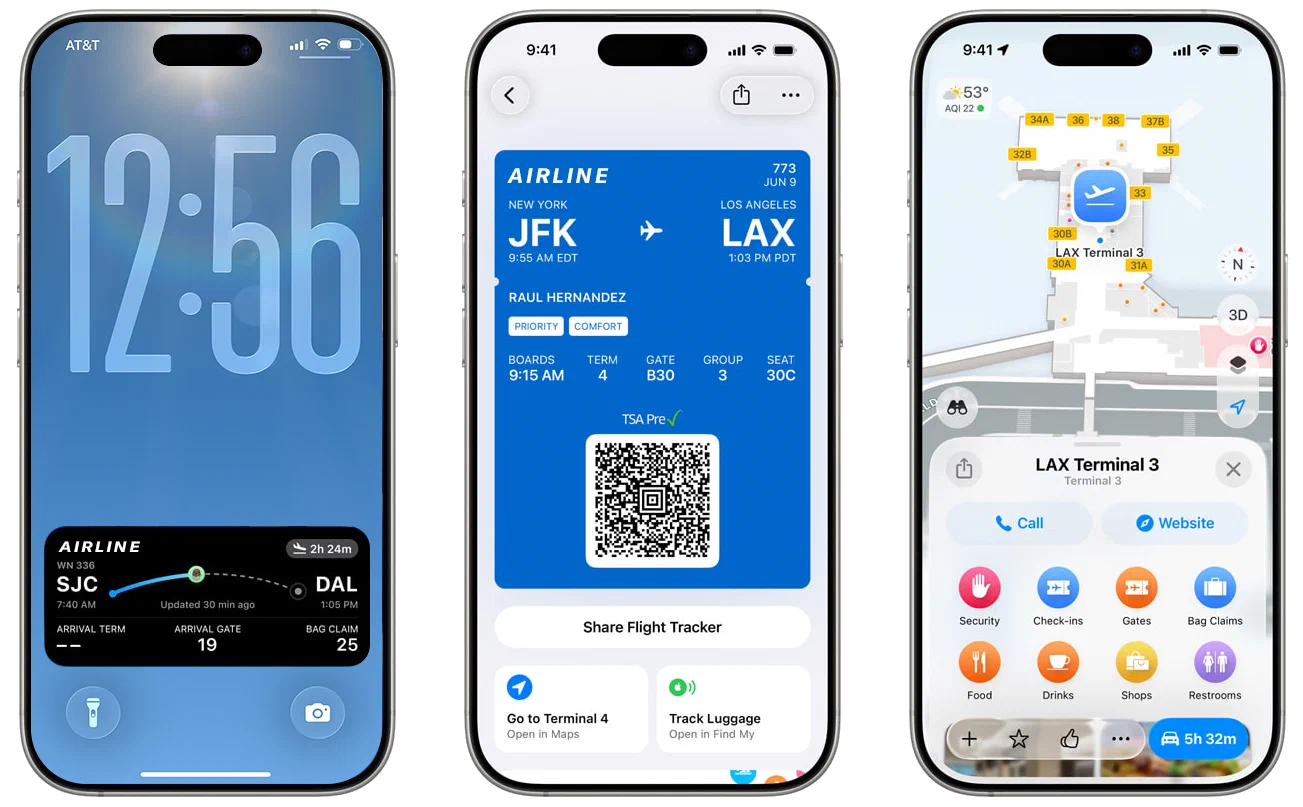
*Semantic tags for Apple boarding passes enable enhanced user experiences.*
Semantic tags are supported on devices running iOS 26 or later. On older versions, the semantic data is not rendered.
For more information, see [Supporting semantic tags in Wallet passes](https://developer.apple.com/documentation/walletpasses/supporting-semantic-tags-in-wallet-passes) and the [SemanticTags](https://developer.apple.com/documentation/walletpasses/semantictags) object in Apple's developer documentation.
### iOS 26 boarding pass design and backward compatibility
Apple refreshed the boarding pass layout, behavior, and functionality for iOS 26. The updated design depends on the presence of semantic tags. Without them, your Apple boarding passes will render using the legacy design.
To preserve backward compatibility, design your boarding passes using standard (legacy) field data to support their appearance on devices running iOS versions lower than iOS 26.
### Automatic tag mapping
Airship can automatically map standard boarding pass fields to semantic tags, so you can take advantage of Apple’s refreshed boarding pass experience immediately, without modifying your Wallet API integration.
These flight-level field names map to semantic tags:
| Flight field name | Semantic tag name |
| :--- | :--- |
| `airlineCode` | `airlineCode` |
| `flightNumber` | `flightNumber` |
| `departureAirport`1 | `departureAirportCode`, `departureCityName` |
| `departureTerminal` | `departureTerminal` |
| `departureGate` | `departureGate` |
| `departureTime` | `originalDepartureDate` |
| `boardingTime` | `originalBoardingDate` |
| `departureLocation` | `departureLocation` |
| `departureLocationTimeZone`2 | `departureLocationTimeZone` |
| `arrivalAirport`1 | `destinationAirportCode`, `destinationCityName` |
| `arrivalTerminal` | `destinationTerminal` |
| `arrivalGate` | `destinationGate` |
| `arrivalTime` | `originalArrivalDate` |
| `destinationLocation` | `destinationLocation` |
| `destinationLocationTimeZone`2 | `destinationLocationTimeZone` |
| `actualDepartureTime` | `currentDepartureDate` |
| `actualArrivalTime` | `currentArrivalDate` |
1. Mapped from the field value and label.
2. Optional flight fields. If not set, the time zone of the airport is used.
These passenger-level field names map to semantic tags:
| Passenger field name | Semantic tag name |
| :--- | :--- |
| `passengerName` | `passengerName` |
| `confirmationCode` | `confirmationNumber` |
| `seatNumber` | `seat` |
| `boardingGroup` | `boardingGroup` |
| `boardingPosition` | `boardingPosition` |
| `boardingZone` | `boardingZone` |
To enable or disable the feature, go to **Settings**, then **Project Details**, and toggle **Semantic tag auto-mapping for Apple Wallet**.
You can keep auto-mapping enabled indefinitely. However, when you're ready to unlock the full range of Apple's capabilities, extend your Wallet API calls with additional semantic tag data. API-set values override auto-mapped ones.
The remainder of this guide walks you through using semantic tags in API calls.
## Using semantic tags with boarding passes
First, define the flight in your project and design the pass's visual appearance. Then you can generate [Adaptive Links](https://www.airship.com/docs/reference/glossary/#adaptive_link) to distribute to users.
### Create a flight
You can add semantic tags as key-value pairs within the `semantics` object at two levels:
- **Top level** — Within the `fields` object, provide flight-wide information like airport codes, gates, and departure times
- **Field level** — For individual fields, provide additional context such as whether a time is estimated or confirmed
A flight serves as the foundation that all boarding passes will reference, so when creating the object:
* Include semantic tags that apply to the entire flight experience, plus any field-level semantic tags you need.
* Populate canonical values wherever possible: IATA airport codes, ISO timestamps, marketing versus operating carrier, etc.
For a list of supported semantic tags, see the properties for the [Flight semantics object](https://www.airship.com/docs/developer/rest-api/wallet/schemas/flights-and-boarding-passes/#flightsemantics) in the Wallet API reference.
Include the flight object in the request body of a flight creation operation:
* [Create flight](https://www.airship.com/docs/developer/rest-api/wallet/operations/flights/#createflight)
* [Create flight with external ID](https://www.airship.com/docs/developer/rest-api/wallet/operations/flights/#createflightexternalid)
Note the `flightId` or `flightExternalId` in the response for reference when creating pass links.
#### Example flight object
The following example flight object contains these semantic tags:
- **Field-level semantic tags** — Individual field properties that provide context for specific values:
- `boardingTime` with `isEstimated: false` indicates the boarding time is confirmed.
- `arrivalTime` with `isScheduled: true` marks this as the scheduled arrival time.
- `boardingPolicy` with `priorityBoarding: true` enables priority boarding features.
- `seatingPolicy` with `seatAssignmentRequired: true` indicates seat assignments are required.
- **Top-level flight semantic tags** — Flight-wide information that enables iOS features:
- Basic flight details: airline code, flight number, airport codes
- Location details: terminal, gate, departure and destination cities
- Time zone information for accurate time display
- Original scheduled times for comparison with any updates
**Example flight object with top- and field-level semantic tags**
```json
{
"fields": {
"airlineCode": { "value": "OA" },
"flightNumber": { "value": "1219" },
"departureAirportCode": { "value": "SEA" },
"arrivalAirportCode": { "value": "SFO" },
"boardingTime": {
"value": "2025-09-05T16:10:00-07:00",
"semantics": { "isEstimated": false }
},
"arrivalTime": {
"value": "2025-09-05T18:20:00-07:00",
"semantics": { "isScheduled": true }
},
"boardingPolicy": {
"value": "zoneBased",
"semantics": { "priorityBoarding": true }
},
"seatingPolicy": {
"value": "cabinBased",
"semantics": { "seatAssignmentRequired": true }
},
"semantics": {
"airlineCode": "OA",
"flightNumber": "1219",
"departureAirportCode": "SEA",
"destinationAirportCode": "SFO",
"departureTerminal": "A25",
"departureGate": "A21",
"departureLocationTimeZone": "America/Los_Angeles",
"departureCityName": "Seattle",
"originalBoardingDate": "2025-09-05T16:10:00-07:00",
"originalDepartureDate": "2025-09-05T16:30:00-07:00",
"originalArrivalDate": "2025-09-05T18:20:00-07:00",
"destinationCityName": "San Francisco",
"destinationLocationTimeZone": "America/Los_Angeles"
}
}
}
```
### Create a template
Your boarding pass requires a visual design. If you do not already have Apple template for the pass, create it now. See [Designing and managing templates](https://www.airship.com/docs/guides/wallet/user-guide/design-template/).
Semantic tags are not reflected in previews when designing boarding pass templates in the Airship dashboard.
### Create pass links
After creating your flight and template, you can create [Adaptive Links](https://www.airship.com/docs/reference/glossary/#adaptive_link) for the boarding passes. You will refer to both the template and flight when creating the links.
You can add semantic tags as key-value pairs within the `semantics` object at two levels:
- **Top level** — Within the `fields` object, provide passenger information like name and seat assignment
- **Field level** — For individual fields, provide additional context such as a seat row or a passenger's loyalty level
You must use the `/links/adaptive/multiple/project/{projectId}` endpoint, not the standard `/links/adaptive` endpoint. See [Create boarding pass Adaptive Links](https://www.airship.com/docs/developer/rest-api/wallet/operations/adaptive-links/#createboardingpassoreventticketadaptivelinks) in the Wallet API reference. The request generates a separate Adaptive Link for each passenger in the `passengers` array. Each Adaptive Link references a flight and includes passenger-specific information.
For a list of supported semantic tags, see the properties for the [Passenger semantics object](https://www.airship.com/docs/developer/rest-api/wallet/schemas/flights-and-boarding-passes/#passengersemantics) in the Wallet API reference.
For comprehensive boarding pass guidance, see [Adaptive Links for Boarding Passes](https://www.airship.com/docs/guides/wallet/user-guide/create-links/flights-boarding-passes/#adaptive-links-for-boarding-passes) in *Flights and boarding passes*. For request schema details, see [Boarding pass Adaptive Link request](https://www.airship.com/docs/developer/rest-api/wallet/schemas/flights-and-boarding-passes/) in the Wallet API reference.
#### Example boarding pass Adaptive Link request
The following example contains these semantics:
- **Field-level semantic tags**: The `seatNumber` field includes detailed seat information: row and type.
- **Top-level passenger semantic tags**: Top-level passenger information enables iOS to recognize the traveler and provide personalized features, including loyalty program status.
**Example boarding pass Adaptive Link request object with field- and passenger-level semantic tags**
```json
{
"payload": {
"flights": [
{
"flightExternalId": "SABINE1219-2025-09-05",
"passengers": [
{
"fields": {
"givenName": { "value": "Casey" },
"familyName": { "value": "Lee" },
"seatNumber": {
"value": "12A",
"semantics": {
"seat": {
"seatNumber": "12A",
"seatRow": "12",
"seatType": "window"
}
}
},
"sequenceNumber": {
"value": "007",
"semantics": { "frequentFlyerTier": "GOLD" }
}
},
"semantics": {
"passenger": {
"givenName": "Casey",
"familyName": "Lee",
"loyaltyProgram": "Sabine Rewards",
"loyaltyId": "SR123456"
}
}
}
]
}
]
}
}
```
## Live flight information exclusions
Apple Wallet uses semantic tags to identify the flight associated with a boarding pass and automatically subscribe to live flight updates. These updates power features like Apple's Flight Tracker and dynamically populate key details on the pass, including times, gates, terminals, and baggage information. When live flight data is available, Apple Wallet uses it as the authoritative source. If live data is not available for a given flight, values provided for semantic tags appear on the pass instead.
When you need to ensure passes always reflect your own data, override specific live flight fields by listing them in `liveDataConfiguration.excludedSemantics`. Any excluded semantics will display your provided values and will not be updated by Apple's live flight information. Semantics exclusion is supported for iOS 26.1 and later.
The `liveDataConfiguration` block is included inside the `semantics` block. The following semantic fields can be excluded from live flight information updates:
| Live flight information | Semantic fields |
| :--- | :--- |
| Departure/arrival times | `currentDepartureDate`, `currentArrivalDate` |
| Departure/arrival terminal | `departureTerminal`, `destinationTerminal` |
| Departure/arrival gate | `departureGate`, `destinationGate` |
| Arrival baggage claim | `arrivalBaggageClaim` |
**Example excluding departure gate and terminal from live data**
```json
{
"fields": {
"semantics": {
"departureGate": "16",
"departureTerminal": "7",
// ... other semantic tags
"liveDataConfiguration": {
"excludedSemantics": [
"departureGate",
"departureTerminal"
]
}
}
}
}
```