Saving Performance Analytics queries
You can save any query for later access, either as a Look or to a new or existing dashboard.
Start from the Explore view. If you are starting from a Look or dashboard, hover over the Look, then click the more menu icon () and select Explore from here to open the Explore view.
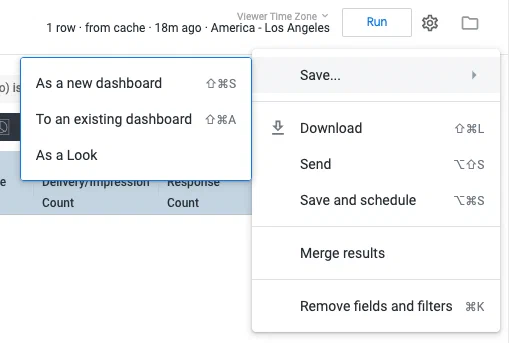
From the Explore view, click the gear icon (), then select Save as… and choose a format/location:
Existing dashboard — Enter a title, select a dashboard, then click Save to Dashboard.
Look or New dashboard — Enter a title, select a folder, then click Save or Save & View Look. Folder options:
My folder — No one else in your Airship project has access to the content in this folder.
Group — Anyone with access to your Airship project and Performance Analytics can access this folder. If you would like to save Looks and dashboards across multiple projects, use this folder.