Generative AI content
Use AI to create message content faster and according to guidelines you set. AXP Generative AI
AI-generated content is created from the text you provide. To refine the output, you can select a personality defined in your project’s Brand guidelines, include emojis 😎, and set the content length. The tool is available for most text fields when composing messages and templates.
Use AI-generated text for quicker variant creation in A/B tests. See About A/B testing.
Opting In to AI Functions
If you opted out of AI usage, you must sign an updated contract to enable this feature. Contact your account manager for assistance.
Compliance Considerations in Using AI Functions
The Service incorporates AI functions, including Generative AI and Agentic AI.
Generative AI generates content such as Notification copy, images, and Journeys based on your prompts.
Agentic AI autonomously optimizes, personalizes, or executes cross-channel customer engagement actions, or analyzes audience and performance data, subject to the parameters and controls you set in the Service. These systems operate under human-defined parameters and do not initiate customer-facing actions without human interaction or pre-configured parameters. You are responsible for reviewing Generated Outputs for accuracy, appropriateness, and to ensure they do not violate third-party intellectual property or other rights. Airship does not publish Generated Outputs to end users without approval from the Customer.
In addition to the applicable terms of your agreement with Airship (e.g., Use of Service, Customer Responsibilities sections), you must comply with the Airship Acceptable Use Policy, which provides additional details about appropriate conduct when using the Service.
The Service includes safety features to block harmful content, such as content that violates our Acceptable Use Policy. You may not attempt to bypass these protective measures or use content that violates your agreement with Airship.
About the AI models:
Airship utilizes Google Gemini and Imagen to generate copy and images for AI Scene screens. The content is created solely with Google’s out-of-the-box models, and no customization or fine-tuning with Customer Data is applied. See Responsible AI in Google’s Google Cloud documentation.
Generate AI content
For each of your projects, you can generate AI content a maximum of 150 times per day.
For a text field:

Select the sparkle icon to access AI content generation Select the sparkle icon for the field.
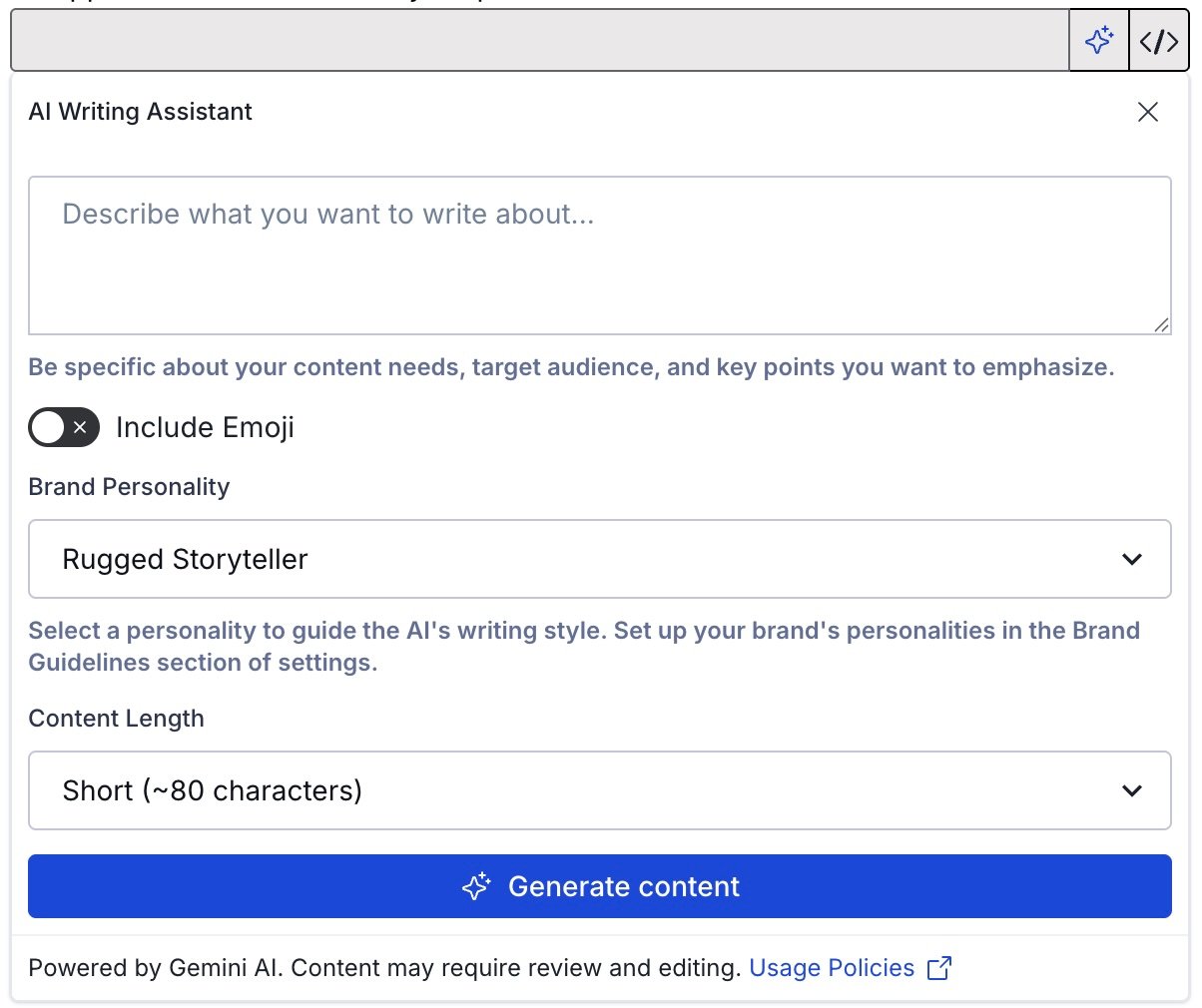
Generating AI content Under AI Writing Assistant, enter the information you want to include in your message. This can be a full version of the intended content or just keywords. The text you enter determines the language, but you can specify a different language for the generated content.
Example text for a message: “A persuasive promotional email in Spanish encouraging users to join our new loyalty program and highlighting sign-up bonuses”.
Make settings selections:
Setting Description Include emoji Optional. Related emoji will be included in the generated text. Brand personality The message content voice and tone will be determined by a personality defined in your brand guidelines. If none is selected, voice and tone will be determined only from your provided text. Content length Your message can be Short (~80 characters), Medium (~240 characters), or Long (~400 characters). Select Generate content and review the generated version. If it’s not quite right, select Try again, edit your provided text, adjust the settings, and then generate content again.
Select Use this text to transfer the current generated content to the message’s text field, where you can refine your text.
Review generated content transferred to text fields before sending a message.