# Plugins
Plugins extend the functionality of the Airship Web SDK.
# HTML Prompt
> Allow users to express their interest in notifications prior to registration.> **Note:** Web [Scenes](https://www.airship.com/docs/reference/glossary/#scene) can be used to collect push notification opt-ins. You may continue to use this plugin should you require its specific features, but the preferred method is to use a Scene to prompt for opting in.
This plugin provides a utility that allows users to express their interest in receiving notifications prior to registering their channel.
It is a best practice to explain the value of your notifications before prompting the opt-in flow.
Using a soft prompt also gives users the chance to politely decline for now, without
setting the browser permission to *denied*, giving you the chance to request again
at a later time.
Two HTML prompt templates are available:
| Template | Description | Example image |
| --- | --- | --- |
| **Alert** | A basic alert, with configurable title, message, logo, and button fields | 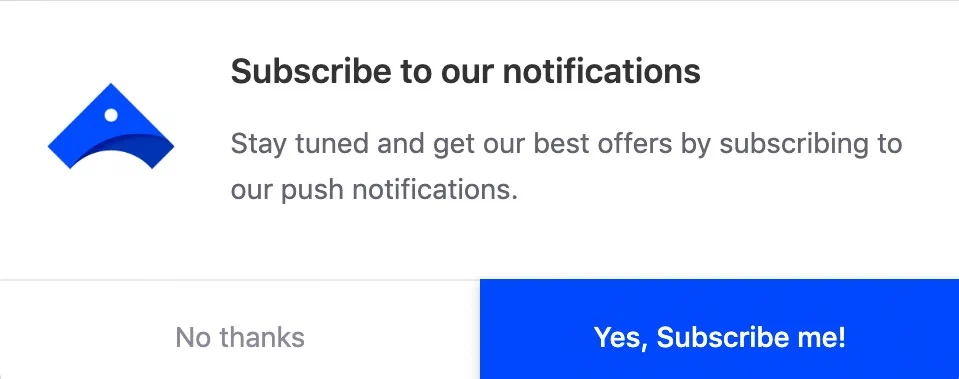
*Alert prompt template* |
| **Bell** | A small bell that stays fixed on the page | 
*Bell prompt template* |
## Loading the Plugin
The URL will differ depending on whether you are using our North America
or EU data center:
* **North America**: `https://aswpsdkus.com/notify/v2/ua-html-prompt.min.js`
* **EU**: `https://aswpsdkeu.com/notify/v2/ua-html-prompt.min.js`
**Loading the HTML Prompt Plugin (US Data Center)**
```js
UA.then(sdk => {
sdk.plugins.load(
// globally unique plugin identifier; we always use `html-prompt`
'html-prompt',
// URL to the html-prompt script; this example is for the US data center
'https://aswpsdkus.com/notify/v2/ua-html-prompt.min.js',
// options passed to the plugin
{type: 'alert'}
)
})
```
See below for the full list of options you may use when loading the plugin.
### Options
Options for the `alert` and `bell` templates:
| Key | Type | Description | Default value |
| --- | --- | --- | --- |
| type | string | Template to use, one of `alert` or `bell`. | alert |
| appearDelay | number | Delay, in milliseconds, before displaying the prompt. Useful when `auto` is set to `true`. | 0 |
| disappearDelay | number | Delay, in milliseconds, before the prompt automatically disappears | 0 |
| askAgainDelay | number | Delay, in seconds, before prompting user again after dismissing or ignoring the prompt | 1209600 (2 weeks) |
| stylesheet | string | CSS Stylesheet URL to customize the prompt appearance | null |
| auto | boolean | Controls automatically displaying the prompt on page load | false |
| UA | string | UA global variable used in your SDK snippet. Only use if you have overridden the default global variable. | UA |
Options for the `alert` template only:
| Key | Type | Description | Default value |
| --- | --- | --- | --- |
| position | string | The position of the alert on the webpage, one of `top` or `bottom` | top |
| i18n.{lang}.title | string | Alert title | 'Subscribe to our notifications' |
| i18n.{lang}.message | string | Alert message | en: 'Stay tuned and get our best offers by subscribing to our push notifications.' |
| i18n.{lang}.accept | string | Label for Accept button | en: 'Yes, Subscribe me!' |
| i18n.{lang}.deny | string | Label for Deny button | en: 'No thanks' |
| logo | string | Logo URL to be displayed in the alert | null |
Option for the `bell` template only:
| Key | Type | Description | Default value |
| --- | --- | --- | --- |
| position | string | The position of the alert on the webpage, one of `top-left`, `top-right`, `bottom-left`, or `bottom-right` | bottom-left |
## Methods
Use `.prompt(options = {})` to trigger the display of the HTML prompt. More options can be passed into this method to override the ones passed when loading the plugin.
```js
UA.then(sdk => {
sdk.plugins.load(
'html-prompt',
'https://aswpsdkus.com/notify/v2/ua-html-prompt.min.js',
{
stylesheet: 'https://my.domain/path/to/some.css',
askAgainDelay: 3600
}
)
.then(plugin => plugin.prompt())
});
```
# Opt-in Forms
> An opt-in form is a form you can add to your website, where your users can sign up for email or SMS messaging.For more information, see the user guide: [Opt-in Forms](https://www.airship.com/docs/guides/messaging/features/opt-in-forms/).
## Loading the Plugin
The URL will differ depending on whether you are using our North America
or EU data center:
* **North America**: `https://aswpsdkus.com/notify/v2/ua-subscription-form.min.js`
* **EU**: `https://aswpsdkeu.com/notify/v2/ua-subscription-form.min.js`
**Creating an email modal opt-in form (US data center)**
```js
var options = {
platform: "email",
size: "large", // or "small" for a smaller form
i18n: {
en: {
terms:
'By checking this box, I agree that [COMPANY NAME] can be in touch with me by email to provide [insert purpose of communications - e.g. updates and marketing offers]. I understand that I can change my mind and opt out at any time by clicking the unsubscribe link in the footer of any email I receive from [COMPANY], or by contacting [email address]. I understand that I do not need to provide consent to these messages as a condition for any purchase. I understand that my information will be used as described here and in compliance with the privacy policy.',
footer:
'Our Terms of Service are available here.'
}
},
automatic: {
// required: how long until the modal appears. values are in milliseconds,
// so multiply any value in seconds you wish to use by 1000
appearDelay: 20 * 1000, // 20 seconds
// optional: the modal will disappear after this amount of time if it is
// not interacted with
disappearDelay: 15 * 1000, // 15 seconds
// optional: if the modal has been displayed before, don't show it again
// for a period of time
askAgainDelay: 7 * 24 * 60 * 60 * 1000 // 7 days
}
}
UA.then(function (sdk) {
return sdk.plugins.load(
// globally unique plugin identifier; we always use `subscription-form`
"subscription-form",
// URL to the opt-in form script; this example is for the US data center
"https://aswpsdkus.com/notify/v2/ua-subscription-form.min.js"
)
}).then(function (formFactory) {
formFactory.setupModalForm(options)
})
```
See below for the full list of options you may use when loading the plugin.
### Options
The following table covers the options that apply to all forms. See format- and platform-specific options below.
| Key | Type | Description | Default value |
| --- | --- | --- | --- |
| platform | string | **Required** — Platform, one of `email` or `sms` | |
| size | string | Size, one of `large` or `small` | small |
| defaultTranslation | string | Default language, must have a translation specified | en |
| i18n.{lang}.terms | string | **Required** — Terms and conditions that a user agrees to when registering. HTML is supported for inserting links to any terms or privacy policy pages. | |
| i18n.{lang}.heading | string | Heading text on the form, omitted if not provided | |
| i18n.{lang}.footer | string | Footer text at bottom of form, omitted if not provided | |
| i18n.{lang}.bannerUrl | string | URL to a banner image, omitted if not provided | |
| i18n.{lang}.placeholderEmail | string | Placeholder email address displayed in the form | |
| i18n.{lang}.placeholderMsisdn | string | Placeholder [MSISDN](https://www.airship.com/docs/reference/glossary/#msisdn) displayed in the form | |
| i18n.{lang}.submitButton | string | Label for Submit button | |
| i18n.{lang}.invalidEmail | string | Error message displayed when email is invalid | |
| i18n.{lang}.invalidMsisdn | string | Error message displayed when phone number is invalid | |
| i18n.{lang}.genericError | string | Error message displayed when registration fails | |
| onRegister | function | A function to be called when a registration is submitted | |
#### Modal
The modal supports the [options above](#options), as well as additional optional timing options for automatic display. Any required options are only required if choosing to use the automatic display feature.
| Key | Type | Description |
| --- | --- | --- |
| automatic.appearDelay | number | **Required** — Milliseconds to wait before displaying |
| automatic.disappearDelay | number | Milliseconds to wait before closing if not interacted with |
| automatic.askAgainDelay | number | Milliseconds to wait before asking again |
| automatic.displayPredicate | function | A function that will be called before the modal is opened; should return a boolean indicating if it should be opened or not |
#### Email
When `email` is set as the `platform` value, you may specify the following options:
| Key | Type | Description |
| --- | --- | --- |
| doubleOptIn | boolean | When `true`, [Double Opt-In](https://www.airship.com/docs/reference/glossary/#double_opt_in) will be requested |
| getProperties | function | A function that will be called to retrieve additional properties |
**Double Opt In**
When the `doubleOptIn` option is set `true` the following will occur:
* Email addresses registered via the form will be opted into transactional messages, but not commercial
* The registration will be sent such that [Double Opt-In](https://www.airship.com/docs/reference/glossary/#double_opt_in) is requested
You must have a double opt-in message configured within your project when using this feature. See [Double Opt-In](https://www.airship.com/docs/developer/api-integrations/email/getting-started/#double-opt-in) in the Email platform *Getting Started* documentation.
**Properties**
Additional properties may be sent along with the registration to distinguish the type of double opt-in message that should be sent. The `getProperties` option allows you to provide a function which will be called prior to registration, and may return a key/value object containing these properties. This function is asynchronous, and you may return a `Promise` which resolves to those properties.
Properties must be in the same [format as required for custom events](https://www.airship.com/docs/developer/rest-api/ua/schemas/others/#customeventobject).
#### SMS
When `sms` is set as the `platform` value, you must specify the following options:
| Key | Type | Description |
| --- | --- | --- |
| senderId | string | **Required** — The [Sender ID](https://www.airship.com/docs/reference/glossary/#sender_id) under which the customer [MSISDN](https://www.airship.com/docs/reference/glossary/#msisdn) should be registered |
| country | string | Locks the form to a particular country, one of `US` or `CA`, which have identical behavior |
**Country**
The `country` option sets the form into a configuration where it better matches expectations for a particular country, but only allows entries that match the selected country's phone numbers.
When not set, a user must enter their _full_ phone number, country code included.
**US & Canada**
When `country` is set to either `US` or `CA`, the form will do the following:
* Prepend a `1` country code to the number, if one is not provided
* Require an eleven-digit number (including the country code) to match the [North American Numbering Plan][NANP](https://en.wikipedia.org/wiki/North_American_Numbering_Plan).
## Localization (i18n)
The form supports internationalization options. Any text which is displayed on the form can be translated into your preferred language.
The form ships with English as the default unless you specify another language.
When the form is loaded, it determines the browser's language and attempts to find that translation, falling back to the default if a translation for that language is not found. The options are the same for the email and SMS forms.
**JavaScript**
```javascript
var options = {
i18n: {
// the ISO 639-1 two-letter language code; here `en` for English; you may
// specify as many translations as you wish.
en: {
// required: terms which must be agreed to in order to sign up; be sure to
// include a link to your terms and privacy policy.
terms:
'By opting into sms messages, I agree to the terms and conditions.',
footer:
'Our Terms of Service are available here.'
// optional: a header which will be displayed at the top of the form
heading: "Sign up for great deals!"
// optional: a URL to an image to be displayed in the form
bannerUrl: "https://brand.example/assets/banner.png"
// optional: text which is displayed if an invalid email is entered
invalidEmail: "That email is invalid, please try again."
// optional: text which is displayed if an invalid phone number is entered
invalidMsisdn: "That phone number is invalid, please try again."
// optional: the text on the submit button within the form
submitButton: "Sign Up"
},
// French
fr: {
// french translations, same keys as above...
}
},
// optional: the default translation; `en` if not specified
defaultTranslation: "fr"
// remaining options...
}
```
## Code examples
For both email and SMS modal forms the timing option is not required. Without the timing option, the modal will not display unless explicitly called to display.
> **Important:** The suggested opt-in text and the design and usage guidelines provided in the Documentation are not intended to be legal advice. The suggested text should not be used "as is", and is instead an example of what may meet opt-in standards or requirements. Please consult your legal counsel before implementing particular language for your campaigns to address your specific use case or regulatory requirements in your jurisdiction.
### Email: Embedded
Embed an email form into an existing element on a page. This example specifies only the required options. See [Options](#options) for more details.
**HTML**
```html
```
**JavaScript**
```javascript
var element = document.querySelector("[rel=email-opt-in]")
var options = {
platform: "email",
size: "large", // or "small" for a smaller form
i18n: {
en: {
terms:
'By checking this box, I agree that [COMPANY NAME] can be in touch with me by email to provide [insert purpose of communications - e.g. updates and marketing offers]. I understand that I can change my mind and opt out at any time by clicking the unsubscribe link in the footer of any email I receive from [COMPANY], or by contacting [email address]. I understand that I do not need to provide consent to these messages as a condition for any purchase. I understand that my information will be used as described here and in compliance with the privacy policy.',
footer:
'Our Terms of Service are available here.'
}
}
}
UA.then(function (sdk) {
return sdk.plugins.load("subscription-form", "https://aswpsdkus.com/notify/v2/ua-subscription-form.min.js")
}).then(function (formFactory) {
formFactory.embedForm(element, options)
})
```
### Email: Modal
Display an email registration modal on an existing page, which will open automatically after a given amount of time.
**JavaScript**
```javascript
var options = {
platform: "email",
size: "large", // or "small" for a smaller form
i18n: {
en: {
terms:
'By checking this box, I agree that [COMPANY NAME] can be in touch with me by email to provide [insert purpose of communications - e.g. updates and marketing offers]. I understand that I can change my mind and opt out at any time by clicking the unsubscribe link in the footer of any email I receive from [COMPANY], or by contacting [email address]. I understand that I do not need to provide consent to these messages as a condition for any purchase. I understand that my information will be used as described here and in compliance with the privacy policy.',
footer:
'Our Terms of Service are available here.'
}
},
automatic: {
// required: how long until the modal appears. values are in milliseconds,
// so multiply any value in seconds you wish to use by 1000
appearDelay: 20 * 1000, // 20 seconds
// optional: the modal will disappear after this amount of time if it is
// not interacted with
disappearDelay: 15 * 1000, // 15 seconds
// optional: if the modal has been displayed before, don't show it again
// for a period of time
askAgainDelay: 7 * 24 * 60 * 60 * 1000 // 7 days
}
}
UA.then(function (sdk) {
return sdk.plugins.load("subscription-form", "https://aswpsdkus.com/notify/v2/ua-subscription-form.min.js")
}).then(function (formFactory) {
formFactory.setupModalForm(options)
})
```
### SMS: Embedded
Embed an SMS form into an existing element on a page. This specifies only the required options. See [Options](#options) for more details.
**HTML**
```html
```
**JavaScript**
```javascript
var element = document.querySelector("[rel=sms-opt-in]")
var options = {
platform: "sms",
senderId: "555555", // your sender id, required for SMS
size: "large", // or "small" for a smaller form
i18n: {
en: {
terms:
'By checking this box, I consent to receive [marketing offers / abandoned cart reminders / order tracking / order information] text messages sent from [COMPANY NAME] at the phone number provided. I verify that the phone number provided is my own. I understand that message and data rates may apply, and that I can text STOP to end all messages. I understand that I do not need to provide consent to these text messages as a condition for any purchase. I understand that my information will be used as described here and in compliance with the privacy policy.',
footer:
'Messaging and data rates may apply. Our Terms of Service are available here.'
}
}
}
UA.then(function (sdk) {
return sdk.plugins.load("subscription-form", "https://aswpsdkus.com/notify/v2/ua-subscription-form.min.js")
}).then(function (formFactory) {
formFactory.embedForm(element, options)
})
```
### SMS: Modal
Display an SMS registration modal on an existing page, which will open automatically after a given amount of time.
**JavaScript**
```javascript
var options = {
platform: "sms",
senderId: "55555",
size: "large", // or "small" for a smaller form
i18n: {
en: {
terms:
'By checking this box, I consent to receive [marketing offers / abandoned cart reminders / order tracking / order information] text messages sent from [COMPANY NAME] at the phone number provided. I verify that the phone number provided is my own. I understand that message and data rates may apply, and that I can text STOP to end all messages. I understand that I do not need to provide consent to these text messages as a condition for any purchase. I understand that my information will be used as described here and in compliance with the privacy policy.',
footer:
'Messaging and data rates may apply. Our Terms of Service are available here.'
}
},
automatic: {
// required: how long until the modal appears. values are in milliseconds,
// so multiply any value in seconds you wish to use by 1000
appearDelay: 20 * 1000, // 20 seconds
// optional: the modal will disappear after this amount of time if it is
// not interacted with
disappearDelay: 15 * 1000, // 15 seconds
// optional: if the modal has been displayed before, don't show it again
// for a period of time
askAgainDelay: 7 * 24 * 60 * 60 * 1000 // 7 days
}
}
UA.then(function (sdk) {
return sdk.plugins.load("subscription-form", "https://aswpsdkus.com/notify/v2/ua-subscription-form.min.js")
}).then(function (formFactory) {
formFactory.setupModalForm(options)
})
```
### Controlling the modal
Instead of using an auto-display modal, you may choose to control the modal's display and closing yourself, using the `open` and `close` instance methods:
**JavaScript**
```javascript
var options = {
platform: "email",
size: "large", // or "small" for a smaller form
i18n: {
en: {
terms:
'By opting into email, I agree to the terms and conditions.'
}
}
}
UA.then(function (sdk) {
return sdk.plugins.load("subscription-form", "https://aswpsdkus.com/notify/v2/ua-subscription-form.min.js")
}).then(function (formFactory) {
var form = formFactory.setupModalForm(options)
// attach a listener to some button element, and open the modal on click
var button = document.querySelector("button[rel=open-modal]")
button.addEventListener(function (ev) {
ev.preventDefault()
form.open()
})
})
```
### Modal Display Predicate
You may optionally pass a method to an auto-display modal that will be executed to determine if the modal should be allowed to open. If the function returns the value `true`, it will open. If it returns the value `false`, the modal will not open.
**JavaScript**
```javascript
var options = {
platform: "email",
size: "large", // or "small" for a smaller form
i18n: {
en: {
terms:
'By opting into email, I agree to the terms and conditions.'
}
},
automatic: {
appearDelay: 20 * 1000, // 20 seconds
displayPredicate: function() {
// your own code to determine if display is allowed
return booleanValue
}
}
}
UA.then(function (sdk) {
return sdk.plugins.load("subscription-form", "https://aswpsdkus.com/notify/v2/ua-subscription-form.min.js")
}).then(function (formFactory) {
formFactory.setupModalForm(options)
})
```