Email Deliverability
Following email sender best practices helps messages reach the inbox.
Deliverability is whether your messages are accepted by mailbox providers and placed in the inbox instead of being filtered or rejected. Follow these best practices for strong deliverability:
- Monitor sender reputation in message- and project-level reports.
- Maintain clean, permission-based subscriber lists.
- Send relevant content to engaged recipients.
- Send with a consistent and predictable volume and cadence.
- Properly authenticate all messages.
Airship automatically suppresses channels when hard bounces or spam complaints occur. See Email Bounce Handling and Suppression. You remain responsible for DNS configuration, list acquisition and consent practices, content quality, and sending strategy.
After domain authentication is in place, you can optionally publish a BIMI record and/or set up Apple Branded Mail for added brand recognition in supported inboxes.
Sender reputation
Mailbox providers continuously evaluate your sender reputation. Monitor key signals such as spam complaints, bounce rate, unsubscribe rate, and domain-level performance using Airship reports and provider tools. Investigate quickly if these metrics worsen after a list import, new sending domain, or volume increase.
Domain and IP blocklists, such as Spamhaus, can also harm inbox placement at most mailbox providers.
Message reports
Check message reports for information about individual sends. They include email performance data and selected statistics for the top 20 recipient domains by volume. You can also find the top 10 clicked URLs with total and unique click counts. A click heat map shows where recipients interact with named links in the message, so you can optimize message layout.
See Message Reports.
Email engagement report
Use the Email engagement report for an aggregate view of your project’s email performance. It includes sends, delivery rate, open and click rates, bounce rate, hard bounce detail, and domain-level performance, such as spam complaint and unsubscribe rates by recipient domain. Monitor these metrics to spot deliverability and sender reputation issues.
See Email in Engagement reports.
Spam complaints and feedback loops
Not all mailbox providers offer per-recipient spam complaint feedback loops. For example, Gmail and Apple do not provide a per-recipient feedback loop for spam complaints. For Gmail, use Google Postmaster Tools for aggregate spam-rate and reputation signals. Apple has no equivalent sender tool.
List hygiene and consent
Maintain a clean, consent-based subscriber list with these practices:
List sources — Do not mail addresses from public lists, paid lists (purchased or rented), or other third-party files if you did not acquire those subscribers organically through your own sign-up flows.
Recipients on such lists have not opted in to your mail. Those sources also tend to include invalid addresses and spam traps, which drive up spam complaints and harm your sender reputation. Sending to recipients who did not opt in can also violate spam and data protection laws that carry significant fines. See Email compliance.
Opt-in — Send commercial email only to users who opted in. Use double opt-in when you need a confirmation step for commercial registration.
Validation — Verify addresses at collection time when possible. Remove hard bounces, malformed addresses, misspelled addresses, spam traps, and other addresses your policies exclude from active sends.
Unsubscribes — Provide a clear unsubscribe path and process requests within the timeframe each provider specifies. In Airship, configure Email unsubscribe links to match those requirements.
Inactive subscribers — Segment your target audience by recent engagement. Remove long-inactive addresses according to your program rules.
Content quality and relevance
Send relevant, high-quality content with these practices:
Audience match — Keep message content aligned with what the user signed up to receive. Sending off-topic content increases unsubscribes, complaints, and deletion without opens.
Personalization — Use contact or channel attributes to make messages more relevant. Personalized messages typically drive higher engagement. Include fallback values so messages remain coherent when data is missing. See Personalization.
Subject lines — Use clear, specific subject lines that match the message body. Avoid spam-like wording and formatting, including phrases such as
FREE,20% OFF,LIMITED TIME ONLY, andBUY RIGHT NOW, especially when combined with all caps or excessive punctuation. Use emojis sparingly, since emoji-heavy subject lines can trip spam filters. Keep subject lines to 50 characters or fewer to avoid truncation in mobile inboxes.Preheader text — Include preheader text to provide a short preview of the message body in the inbox list view, typically below the subject line. Because the text does not appear in the message body, it can help improve open rates when it clearly supports the subject line. See Preheader text in Email content.
Body content — Keep copy concise and scannable, and focus on one primary call to action per message when possible. Place the call to action above the fold to drive engagement. Keep message size under 100 KB to avoid clipping by mailbox providers.
Links and domains — Use trustworthy links and recognizable domains. Avoid broken links and excessive redirects.
Testing — Validate rendering and links before sending, and use subject line or content tests to improve engagement over time. See Preview and test groups and Previewing personalized content.
Send volume and cadence
Grow volume in steps and send on a steady cadence with these practices:
IP and domain warm-up — Warm up a new IP address or sending domain by gradually increasing volume. Airship provides IP warming guidance as part of email onboarding. For dedicated IPs, Airship can automate the warm-up schedule.
Consistency — Steady sending is easier for providers to classify than long gaps followed by a single large send, which can lead to delivery delays or rejections. If you send email infrequently, consider splitting a large audience across multiple days.
Volume increases — Raise daily or weekly total volume in steps rather than moving to a much higher volume in a single day. Sending more than twice your typical daily average volume increases the risk of deliverability issues.
Rollouts — When expanding your audience or testing new content, start with subscribers who have engaged recently, and then widen the audience while monitoring metrics. For example, first target users who have opened or clicked within roughly the last 60–90 days.
Domain authentication
Publish authentication DNS records for each domain you use to send mail:
| Record | Description |
|---|---|
| Sender Policy Framework (SPF) | Specifies which mail sources are permitted to send email for your domain |
| DomainKeys Identified Mail (DKIM) | Adds a signature so receivers can verify the sending domain and message integrity |
| Domain-based Message Authentication, Reporting, and Conformance (DMARC) | Sets a policy, such as quarantine or reject, for mail that fails SPF or DKIM alignment, and can include aggregate reporting |
Bulk senders are generally expected to publish DMARC with SPF and/or DKIM aligned to the From domain. Coordinate with the domain owners to implement and test DNS records for every domain used with Airship, including From and bounce/return-path domains.
Mailbox providers also publish their own bulk sender and authentication requirements. Review current guidance for the providers your audience uses, for example Google and Yahoo.
Brand logo in the inbox
Use BIMI and Apple Branded Mail to display verified brand logos in supported mail clients.
BIMI
Brand Indicators for Message Identification (BIMI) is a DNS-based standard for displaying your brand logo in supported mail clients next to authenticated messages. Use BIMI to reinforce brand recognition in the inbox. It is optional and works alongside SPF, DKIM, and DMARC rather than replacing them.
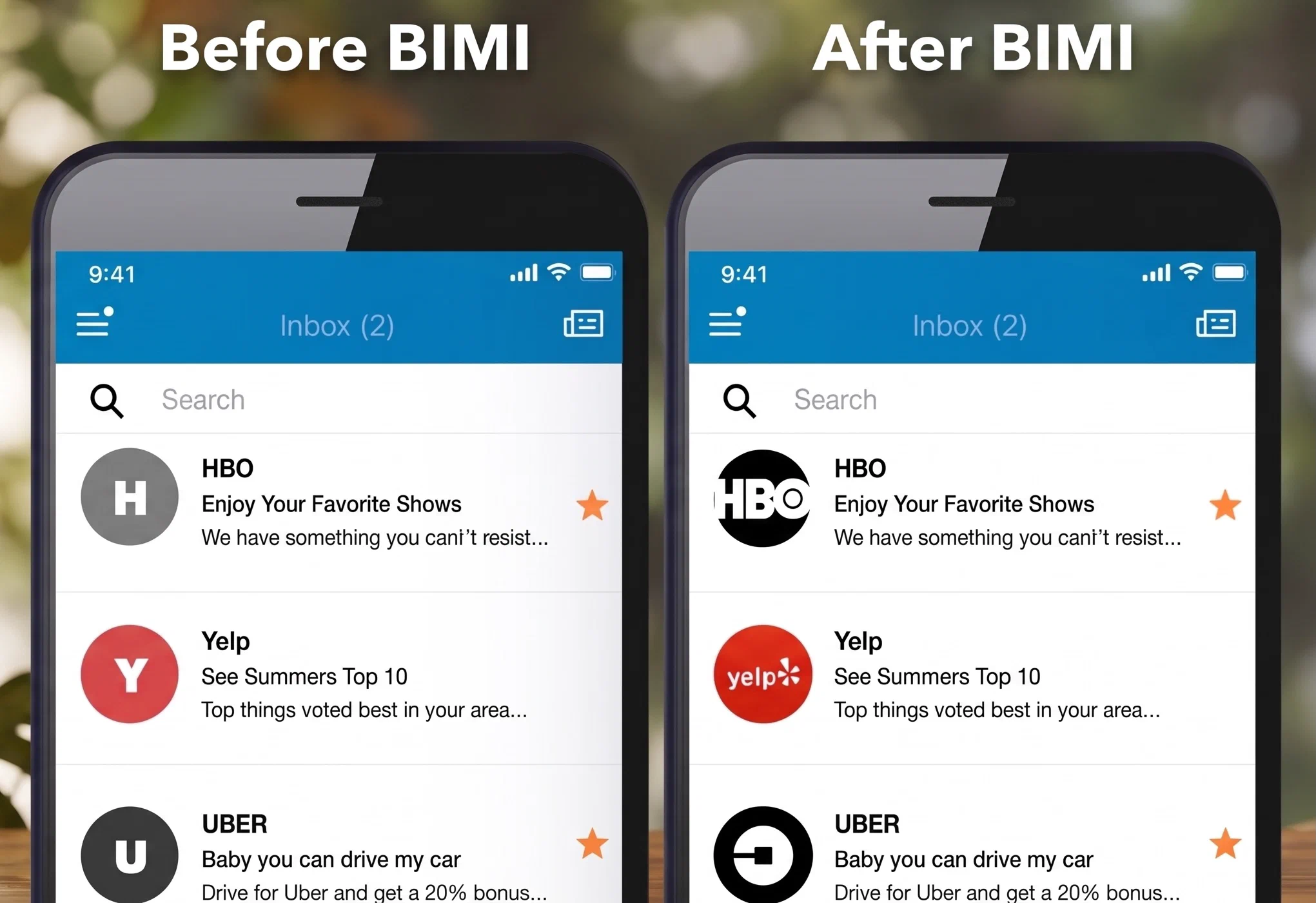
The BIMI Group maintains the authoritative specification. See the BIMI Group implementation guide.
Apple Branded Mail
Apple Branded Mail (ABM) is a proprietary feature that allows verified businesses to display their official brand logo directly in the inbox of the native Apple Mail app across iOS, iPadOS, and macOS devices. Unlike BIMI, ABM will work at any mailbox provider, so long as the end recipient views your message on a native Apple Mail app.
Unlike generic initials or stock images, this logo is verified and managed through Apple Business Connect (ABC), providing an immediate visual cue of authenticity to the recipient. The logo appears right next to the sender’s name, significantly improving brand visibility in crowded inboxes.
For requirements and implementation, see Prepare to use Branded Mail in Apple Business and Set up Branded Mail in Apple Business.